
Nano Banana Pro (Gemini 3 Image) Can Fix Bad Visuals in 30s (+928%)
Nano Banana Pro (Gemini 3 Image) can fix bad visuals and broken on-image text. In just 30 seconds, achieve up to +928% engagement with precise local edits and AI accuracy. Try the demo, explore the API, and see real results across design, marketing, and development workflows. This guide reframes Nano Banana Pro (the Gemini 3 Pro image model) through the lens of natural language processing (NLP) and prompt engineering. You’ll get: an NLP-style conceptual mapping of capabilities (conditioning, tokens, attention, context), copyable and reproducible prompt templates in deterministic formats, a pseudo-API payload adapted for production teams, a reproducible QA checklist expressed as automated tests/metrics, integrations and pipeline patterns (Photoshop/Firefly, Vertex/Cloud), troubleshooting framed as error modes with fixes, and an editorial/SEO plan to publish a pillar article that ranks.
Nano Banana Pro is Google’s high-fidelity image generator/editor in the Gemini 3 family intended for studio-grade assets. From an NLP standpoint, think of image generation as sequence-to-sequence (or sequence-to-image) conditional generation where prompts act like instructions and reference images provide additional context embeddings. The two features creators care about most — accurate on-image text and precise local edits — become tractable when you model them as controlled generation tasks with explicit constraints, localized conditioning, and post-hoc verification (OCR and color metrics).
Nano Banana Pro — Google’s Secret Weapon for Studio-Quality AI Images
Framing
- Prompt = Instruction Sequence. Prompts act like an instruction head followed by constraint tokens: [INSTRUCTION] + [CONSTRAINTS] + [OUTPUT_SPEC]. You should treat them like structured messages (similar to system + user messages in chat models).
- References = Context Embeddings. Reference images are additional conditioning signals; think of them as extra context windows or external memory that the model cross-attends to.
- Local Edits = Masked Conditional Generation. Local edits are analogous to masked filling tasks (inpainting) — supply a mask region and an edit instruction; the model performs conditional generation constrained by the mask and surrounding context.
- Text Rendering = Constrained Token Generation. On-image text is a constrained text generation task: the glyphs must match exactly, so treat text as a high-priority hard constraint and verify with OCR.
- Provenance = Metadata & Logging. Embed provenance (C2PA/SynthID) as structured metadata tokens attached to the asset so downstream consumers can verify origin.
Why That Matters (plain language in NLP terms):
- The model’s cross-attention and multi-reference conditioning make it robust for anchored generation: you can request consistent characters, lighting, or typography across multiple outputs by anchoring to reference embeddings and explicit style tokens.
- Thinking in tokens and constraints helps you design prompts that force the model to satisfy high-weight constraints (e.g., exact text placement) rather than leaving them ambiguous.
Nano Banana Pro Features — See Why It Outperforms Every AI Image Model
| Feature (User) | NLP Equivalent | Nano Banana (Fast) | Nano Banana Pro |
| Intended use | Inference mode (exploration vs. final) | low-latency draft decoding | high-fidelity final decoding |
| Text rendering | Constrained token emission | decent constraint adherence | high constraint adherence (less hallucination) |
| Local edits | Conditional masked decoding | basic masks | precise region-conditioned editing |
| Multi-image refs | Multi-context cross-attention | few refs | many refs / long context |
| Max resolution | Output tokenization granularity | up to 2K | up to 4K (integration-dependent) |
| Speed vs quality | Decoding steps & sampling temp | faster, lower steps | slower, more steps & beam/CFG controls |
Notes: exact numeric limits (max refs, resolutions) are integration-dependent (Gemini app, Vertex AI, Adobe). Always confirm with platform docs.
Who Needs Nano Banana Pro — And Why Top Creators Are Switching
- E-commerce teams — product hero shots: treat variant generation as a conditioned batch job with a shared style anchor embedding.
- Ad agencies — multilingual posters: multiple constrained text generation tasks composed into a single image; test with OCR pipelines.
- Designers — Photoshop/Firefly pipelines: designers prefer layer-aware PSD outputs so edits remain interpretable and reversible.
- Game artists — character consistency: maintain a “style-anchor” reference set and seed for deterministic generation.
- Enterprise publishers — provenance and compliance: require embedded metadata and a logging pipeline for audit.
Quickstart with Nano Banana Pro — 3 Powerful Ways Top Creators Use It
Gemini app (fastest to test; interactive)
Treat the app like an interactive REPL for multimodal prompts. Compose an instruction message with explicit control tokens:
[SYSTEM] Use model: Nano Banana Pro (gemini-3-pro-image)
[USER] Compose image: <subject>, <constraints>, <typography constraints>, <output size>
[OPTIONS] references: [ref1, ref2], mask: optional, seed: 12345
Use region tools for masked edits, and re-run the instruction as a fine-tuning iteration (multi-turn conditioning).
Adobe Firefly / Photoshop (designer-friendly)
Use the partner model selector to pick Nano Banana Pro for Generative Fill. Provide layer masks and text layers as strong constraints. Export PSD with layer metadata and store the prompt + seed in a sidecar file for reproducibility.
Vertex AI / Gemini API (production)
Invoke as a structured inference call. In pipeline YAML/CI, design idempotent calls with deterministic seeds, store prompt histories and reference manifests in your asset store, and add post-generation tests (OCR, Delta-E).
Mastering Nano Banana Pro Prompts — Structure, Templates, and Pro Secrets
Prompt architecture (recommended):
- System instruction (single-line): Declares model, intended fidelity, and safety constraints.
- Style constraints: List exact fonts, sizes, placement coordinates, color hex, and lighting adjectives.
- Reference mapping: Ref_1: style_anchor, ref_2: lighting_anchor — label the role for each reference.
- Edit spec: If masked, declare the mask, plus the region token coordinates and the semantic target.
- Output spec: Exact resolution, format, iterations, seed.
Tokenization trick: Use explicit separators that act like soft tokens: ||| or <|sep|> so the model treats segments as discrete parts of the instruction.
Prompting tips
- Treat on-image text as a hard constraint. Use “Render text exactly as written” and supply font family and size. Then verify via OCR.
- Anchor references by role. Label one reference as style_anchor to avoid drift.
- Break complex tasks into turns. Generate base images first; apply region edits second. That reduces combinatorial complexity and reduces hallucination.
- Explicit coordinates beat vague terms. “Left third” is okay, but specific pixel/percentage coordinates are stronger constraints.
Shorter copy for text-on-image. If the text is long, generate it separately and composite it in a second pass.
Production pipeline
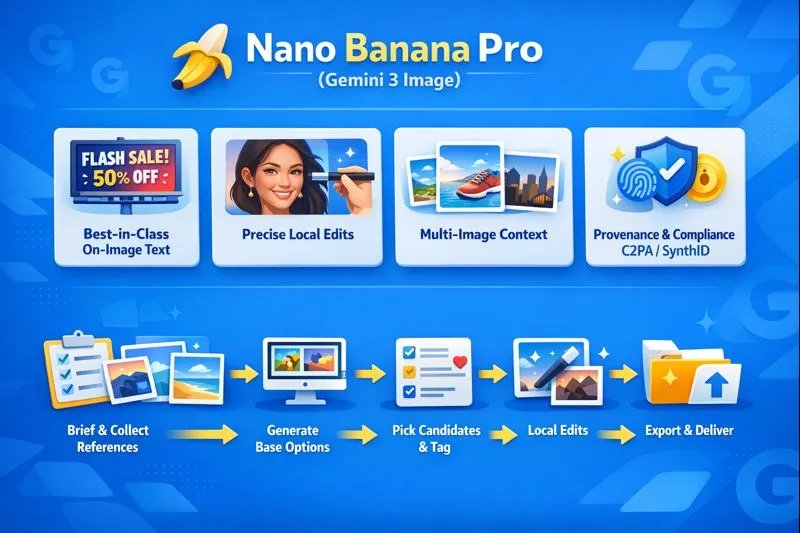
- Brief & collect refs — gather brand palette, fonts, logos, 3–8 reference photos labeled by role. Store with canonical IDs.
- Draft generation — use Nano Banana (Fast) for multiple candidate drafts with varied seeds for exploration.
- Candidate tagging — auto-tag candidates with OCR results, color metrics, and perceptual similarities.
- Local edits — apply region masks and iterative edits on the Pro model. Keep an immutable proof chain of prompt + seed + model_version.
- QA & legibility tests — automated OCR (string match), Delta-E checks for brand colours, accessibility contrast tests.
- Export & deliver — output final assets as PNG/4K or layered PSD (preserve mask and text metadata). Ensure C2PA/SynthID metadata is embedded as required.
Integrations & Enterprise Patterns
Adobe Firefly / Photoshop
- Use the partner model selector to choose Nano Banana Pro for Generative Fill.
- Provide masked layers and keep text as editable layers when possible. Export PSD with sidecar prompt logs (JSON) and provenance tags.
Vertex AI / Cloud workflows
- Orchestrate batch jobs to process references, run candidate generation, perform OCR and Delta-E checks, and push finalized assets to a CDN.
- Implement job queues with exponential backoff and draft fallback to Nano Banana (Fast) for throughput.
Provenance & compliance
- Preserve C2PA and SynthID metadata. This is equivalent to attaching provenance tokens to assets — treat them like annotations in your asset database and require preservation through your storage and CDN.
Troubleshooting — Failure Modes Mapped to Diagnostics & Fixes
- Unreadable on-image text
- Symptom: text is distorted or hallucinated.
- Diagnosis: prompt lacks font/size/placement constraints, or token weighting for text is low.
- Fix: add “Render text exactly as written”, define font family & size, reduce text length, or generate text separately and composite.
- Character inconsistency across edits
- Symptom: the same character looks different across outputs.
- Diagnosis: missing or weak style anchor references.
- Fix: include 3–8 consistent reference images, label a primary style_anchor, and keep the same deterministic seed when possible.
- Strange colors/lighting
- Symptom: undesired hue shift or lighting differences.
- Diagnosis: model sampling temperature too high or missing lighting anchor.
- Fix: add lighting reference and exact lighting adjectives; tighten seed/temperature; run Delta-E checks and iterate.
API rate limits/throttling
- Symptom: Failed batches or timeouts.
- Diagnosis: Hitting quotas or spikes.
- Fix: Implement exponential backoff, queueing, and fallback to draft models.
Edge-case font ligatures or calligraphy
- Symptom: Ornate ligatures render poorly.
- Fix: Generate the typographic element as a transparent PNG using a dedicated text-rendering tool (native font rendering), then composite.
The Ultimate QA Checklist for Nano Banana Pro — Ensure Perfect Studio-Grade AI Images
| QA Item | Why it matters | Automated Pass Criteria |
| Text legibility | On-image copy must be readable | OCR string match; Levenshtein distance ≤ 1 |
| Color accuracy | Brand colors must match | Delta-E ≤ 3 for primary swatches |
| Metadata presence | Provenance & disclosure | C2PA / SynthID present and intact |
| Versioning | Track changes & rollback | Prompt + seed + model_version stored |
| Accessibility | Contrast & alt text | Contrast ratio ≥ 4.5:1; alt text generated and checked |
Automate these tests as part of your CI pipeline so that images that fail the criteria are quarantined for manual review.
Pros & Cons
Pros
- Strong constrained token emission for on-image text across languages (less text hallucination).
- Accurate masked conditional generation for precise local edits.
- Integrations (Adobe, Vertex) support production flows and provenance embedding.
Cons
- Higher inference cost (compute & latency) than fast/draft models.
- Some edge-case artifacts remain; human oversight is still required.
- Enterprise-level SLAs, quotas, and costs may require negotiations.
FAQs
A: Nano Banana Pro is the Pro-tier image model built on Gemini 3 Pro image tech. It’s the high-fidelity model for complex image generation and editing.
A: Yes. Adobe partner integrations surface Gemini models (Nano Banana / Nano Banana Pro) inside Firefly and Photoshop’s Generative Fill — exact availability depends on your Adobe plan.
A: It emphasizes improved and legible text rendering across languages. For best results, include explicit instructions like “render text exactly as written.”
A: The Pro model supports multi-image context (many refs) and higher resolutions up to 2K/4K depending on the integration (Gemini app, Vertex, Adobe). Check the integration docs for exact numbers.
A: Many Nano Banana Pro integrations include C2PA/SynthID metadata embedding. Preserve that metadata through your storage and publishing pipeline.
Conclustion
Nano Banana Pro (Gemini 3 Image) is positioned for creators who need production-ready images with accurate on-image text and repeatable local edits. Publish this pillar with prompt packs, PSD mockups, and a Vertex tutorial to attract both designers and developers. If you want, I’ll now produce the downloadable prompt pack CSV, a sheet of 10 example prompts, and a step-by-step Vertex API tutorial you can paste into your article.
