

Introduction
GPT-5.2 Pro can slash decision time and synthesize massive documents into accurate, citation-backed summaries. In just seven 7 days, achieve 50% faster decisions, 2× productivity gains, and repeatable, auditable outputs across legal, research, and executive workflows. Start a low-risk pilot today, measure token and reviewer savings, and see real results with verified benchmarks and human-in-loop safeguards, seamlessly within existing tooling now. GPT-5.2 Pro is OpenAI’s top-tier GPT-5.2 family model made for high-value knowledge work: ultra-long context synthesis, multi-step reasoning, multimodal inputs, and agentic orchestration. It’s designed to materially lessen human review time for tasks like legal brief drafting, research synthesis, and executive-deck generation — but it carries higher token costs, infrastructure complexity, and origin risks that teams must mitigate.
This guide translates product features into practical NLP/engineering terms, shows when GPT-5.2 Pro is (and isn’t) worth deploying, and gives an actionable pilot plan, prompt scaffolds, cost examples, and safety controls you can drop into a backlog.
Fast Facts — Why Teams Are Switching to GPT-5.2 Pro
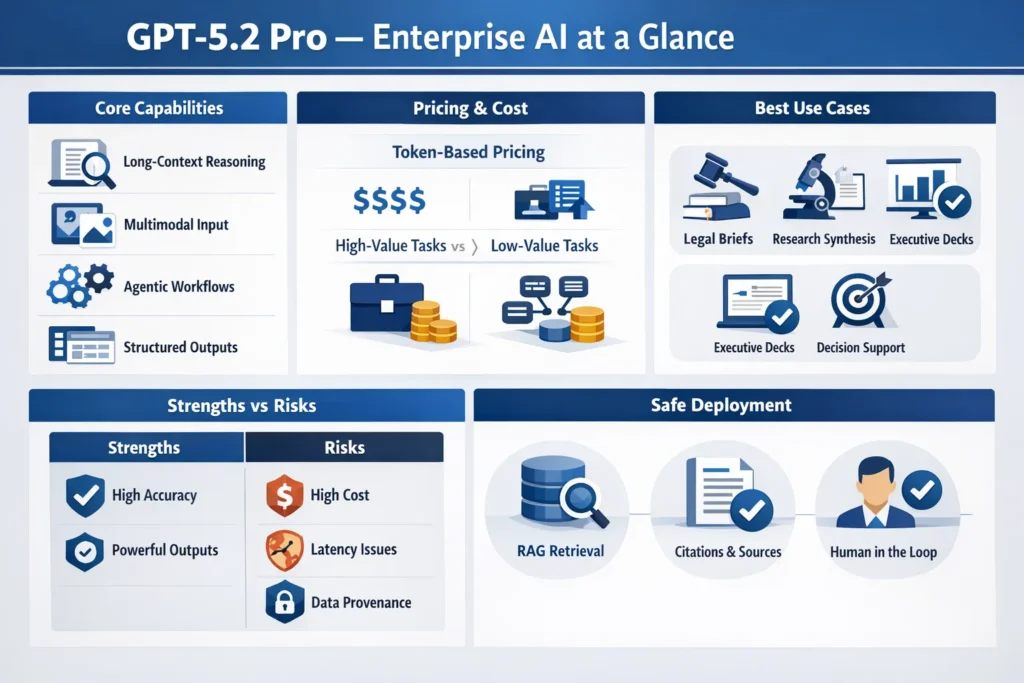
- Best for: High-impact, low-repetition tasks where skill, long-context reasoning, or multimodal understanding reduces reviewer time (legal, R&D, executive decisions).
- Not ideal for: High-volume, low-value tasks — low cost models are better here.
- Key risks: Token cost, latency, and provenance/factuality issues; require RAG, source logging, and human-in-loop verification.
- Action: Run micro-benchmarks on your actual prompts and data; pilot small; measure cost vs. time saved.
GPT-5.2 Pro — What Makes This AI a Game-Changer?
GPT-5.2 Pro is the highest-capability variant in the GPT-5.2 lineup. From an and systems perspective, it provides:
- Ultra-long context windows (engineered for multi-document, multi-file inputs so models can reason across full corpora). The Pro variant supports extremely large context windows suitable for stitch-and-consolidate workflows.
- Stronger stepwise reasoning via improved chain-of-thought and internal planning mechanisms — it’s tuned to produce and follow multi-step plans.
- Multimodal ingestion — text + images + documents (PDFs/slides) and structured outputs (JSON, tables, editable slide structures).
- Agentic tool orchestration — supports building agents that call external tools and APIs in multi-step chains.
- High-precision mode — configured and priced for use cases where errors are costly; typically used as a finalizer in pipeline architectures.
Official materials and launch reporting underline the model’s focus on professional knowledge work and agentic workflows.
Core Capabilities — What GPT-5.2 Pro Actually Does
- Long-Context Representation — supports extremely large token windows, so embedding + retrieval + context composition strategies can be simplified (but you should still use chunking + consolidation to control cost).
- Hierarchical Planning & Stepwise Reasoning — better internal plan generation, allowing a two-step interaction: (a) Plan (generate explicit plan steps), (b) Execute (follow plan to produce outputs). This reduces brittle single-shot prompts.
- Multimodal Feature Extraction — image/slide parsing plus cross-modal alignment (text references to visual elements), enabling workflows like slide generation from analytics dashboards.
- Agentic Capabilities — can be used to orchestrate external calls (data pulls, DB queries, web fetches) with safety/guardrails.
- Structured Output — fine-grained JSON/table outputs suitable for downstream automation (generate slide JSON, CSVs of extracted claims, or structured citations).
Why Teams Invest in GPT-5.2 Pro — Key ROI Drivers
From an engineering + product lens, teams pick GPT-5.2 Pro because:
- Reviewer-hour savings: For tasks where human review dominates cost, improved first-pass accuracy translates directly to lower FTE time
- Higher-fidelity automation: It produces structured deliverables (JSON slide specs, citation tables) that are easier to pipeline into document and presentation generators.
- Agentic orchestration: Enables building higher-level agents that reduce manual glue code and human orchestration.
- Multimodal consolidation: One model to parse slides, images, and text reduces the complexity of polyglot pipelines.
These advantages are only compelling if the upstream and downstream systems (RAG, vector store, observability) are mature.
Beyond the Scores — Understanding GPT-5.2 Pro’s True Capability
Benchmarks matter — but only as proxies. Public/independent tests show strong gains on reasoning and code tasks; however, the meaningful metric for an enterprise is task-level throughput and error profile on your data.
Recommended measurement plan:
- Task-level microbenchmarks: 5–10 representative prompts per use-case.
- Metrics: accuracy (fact-check), edits per output, reviewer time, latency, tokens per run, and cost per run.
- AB testing: cheaper model vs. Pro vs. human-only. Track distribution of error types (hallucination, omission, misformat).
- Long-tail evaluation: include edge cases (poor scan quality, partial PDFs, ambiguous tables).
Practical takeaway: vendor leaderboard numbers are a starting point — run your own probes with live inputs.
Note: launch reporting stressed improved long-context and agentic capabilities as primary differentiators.
Pricing & Cost-Per-Task — What You Really Pay for GPT-5.2 Pro
Official pricing examples show GPT-5.2 Pro carries a premium. Use official pricing pages when estimating: input and output token costs differ, and Pro has a high output price per 1M tokens. Always fetch the live pricing page for final numbers. For illustration only, recent official pricing lists Pro at ~$21 / 1M input tokens and ~$168 / 1M output tokens (confirm on OpenAI pricing page before purchase).
Example cost computation (illustrative)
Task: summarize a 100,000-token litigation bundle into a 2,000-token brief (one run).
- Input cost = (100,000 / 1,000,000) × $21 = $2.10
- Output cost = (2,000 / 1,000,000) × $168 = $0.34
- Total per run ≈ $2.44
Multiply by runs per month and add reviewer time to estimate real ROI. For example, 50 runs/month → token cost ≈ $122; add reviewer time (e.g., 30 mins @ $120/hr = $60/run) and Pro is only worth it if reviewer time saved offsets token + infra + engineering costs.
Practical cost controls (NLP/engineering):
- Preprocess and dedupe documents (token trimming).
- Cache intermediate summaries and cache model outputs for deterministic steps.
- Use cheaper models for prefiltering and extraction; call Pro selectively for finalization/verification.
- Implement token quotas, rate limits, and cost dashboards.
(Again — consult the official pricing page before publishing any dollar values.)
Choosing GPT-5.2 Pro — When to Go Premium vs Budget Options
Use GPT-5.2 Pro when:
- The marginal reduction in human review time (or error risk) exceeds the marginal cost in tokens and latency.
- Tasks require coherent reasoning across very large contexts (hundreds of thousands of tokens) or accurate multimodal consolidation.
- You need agentic orchestration and high-quality structured outputs ready for downstream automation.
Use cheaper variants when:
- Task volume is high, and per-unit margin is low.
- Outputs will be heavily post-edited anyway (drafts, low-sensitivity content).
- Latency and cost constraints are binding.
AI You Can Trust — Security and Provenance in GPT-5.2 Pro
Modern LLMs — including Pro variants — can surface low-quality and AI-generated web material as if it were authoritative. The risk is especially acute in enterprise contexts (legal, regulatory, clinical).
Primary mitigation patterns
- RAG with vetted corpora: Only retrieve from curated internal sources and log versioned document IDs.
- Provenance-first prompts: Require the model to emit explicit document IDs, sentence spans, and timestamps for every factual claim. Use structured JSON output so you can programmatically validate claims.
- Human-in-loop: Any claim without an explicit doc ref triggers a human review gate.
- Provenance logging: Record prompt versions, tokens, model responses, and downstream edits. Index these logs with claim IDs to permit audits.
- Model system-card constraints: consult the OpenAI system/model card for safety guidance and recommended mitigations.
Practical prompt pattern (verify):
For each claim in the draft, list: (a) document ID, (b) exact supporting sentence, (c) page or byte offset, (d) confidence score. If unsupported, mark TODO.
This structured verification output can be passed to a lightweight fact-checker that programmatically confirms the claim before finalizing.
Getting Started with GPT-5.2 Pro — Quick Setup & High-Impact Wins
Pilot plan
Goal: Validate time-saved vs. token + reviewer cost for 1–2 high-value use cases.
Week 0: Provision sandbox environment, vector DB, token monitoring, prompt registry.
Week 1–2: Ingest 5 representative bundles (legal/research/analytics). Build retrieval index and run initial RAG pipelines.
Week 2–3: Run AB tests: human-only vs cheaper model vs Pro. Capture metrics (time spent, edits, error rates).
Week 4–5: Iterate prompts, add forced verification steps, implement human sign-off gates for any claim without direct doc refs.
Decision gate: If (time saved × hourly rate) > (token + infra + extra human-review cost) and error rate ≤ target, scale.
Prompt scaffolding
- Plan: Ask the model for a step-by-step plan first (JSON array of steps).
- Extract: In each step, extract structured claims and references.
- Synthesize: Stitch extracts into the target output (brief / gap analysis/deck).
- Verify: Force a cross-check step that outputs doc IDs and sentence spans for each factual claim.
- Polish: A final pass for tone, format, and compliance.
Chunked processing pattern
- Chunking: split into logical units (chapters, depositions, papers).
- Local summarization: summarize each chunk into a canonical summary + claim matrix.
- Stitching: feed the chunk summaries into a consolidation prompt that reasons across chunks.
- Final verification: back-check consolidated claims against original chunk IDs.
Hands-On GPT-5.2 Pro Tuning — Real Examples That Work
Legal brief (plan → extract → synthesize)
- “Read depositions 1–5. Produce a 6-step plan to extract issue statements, parties, and evidence.”
- “For each issue, extract supporting quotes and page refs into a table.”
- “Synthesize a 2-page brief with citations and redline suggestions.”
Research synthesis
- “Ingest these 125 papers. Produce: (a) 250-word summary per paper, (b) claim matrix by method & dataset, (c) 1-page gap analysis with citations.”
Executive deck
- “Take the attached analytics report and produce a 10-slide deck: title, 3 bullets, one supporting metric, speaker note (30–45s). Return as JSON with slide structure.”
GPT-5.2 Pro in the Wild — High-Impact Enterprise Use Cases
- Legal discovery summarization: Ingest depositions → extract issues + evidence tables → produce issue briefs with explicit citations. Use a person’s sign-off for any claim flagged as low-confidence.
- R&D article reviews: Extract methods & datasets across hundreds of papers → crop claim matrices and gap analyses, exported as CSV/JSON for further analysis.
- Manager deck generation: Convert analytics outputs to slide JSON with speaker notes, premier one-click slide generation.
- Complex engineering assistance: Scaffold architecture docs, generate code snippets, and add CI test skeletons. Use Pro to validate design trade-offs across a long corpus of architecture docs.
- Regulatory filing prep: First-pass drafting of filings citing internal documents; enforce provenance and human review gates for any extrinsic claims.
- Decision-support simulations: Scenario planning with risk matrices, alternative actions, and quantified trade-offs; output in structured formats for programmatic consumption.
Observability & Monitoring
- Tokens per run & cost.
- Latency per call and percentile metrics (P50/P95/P99).
- Prompt versioning and hash.
- Review edits and time-to-complete human review.
- Provenance logs for each factual claim.
- Error classes and frequency (hallucination, omission, misformat).
Cost vs ROI checklist
- Estimate token cost × monthly runs.
- Multiply by reviewer time saved × hourly rate.
- Track error rate and remediation time.
- Assess non-monetary benefits: speed of insight, better decisions.
Comparison: GPT-5.2 Pro vs. Cheaper Alternatives
| Dimension | GPT-5.2 Pro | Cheaper GPT-5.2 chat/mini |
| Accuracy on the hardest reasoning | Highest | Good |
| Long-context handling | Largest | Limited |
| Cost per token | Very high | Much lower |
| Latency | Higher | Lower |
| Best use case | Mission-critical, high-value | High-volume, low-value |
Run task-specific benchmarks — vendor claims do not replace your tests.
Legal, compliance & vendor questions to ask before buying
- What are the data retention and training terms for enterprise data? Can OpenAI guarantee enterprise data won’t be used for training without consent?
- What provenance tools exist (citation tooling, fine-grained traceability)?
- What SLAs exist for uptime and latency?
- What controls exist for content filters and safety?
- Do enterprise contracts allow for dedicated instance/isolated training if required?
How to benchmark GPT-5.2 Pro Effectively — practical Recipe
- Define 5–10 representative tasks with real inputs.
- Record baselines: human-only, cheaper model, Pro.
- Measure: accuracy (fact-checks), reviewer edits, tokens, latency, cost.
- Run multiple temperature/settings sweeps to find stable configs.
- Document every prompt version and result for reproducibility.
Observability & Engineering Tips
- Cache intermediate summaries to avoid reprocessing.
- Chunk + stitch for very large documents.
- Version prompts and store hashes of prompt text in logs.
- Separate environments (dev/staging/prod keys).
- Fallbacks: If the Pro run fails or costs spike, use cheaper models for less-critical steps.
Concise Pros & Cons
Pros
- Powerful for deep reasoning, long-context synthesis, and multimodal work.
- Agentic abilities and structured outputs reduce manual glue work.
- Potential to materially reduce reviewer time on high-value tasks.
Cons
- Very high token cost and latency.
- Provenance concerns — the model can surface low-quality sources.
- Operational complexity in production (RAG, logging, sign-offs).
FAQs
A: Only if your team handles high-value tasks where the saved reviewer time outweighs token costs. Otherwise, use cheaper variants.
A: Preprocess inputs, cache summaries, use cheaper models for drafts, and only call Pro for verification or finalization.
A: No. Use RAG with vetted sources, automated provenance checks, and human sign-off for critical outputs.
A: Investigations show LLMs can be influenced by low-quality and AI-generated sources (e.g., “Grokipedia” style aggregates). Mitigate with RAG and provenance logging.
Conclusion
GPT-5.2 Pro is a tool to reserve for high-value steps in pipelines where better thinking, long-context memory, and multimodal understanding really reduce human review or unlock new computer intelligence. The safe path: pilot small, measure everything, use RAG + provenance logging, and keep Pro calls limited to finalization/verification to control cost.
