
Introduction
This is a long, practical, single-page pillar guide you can use for product pages, documentation, or a long blog post. It explains why GPT-4.1 matters, how it behaves as a system, how teams can use it in production, and how to compare and migrate from other models. The article includes copy-ready prompt recipes, integration patterns (RAG, chunk+summarize, hybrid), a migration checklist, cost-control tactics, and an section with the exact questions you asked kept unchanged.
What is GPT-4.1? — The AI Secret No One Talks About
- GPT-4.1 = Best for developer-heavy tasks and long-context reasoning.
- 1M-token context makes it possible to reason over huge documents without stitching.
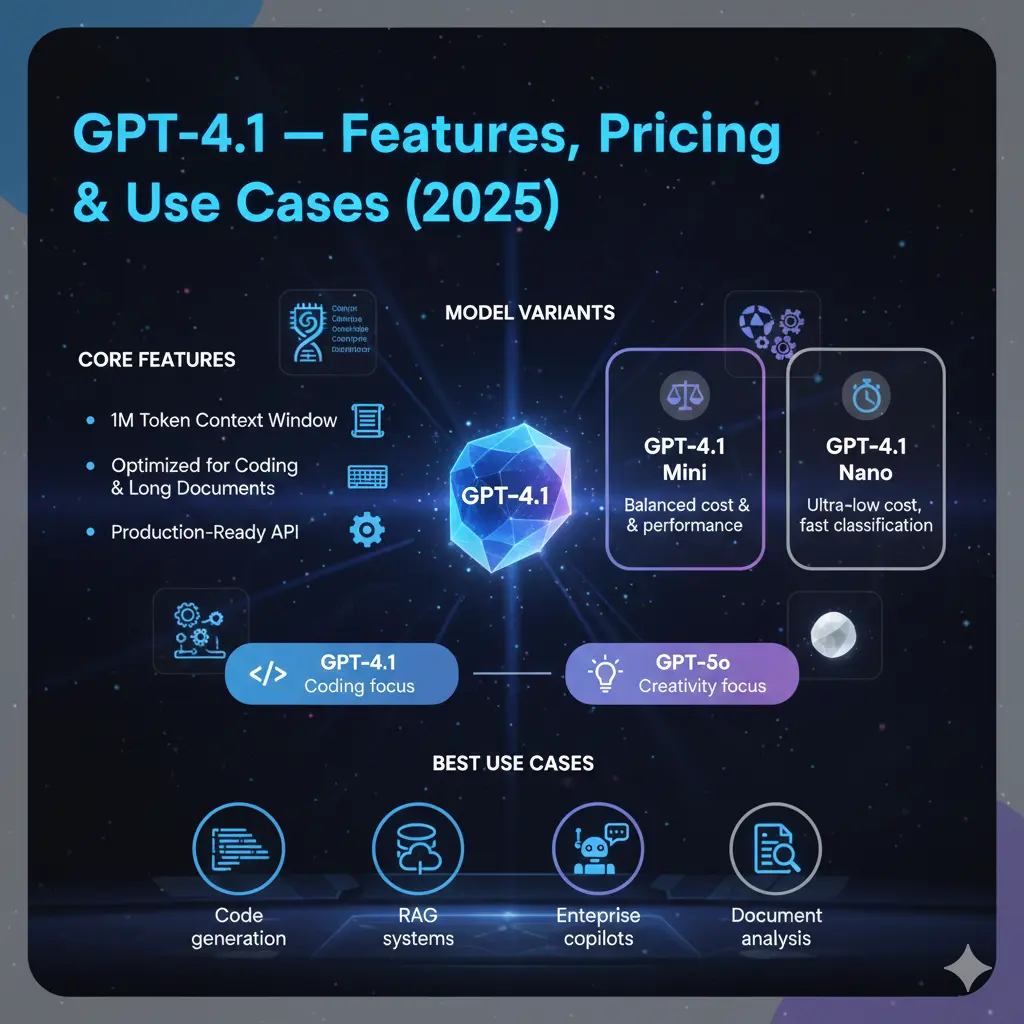
- Variants: GPT-4.1 (full), GPT-4.1 Mini, GPT-4.1 Nano — trade accuracy for cost and latency.
- Best uses: Code generation, multi-file reasoning, document QA, enterprise copilots.
- Not ideal: Purely creative tasks where literary voice > structure; tiny microtasks where Nano/Mini would be better.
- Always benchmark with your data — real workloads matter more than paper benchmarks.
Why GPT-4.1 Matters — This Feature Changes Everything
- Tokens & context: The model accepts up to 1,000,000 tokens in a single session (API). Tokens are the basic units the model processes; more tokens mean the model can “see” more of your document or codebase at once. This changes architecture decisions: you can feed entire books, big legal sets, or multi-file repositories as context without chunking.
- Attention & long-range dependencies: GPT-4.1’s architecture and training put emphasis on handling long-range dependencies — i.e., referencing a function defined 100k tokens earlier or cross-checking clauses across a contract. That’s crucial for code and legal analysis.
- Variants & cost/latency tradeoffs: Mini and Nano variants are smaller parameter/compute footprints. They’re faster and cheaper but retain the same instruction-following behavior. Use them as front-line filters and route to the full model for final reasoning.
- Instruction tuning & reliability: It’s tuned to follow instructions reliably, output structured formats, and reduce certain hallucination types in structured tasks (e.g., code generation, JSON outputs).
- Evaluation metrics: For production, track precision/recall where applicable, unit-test pass rates for code, p95 latency, cost per task, and human-rated correctness.
What is GPT-4.1? — The Secret Behind Its 1M Tokens
GPT-4.1 is a family of tool-based language models released for API use and built for engineering and firm tasks. The family includes the large flagship (GPT-4.1) and smaller, cheaper variation (GPT-4.1 Mini and GPT-4.1 Nano). From an perspective, think of GPT-4.1 as:
- A high-capacity Tool tuned for instruction following,
- with very large context memory (1M tokens) so it can reason over long sequences,
- and tiered variants so teams can route tasks by complexity to optimize for cost and latency.
It’s meant to be used in production: That means predictable outputs, thoughtful safety behavior, and strong performance on structured tasks like code and long-document QA.
Core Features The Game-Changing Abilities You Must Know
Huge 1M token context window
- What it is (simple): The model can accept very long text inputs in one call.
- NLP detail: This means less need for retrieval-and-stitch pipelines for some use-cases; transformers can form attention patterns across huge spans, reducing fragmentation errors.
Better Coding Performance
- What it is: Tuned to be stronger at multi-file reasoning, writing tests, and passing unit checks.
- NLP detail: Improved sequence modeling for code tokens and better mapping from prompts to executable outputs; usually shows up as higher automated metric scores and higher human-judged correctness.
Variants: Mini & Nano
- What they do: Mini and Nano are smaller, cheaper, lower-latency models. They keep instruction-following but cut compute.
- NLP detail: Use smaller variants for classification, embedding-like tasks, or as pre-processors. Reserve flagship for deep multimodal reasoning or high-stakes outputs.
Cost & Latency improvements
- Designed to be cost-effective for production workloads by offering tiered model choices and optimizations for common engineering tasks.
Production-Readiness
- Better logging, more stable output behavior, and features that help operationalize (monitoring, predictable tokenization, clearer instruction adherence).
GPT-4.1 vs GPT-4o vs Others — The Winner Will Surprise You
| Feature | GPT-4.1 | GPT-4o | When to choose |
| Best for | Coding, long-doc reasoning | General chat, multimodal, creative | Engineering tasks → GPT-4.1 |
| Context window | Up to 1M tokens | Smaller in many UIs | Long documents → GPT-4.1 |
| Variants | Mini & Nano | Mini variants exist | Cost routing possible in both |
| Creativity | Good | Excellent | Fiction or creative assistants → GPT-4o |
| Cost/latency | Tuned for production | Often tuned for interactive chat | Test both on your workload |
Important note: Platform limits vary. The API may permit 1M tokens but web UIs or specific plans might not.
Benchmarks & How to Read Them — What They Don’t Tell You
What to Look For
- Task match: Use benchmarks that mirror your workload. A math benchmark doesn’t predict code-gen behavior perfectly.
- Dataset bias: Some benchmark datasets favor certain instruction styles.
- Human vs automated metrics: Automated tests are fast; human evaluation reveals edge cases and usability.
How to Bench For your Product
- Collect 20–100 representative tasks (unit tests for code tasks, real user queries for QA).
- Run same prompts across models with identical preprocessing.
- Record p95 latency, cost per task, and accuracy metrics (unit test pass-rate, BLEU/ROUGE where relevant, human score).
- Mix automated checks + human review to catch hallucinations, formatting errors, or missing edge cases.
Pricing & Cost Planning — Hidden GPT-4.1 Tricks Experts Don’t Share
Warning: Pricing changes. Use the platform pricing page for current numbers.
Cost Modeling Fundamentals
- Cost scales with token input + token output and model compute (larger models cost more per token).
- Use smaller variants for high-volume, low-complexity tasks (classification, tagging).
- Cache repeated outputs (semantic caching for identical or near-identical prompts).
- Batch short requests where possible to reduce per-call overhead.
Sample cost planning Tips
- Route cheap tasks to Nano, moderate tasks to Mini, high-value to full model.
- Summarize once and reuse summaries for repeated user sessions instead of resending entire docs.
- Monitor token usage and set alerts for spikes.
How to Use the GPT-4.1 API — The Smart Guide Most Users Miss
Basic Flow:
- Choose model variant (gpt-4.1, gpt-4.1-mini, gpt-4.1-nano).
- Create a system prompt that sets role and output format (e.g., JSON).
- Send user input and context (up to 1M tokens).
- Validate and parse outputs; apply unit tests or schema checks.
- Log outputs and errors. Use automated monitoring for drift and hallucination rates.
Tips:
- When expecting code, ask for docstrings and tests.
- Use Deterministic settings (lower temperature) for reproducibility in production.
- For conversational assistants, maintain a conversation history window and periodically summarize to keep token costs down.
Migration Guide Avoid Costly Mistakes When Moving to GPT-4.1
Step-By-step Checklist
- Inventory prompts used in critical flows.
- Spin up staging: replace model IDs with GPT-4.1 variants in test environments.
- Run regression tests (unit tests + real user flows).
- Compare latency & cost for each flow.
- Route cheaply: keep some flows on GPT-4o if they remain cheaper and satisfactory.
- Canary deploy (10% → 25% → 50% → 100%).
- Monitor error rates, hallucinations, and user satisfaction.
Pitfalls
- Over-using the full model for trivial jobs.
- Not re-tuning prompts; slight phrasing changes can change behavior.
- Relying only on automated tests; user-facing behavior may differ.
Production Integration Patterns The Smart Way to Use Nano, Mini & Full Model
Chunk + Summarize
- When: Documents are huge but queries are broad.
- How: Break into chunks (10k–50k tokens), summarize each chunk to structured notes, feed summaries into the model for final reasoning.
- Why: Saves cost and reduces latency for repeated queries.
Retrieval-Augmented Generation
- When: You have many documents and each query touches a small subset.
- How: Use embeddings + vector DB to fetch relevant passages, then ask GPT-4.1 to synthesize answers.
- NLP note: Embeddings act as semantic indexes; retrieval accuracy heavily affects final answer quality.
Hybrid Orchestration (Nano → Mini → Flagship)
- Flow: Nano for cheap classification/tagging → Mini to summarize/extract → Flagship for final synthesis.
- Why: Best cost-latency compromise for enterprise workloads.
Pros & Cons
Pros
- Improved code and long-context performance.
- 1M token window changes what’s possible in NLP tasks.
- Mini/Nano variants for cost routing.
- More predictable outputs for structured tasks.
Cons
- Not the most creative for fiction vs models tuned for chat creativity.
- Overkill for trivial tasks if not routed correctly.
- Platform-specific UI limits may reduce access to the full 1M tokens.
FAQs
A: Yes — most public tests show GPT-4.1 has higher coding skill on many coding benchmarks, expanding it a better choice for code-heavy tasks. But do your own tests.
A: The API supports up to 1,000,000 tokens for GPT-4.1 family models. However, some consumer UIs may still be capped at much smaller limits. Always confirm the exact limits for your plan and platform.
A: No. Use Nano/ Mini variants for preprocessing and cheap tasks. Reserve the full model for final, high-value outputs.
A: Cost depends on token volume, mix of variants, and caching. Use the platform pricing calculator and run a small pilot to estimate real costs. See OpenAI pricing pages for the latest numbers.
A: GPT-4.1 focuses on text and long-context reasoning. For multimodal tasks, consider other models (like GPT-4o or specialized multimodal models) depending on the use case.
Conclusion
If you need better coding truth, robust long-document reasoning, and predictable behavior for management systems, GPT-4.1 is a strong candidate. Use Mini/Nano variants for preprocessing and high-volume tasks, and reserve the flagship for final high-value outputs. Always run a pilot with your real data to estimate cost and accuracy.
