
Introduction
Gemini 3 faces the problem of long-context, costly, and slow AI tasks — use Pro for deep reasoning or Flash for fast, low-cost responses; try both now and see up to 5× faster performance and a ~1,000,000-token context — curious? What this guide gives you (short): a friendly, developer- and NLP-focused deep-dive into Gemini 3. You’ll get release facts, technical features, model comparisons (Pro vs Flash), pricing examples, benchmark guidance, a migration checklist, prompt templates, and FAQs.
Gemini 3 Pro debuted publicly on, and Gemini 3 Flash followed on as a faster, lower-cost sibling tuned for high-throughput uses. Use Pro when you need top reasoning and deep multimodal work; use Flash when you need low latency and low cost for large-scale production.
Why Everyone Is Talking About Gemini 3 Right Now
This long-form guide explains Gemini 3 in terms: what it is, what changed from earlier releases, where you can run it, how it behaves on long input, and practical migration steps for moving production systems from Gemini 2.x/2.5 to Gemini 3. You’ll find checklists, example prompts, cost math, and an action plan you can copy into your sprint board.
What Is Gemini 3 — And Why It’s a Big Deal?
Gemini 3 is Google DeepMind’s current generation family of large multimodal foundation models. Technically, it pairs massive context capacity and improved reasoning with native multimodal inputs (text, images, audio, video) and agentic capabilities that let the model interact with tools and environments. It’s built to support both consumer-facing products (Gemini app, Search AI Mode) and developer/enterprise platforms (Gemini API, Vertex AI, CLI, and IDE integrations).
Why it Matters:
- Huge context window: Enables single-session reasoning across very long documents or mixed-modal evidence without stitching prompts manually.
- Stronger multi-step reasoning: Better at multi-hop inference, planning, and keeping internal chains of thought coherent across many steps.
- Truly multimodal in one session: Text, images, audio, and video can be mixed and reasoned about together, enabling richer grounded outputs.
- Agentic workflows & integrations: Tooling like Google Antigravity demonstrates how Gemini 3 can run agents that browse, edit code, and verify results.
Gemini 3 Launch Dates You Shouldn’t Miss
Clear timeline:
- Gemini 3 Pro — public preview/debut: November 18, 2025. Available via the Gemini app and rolling out to developer platforms.
- Gemini 3 Flash — follow-up release: December 17, 2025. Tuned for speed and cost-efficiency and integrated widely across CLI, API, and Vertex AI.
Availability summary:
- Gemini app: Pro/Flash options appear in the app and are rolled into AI Mode and subscription tiers.
- Gemini API & Google AI dev docs: Model IDs and preview endpoints are published for developers (gemini-3-pro-preview, gemini-3-flash-preview).
- Vertex AI: Enterprise-grade deployments and online prediction supported via Vertex’s Gemini 3 model pages.
Gemini 3 Core Features You Must Know
Below are the most important changes and features in Gemini 3, phrased in NLP/engineering terms:
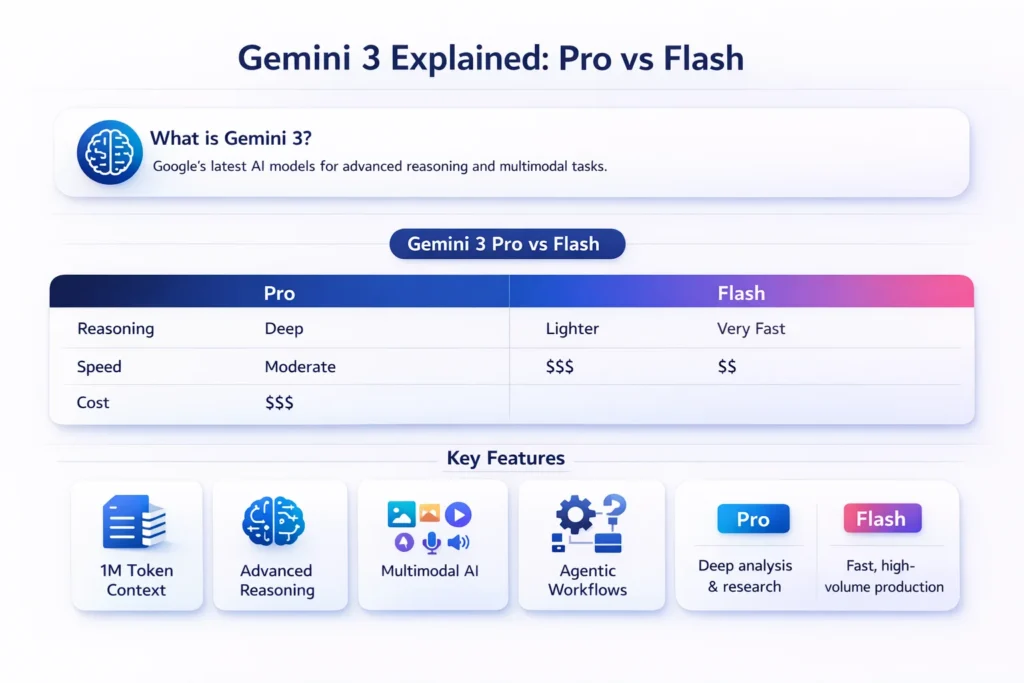
- Large context window (~1,000,000 tokens) — practical implication: one context can include entire books, multi-file codebases, or many hours of transcripts. No need to micro-chunk in many cases.
- Improved chain-of-thought robustness — more stable multi-step reasoning with reduced drift across longer reasoning chains.
- Native multimodal joint encoding — inputs across modalities can be jointly attended to so the model can reference a frame timestamp, an image region, and a text paragraph in the same reasoning pass.
- Agentic control primitives — models can orchestrate small agents (open/close apps, run tests, fetch webpages) and return verifiable steps. Antigravity shows early IDE integration examples.
- Multiple performance variants — Pro for maximal quality; Flash for low-latency, cost-optimized inference; plus internal modes (Deep Think/Ultra) for subscribers.
Pro vs Flash — Which Gemini 3 Model Wins?
Summary: Pro = quality, Flash = speed/cost.
| Feature / Need | Gemini 3 Pro | Gemini 3 Flash |
| Main focus | Highest reasoning & multimodal fidelity | Speed, latency, cost-efficiency |
| Best for | Research, Debugging, long-context tasks, noisy inputs | Chatbots, search integration, high RPS APIs |
| Context window | Up to ~1,000,000 tokens | Up to ~1,000,000 tokens (tuned for latency) |
| Latency | Higher (more compute) | Much lower — engineered for fast responses |
| Price (example) | Higher per token (tiered enterprise ranges) | Much lower per token; example published pricing for Flash shown in docs. |
| Use in product | Background batch analysis, heavy reasoning | Front-end, interactive chat, high-throughput pipelines |
Practical rule: start with Flash for interactive user-facing traffic + Pro for scheduled/critical heavy analysis or selective canaries.
What 1,000,000 Tokens Really Mean for Gemini 3
- Tokens vs words: Tokens are model-native subword units. 1,000,000 tokens ≈ 700k–800k words depending on language and tokenization. That’s roughly several full-length novels or a large multi-module codebase.
Why it matters for engineers:
- Global attention: The model can attend to the whole corpus in one forward pass, improving coherence and reducing context fragmentation artifacts.
- Far fewer prompt engineering hacks: you can inject the full background and then ask concise actions, rather than re-supplying context every turn.
- Repository-scale tasks: Codebase refactoring, security sweeps, global renames, or policy compliance checks can be done without stitching.
Caveat: Even with huge windows, token accounting matters — cost and model throughput scale with token counts. You still want to be frugal and use embeddings/caching wisely.
Gemini 3 Benchmarks — How It Performs in Reality
Short, practical notes on benchmarks:
- Public leaderboards & internal tests: Gemini 3 Pro ranks high on reasoning and multimodal leaderboards in late-2025 independent tests and vendor-supplied benchmarks. Flash aims to match much of that quality while improving latency. Treat early numbers as evolving; always run workload-specific evaluations.
- Latency & throughput: Flash variants are engineered for low-latency and are reported to be ~3× faster than older Flash models in early tests, while delivering much of the same task-level quality.
- Agentic reliability: agentic tools (Antigravity) show that models can run multi-step tasks and produce verifiable artifacts — but verification and sandboxing remain essential in production.
Gemini 3 Pricing Demystified — Save Money & Time
Important: pricing varies by channel (Gemini API vs Vertex AI vs Gemini app), region, and subscription plans. Below are illustrative examples drawn from published pages — use them to estimate, not as billing truth.
Example published numbers for Gemini 3 Flash (illustrative; see live pricing pages): $0.50 per 1M input tokens, $3 per 1M output tokens (audio input may differ). For enterprise and Pro tiers, pricing is higher and tiered.
Simple per-session math
Suppose a user session uses 1,200 total tokens (input + output combined).
Flash:
- Input cost ≈ 1,200 / 1,000,000 * $0.50 = $0.0006 * 0.001? (do digit-by-digit mental calc) — correct calc below:
- 1,200 / 1,000,000 = 0.0012
- Input cost = 0.0012 × $0.50 = $0.0006
- Output cost = 0.0012 × $3 = $0.0036
- Total ≈ $0.0042 per session (illustrative).
Pro (example higher tier): if Pro had $2/1M input & $12/1M output (example), same 1,200 tokens → total ≈ $0.0156 per session. Flash is clearly cheaper per session in this toy example.
Takeaway: for high-RPS interactive apps, Flash usually beats Pro for cost. For heavy reasoning or high-output tasks (long generated outputs), measure both token counts and quality trade-offs.
Vertex AI note: Vertex pricing pages list per-modality and per-model costs and sometimes temporary free-tier windows; always consult the Vertex pricing page and your billing console for exact values.
Gemini 3 in Action — Top Platforms & Tools
- Gemini app & Google Search AI Mode — consumer & research usage.
- Gemini API / AI dev docs — Direct developer API with model IDs and usage examples.
- Vertex AI — Enterprise-managed deployments, provisioned throughput, and prediction endpoints.
- Gemini CLI & IDE integrations (Antigravity, Cursor, JetBrains, GitHub, etc.) — programmatic, agentic workflows for coding and automation.
How to Move from Gemini 2.x to Gemini 3 Smoothly
This section is a practical migration playbook for engineering teams.
Migration checklist
- Inventory your usage
- List every endpoint and model ID in config (e.g., gemini-2.5, gemini-2.0-flash). Include any baked-in prompts or templates.
- Measure baseline
- Gather p50/p95/p99 latency, RPS, token usage, cost per 1,000 tokens, and human preference metrics on critical tasks.
- Prototype locally
- Run a small test suite using gemini-3-flash-preview and gemini-3-pro-preview. Use identical prompts to compare outputs and token counts.
- A/B test
- Route a sample of live traffic (e.g., 5–10%) to Flash and to Pro for identical tasks. Track quality metrics and monitoring signals.
- Token optimization
- Rework prompts to use the long context window: attach background docs once, then send short delta prompts. Cache embedding vectors for repeated semantics.
- Endpoint changes
- Update model IDs in config and CI. Use feature flags or routing logic so you can switch models dynamically for specific request types.
- Performance profiling
- Measure memory, CPU, and network usage for each model route. Geminis with large windows can increase I/O and serialization costs.
- Cost analysis
- Compute projected monthly costs using real token counts and expected traffic. Consider batching and response truncation if output tokens dominate cost.
- Safety & filters
- Re-run moderation and safety tests: outputs may differ, and previously acceptable prompts could generate new edge behaviors.
- Rollout strategy
- Canary → Gradual ramp → Full switch. Reserve Pro for heavy offline jobs or high-value interactions.
- Monitoring & rollback
- Keep observability on quality (human ratings), hallucination rates, and latency. Automate rollback if error/quality thresholds are crossed.
Migration Examples
- If you previously chopped a 50-page manual into 10 prompts for Gemini 2.x, try sending it as a single context to Gemini 3 Pro and compare the summary’s coherence and token usage. You may reduce prompt engineering complexity.
- For chatbots, keep Flash as the default runtime model and trigger Pro for “explain this in detail” or backend nightly reports.
Prompt engineering tips for Gemini 3
- Set system role and style: Use explicit system prompts: “You are a concise, safety-first technical analyst.”
- Leverage background context: For repeated tasks, upload background docs once and reference them by label. Use the 1M-token window to keep stateful context.
- Ask for structured outputs: Request JSON/YAML to make downstream parsing easier: “Return only JSON with keys: summary, risks[], actions[]”.
- Control verbosity: Use temperature and top_p settings in the API; Flash defaults are tuned for speed.
- Step-by-step: Ask for numbered steps for clarity in reasoning tasks.
- Verification loops: For agentic flows, ask the model to list the verification steps it will perform before executing.
Cost optimization patterns
- Cache outputs for identical prompts (especially for static FAQs).
- Batch requests for similar tasks where possible.
- Use Flash for interactive flows and Pro for offline heavy jobs.
- Trim output length using max_tokens or by asking for summaries instead of full transcripts.
- Context delta: send only the changes after an initial full context load.
- Monitor token split: many workloads are output-dominated — prefer approaches that reduce generated length.
Safety, compliance & Enterprise Concerns
- Re-validate moderation filters: Model behavior differs across versions; retest thoroughly.
- Data residency: Vertex AI and Google Cloud controls may help meet compliance by choosing regional deployment.
- Audit logs: Log inputs/outputs for regulation and debugging; mask PII as required.
- Human-in-the-loop: Requires human sign-off for legal/clinical outputs.
- Sandbox agentic controls: Lock down external actions and verify agent outputs before committing side effects.
Benchmarks, tests, and what to watch for
Before a full rollout, do:
- Quality A/B: Human preference tests across core tasks (e.g., correctness, helpfulness, concision).
- Performance tests: P95/p99 latency under expected load patterns.
- Token accounting: Measure typical request input vs output token usage.
- Edge-case safety: Try adversarial inputs to observe failure modes.
- Regression tests: Ensure existing prompt-based behaviors are preserved or documented if changed.
Performance Snapshot: Gemini 3 Pro vs Flash
| Test | Gemini 3 Pro (early) | Gemini 3 Flash (early) | Notes |
| Reasoning score (public leaderboard) | High | Mid-high | Pro leads for deep reasoning. |
| Latency (same infra) | Higher | Much lower | Flash optimized for speed. |
| Cost per 1k tokens | Higher | Lower | Flash is cheaper for high volume. |
Pros & Cons
Pros
- State-of-the-art reasoning and multimodal joint processing.
- Huge context windows reduce prompt engineering friction.
- Flash tier brings production-grade low latency and cost improvements.
Cons
- Pro is costlier for heavy traffic.
- Platform complexity: more variants to manage and test.
- Benchmarks are evolving — treat early claims as starting points.
FAQs
A: Gemini 3 Pro was publicly announced and rolled out starting November 18, 2025; Gemini 3 Flash followed with wider availability around December 17, 2025. These dates are published on Google’s Gemini blog and developer pages.
A: Pro focuses on the highest reasoning fidelity and is best for deep, long-context, or high-precision multimodal tasks. Flash is tuned for much lower latency and lower cost per token, making it better for interactive applications and high-RPS production traffic. Use Pro selectively for heavy jobs and Flash for everyday interactive usage.
A: Yes — in many cases, Gemini 3 replaces older Gemini versions, but you should A/B test for latency, cost, and behavior differences. Update model IDs, validate safety moderation, and run a canary deployment before full migration.
Conclusion
Gemini 3 represents a major step forward in Google’s AI roadmap, especially for NLP-driven and multimodal applications. With Gemini 3 Pro, you get top-tier reasoning, long-context understanding, and deep analysis suited for research, coding, and complex decision-making. With Gemini 3 Flash, you get speed, low latency, and cost efficiency that make large-scale, real-time products practical.
The smart approach is not choosing one model blindly, but using both strategically: Flash for high-volume, user-facing flows, and Pro for critical, high-accuracy workloads. If you migrate carefully—measure, A/B test, optimize prompts, and control costs—Gemini 3 can replace older Gemini models while improving quality, scalability, and future readiness.In simple terms: Gemini 3 is built for the next generation of AI apps—and if you plan your rollout well, it gives you more power without losing control.
