

Introduction
Gemini-2.5-Flash: Are you really using it right in production? Many developers miss critical API nuances, risking slower performance, higher costs, or hidden errors. This guide shows exactly what to watch, how to call the API correctly, and safely migrate your workloads. If you run production NLP systems — chatbots, summarizers, extraction pipelines, or any service that must balance latency, throughput, and multi-step reasoning — Gemini-2.5-Flash deserves a close look. In terms, Flash is positioned as the mid-sized member of the Gemini 2.5 family: it preserves substantial internal multi-step reasoning capacity (helpful for tasks requiring compositional thinking or intermediate representations) while being engineered for lower latency and better price/performance than the highest-capability variant (Pro). Flash-Lite sits below Flash for extreme scale and minimal latency, optimized for high QPS, often at the cost of some internal reasoning depth.
This guide is written for engineers, ML infra teams, and practitioners who need a reproducible migration plan, exact API model names (and the naming gotchas that cause outages), copy/paste examples for REST/Node/Python, and a step-by-step checklist for safe rollout. I frame recommendations using standard concepts: tokenization, context windows, attention budgets, reasoning (chain-of-thought) vs direct prediction, and evaluation metrics like p50/p95 latency, token usage, ROUGE/BLEU for generative quality, and explicit hallucination tracking.
What you’ll get:
- Canonical model IDs and naming pitfalls to avoid.
- Ready-to-run REST, Node, and Python code snippets (copy/paste).
- A deeper NLP framing of “thinking” and how to tune it.
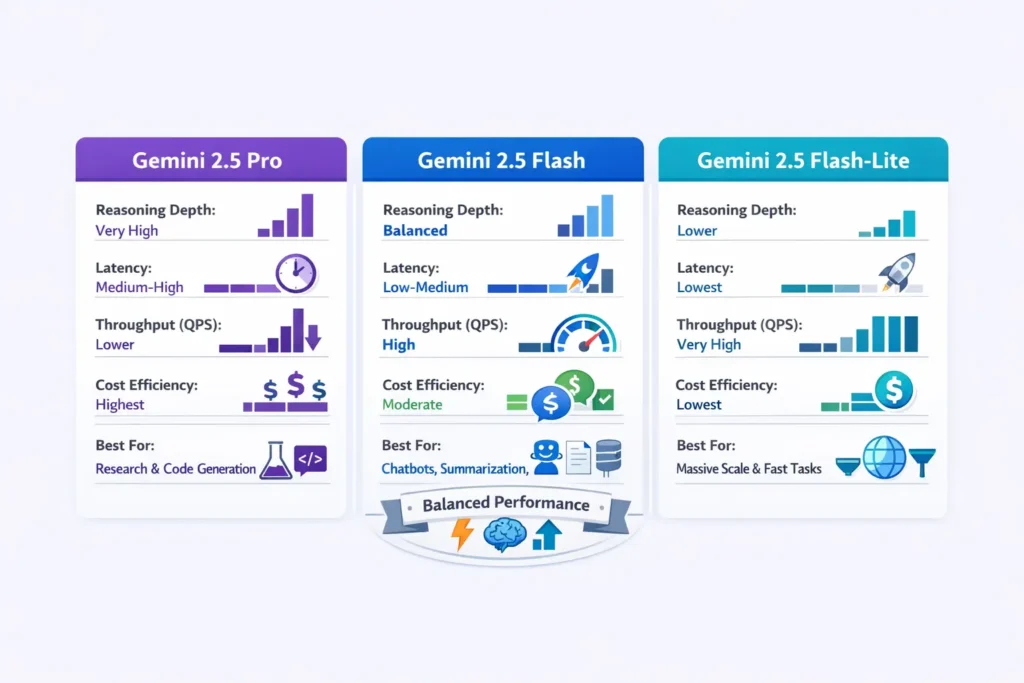
- Flash vs Flash-Lite vs Pro head-to-head in terms of reasoning budget, latency, and throughput.
- A reproducible benchmark plan and migration checklist for safe staging → production rollout.
- Practical prompt engineering patterns, token budgeting tactics, and observability playbooks.
Quick TL;DR: Are You Missing Critical Gemini-2.5-Flash API Insights?
- Gemini-2.5-Flash: Best balance of reasoning (multi-step internal computation) and throughput/latency. Good default for summarization, extraction, and chat where you need solid accuracy and fast responses.
- Gemini-2.5-Pro: Higher attention/reasoning budget — better for complex code generation, long chains of reasoning, and research tasks where correctness outweighs cost.
- Gemini-2.5-Flash-Lite: Ultra-efficient, lowest latency and cost; ideal for bulk classification and extremely high QPS scenarios where lighter reasoning is acceptable.
- Use Flash when you want production reliability and good reasoning without Pro’s cost. Use Flash-Lite as a fallback/scale option. Use Pro when accuracy is paramount.
Model Naming & API Surfaces: Are You Using Gemini-2.5-Flash Wrong?
- Generative Language (Gemini API): Gemini-2.5-flash (often the short name used in SDK examples).
- Vertex AI resource name: Projects/<PROJECT>/locations/<LOCATION>/models/google.gemini-2-5-flash or UI label google.gemini-2-5-flash.
- Variants/spelling differences: You may see gemini-2-5-flash (dash vs dot). Always rely on the model list returned by the platform when the client boots, and confirm resource names in your console.
Pitfalls:
- Old tutorials reference beta endpoints (v1beta) or preview resource paths — these can break. Always verify the exact resource name and endpoint in your cloud console or the provider SDK at deploy time.
- Hardcoding model strings across multiple microservices makes coordinated updates painful; centralize model identifiers in a single config service or feature flag.
The Concept of “Thinking”: Are You Tuning Gemini-2.5-Flash Correctly?
In Gemini families, “thinking” refers to an internal mechanism that effectively allocates more of the model’s computation to intermediate reasoning steps (chain-of-thought-like internal state) instead of instantly committing to a final token sequence. From an NLP/ML perspective, this can be viewed as:
- Increasing internal attention passes or secondary planning steps before sampling output — this can surface intermediate latent representations useful for complex tasks.
- Trading compute/time budget for higher internal deliberation, which often reduces hallucination and increases correctness on multi-step tasks, but increases latency and token billing (if internal trace tokens are returned).
- Adjustable via parameters like thinking_level (or thinkingLevel) with values like minimal, low, medium, high, or via boolean flags to return the internal trace.
Engineering Implications:
- More thinking = more CPU/GPU work and potentially more billed tokens (if the service returns the internal trace).
- When you disable the trace but allow internal thinking, you may still pay for the compute but avoid long responses.
- Use higher thinking for debugging, audits, or high-risk outputs (legal, medical drafts), and lower thinking for high QPS classification where speed is critical.
Practical Tuning:
- Extraction tasks: Set thinking_level to minimal or low.
- Complex reasoning: Use medium or high and collect internal steps for human audit.
- Debugging: Enable verbose thinking to inspect latent chains and failure modes.
Performance, Cost & Throughput: Are You Wasting Tokens on Gemini-2.5-Flash?
Key Tradeoffs
- Throughput vs reasoning depth: Flash is tuned to balance both; Pro tilts heavily toward depth.
- Batching: Combine multiple small requests into a single call when the API supports batching to amortize per-request overhead.
- Streaming: Use streaming for faster time-to-first-token; useful for chat UIs to reduce perceived latency.
- Warm workers & regional endpoints: Keep pools warm and use region-local endpoints to lower p50 cold starts.
Cost Control Tips
- Set strict maxOutputTokens.
- Use Flash-Lite for bulk classification.
- Shorten system prompts and push fixed context to the local cache.
- Monitor token usage by tagging logs with model, temperature, and thinking_level.
- Autoscaling rules: scale up replicas based on QPS and model latency so per-request latency remains predictable.
Important: Exact pricing varies by region and time — consult your cloud provider’s pricing pages in production.
Observability & Telemetry: Are You Blind to Gemini-2.5-Flash Issues?
- Latency: p50, p95, p99 (ms).
- Time-to-first-token: Critical for chat UX.
- Tokens per call: Input vs output tokens.
- Cost per 1k requests: Derived metric combining tokens and pricing.
- Success/error rates: HTTP codes, retries, rate limit events.
- Quality metrics: Automatic (BLEU/ROUGE/F1/EM) and human scores.
- Hallucination events: Logged instances where outputs contradict ground truth (requires human audit or rule-based checks).
- Model tag: Include model=gemini-2.5-flash for every request in logs.
Instrumentation suggestions:
- Emit per-request traces to your tracing backend with model, prompt hash, tokens, latency, and temperature.
- Sample a small fraction (1–5%) of responses for human evaluation each day.
Reproducible Benchmark Plan: Are You Measuring Gemini-2.5-Flash Wrong?
Dataset: 1k representative prompts sampled from production logs, stratified by intent, length, and expected output complexity.
Metrics:
- Latency p50/p95
- Tokens per request
- Cost per 1k requests
- ROUGE/BLEU/F1 for summarization/extraction
- Human quality score (1–5)
- Hallucination rate
Procedure:
- Fix seeds and deterministic sampling where possible (low temperature) to reduce variance.
- Run each prompt across Flash, Flash-Lite, and Pro with identical parameters except for model id.
- Collect raw outputs, compute automated metrics, and aggregate latency & token stats.
- Human-grade a 200-sample subset per model.
- Compare results in a report with cost/quality tradeoff plots
Decide: Choose the model that satisfies SLA constraints (latency/cost) while meeting minimum human quality thresholds.
Migration checklist — production step-by-step
Use this checklist when moving from an older model or another vendor to gemini-2.5-flash.
- Audit current usage
- Log average prompt size, output size, concurrency, and error profile.
- Collect a representative prompt corpus (1k–10k).
- Map models
- Map high-accuracy flows to 2.5-pro, balanced flows to 2.5-flash, and high-scale low-latency flows to flash-lite.
- Staging compatibility run
- Replace the model id in a staging environment.
- Run smoke tests and unit tests against response shapes and error handling.
- A/B testing
- Side-by-side tests: Flash vs Pro vs Flash-Lite.
- Collect latency p50/p95, tokens, cost, and human quality.
- Prompt tuning
- Shorten system prompts, reduce temperature for deterministic flows, and rework prompts that previously relied on vendor quirks.
- Client code & auth
- Confirm endpoints, OAuth/ADC flows, and response schema. Update retry, backoff, and circuit breakers.
- Observability
- Add metrics and logs with a model tag. Ensure dashboards for p50/p95 latency and cost.
- Fallback & degradation
- Implement Flash-Lite fallback under high load. Use circuit breaker patterns and graceful degradation.
- Rollout
- Canary (1%) → 5% → 25% → full. Monitor continuously, roll back if hallucination or error rates spike.
- Post-migration audit
- Review hallucination logs, cost vs forecast, and human QA checks. Iterate on prompts/temperature.
Head-to-Head: Gemini 2.5 Pro vs Flash vs Flash-Lite
| Dimension | Gemini 2.5 Pro | Gemini 2.5 Flash | Gemini 2.5 Flash-Lite |
| Reasoning depth | Very high | High (balanced) | Lower by default |
| Latency | Medium-High | Low-Medium | Lowest |
| Throughput | Lower | High | Very high |
| Cost | Highest | Moderate | Lowest |
| Thinking enabled | Yes (heavy) | Yes (balanced) | Configurable (lighter) |
| Best for | Research, code gen | Chat, summarization, extraction | Bulk transforms, classification |
When to prefer Flash: Default production workhorse — balances speed and reasoning. Prefer Flash-Lite for cheap, extremely fast workloads. Prefer Pro when correctness is critical (complex reasoning, long-form planning).
Safety, Fairness & Hallucination Control: Are You Risking Gemini-2.5-Flash Errors?
- Automated filters: Run toxicity & safety heuristics client-side before exposing outputs.
- Grounding: When possible, force models to cite sources or limit outputs to user-supplied facts.
- Human-in-the-loop: For high-risk outputs (medical/legal), requires reviewer approval.
- Log hallucination incidents: Annotate and track to spot model drift or prompt failure patterns.
- Prompt constraints: Enforce templates and strict JSON outputs to reduce creative hallucinations.
FAQS
A — Use the model id shown in your provider’s model list. For Gemini API, it’s commonly gemini-2.5-flash. For Vertex AI, the resource name often has a Google. prefix (e.g., google.gemini-2-5-flash) — confirm in the console.
A — Yes. Flash-Lite is optimized for the lowest latency and cost and is intended for massive scale. It typically costs less per token than Flash, but may be lighter in default reasoning behavior. Check current pricing in your cloud console or vendor pricing page.
A — The Gemini API exposes parameters to tune thinking budgets (e.g., thinking_level). If you do not want internal reasoning steps returned, instruct the model or disable verbose thinking in request options. See the official thinking docs for exact parameter names.
A — Many Gemini surfaces support streaming for lower time-to-first-token. Use streaming when you need chat-like real-time UX.
A — Use a low temperature (0–0.2), explicit instructions, a short system prompt, and maxOutputTokens to guard cost.
Final Notes
Gemini-2.5-Flash is an excellent production compromise: it retains meaningful internal reasoning capacity while pushing for lower latency and cost. Use the migration checklist and benchmark plan above to validate your performance and accuracy objectives.
