
Introduction
Leonardo AI Luna — struggling to get consistent character art or clean stylized results? Many users face issues like extra fingers, inconsistent poses, and uneven style. With the right settings, guidance, and workflow techniques, you can produce reliable, expressive illustrations every time. In this guide, we reveal 7 proven strategies to master Luna and create stunning art effortlessly — read on to see exactly how it works!Leonardo AI Luna is a community-finetuned diffusion engine available inside the Leonardo.ai platform. From an engineering perspective, it’s a transfer-learned image diffusion model biased toward stylized character and paper/illustration aesthetics. It excels at expressive faces, silhouettes, and thumbnail-scale compositions; it is less reliable for photorealistic fidelity and anatomically perfect hands.
For reproducible, consistent outputs, prefer lower-to-mid classifier-free guidance values, deterministic seeds, short structured prompts, and explicit negative constraints. Licensing and commercial rights depend on Leonardo.ai account tier and model-specific usage notes — always confirm the platform’s Terms and the model metadata before commercial deployment.
Leonardo AI Luna — Struggling with Stylized Art? 5 Ways to Master It Fast
In machine-learning parlance, Luna is a community-finetuned latent diffusion model (LDM) variant provided inside the Leonardo.ai service. Concretely, Leonardo.ai has an internal model zoo; community finetune means a base diffusion checkpoint (a pretrained generative diffusion backbone) was further optimized on a curated dataset emphasizing stylized character art and paper/illustrated textures. The finetuning process shifts the model’s learned conditional distribution pθ(x∣y)p_\theta(x|y)pθ(x∣y) toward training-domain modes that favor linework, soft shading, and expressive facial features. For users, this means Luna produces a consistent aesthetic out of the box, reducing the need for very long engineer-style prompts — but it also implies greater sensitivity to guidance hyperparameters, conditioning signals, and negative prompt constraints.
From an analogy: Imagine a large language model that’s been domain-adapted on legal texts — it becomes efficient for legal queries but less flexible for other domains. Luna is the same concept applied to visual generation.
Why Artists Love Leonardo AI Luna — 4 Secrets to Consistent Stylized Art
- Style bias: The finetuning introduces a strong inductive bias toward expressive faces and clean silhouettes, which reduces prompt engineering overhead.
- Fast convergence to a look: Because the conditional manifold is narrower, fewer iterations of prompt trial-and-error are needed to get a coherent stylized output.
- Predictable compositional tendencies: The model tends to favor certain line styles, color palettes, and shading approaches that suit thumbnails and character busts.
Leonardo AI Luna — Key Characteristics & 5 Tips to Overcome Common Challenges
Strengths (Model Behavior)
- High probability mass on stylized character portraits and paper-art outputs.
- Low sample variance for certain short, well-phrased prompts.
- Good inductive priors for clear facial expressions and silhouette readability.
Weaknesses
- Anatomical artifacts (extra fingers, malformed hands) — common mode collapse or dataset bias artifacts.
- Difficulty with hyper-detailed photorealism — the finetune reduces capacity for raw photoreal distribution modes.
- Sensitivity to conditioning and guidance hyperparameters — small changes in guidance scale or prompt wording can cause large shifts.
Leonardo AI Luna vs Other Models — 4 Ways to Pick the Best for Your Art
| Model | Dominant distribution | Typical Strengths | Typical Weaknesses | Best for |
| Luna | Stylized character manifold | Expressive faces, thumbnails, stylistic consistency | Hands, photoreal detail | Stylized portraits, thumbnails |
| Phoenix / Phoenix-like | Photoreal manifold | Stability, realistic lighting | Less stylized flair | Product visuals, photoreal portraits |
| Lucid Origin | Balanced latent | Flexible outputs | Can be generic | General purpose |
| Anime Pastel | Narrow anime manifold | Clean anime outputs | Narrow domain | Pure anime art |
Note (experimental): distributions change as Leonardo updates models — treat this table as a snapshot.
How Leonardo AI Luna Works — 5 Secrets to Get Consistent Stylized Art
At inference time, Luna follows the diffusion denoising process in latent space: a sample is produced by iterative denoising conditioned on a textual embedding (from a text encoder such as CLIP or a similar multimodal encoder used by the platform). Finetuning modifies the model weights θ\thetaθ to increase likelihood on a curated stylized dataset DstyleD_{style}Dstyle. Classifier-free guidance (CFG) is commonly used to trade off adherence to the text prompt versus sample diversity; Luna’s finetuned weights make optimal CFG ranges narrower.
What finetuning means for users (pros and cons):
- Pros: Less verbose prompting required; quick stylized output; better base aesthetic.
- Cons: Greater brittleness to out-of-distribution prompts; over-stylization risk (the model prefers its learned style even when you try to force photorealism).
Best Settings for Leonardo AI Luna — 7 Steps to Perfect Stylized Art
These are reproducible hyperparameters framed as an inference checklist.
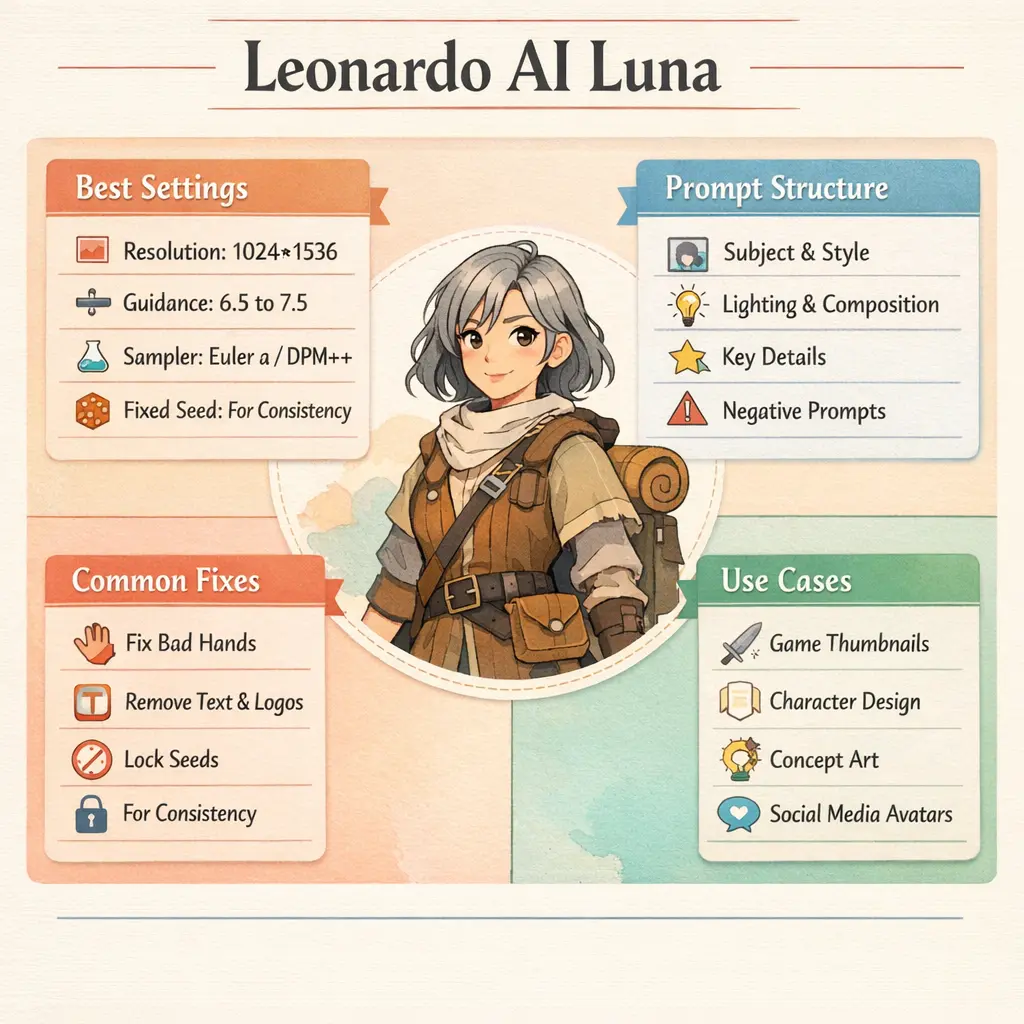
Recommended Base Settings (starter):
- Model: Luna
- Resolution: 1024×1536 (portrait) or 1536×1536 (full body)
- Guidance scale (CFG): 6.0–9.0 — start at ~7.0
- Sampler: Euler a (or DPM++ if available)
- Seed: Fix a deterministic RNG seed for reproducibility
- Prompt strength: Medium (avoid extremely long, conflicting prompts)
- Image prompt: Optional — useful as a conditioning reference to anchor pose/anatomy
Why these choices:
- Lower guidance (6–7) preserves stylistic fluidity; higher guidance (8–9) enforces the learned style and reduces inter-sample variance.
- Fixed seeds and consistent samplers yield deterministic outputs (modulo stochasticity from platform implementation).
- Higher resolution improves fine line rendering and reduces checker/aliasing artifacts common at low resolution.
Troubleshooting Leonardo AI Luna — 6 Fixes for Common Art Issues
Below are common failure modes along with model-centric remediations.
Problem: Extra fingers or deformed hands
Cause: Dataset bias and underrepresentation of correct hand poses; the diffusion model has difficulty learning highly precise finger articulation.
Fixes (practical & technical):
- Add hand-specific negatives: extra fingers, mutated hands, malformed fingers.
- Provide a pose reference image (image prompt) to condition the model on the correct hand silhouette.
- Try different samplers (Euler a vs DPM++) — samplers change the traversal of the reverse diffusion path and can affect fine details.
- Use higher guidance (+0.5) and a fixed seed; combine with inpainting to correct small errors.
Inconsistent Style Across Generations
Cause: High sample variance due to stochastic sampling or insufficient conditioning.
Fixes:
- Lock the RNG seed.
- Add a style anchor token (e.g., paper cut illustration, delicate ink outline) to reduce drift.
- Use a saved preset that contains exact sampler, guidance, resolution, and negatives.
Unwanted text or Logos
Fixes:
- Add text, watermark, and logo to negative prompts.
- Avoid prompt words that mimic advertising copy or titles.
- Use inpainting/upscaler tools to remove small artifacts post-generation.
Reproducibility Tips for Leonardo AI Luna — 5 Tricks to Get Consistent Art Every Time
- Use a fixed seed for deterministic RNG initialization.
- Save a preset capturing the exact sampler, guidance, resolution, negative tokens, and seed.
- Use image prompts to anchor pose/composition and reduce ambiguity.
- Reuse a short style string (e.g., paper art illustration, delicate ink outlines, muted palette) across prompts — treat it as a style embedding.
How to speed up iteration
- Start with low resolution (512×768) for layout tests to conserve tokens/time.
- Use fewer inference steps and faster samplers for exploratory iterations (e.g., DPM++, Euler) — then switch to higher settings for final renders.
- Use batch Generation across several seeds and pick the best result.
- Use progressive upscaling: rough layout → refine → upscale → final denoise/inpainting pass.
Evaluation metrics & quality checks
While you won’t typically compute these for every image, here are useful signals:
- Perceptual similarity (LPIPS) to a reference image if you’re matching a target pose.
- Frechet Inception Distance (FID) and Inception Score (IS) for batch-level style fidelity, if you’re benchmarking models.
- Human evaluation: A/B tests on thumbnails for click performance.
- Artifact frequency: track how often failure modes (extra fingers, text artifacts) appear across 100 samples.
How Luna is typically finetuned
- Base model: A pretrained latent diffusion backbone (often trained on a broad image corpus).
- Dataset curation: A stylized corpus focusing on character portraits, line art, and illustration textures.
- Optimization: Low-learning-rate continued training with data augmentation to prevent catastrophic forgetting.
- Techniques: Full-weight finetune or parameter-efficient finetuning (LoRA, adapters) depending on how the community contributed to the model.
- Objective: Maximize likelihood on stylized domain images while preserving denoising stability.
Can You Run Leonardo AI Luna Locally? 4 Safe Alternatives to Try
Short answer: Not usually. Community-finetuned checkpoints inside platforms like Leonardo.ai are often hosted and gated. Downloading or redistributing a checkpoint may violate licensing. If you need local control, consider:
- Fine-tuning an open checkpoint yourself on a curated dataset.
- Using parameter-efficient finetuning (LoRA) against an open base model.
- Using Leonardo.ai’s Elements/LoRA features, if they allow export under your plan (check docs).
Legal & Licensing Tips You Must Know (5 Key Points)
Important: Licensing and commercial use rules change. Always confirm on Leonardo.ai.
Checklist before commercial use:
- Read Leonardo.ai Terms of Service.
Verify the model usage notes for Luna (model-specific restrictions). - Confirm whether your generation is public or private under your plan.
- If using reference images or training LoRAs, ensure you have the rights to those inputs.
- When in doubt, contact Leonardo.ai support or consult a legal advisor for high-stakes commercial uses.
Common platform realities:
- Free tiers may allow commercial use but not public generations.
- Paid tiers may offer private or ownership-like rights; check the exact wording.
- Model finetunes contributed by the community may carry additional constraints — check model metadata.
Use cases and who should use Luna
Ideal for:
- Indie game developers need stylized character concepts and thumbnails.
- Concept artists producing portrait sets.
- YouTubers and marketers who need consistent, stylized thumbnails.
- Designers making expressive avatars and social art.
Not ideal for:
- Product photography or realistic human photos require photoreal accuracy.
- Mechanical/engineering designs where photoreal precision is required.
FAQs
A: Model access depends on Leonardo’s plan. There is a free tier with limits and paid tiers with more tokens and private features. Always check the current pricing page.
A: It depends on Leonardo.ai’s license and your plan. Leonardo has guidance about commercial use, but plan details and model-specific rules can change — read the Terms of Service and the model notes before selling.
A: Not officially. Community models inside platforms may not be published as public checkpoints. It’s safer to fine-tune a compatible open model or use platform features like Elements/LoRA.
A: Luna is finetuned and sensitive to guidance, sampler, and seed. Fix the seed, use a preset, or raise guidance to reduce variation.
A: Add hand-specific negatives (e.g., extra fingers, mutated hands) and use reference images; also, slightly raise guidance and lock the seed.
Conclusion
Leonardo AI Luna is best understood as a style-focused creative tool rather than a general-purpose image model. When used with clear prompts, controlled settings, and fixed seeds, it delivers expressive characters and consistent illustrated results with very little effort. Its limitations—especially with hands and realism—are manageable once you know how to guide it properly. If your goal is fast, stylized character art for thumbnails, concepts, or avatars, Luna is a strong and reliable choice. Just remember to confirm licensing terms before commercial use and save your settings to maintain consistency across projects.
