
Introduction
Isometric Sci-Fi Buildings look simple, but they’re one of the most valuable asset types to get right. Clean contour, perfect angles, and seam-free tiles all depend on a precise workflow. This guide breaks down the exact process used to create consistent, game-ready isometric sci-fi buildings with Leonardo.ai—without broken angles or wasted renders. Leonardo AI Isometric Sngci-Fi Buildis buildings are ubiquitous in indie games, tabletop tiles, background plates, and concept art boards. They appear deceptively simple but depend on consistent projection, repeatable modules, coherent silhouette constraints, and strict camera priors. Leonardo AI Isometric Sngci-Fi Buildis Converting generative results into engine‑ready sprite sheets and tilemaps requires not only a strong prompt but a reproducible pipeline that controls latent drift, maintains alignment, and preserves legibility at low pixel densities.
This pillar guide reframes the creative process in‑engineering terms: prompts as structured conditioning, Flow State as high‑throughput stochastic sampling, image‑to‑image passes as constrained latent refinement, and the upscaler as a resolution lifting operator. You’ll learn projection theory (isometric vs perspective) in the context of conditional generation, adopt a reusable prompt formula (a template of high‑value tokens and modifiers), and apply a 6‑step image‑to‑image loop to make tileable, seam‑free assets. The article also includes copy‑paste prompts, a negative prompt bank, troubleshooting checks, and a downloadable prompt pack to speed your pipeline.
The Exact Workflow Pros Don’t Share
- Why Leonardo.ai (Flow State + upscaler + image guidance) maps well to an iterative asset pipeline. (leonardo.ai)
- The projection difference between isometric (orthographic) and perspective, and how to force the model with tokens and placement.
- A reusable prompt formula encoded as token groups, and nine ready‑to‑use prompts (Starter, Pro, Cinematic).
- A 6‑step image‑to‑image refinement loop to enforce tile seams and silhouette constraints using image guidance. (docs.leonardo.ai)
- Recommended Leonardo settings and upscaler recipes, and why the Universal/Ultra upscaler is useful for engine assets. (docs.leonardo.ai)
- How to export sprite sheets, tile sets, and supporting maps (normal/height/alpha).
- A negative prompt bank and concrete fixes for common artifacts.
- A licensing checklist and links to Leonardo’s commercial usage help and Terms of Service so you stay legally safe. (intercom.help)
What Makes Leonardo.ai Ideal for Isometric Sci-Fi Builds
From an/conditioning perspective, Leonardo.ai provides three affordances that make it effective for game‑asset production:
- High‑throughput sampling (Flow State): Flow State enables you to perform fast, batched stochastic sampling over the prompt manifold so you can explore silhouette space quickly — analogous to beam search combined with diverse sampling in text models. Use Flow State early to surface structural modes (low‑frequency layout, silhouette) before committing to texture and lighting. (leonardo.ai)
- Image guidance / image‑to‑image: Treat image‑to‑image as a conditional refinement operator that anchors latent space to a reference image. This is essential for seam fixes, mirrored edge passes, and iterative detail refinement. The docs explicitly describe image guidance workflows you can use to nudge outputs toward a target structure. (docs.leonardo.ai)
- Built‑in upscaler (Universal/Ultra): The upscaler functions as a learned super‑resolution operator — raise resolution while preserving edge fidelity and texture details, so you reduce manual rework. Use it carefully to avoid haloing or over‑sharpened artifacts. (docs.leonardo.ai)
Quick legal note: Always verify model‑specific licensing for commercial distribution and save your provenance (prompts, seeds, model versions). Leonardo’s help center covers commercial usage scenarios and caveats. (intercom.help)
Isometric vs Perspective: Stop Mixing These Up
Isometric (orthographic) short primer
- Projection constraint: Parallel projection — no single vanishing point; rays remain parallel in rendered output.
- Scale invariance: Objects retain proportional scale regardless of depth — critical for tile alignment and engine snapping.
- Prompt tokens to use: Isometric, orthographic, 3/4 top-down, axonometric, no perspective, orthographic only.
Why does that Matter in Conditional Generation
Generative models implicitly model perspective priors from data. If the prompt lacks orthographic tokens or you bury them late in the token sequence, the model’s learned prior for perspective may dominate and produce subtle foreshortening. That destroys tileability. Put isometric/orthographic tokens early to bias the model heavily toward the orthographic manifold.
Perspective — short primer
- Vanishing points & foreshortening: Perspective uses depth cues; objects shrink with distance and edges converge.
- When to use: Great for hero renders, cinematic concept art, or non‑tileable compositions.
Operational rule: If an asset is meant for tiling or engine use, force orthographic tokens and verify by sampling thumbnails at target pixel sizes to catch residual foreshortening.
Isometric Building Composition: The Non-Negotiable Checklist
Before you commit to a batch, validate these programmatically or visually:
- Silhouette first: Render thumbnails at 128–256 px. If read‑at‑small fails, redesign the silhouette.
- Modularity: Compose designs from repeating modules (roof, vent, antenna). Use tokens like modular, repeatable modules in your prompt to bias the model toward tilable motifs.
- Edge readability: Crisp outlines and high-frequency edges near silhouette boundaries—test with a Sobel filter or simple edge detection to ensure consistent contours.
- Limited foreshortening: Add no perspective, orthographic only. Verify by overlaying each tile in a grid.
- Controlled palette: Use a limited palette, muted teal base, neon magenta accents, and tokens to bias color distributions.
Recommended Leonardo AI Isometric Sngci-Fi Buildis Settings Practical Table
| Purpose | Model / Mode | Resolution | Guidance / Strength | Notes |
| Fast ideation | Flow State | 1024×1024 | default/moderate | Use for broad silhouette sampling; treat as a cheap stochastic search. (leonardo.ai) |
| Detailed asset | High‑fidelity model | 2048×2048 | higher guidance | Use for final renders and texture passes. |
| Tile testing | Image‑to‑image | 1024→1024 | low–medium strength | Preserve structure while adding detail. (docs.leonardo.ai) |
| Final hero | Highest res + upscaler | 3072–4096 + upscaler | high | Upscale then clean edges in an editor; avoid a single extreme upscale step. (docs.leonardo.ai) |
Notes: Start low for speed; reserve high resolution for final assets. Track the model name and version for reproducibility.
The Exact Image-to-Image Workflow (Step by Step)
This is a practical, repeatable loop to transform a concept into engine assets. Each step is a conditioning or transformation operator in the pipeline.
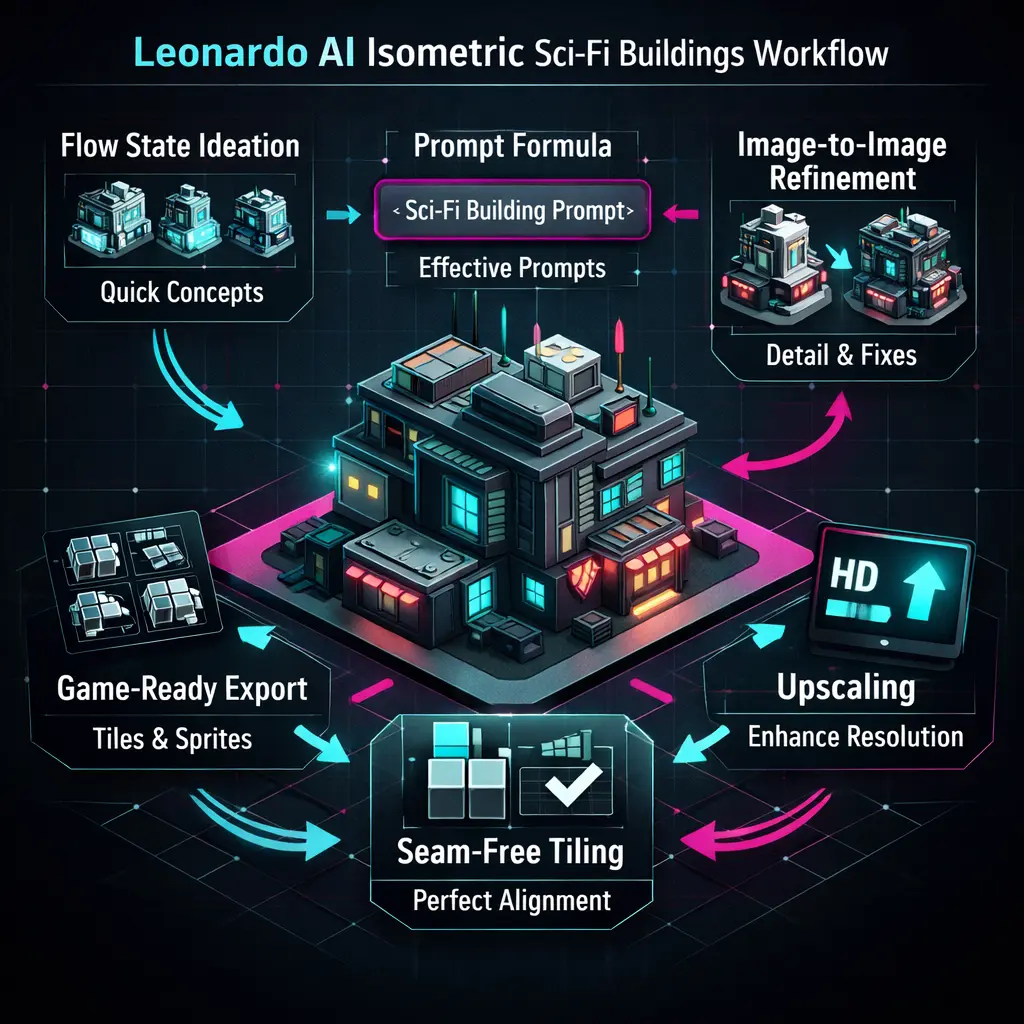
- Blockout (Flow State) — Use broad prompts to generate many 1024 samples. Think of this as searching the silhouette manifold with high diversity.
- Select best — Pick top 3–6 candidates based on silhouette clarity and modular composition.
- Reference pass — Feed the chosen candidate into image‑to‑image with low strength to preserve structure while increasing detail. This acts like a guided latent refinement. (docs.leonardo.ai)
- Tile check — Crop edges and arrange in a 2×2 or 3×3 grid at target resolution to inspect seams at 100% pixel density.
- Seam fix — Use inpainting or mirrored edge passes in image‑to‑image to remove seams. Iterate until convergence.
- Polish & upscale — Apply the Universal/Ultra upscaler cautiously, then perform final manual cleanup in Photoshop, Krita, or Aseprite for pixel pipelines. (docs.leonardo.ai)
Operational tip: Keep a spreadsheet with prompt text, seed, model, and result IDs. This metadata is essential for provenance and reproducibility.
The Game-Ready Export Rules Leonardo AI Isometric Sngci-Fi Buildis
General Export Rules
- Use consistent square sizes: 512, 1024, 2048.
- Use descriptive filenames with seed and angle: habitatA_front_0_0_seed1234.png.
- Save layered PSDs or separate passes where possible to enable partial rework.
Tiling & Seams
- Always generate overlap margins and test a 2×2 tile grid at the engine’s import size.
- If seams persist, inpaint edges with overlap or run mirrored edge passes until seams vanish.
- For pixel‑art pipelines, perform a final vector trace or manual pixel retouch.
Sprite sheets & isometric Offsets
- Keep pivot points consistent across frames. For isometric sprites, place the pivot at the base (where the object stands) for deterministic sorting in engines like Unity or Godot.
- Use even pixel heights for isometric snapping and ensure consistent origin points across tiles. Community recommendations and Unity docs discuss sorting and pivot best practices for isometric games. (discussions.unity.com)
Normal maps/Engine Maps
- Generate height/normal maps using xNormal, CrazyBump, or neural normal estimators for quick Approximations.
- Provide alpha channels where needed to cut out silhouettes cleanly.
Optimization & post‑processing
- Upscale selectively — only final assets.
- Unify palettes — batch color grade to ensure cohesion across a pack.
- Edge cleanup — remove stray pixels and apply controlled dithering where appropriate.
- Compression & MIPmaps — Export correct MIPmaps for target devices and hardware test.
Licensing & Best Practices: What You Must Know Before Selling
Before selling assets or including them in a commercial product:
- Check Leonardo.ai Terms & Model License — Licensing can vary by model and plan. Leonardo’s Help Center and Terms of Service are the canonical sources. Save a link or snapshot of the exact terms you used. (intercom.help)
- Record provenance — Save prompts, seeds, model version, and result IDs in a manifest file inside your project repository.
- Avoid copyrighted references, Ued, model name, date, seed, and whether public or private generations were used.
- Credits & disclosure — Some platforms require disclosure of AI usage; add it to dev notes and marketplace descriptions if required.
Short note on Leonardo licensing: Leonardo typically permits commercial use for user generations, but specifics (public vs private images, model training data, team/enterprise plans) may change. Read the official Help Center entry on commercial usage and the Terms of Service to be sure. (intercom.help)
Why Your Isometric Assets Break — and the Fixes
Problem: Renders have residual perspective or vanishing points. Fix: Add orthographic only, no perspective, and move those tokens early in the prompt. Use image guidance with mirrored edge passes for tile seams. Monitor at thumbnail scale.
Problem: Tile seams show up in the 2×2 test. Fix: Inpaint edges with overlap; run image‑to‑image mirrored passes until edges align. Test with a scripted 2×2 overlay.
Problem: Silhouette collapses at small sizes. Fix: Simplify to low‑poly, flat lighting, or apply edge enhancement operators and retest thumbnails.
Problem: Upscaler adds halos or blurs edges. Fix: Use a moderate upscaler setting or two‑stage upscaling, and perform manual outline cleanup in a raster editor.
One-Page Cheat Sheet: Everything That Actually Matters
- Include isometric in every prompt and place it early.
- Start generation at 1024 for iteration; use 2048+ for finals.
- Use Flow State for ideation; image‑to‑image for refinement and seam fixes. (leonardo.ai)
- Test 2×2 grids for seams.
- Save seeds + prompts for reproducibility.
Example pipeline
- Ideation (Flow State): 30–60 min — generate 50+ variations. Use batch sampling and pick the top silhouettes. (leonardo.ai)
- Selection & reference pass: 20–40 min — pick top 6 and run image‑to‑image for structure preservation. (docs.leonardo.ai)
- Seam fixing & tile test: 30–90 min — inpaint edges and run 2×2 tests.
- Upscale & polish: 30–60 min — use upscaler then manual touch‑ups.
- Export & engine import: 20–60 min — compose sprite sheets, set pivot placement, and test in Unity/Godot. Unity’s docs and community threads can help with sorting and pivot issues. (docs.unity3d.com)
Tile Testing Checklist
| Step | Action | Pass / Fail |
| 1 | Generate 4 tiles with the same prompt + seed offset | |
| 2 | Arrange in a 2×2 grid | |
| 3 | Zoom to 100% and inspect seams | |
| 4 | Inpaint overlapping edges if a seam is present | |
| 5 | Re‑test until seams are gone |
Flow State vs Standard Generation — head‑to‑head
| Feature | Flow State | Standard Generation |
| Speed of ideation | High — many variations fast; multi‑sample exploration. (leonardo.ai) | Lower — generate single images or small batches |
| Best for | Silhouette exploration & style variety | Single high‑control image |
| Ease of refinement | Feed outputs back as references to image‑to‑image | Image‑to‑image only |
| Recommended use | Early concept stage | Final detail renders |
Leonardo AI Isometric Sci-Fi Buildings: Pros, Cons & Real Limits
Pros
- Rapid ideation via Flow State. (leonardo.ai)
- Built‑in upscaler reduces manual rework. (docs.leonardo.ai)
- Effective primitives for architectural forms and texture.
Cons
- Tile seams may require manual inpainting and iteration. (docs.leonardo.ai)
- Ultra‑high fidelity often requires a human in the loop for final polish.
- Licensing checks are essential for commercialization. (intercom.help)
FAQs About Leonardo AI Isometric Sci-Fi Buildings
A: Use isometric, top‑down orthographic, and 3/4 top‑down, and add no perspective early in the prompt.
A: Use Flow State for ideation and the platform’s high‑fidelity model for final renders. Flow State excels at producing many silhouettes fast. (leonardo.ai)
A: Generate overlap margins, test 2×2 grids at target resolution, and use image‑to‑image with mirrored edge inpainting until edges align. (docs.leonardo.ai)
A: Often yes, but always check the model’s license and the Terms of Service for commercial use and public content caveats. Keep a manifest of prompts and seeds for provenance. (intercom.help)
A: Leonardo’s official docs and community tutorials (YouTube, blogs) show practical Flow State → image‑to‑image workflows. Search YouTube for example walkthroughs. (youtube.com)
Conclusion: Mastering Leonardo AI Isometric Sci-Fi Buildings
You can produce professional, tileable Isometric Sci-Fi Buildings with Leonardo.ai by treating the system as a stack of conditioning operators: ideate in Flow State to explore silhouette space, lock in the best candidates, refine with image-to-image to enforce seams and modules, then upscale and polish for production. Save prompts, seeds, model versions, and legal snapshots. Run a small test batch (8–12 tiles), fix seams, and you’ll be ready to scale.
