

Introduction
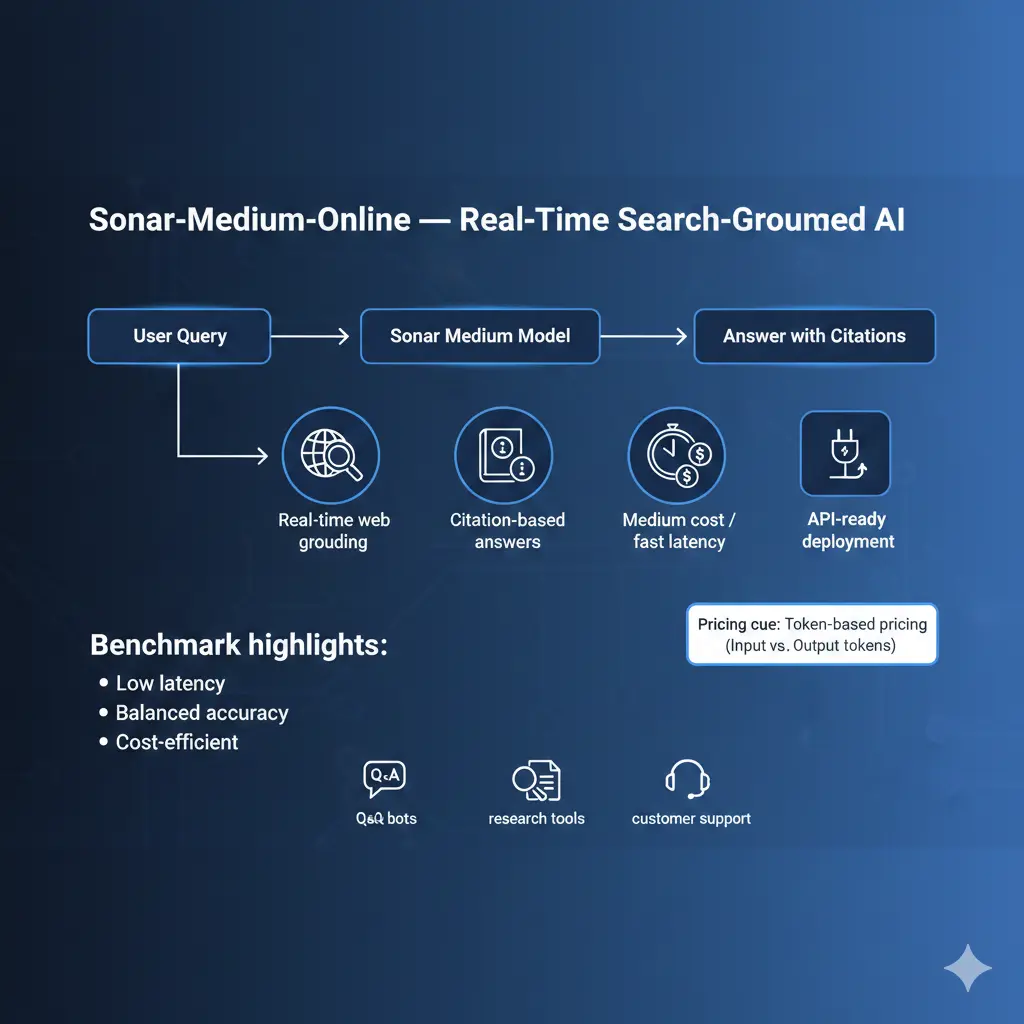
From an and systems perspective, Sonar is a retrieval-augmented generation (RAG) family: Sonar-Medium-Online at inference, it runs a retrieval step (live web search), converts the retrieved documents into a compact context, and conditions a language model to generate an answer that includes explicit citation metadata. Sonar-Medium-Online In other words: retrieval → context assembly → conditional language generation → citation attachment.
Why This Matters Sonar-Medium-Online:
- It changes the conditioning distribution of the model: Responses are explicitly anchored to retrieved source content, so hallucination surface area drops compared to closed models that rely solely on parametric memory.
- It introduces new operational signals to measure and optimize: Retrieval latency, retrieval precision, context size vs token cost, citation correctness, and the end-to-end latency from caller to first token.
- It requires production-grade shaping: Caching, domain filters, post-filters, active monitoring of token usage, and fallback paths if the search layer fails.
This guide treats Sonar-Medium-Online as a mid-tier RAG model: Lower cost and lower search-context depth than Pro/Deep tiers, but optimized for short, citation-aware answers and low latency.
What is Sonar-Medium-Online
Sonar = Retrieval + Generator + Attributor:
- Retriever (online): Live web queries run at request time. The retriever returns candidate documents or snippets (URLs, content snippets, metadata).
- Context builder: A component that decides how much retrieved content to include in the LM conditioning buffer (search_context_size: Low/medium/high).
- Conditional LM: The sequence model (the “Sonar” model) that receives the user prompt plus the selected retrieved context and emits a grounded answer.
- Attribution post-processor: The model (or the pipeline) formats inline citations or a citation block mapping claims to source URLs and snippets.
From an NLP quality view, Sonar reduces unconstrained generation by constraining the LM to ground on retrieved evidence. That said, retrieval quality and the heuristics for context selection remain critical to overall accuracy.
Sonar-Medium-Online explained: variants & when to use them
Terminology:
- Sonar — family name (RAG-capable models).
- Medium — mid-level compute/parameter/capacity tradeoff. Think of it as “balanced perplexity vs cost”.
- Online — retrieval happens live against web indexes at inference time (vs offline or cached retrieval).
When to pick Sonar-Medium-online
- You need fast, short answers with citations (user-facing Q&A, help widgets).
- You need freshness (news, product pages, specs) but can accept medium citation depth (2–5 sources most of the time).
- Latency and cost are constraints: pick medium-online for chat UIs where response time needs to be low and per-request cost must be moderate.
When not to pick it:
- When you need long-form, deeply-sourced research across hundreds of papers — choose Pro/Deep or a heavy RAG pipeline with specialized retrievers.
- When you need heavy multimodal synthesis (images + reasoning) — pick a multimodal stack.
Key Features Sonar-Medium-Online
- Live retrieval grounding: Reduces parametric hallucinations by giving the LM explicit evidence to condition on.
- Search_context_size controls: A tunable knob that changes the number and length of retrieval snippets added to the prompt. This is the main cost/coverage tradeoff.
- Citation-aware outputs: Model includes URLs and short snippets or inline citations, enabling user verification and EEAT improvement.
- Latency-optimized for short answers: The Model and retrieval pipeline are tuned to return first tokens quickly for chat-like interactions.
- API-first design: Integrates with standard REST/SDK flows and supports usual production controls (max_tokens, stop tokens, timeouts).
Note: because the model conditions on retrieved snippets, the effective context window for the LM includes both the user prompt and the retrieved tokens — so prompt engineering must balance prompt length vs the retrieval budget.
Real-World Performance & Benchmarks
Below is a reproducible benchmarking plan you can run with your prompts. Publish raw prompts and test vectors for EEAT.
What to Measure
- Latency (ms): Time to first token (TTFT) and time to last token (TTL). Use client timestamps.
- Token usage: Input tokens (prompt + retrieved context) vs output tokens.
- Citation precision: % of claims backed by cited sources (manual audit).
- Answer quality: Human-blind rating (1–5) for correctness, completeness, and clarity.
- Failure modes: Percentage of requests that return malformed JSON, loops, or finish_reason: length.
Recommended Test Tasks
- Short factual Q&A (10–50 tokens): 200 sample questions across domains (dates, specs, definitions). Measure accuracy and TTFT.
- Multi-source summaries: Provide 3–8 URLs and ask for a 150–250 word summary with citations. Measure citation recall and coverage.
- Attribution test: Ask the model to state a fact and cite the exact sentence/paragraph and URL that supports it. Manually validate.
- Stress test: Long prompts, heavy retrieval (high search_context_size), and repeated rapid requests to observe rate limits and instability.
Example Benchmark Table
| Task | Metric | Expectation (sonar-medium-online) | Notes |
| Short factual Q&A | TTFT | Low (<300ms typical) | Great for chat UX |
| Multi-doc summary | Accuracy | Medium-High | May miss deep scholarly citations |
| Citation correctness | Precision | Medium | Increase search_context_size for more sources |
| Stability | Failure modes | Occasional loops reported | Log request IDs when reproducible |
Benchmarking Tips
- Use fixed seeds for deterministic generation when possible.
- Save raw request/response payloads and request IDs for reproducibility and bug reports.
- Include environment metadata (region, API version, date-tested) with each benchmark result.
Pricing Explained
Pricing primitives
- Input tokens: Everything you send (system prompt + user input + retrieval snippets).
- Output tokens: What model returns.
- Per-1M token price: Price for 1,000,000 tokens for input and for output (they may differ).
- Total cost per request = input_cost + output_cost.
Important: pricing changes, and you should validate current per-1M rates on the official price page before publishing.
Illustrative worked examples Sonar-Medium-Online
Assume:
- Input price = $1 per 1,000,000 tokens
- Output price = $5 per 1,000,000 tokens
Example A — short chat
- Input: 200 tokens → $0.0002
- Output: 150 tokens → $0.00075
- Total ≈ $0.00095 per short request.
Example B — Multi-Doc Summary
- Input: 2000 tokens → $0.002
- Output: 1500 tokens → $0.0075
- Total ≈ $0.0095 per summary request.
Monthly Sample
- 200,000 short chat requests @ $0.00095 ≈ $190 / month.
Integration and Infra Patterns
- search_context_size: Set to low for fast chat, medium for typical QA, and high for summarization or deep research.
- Retries & backoff: Handle 429/5xx with exponential backoff.
- Streaming support: If the API supports streaming, show partial content quickly and continue receiving tokens.
- Post-filtering: Apply domain whitelists/blacklists to remove low-quality or NSFW sources before presenting to users.
- Caching: Cache retrieved documents and model outputs for repeated queries; cache keys should include the query normalized plus a TTL.
- Monitoring: Log request_id, latencies, token counts, and sample outputs for manual review.
- Fallbacks: Fall back to cached answers or a safe canned response when the retrieval layer fails.
Common problems with sonar-Medium-Online and Fixes
Garbled Output or Token Loops
- Regenerate (sometimes transient).
- Increase model tier to Pro/Deep to see if behavior persists.
- Add explicit stop tokens and lower max_tokens.
- Save request_id and payload, and file a bug with support if reproducible.
Low-Quality or NSFW Citations
- Use server-side domain whitelists and blacklists.
- Post-filter results and remove suspicious domains.
- Report reproducible examples to the community/support.
Unexpected Costs
- Enforce max_tokens and search_context_size.
- Use progressive summarization.
- Set alerts on billing dashboards and periodically audit heavy users/queries.
Retrieval misses/false positives
- Increase search_context_size or tune retriever query generation.
- Use domain-limited retrieval for sensitive apps.
- Preprocess user queries to Disambiguate entities (e.g., canonicalize names, include dates).
Sonar-Medium-Online vs Alternatives
Short verdict: Choose Sonar when you need live web grounding + citations, and you care about latency. Use deeper tiers for research, and different stacks for multimodal or heavy fine-tuning.
| Feature / Need | Sonar-Medium-Online | Sonar-Pro / Deep | Large Generative LLMs (no live retrieval) | Specialized stacks (Claude, Google models) |
| Live web grounding | Yes | Yes (deeper) | Varies | Some integrations |
| Cost | Mid | Higher | Varies | Varies |
| Best for | Fast Q&A, citation-aware UIs | Research reports | General assistants | Safety-critical / enterprise |
| Citation depth | Medium | High | Low | Medium/Varies |
Decision checklist
- Do you need citations + fresh web content? → Sonar family.
- Is sub-second latency critical? → prefer medium tier and small retrieval context.
- Need deep analysis across many sources? → Sonar-Pro/Deep or custom RAG stack.
Pros & Cons Sonar-Medium-Online
Pros
- Built for live retrieval, grounding, and citations.
- Good latency for short queries.
- Flexible tiers to control cost/quality tradeoffs.
Cons
- Some community reports of instability (rare token loops).
- Citation quality depends on retrieval quality; post-filtering is often needed.
- Pricing depends on retrieval context size; test with your workload.
FAQs Sonar-Medium-Online
A: Fast, citation-aware Q&A and short summaries where you need up-to-date grounding without paying for higher-end reasoning tiers.
A: Use token limits, concise system instructions, chunking, caching, and the cost calculator to estimate per-request price. Enforce max_tokens and prefer progressive expansion.
A: Some users report garbled or looping outputs in certain builds. If you see reproducible problems, collect request/response IDs and report them to Perplexity support or the community.
A: Perplexity’s official model docs and pricing pages are the canonical sources. Add links to those pages in your article.
Conclusion Sonar-Medium-Online
Sonar-Medium-Online is a practical, mid-tier RAG model for providing quick, citation-aware answers at a moderate cost. It’s ideal for chat UIs, support bots, and news Q&A. Always benchmark with your real prompts, log reproducible Failures, and publish your “how we tested” details to improve trust.
