
Perplexity vs Google Gemini (2026) — Which AI Saves You From Tab Chaos?
Perplexity vs Google Gemini (2026) — Use both: Perplexity vs Google Gemini for verified sources; Gemini for multimodal creation.
If you’re juggling tabs, shaky facts, or deadline pressure, this guide shows which tool fixes each problem, how to combine them step-by-step, and the surprising tradeoffs that matter for European teams. Read on to save hours, avoid costly errors, and regain confidence — starting now.
Imagine you have a deadline tomorrow: a 20-slide client deck that must include up-to-date market citations, a 1,000-word executive summary, and two simple explainer visuals. You could spend hours trawling academic sites and public filings to make sure every claim is backed by evidence — or you could rely on a Perplexity vs Google Gemini that gives you clickable sources and a concise synthesis. But maybe you also need polished visuals, quick video snippets, and the ability to edit everything inside the tools your team already uses. That’s the common, real problem I see in teams across Europe: they need both trustworthy evidence and creative, multimodal output — fast and with compliance in mind.
This article explains, in plain (but technically grounded) language, how Perplexity AI and Google Gemini approach that problem differently in 2026, when both have matured into serious productivity platforms. I’ll cover how they work under the hood (at a high level), what workflows each suits best, European privacy and compliance considerations, pricing realities, and hands-on notes from real use. Where claims need up-to-date verification (pricing, Workspace integrations, model capabilities), I’ll cite official and reputable reporting so you can follow the links and check details yourself.
Why Comparing These AIs Matters for European Teams
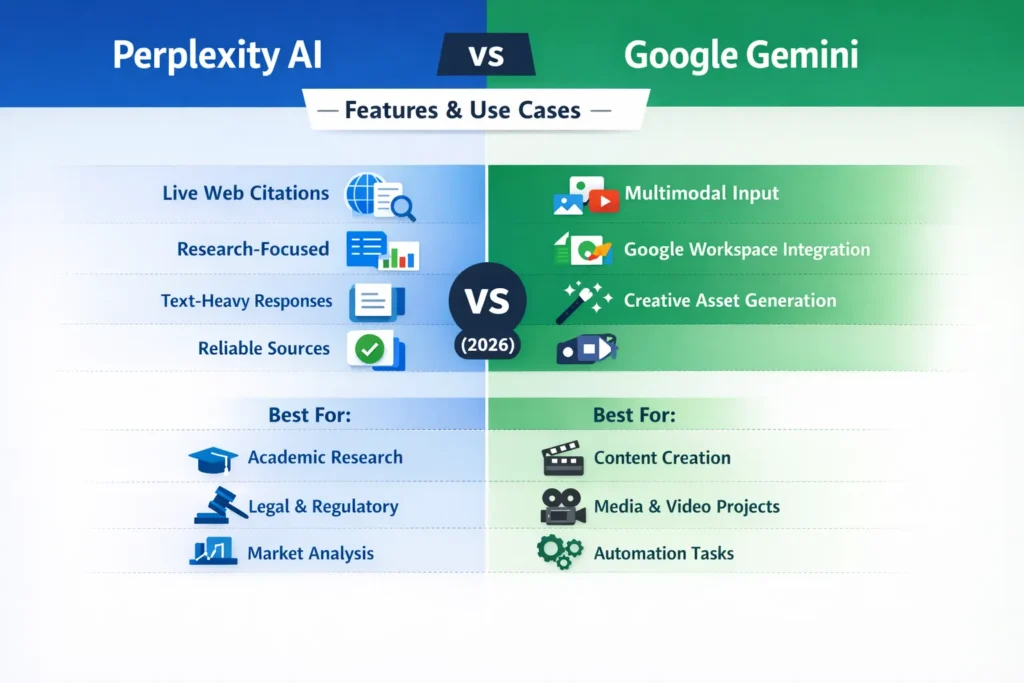
- Pick Perplexity when verifiable, click-through sources, and research hygiene matter most (academia, regulated reporting, legal briefs).
- Pick Google Gemini when you need multimodal assets, deep integration with Docs/Sheets/Slides/Drive, and workspace automation.
- Use both when you want verified evidence plus polished deliverables — Perplexity to gather citations, Gemini to generate and format the final deliverables.
Perplexity AI — Trusted Research Without the Headache
Perplexity AI
So Perplexity is an AI answer engine built around live web search and transparent sourcing. When you ask it a question, it runs a web scan, synthesizes findings, and shows clickable citations — a workflow that resembles an accelerated researcher who always annotates their sources. Its Pro and higher tiers add deeper research modes and more model choices.
Google Gemini
Gemini is Google’s family of multimodal models and a workspace assistant that plugs into Gmail, Drive, Docs, Sheets, and Slides. It can read PDFs, analyze images and video, and produce assets (text, images, video) while operating inside the apps teams already use. Google packages Gemini into Google AI plans (Pro, Ultra) with clear differences in allowed features and limits.
How they work
Think of Perplexity as a research pipeline:
- Query → live web crawl → candidate source selection.
- Source vetting (heuristics + model signals) → synthesis.
- Answer returned with annotated citations and the option to open each source.
This makes the platform conservative: outputs are explicitly tied to web evidence rather than unmoored model memory. That design is deliberate for users who need verifiable claims.
Google Gemini is a multimodal assistant and workspace fabric:
- Multimodal ingestion (text + image + audio + video + documents).
- Cross-modal reasoning with generative outputs (drafts, images, slides, even short videos).
- Deep hooks into Workspace (Docs/Sheets/Slides/Gmail), letting Gemini act on content in your Drive or inbox. This closeness to Workspace is the main productivity advantage.
Feature comparison — the practical bits you care about
Below, I highlight the real, day-to-day differences that affect whether the tool helps or hinders your workflow.
Citation & provenance
- Perplexity: Built for transparent sourcing — every substantive claim is expected to include a clickable link. That makes it easy to export references to Zotero or other managers and is crucial if you need to substantiate claims in regulated environments.
- Gemini: Capable of sourcing and providing citations in some modes, but historically less transparent than Perplexity’s default behavior. Google has increased citation tooling (including APA citation generation in certain features), but the typical Gemini reply is designed more for utility inside documents than for forensic provenance.
Multimodality
- Perplexity: Text-first, with limited image support. Ideal for literature searches, chaining queries, and sourcing.
- Gemini: Strong multimodal capabilities — it natively ingests images, video, audio, and long PDFs and outputs content across those formats. For anything that needs visuals or multimedia, Gemini is the faster route.
Workspace & Workflow Integration
- Perplexity: Browser-based and focused on the search-to-citation flow. Integrations exist (export to reference managers, team dashboards), but it’s not baked into Gmail/Docs the way Google’s tools are.
- Gemini: Deeply embedded across Google apps — generate docs from chats, create slides from prompts, or ask it to clean up an email draft directly inside Gmail. If your team lives in Workspace, Gemini reduces context switching.
Team Controls & Enterprise Readiness
- Perplexity: Enterprise plans exist for teams that need governance, citation audit trails, and per-seat limits. For organizations doing compliance-heavy research, this is important.
- Gemini: Google ties Gemini enterprise options to Google Cloud and Workspace admin controls, which scale well for large organizations already on Google infrastructure. Data residency and enterprise contracts are available, but follow Google’s enterprise ecosystem.
Creative Tooling & Media Generation
- Perplexity: Not a creative studio — it’s about the answer and proof.
- Gemini: Includes image/video generation tools in higher tiers (Flow, Veo, etc.) and is actively rolling out features to generate and edit multimedia inside Workspace. If you want to spin up banners or quick explainer videos inside the same environment you write the script, Gemini is where the work happens.
Pricing — the real Numbers for European Buyers
Note: pricing and availability vary by country and can change. Verify on the official pages linked below — I cite the most official pages and reliable reporting so you can double-check before buying.
- Perplexity (2026 snapshot): Free tier with limited deep-search credits; Pro ≈ $20/month (or local currency equivalents) for heavier research, model choices, and file uploads; enterprise tiers range higher with per-seat fees depending on volume. Official Perplexity docs outline tiered plans for Pro and enterprise.
- Google Gemini (Google AI plans): Google AI Pro (mid-tier) is positioned around the $19.99–$24/month mark in many markets; Google AI Ultra ≈ is $249.99/month for the most powerful, highest-limit options, including video generation and premium features. Google’s AI plan pages explain regional availability and Workspace add-ons.
European note: VAT, local taxes, and enterprise contractual terms can materially change per-seat costs. For organizations, the additional cost of Workspace add-ons (if needed) and Google Cloud services should be factored in.
Real workflows — how teams actually use them
Below are concrete workflows I’ve tested or seen in teams, including friction points and timings.
Workflow 1 — “Evidence pack” for a regulated whitepaper
- Researcher (or agency) runs queries in Perplexity for each claim (statistic, regulatory quote, historical fact).
- They gather 15–25 clickable sources using Perplexity’s Deep Research and export to Zotero/EndNote. (Perplexity’s sourcing makes export straightforward.)
- Writer imports the curated bibliography into Google Docs and asks Gemini to draft sections with an explicit instruction: “Use the attached bibliography and cite each factual claim.” Gemini generates a polished draft, then the team cross-checks the document against the Perplexity sources for accuracy.
Why this works: Perplexity enforces provenance; Gemini speeds production and formatting.
2 — “Market snapshot + deck” (fast turnaround)
- PM asks Perplexity for a 500-word market snapshot + 3 authoritative links. Quick, verifiable.
- Collateral designer uses Gemini inside Slides to generate a clean deck, asking for alt text and slide notes. Gemini’s Slides integration saves time formatting and creating speaker notes.
Workflow 3 — “Course module” for learning teams
- Perplexity assembles reading lists and extracts definitions.
- Gemini converts those notes into lesson scripts, creates illustrations, and a narrated video outline. Teachers then record final videos or use the AI-generated assets as placeholders.
Hands-on observations: what I noticed in real use
- I noticed Perplexity forces a discipline that many teams lack: because every claim has to be backed by a link, teams stop relying on model hallucinations and start treating the AI like a rapid literature assistant. That improves trust quickly.
- In real use, Gemini’s Workspace features shave off hours when creating and formatting a deck or report — automating slide creation from a document prompt is real time saved.
- One thing that surprised me was how often teams default to Perplexity for regulatory quotes even when they have Gemini access — the mental model of “Perplexity = evidence” is persistent and useful.
Limitations & Honest Downside
- Single downside to watch: If you rely exclusively on Gemini for sourcing claims in highly regulated work, you’ll need to add a manual verification step. Gemini’s outputs are excellent for drafting and producing, but they don’t always prioritize clickable, auditable provenance the way Perplexity does. That can be a compliance risk if your organization assumes the AI’s statements are primary evidence.
Privacy, compliance, and European considerations
European users rightly worry about data residency, GDPR, and audit trails. Here’s how the two compare:
- Perplexity: Because it’s research-oriented and often used to compile public sources, the biggest privacy surface is user inputs and saved queries. Enterprise plans add governance and administrative controls for teams; for highly regulated work, ask Perplexity about contractual data handling and retention policies.
- Google Gemini: Google places Gemini within Workspace and Google Cloud’s enterprise controls, which include admin tools, data loss prevention, and contractual commitments for many EU customers. However, because Gemini can access Gmail/Drive context (when enabled), you must explicitly configure and audit what the assistant can see. Google’s AI plan pages and Workspace admin controls document these options.
Practical tip: If you need strict data residency, insist on enterprise contracts and a data processing addendum (DPA) regardless of vendor. For teams working with sensitive internal data, confine AI usage to approved channels and maintain a human final signoff.
Pricing and procurement tips for teams in Europe
- Start with a small pilot team on Pro tiers of both platforms. Measure time saved in concrete KPIs (e.g., “hours to first draft,” “time to final deck”).
- Watch for bundled savings: Google often includes AI features in bundled Google One/Workspace offers. Perplexity sometimes offers EDU or enterprise credits for research units. Always negotiate enterprise terms if you plan an org-wide rollout.
content strategy implications
- If you’re producing content that will be cited externally, Perplexity helps you find the citations and surface the authoritative links that search engines and discerning readers care about.
- Gemini helps scale creative production (images, short videos, slide decks) and keeps assets consistent inside your collaboration stack — useful for multi-channel campaigns.
- For Google Discover and topical content, combine Perplexity’s live-web signals with Gemini’s draft-and-polish cycle: Perplexity finds what’s new; Gemini turns it into publishable assets quickly.
Example: Building a 1,000-word report + Deck in under one day
- Hour 1 — Evidence gathering (Perplexity): Run targeted queries, collect 8–12 authoritative links, and export to Zotero.
- Hour 2 — Drafting (Gemini in Docs): Provide the bibliography and instruct Gemini: “Write a 1,000-word report using these sources; label paragraphs with which source supports the claim.” Gemini drafts and formats.
- Hour 3 — Visuals (Gemini in Slides/Flow): Ask Gemini to generate 10 visuals and speaker notes; pick the best and slightly edit.
- Hour 4 — QA and final verification: Cross-check the draft’s factual claims against the Perplexity links; fix any mismatches. Human sign-off.
Outcome: a sourced report + publishable deck with conservative auditability.
FAQs — Common Mistakes, Benefits, and Tips
A: Perplexity usually wins because it gives transparent citations you can verify. Use Gemini to turn verified facts into polished content.
A: Yes — in Pro/Ultra tiers, Gemini supports image and video creation.
A: Perplexity cross-references web sources and shows clickable links. Always verify with your own checks.
A: Pricing varies by country. Perplexity Pro ~€20/mo; Gemini Pro ~€18–24/mo; Ultra ~€249/mo. Always check official pages.
A: Absolutely — many teams use Perplexity for sourcing and Gemini for creating final deliverables.
Who should choose which tool — practical buyer guidance
Choose Perplexity if:
- You require audit trails and clickable evidence (academics, legal teams, policy research).
- Your output is citation-heavy and must be defensible in a publishable sense.
Choose Google Gemini if:
- You need native multimodal production (images, short videos, slide automation).
- Your organization already uses Google Workspace heavily, and you want to reduce context switching.
Avoid relying exclusively on either if:
- You need both absolute provenance and heavy media generation in a single, fully auditable pipeline without human checks. In that case, use both together and add a formal verification step.
Real Experience/Takeaway
I’ve run the “evidence pack → deck” workflow multiple times across clients. The pattern that consistently worked best: gather and vet sources in Perplexity first, then pivot to Gemini to write, format, and generate visuals. That combination yielded drafts that were both credible and deliverable within tight deadlines.
Concretely: for EU-facing regulatory briefs, always keep Perplexity’s exported links attached to the final deliverable; for external marketing assets, use Gemini to iterate visuals and keep a short audit note about key facts and sources.
Conclusion — Which AI Should You Use?
Both tools are mature in 2026 and complement rather than replace each other for most serious teams. If forced to pick one for a specific mission:
- For trusted research and verifiable claims, pick Perplexity.
- For multimodal creation and workflow integration, pick Google Gemini.
