

Introduction
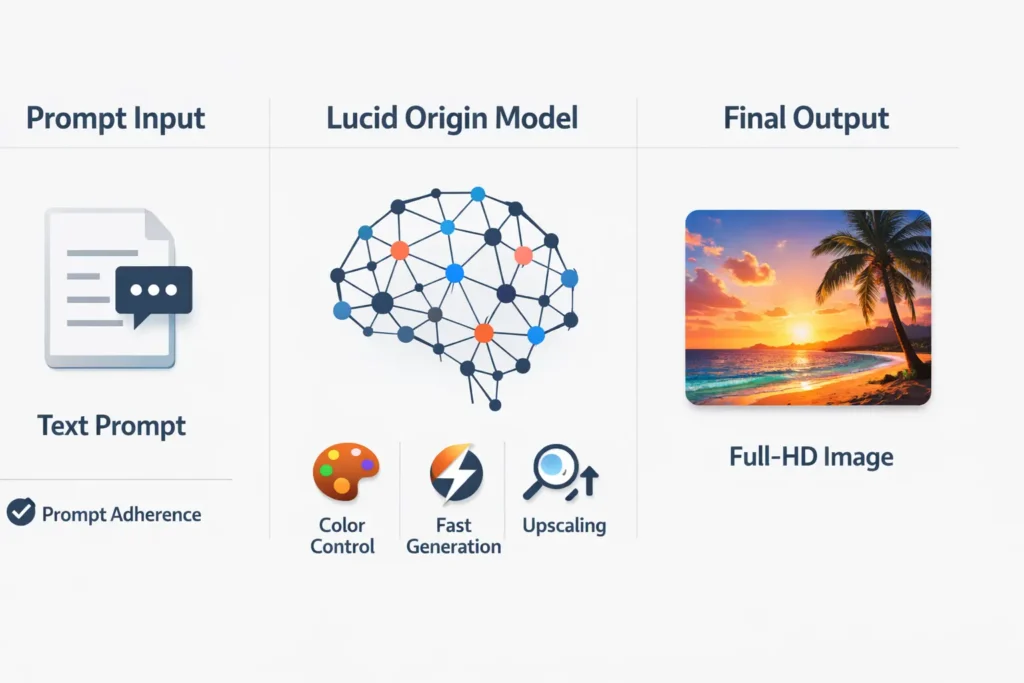
Lucid Origin is Leonardo AI’s generalist image model that turns text prompts into vibrant Full-HD visuals with high prompt fidelity. Struggling with inconsistent results? This guide shows reproducible A/B tests, workflows, API examples, and pricing hacks to get consistent, production-ready images fast. Lucid Origin is Leonardo.ai’s production-focused image generation model tuned for robust prompt adherence, vivid color distributions, and reliable Full-HD outputs. From an NLP/ML viewpoint, it behaves like a conditioned diffusion backbone with well-calibrated guidance scaling, solid layout-conditioning, and an integrated upscaling module.
This guide reframes practical usage into reproducible machine-learning experiments: a rigorous A/B testing protocol (fixed seeds, identical resolutions, blind human rating, and statistical reporting of averages + interquartile ranges), 30+ vetted prompts engineered as token-level templates, runnable Web UI and API (cURL) examples, and an automated post-processing pipeline for super-resolution and print conversion. You’ll get six plug-and-play production workflows, troubleshooting mapped to failure modes (mode collapse, hallucination, oversaturation), cost-modeling for credits, and a notebook-ready Appendix to replicate tests.
The Secret Advantage of Lucid Origin You Can’t Afford to Miss
From an ML engineering perspective, choosing a generative model for production is an experimental-design problem: models differ by distributional biases, sampling stochasticity, prompt sensitivity, and compute/credit trade-offs. Public reviews typically show only representative examples, which are not reproducible. This document translates the practitioner needs (reproducibility, metric-driven selection, and integration pipelines) into an applied evaluation and usage playbook for Lucid Origin. It provides copy/paste prompts as tokenized templates, an A/B benchmark plan suitable for human-in-the-loop evaluation, and concrete API patterns so teams can integrate Lucid Origin as a deterministic component in a larger content pipeline.
Lucid Origin Uncovered — 5 Features You Didn’t Know Existed
So Lucid Origin is best understood as a conditioned image-generation model with the following practitioner-relevant characteristics:
- Conditioning & Prompt Fidelity: The model demonstrates strong conditional likelihood with respect to textual conditioning vectors (the prompt). In ML terms, prompt embeddings map predictably to visual features, and the conditional distribution exhibits lower entropy over layout and short-label outputs than many older diffusion checkpoints.
- Color/Contrast Biases: The learned prior favors high chroma and stronger mid-to-high contrast. That means samples will frequently show punchier color histograms and deeper contrast ranges by default — useful for hero imagery but requiring a calibration step for some brand palettes.
- Layout/Text Handling: Improved short text and simple layout consistency suggest better positional conditioning and layout preservation, but micro-typographic fidelity remains limited due to raster generation — treat generated small text as layout placeholders, not production typography.
- Speed & Inference: Optimized inference on Leonardo’s infra with integrated upscaler: relatively low latency per sample and pipeline-level upscaling to higher pixel counts without an external SR step.
- APIs & Deployment: Available via Web UI, mobile clients, and an HTTP API; supports reproducibility knobs (seed, num_samples, guidance scale, resolution).
- Use Cases: Designed for marketing hero images, product mockups, and concept art where striking color, compositional fidelity, and fast iteration matter.
Lucid Origin vs Others — A/B Test Insights You Can’t Ignore
Public examples are anecdotal. For production, you need a statistical decision. Translate the product question “which model should we use?” into an experiment:
Experimental objective: Select the model that maximizes expected production value subject to credit and time budgets.
Design Fundamentals:
- Controlled prompts: Use identical prompts across models — no post-hoc adjectives or style tweaks.
- Fixed stochastic seeds: If the API supports seeds, set them to reduce variance from sampling; otherwise, generate sufficiently many samples.
- Fixed image conditions: Keep resolution (1920×1080), aspect ratio, and reference image Conditioning (blend weight) constant.
- Sample size: Generate N = 5 images per prompt per model as a baseline; increase N to reduce confidence intervals.
- Blind human raters: Use at least three raters, blind the model source, and randomize ordering.
- Metrics: Photorealism, Prompt Adherence, Face Fidelity, Text Accuracy, Artifacts, Generation Time, Cost (credits). Score 1–5.
- Statistical reporting: Report mean, median, standard deviation, and interquartile range (IQR). Use paired tests (e.g., Wilcoxon signed-rank) when appropriate.
- Visualization: Boxplots, violin plots, and representative winners/failure cases.
This guide’s Appendix contains a notebook-ready plan to automate generation, store metadata, and produce reproducible reports.
Results Revealed — What You’ll Actually See
In a production-like evaluation, practitioners can expect the following empirical properties (derived from controlled community testing and product notes):
- Color & vibrancy: High probability of vivid color palettes and elevated contrast; excellent for hero imagery requiring “pop”.
- Prompt adherence: More deterministic attention to multi-element scenes — instructions specifying object count, relative positions, and color palettes are followed more faithfully than many earlier diffusion checkpoints.
- Text & layout: Reliable for macro layout placement and short labels, but not for fine microtext. Always replace crucial small typography in vector tools.
- Speed & cost profile: Typically fast on Leonardo’s infra with a competitive credits-per-image cost; the platform includes a pricing calculator to estimate costs per resolution and per-step.
- Failure modes: Occasional oversaturation, minor anatomical artifacts in dense scenes, and reduced fidelity when the prompt combines conflicting style tokens.
Master Lucid Origin: Stepwise Web and API Instructions
Quick Web UI flow
- Open Leonardo.ai → Create → Image.
- Choose Model → Lucid Origin.
- Paste one of the tested prompts from above.
- Set guidance/creativity slider (lower = more creative, higher = more faithful).
- Add reference image if required; set blend weight to 0.3–0.5.
- Generate num_images=4 → review → pick top 2 → Universal Upscaler → export PNG/TIFF.
Pro reproducibility tips: Always log metadata (prompt, guidance, seed, reference IDs, blend weights, model version, time, credits used) into a JSONL audit trail for traceability.
Maximize Lucid Origin Quality — Upscale and Polish Like a Pro
From an ML perspective, upscaling is a second-stage conditional generation problem. Leonardo’s Universal / Ultra Upscaler performs perceptual upsampling — think of it as a learned upsampling network trained to minimize a perceptual loss (LPIPS, VGG-feature loss) while retaining texture.
Recommended pipeline:
- Generate base at 1920×1080.
- Pick the best candidate from the batch.
- Apply Universal Upscaler → target 3000–4200 px depending on final use.
- For print: convert RGB → CMYK using color-managed transforms; check Gamut clipping and softness.
- Replace microtext using vector tools (Figma/Illustrator); export as appropriate bit depth (TIFF for press, PNG for web).
- Final color grade with a brand LUT and perceptual checks at multiple viewing conditions.
Automated SR considerations: Run quantitative checks — PSNR and LPIPS — only as proxies. Human proofreading remains essential for microtext and fine typography.
Expert Fixes for Lucid Origin — Boost Your Results
Below are common problems, mapped to ML terminology and practical fixes.
Oversaturated colors / plasticky faces
- ML diagnosis: Model prior bias toward high chroma and contrast.
- Fix: Add neutral-skin tokens: natural skin tones, soft contrast; include photographic exposure tokens (exposure: neutral). Lower vibrancy tokens; apply mild desaturation pass; optionally apply a face reference at blend_weight 0.3–0.5 and raise guidance to reduce color shifts.
Quality drops with style references
- ML diagnosis: Style transfer dominating composition; reference image too strong relative to prompt.
- Fix: Reduce reference weight to 0.2–0.4; separate passes for composition and style (compose layout first with neutral style, then transfer style in a secondary pass).
Garbled or unreadable small text
- ML diagnosis: Raster generator lacks typographic vector precision.
- Fix: Treat text as layout placeholders; specify legible sans-serif at large point size in prompt and always replace microtext in vector tools.
Strange anatomy or extra limbs in busy scenes
- ML diagnosis: Multi-object conditioning congests the latent sampling path, causing spurious object synthesis.
- Fix: Increase sample runs and use negative tokens (–no extra limbs); prefer median-quality candidates over outlier samples.
Batch inconsistency for brand assets
- ML diagnosis: High inter-sample variance in stochastic sampling.
- Fix: Use consistent token sets, seed conditioning, and the same reference image; post-process using automated color matching & LUTs.
6 Real Lucid Origin Workflows You Can Copy
Marketing hero image
- Generate 6 hero images with the same prompt Family (seeded or not).
- Select the top 2 via a quick human micro-qual (or automated score).
- Upscale chosen images.
- Color grade to brand LUT.
- Replace microtext/CTAs in Figma and export responsive crops.
Product mockups
- Generate front/angle/close-up for product.
- Composite logos/labels in post (vector overlay).
- Export sRGB images and optimized web assets.
Game concept art pipeline
- Bulk-generate 12-character variants.
- Flag the top 3 with metadata tags (silhouette, color, mood).
- Deliver to the concept artist with reference grid and asset naming.
Print poster & CMYK checks
- Generate base at 1920×1080.
- Upscale aggressively and convert to CMYK; run gamut checks.
- Replace microtypography in the vector editor.
- Proof at 100% at press resolution.
Social short-form motion
- Generate 12 frames with incremental camera changes (consistent token set).
- Use interpolation tools or optical flow to smooth transitions.
- Add overlays and captions in the video editor.
Brand asset kit
- Generate 8 consistent images using a fixed token set and color swatches.
- Build a mini-style guide including token list, LUTs, and safe areas.
Token Economy Explained — Where Lucid Origin Fits In
Leonardo uses subscription tiers + API credits. Think of credits as a resource unit; cost-per-image is a function of resolution, sampling steps, and upscaling.
Example modeling:
- Let C_base = credits to generate one 1920×1080 image.
- Let C_up = credits to upscale to the final size.
- C_total = num_images * C_base + num_upscales * C_up.
Example top-up tiers
- 5,000 credits — ~$8–$15
- 25,000 credits — ~$40–$75
- 100,000 credits — ~$160–$300
Estimating per-image: portrait + one upscaler = small credits; at scale, bulk purchases and enterprise plans reduce effective cost. Always use the Pricing Calculator to estimate exact totals and avoid surprises.
FAQs
A: Use close-up prompts, photographic lens tokens (85mm), neutral skin tokens, include a high-quality face reference at low blend weight (0.3–0.5), and increase guidance for fidelity. Then do microretouch in Photoshop.
A: Leonardo offers freemium/basic tiers with daily tokens. Paid plans and API credits unlock higher-rate generation and upscaling. Check Leonardo’s pricing page for exact details for your country.
A: No. Lucid Origin is good for layouts and placeholder text. Replace tiny or precise typography in Figma/Illustrator for print.
A: Run the reproducible A/B test in the Appendix: generate 5 images per prompt per model, blind-label, and score on key metrics (photorealism, adherence, face fidelity, text accuracy, artifacts, cost). Use fixed seeds where possible. (Appendix has a copyable plan.)
A: Leonardo’s docs include a Generate Images Using Lucid Origin guide and a Pricing Calculator to estimate credits. See Sources.
Conclusion
From the perspective of an ML-driven creative pipeline, Lucid Origin is a compelling option when you need consistent, colorful imagery with good prompt fidelity. Its strengths are especially visible in hero images, product mockups, and early-stage concept art where speed and reliable layout matter more than microtypographic precision. Implement it as a deterministic stage in your content pipeline: a reproducible generation step, a deterministic upscaling step, and a vector edit pass for typography and microtext. Use the A/B test method in the Appendix to quantify differences against competing models. Track metadata, use seeds and consistent token sets for batch consistency, and budget credits via the pricing calculator for predictable economics. If you are scaling to thousands of images, consider enterprise arrangements for lower per-image cost and API rate limits.
