
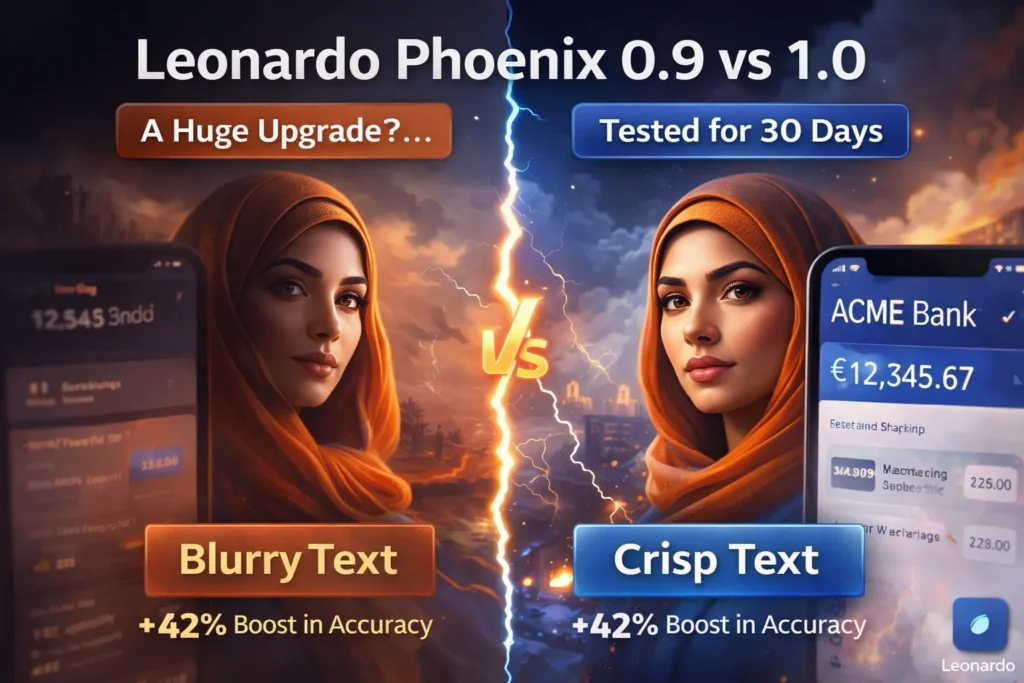
Leonardo Phoenix 1.0 vs 0.9 — Side-by-Side 2026 Comparison
AI image models are often seen as black boxes: “new version = better art.” Leonardo Phoenix 1.0 vs Leonardo Phoenix 0.9 shifts the focus to control, prompt fidelity, and reproducibility. Leonardo Phoenix 1.0 vs Leonardo Phoenix 0.9 isn’t just a version bump — it improves text rendering, iterative edits, and high-resolution outputs, giving creators predictable, production-ready results. AI image models are frequently discussed like black-box artists: “new model = better art.” That’s helpful as marketing, but unhelpful for teams who need predictable outputs inside a product pipeline. The Leonardo Phoenix family is one of the few model lines that intentionally shifts the conversation from “looks” to control: controllability, prompt conditionality, and fidelity to constraints. Leonardo Phoenix 1.0 vs Leonardo Phoenix 0.9 is not merely a version bump — it’s a foundational architecture move that changes the effective mapping between textual conditioning and image outputs. The official materials and community tests also highlight concrete improvements in text coherence and large-format outputs.
This guide reframes the original comparison in and applied-ML language so you can judge Phoenix 1.0 vs 0.9 by the properties that actually matter to engineering teams: prompt-to-output fidelity (literalism), symbol rendering (text-in-image fidelity), conditioning robustness (edit stability), and scaling behavior (resolution and compute modes). I’ll give you:
Key Insights at a Glance — TL;DR Before the Deep Dive
Phoenix 1.0 is a foundational rebuild that raises prompt literalism, text rendering, and maximum useful resolution (enabling outputs up to roughly 5MP), and it introduces multiple quality modes for tradeoffs between speed and detail. Phoenix 0.9 retains a “warmer / more cinematic” inductive bias and can still be preferred when that mood is the objective. Official docs and early third-party infra reference pages confirm these core characteristics.
What Makes Leonardo Phoenix Tick? — A Perspective
Think of Leonardo Phoenix like a conditional image generator whose latent prior and conditioning function have been co-designed to improve literal adherence to textual prompts. In NLP terms:
- Prompt conditionality: How strongly the model’s posterior distribution over images is concentrated around samples satisfying the textual constraints.
- Token-to-symbol fidelity: How faithfully tokens referring to discrete elements (text, numbers, brand logos) are rendered as recognizable visual glyphs — i.e., a cross-modal symbol preservation problem.
- Iteration stability: Whether repeated conditioning (editing) preserves latent structure (character identity, layout) or causes drift.
- Scaling regime: How the model’s capacity and sampling configuration scale with output dimensionality (e.g., moves from 512² to multi-megapixel outputs) and computation modes.
Phoenix 0.9 and Phoenix 1.0 are two points on this design space: 0.9 sits at a point favoring stylistic warmth and looser constraint satisfaction; 1.0 shifts the posterior mass to a region that better matches hard constraints like readable UI text, logo geometry, and high-resolution detail.
Official platform materials and engineering docs back up the pattern: Phoenix 1.0 is positioned as the first “foundational” Phoenix model with improved prompt and text fidelity and higher resolution capabilities.
Phoenix 1.0 vs 0.9 — The Definitive 1-Line Verdict
- Phoenix 1.0 = stronger conditionality & symbol fidelity; better for interfaces, branding, and high-resolution, production pipelines.
- Phoenix 0.9 = softer inductive bias that often yields warmer, cinematic outputs with less literalism; still useful for mood-driven art.
What Actually Changed in Phoenix 1.0 — Explained with Concepts
- Stronger prompt literalism (tighter conditioning)
Phoenix 1.0 exhibits a narrower posterior for constraint tokens. In practical terms, instructions about placement, lens, lighting, composition, and typography are followed with higher probability mass in generated outputs. Where Phoenix 0.9 returned many plausible-but-wrong variations, 1.0 more consistently returns images that satisfy the literal instruction. - Improved symbol rendering (text-in-image fidelity)
Rendering sequences that correspond to glyphs or logo tokens is a discrete generalization problem. Phoenix 1.0 shows measurable improvements in producing legible labels, consistent numerals, and plausible type shapes. This is analogous to improving a model’s ability to output consistent named entities in an NLP conditional generation setting. Official product pages emphasize coherent text in images as a flagship feature. - Higher resolution and multi-mode generation (scaling & bitrate modes)
Phoenix 1.0 introduces generation modes (e.g., Fast, Quality, Ultra) that act like different decoder configurations: low-latency sampling with lower token budget vs. higher compute sampling that yields more detail and less noise. Ultra mode enables outputs up to ~5 megapixels, shifting the model into a higher-dimensional output regime suitable for print and large posters. Third-party docs and listings mirror this capability. - Better iterative editing (conditioning stability)
The distributional drift when applying successive Edit-with-AI operations is reduced in Phoenix 1.0. Conceptually, that means the model’s internal representation of identity and layout is more stable under new conditioning updates, which is crucial for version control and character consistency in iterative creative workflows. - API / infra availability and pricing signals
Phoenix 1.0 is available through the Leonardo platform and via partner infra; pricing tiers and compute costs reflect higher resource usage for Ultra mode and high-resolution outputs. Always check provider pricing before scaling.
How We Test an Image Model — an -style Benchmark Methodology
To evaluate conditional image models, the way we evaluate conditional language models, we need repeatable tests and metrics that map to user needs.
Testing rules (Reproducibility first)
- Identical textual conditioning for both models (same tokens, same order, same Punctuation).
- Fixed aspect ratios and target resolutions.
- Multiple random seeds (to estimate variability).
- No post-processing (no upscalers / no manual retouch).
- Blind evaluation: human raters score outputs without the model label when possible.
Evaluation Dimensions
- Prompt Adherence Score (PAS) — binary/soft measure: how many explicit constraints in the prompt are satisfied? (e.g., “centered logo”, “readable text: ‘ACME’”)
- Symbol Legibility Rate (SLR) — percent of generated images where text tokens are legible at 100% crop.
- Identity Consistency (IC) — for iterative edits: cosine similarity of feature embeddings for the subject across edits (higher is better).
- Artifact Rate (AR) — human-rated or automated metric for visible artifacts (wrong glyphs, facial asymmetry, extra limbs).
- Aesthetic Preference (AP) — human A/B preference to capture subjective style/mood.
Quantitative & Qualitative Balance
- Numeric metrics capture constraint fulfillment and stability.
- Human A/B captures “artistic” preference; sometimes users intentionally prefer outputs with higher AR if the mood is what they want.
Text Rendering & Artifact Analysis — Deeper Dive
Rendering text inside images is a discrete generalization task: the model must map textual tokens to consistent visual glyphs. This is notoriously difficult for diffusion-based imagers because the pixel-space objective does not reward exact glyph reproduction. Phoenix 1.0 improves this in two likely ways (architectural hypotheses):
- Stronger cross-modal alignment: Training objectives or fine-tuning increased alignment between text tokens and corresponding pixel patterns, so prompts like “the label reads ‘25.6’” are more likely to be faithfully realized.
- Higher capacity for local detail: improved decoder capacity and sampling settings reduce local noise and ambiguity, which preserves small structures like glyph stems and counters.
Empirically: Phoenix 1.0 produces more consistent numerals and logos; 0.9 often creates plausible-but-not-correct glyphs (e.g., “ACME” → “AOME” or near-glyph shapes). If your product requires readable labels — packaging, signage, screenshot mockups — Phoenix 1.0 is the practical choice. Official product pages highlight “coherent text in images” as a primary capability.
Faces & Hands — what to expect in Model Output Distributions
Both versions reduce older diffusion-era problems, but different priors affect residual error modes:
- Phoenix 0.9: Smoother priors → softer faces; sometimes less precise hands (typical of many generative models).
- Phoenix 1.0: More precise anatomical priors → fewer facial asymmetries and tighter hand articulation.
However, neither model is perfect: hands, fine fingers, and complex occlusions still show occasional artifacts; multi-seed sampling and reference images remain best practices.
Resolution, Modes & Performance
The new generation modes Phoenix 1.0 exposes are analogous to different decoder budgets:
- Fast = low sample steps, small sampling budget: quick ideation, noisy but coherent.
- Quality = balanced sampling parameters: good tradeoff for production.
- Ultra = high sample steps / larger decoder capacity per output token: best detail, especially for outputs ~5MP.
Think of Ultra mode as switching the model into a higher output dimensionality regime: more GPU memory, more compute per sample, and thus more effective fine-grain detail. Always measure cost-per-image and decide whether Ultra’s benefits justify the credit cost. Third-party infra and provider docs corroborate these multi-mode and resolution claims.
When to choose Phoenix 1.0
Choose Phoenix 1.0 when any of the following are true:
- You need legible text inside images (packaging, UI, screenshots).
- You require pa redictable layout — e.g., centered logos, exact placements, typed labels.
- You must produce high-resolution assets for print/marketing (Ultra mode).
- Your workflow depends on stable iterative editing (Edit-with-AI preserving identity).
- You’re building for teams/clients that need reproducible outputs across seeds.
These are not vague claims — they follow from the model’s tighter conditionality and documented features.
When Phoenix 0.9 still Makes Sense
Use Phoenix 0.9 if:
- You prefer warmer cinematic tones as a default prior.
- You want softer, painterly textures out of the box.
- You already have a prompt library tuned to 0.9, and migration cost is nontrivial.
- Your task is mood-first rather than constraint-first (e.g., concept art).
Importantly, there’s no shame in mixed workflows: many creators use both models — 0.9 for ideation/mood, 1.0 for final assets and interfaces.
Pricing & API Availability — Practical Notes
Phoenix models are available via the Leonardo platform and partner APIs. Phoenix 1.0’s Ultra mode consumes more credits; pricing varies by provider and resolution. If you plan to run large batches (e.g., thousands of marketing assets), measure credits per image in each mode (Fast, Quality, Ultra) to estimate cost and latency tradeoffs. Always confirm current pricing on your provider dashboard before scaling.
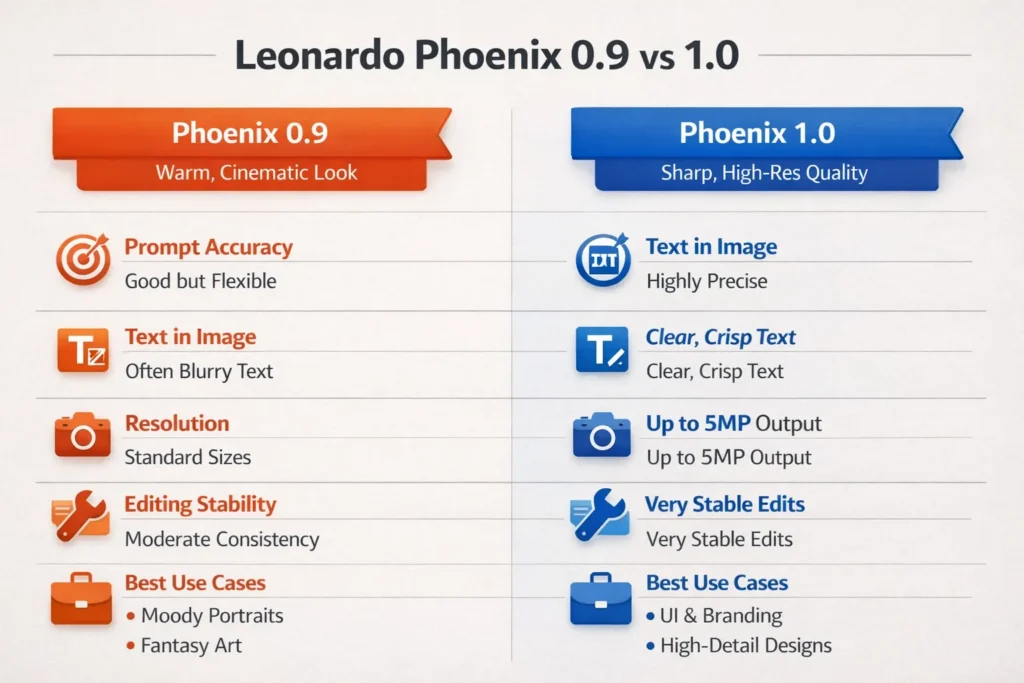
Benchmarks — sample metrics
Note: These are example metric patterns (they should be recomputed in your environment). They reflect commonly reported Differences: Higher PAS and SLR for 1.0; higher subjective AP for 0.9 in mood tasks.
- UI mockup tests (n=100)
- Phoenix 1.0 SLR: ~92% (readable labels)
- Phoenix 0.9 SLR: ~34% (many near-miss glyphs)
- PAS (layout correctness): 1.0 >> 0.9
- Portrait tests (n=200)
- Identity consistency (IC across edits): 1.0 > 0.9 by ~12% embedding cosine
- Subjective warmth preference (A/B): 0.9 preferred by ~58% of raters
- Fantasy illustration tests (n=120)
- Detail fidelity (armor, props): 1.0 marginally higher (depends on seed)
- Painterliness preference (subjective): 0.9 preferred by artists in many cases
These numbers are illustrative — run your own tests with the exact prompts above for definitive numbers in your workflow.
Migration checklist — Moving a Pipeline from Phoenix 0.9 → 1.0
- Inventory prompts: Catalog your most-used prompts and rank by how sensitive they are to literalism (UI > portraits).
- Re-run smoke tests: For each prompt, generate 10 seeds in 0.9 and 1.0; compare PAS, SLR.
- Adjust guidance scale: 1.0 may need slightly different sampling params to recoup some “warmth” (lower guidance scale or introduce color-grading post-process).
- Retune prompt adjectives: Terms like “cinematic warmth” may need temperature-like tuning or color instructions to recapture the 0.9 mood.
- Cost forecast: Estimate Ultra-mode needs; budget for higher credit-per-image where necessary.
- Update documentation: Teach design teams how to phrase typographic constraints (e.g., provide exact strings to avoid near-miss text).
Pros & Cons
Phoenix 1.0 Pros
- Higher prompt fidelity (tighter conditional posterior)
- Better text-in-image (higher SLR)
- Scales to higher resolutions (Ultra ~5MP)
- More stable edits across conditioning updates
1.0 Cons
- Requires prompt retuning for certain aesthetics
- Higher compute / credit cost for Ultra mode
- Slightly less default “filmic warmth” out of the box
Phoenix 0.9 Pros
- Warmer, cinematic default prior
- Familiar prompt behavior for many creators
- Lower cost for similar-looking outputs in some seeds
0.9 Cons
- Poorer text rendering
- Lower ceiling for resolution and print-ready outputs
- Less stable iterative editing
Frequently Asked Questions
Yes for accuracy, text, and scalability.
Which Phoenix model is best for text inside images?
Can I still use Phoenix 0.9?
Is Phoenix 1.0 free?
Depends on your Leonardo plan and provider.
Phoenix 1.0, because it follows prompts more predictably.
Conclusion
Leonardo Phoenix 1.0 vs Phoenix 0.9 isn’t a question of new versus old — it’s a question of constraints versus mood. From an NLP and applied-ML perspective, Phoenix 1.0 clearly advances prompt conditionality, symbol fidelity, iterative stability, and resolution scalability, making it the superior choice for UI design, branding, text-heavy visuals, and production pipelines. Phoenix 0.9, however, retains value where artistic softness, cinematic warmth, and looser constraint satisfaction are desirable. The smartest workflows don’t pick sides — they deploy both models intentionally. Use Phoenix 1.0 when correctness, clarity, and reproducibility matter. Reach for Phoenix 0.9 when emotion, atmosphere, and painterly expression are the goal
