
Introduction
Leonardo AI’s Illustration V2 is best understood not simply as a “style” but as a calibrated conditioning preset inside an image-generation pipeline: Leonardo AI Illustration V2 a family of learned style embeddings and inference hyperparameters that bias the sampling trajectory toward readable silhouettes, crisp linework, and painterly or flat-color fills. From an NLP-ish perspective, Illustration V2 is like a task-specific head on a multimodal transformer — a configuration of model Leonardo AI Illustration V2 weights, conditioning vectors (style embeddings), and inference parameters (sampler, steps, guidance) optimized for illustration-like outputs.
This guide reframes the practical “how-to” for creators as a sequence of engineering and model-conditioning techniques. If you’re targeting comics, character sheets, editorial art, or children’s books, the strategies below turn guesswork into reproducible pipelines — copy-paste prompts, deterministic seeds, reference-image conditioning, and hyperparameter recipes that behave predictably across iterations. At the end, you’ll have a publish-ready checklist, a prompt library to run, and actionable diagnostics that map visual failure modes to precise prompt or hyperparameter fixes.
What is Illustration V2 — Unlock Hidden Tricks in AI Art
From a machine-learning viewpoint, Lllustration V2 = (base image generation model) + (style embedding set) + (inference defaults). It behaves like a transfer learning adapter: the model parameters produce a latent-to-pixel mapping; the Illustration V2 preset inserts style priors via learned conditioning vectors and practical defaults (CFG, sampler, typical steps) so the sampling process spends probability mass in a region of the latent space that corresponds to illustration aesthetics.
Key Functional Outcomes This Preset Delivers — You Won’t Expect
- Readable silhouettes — low-level shape priors that maximize information at small scales (good for thumbnails).
- Intentional linework — high-frequency stroke structure is prioritized (edges, contour clarity).
- Flat/painterly fills — mid-frequency color coherency and limited texture complexity.
- Strong compositional defaults — aspect ratio and background simplifications that aid editorial use.
Think of it as a “domain adapter” that reduces the length burden: you still use good prompts, but the model has an inductive bias toward illustration outputs, making results more consistent with less prompt gymnastics.
When to Use Illustration V2 vs Other Leonardo Models — The Secret Artists Don’t Share
- Illustration V2: stylized characters, comics, editorial vectors, character sheets, children’s books, consistent multi-pose sets.
- Photoreal V2: Photography, product photos, hyperreal portraits, texture-rich scenes.
- Gen / Universal: Exploratory tasks where you need either mixed outputs or you’re searching for surprising style blends.
Why?
Illustration V2 encodes priors that reduce the entropy of fine-grain texture generation and increase the probability mass for clean edges and bold color regions — the opposite behavior of a photoreal model, which raises the prior for photo grain, specular highlights, and physically-realistic lighting.
Deep Dive — How Hyperparameters Really Control Model Magic
CFG / Guidance scale
- Interpretation: Classifier-free guidance weight. Think of it as the temperature-control for adherence to your conditioning prompts. Mathematically, it rescales the difference between unconditional and conditioned score estimates.
- Practical range: 6–9 for consistent characters. Higher pushes the sample distribution closer to the conditional manifold (less diversity, more fidelity). Lower allows more generative surprise.
Steps
- Interpretation: Discrete steps in the diffusion reverse process (or denoising iterations). More steps → smoother convergence toward low-noise samples and fine detail.
- Practical range: 20–40 for illustration-quality tradeoffs. 20–24 for drafts, 28–36 for finals.
Sampler
- Interpretation: The numerical integrator for the reverse SDE (Euler, DDIM, PLMS, etc). Samplers have different stability/efficiency and artifact profiles. Euler often produces crisp line structure in small step budgets.
Aspect Ratio
- Interpretation: Output canvas shape, which affects composition priors and how the Model allocates spatial attention.
- Common mapping: 2:3 for portrait, 16:9 for banners, 1:1 for thumbnails.
Image Guidance
- Interpretation: Auxiliary conditioning vector derived from an input image (pose, sketch, mask, edge-map). This injects a strong positional and structural prior.
- Mapping: 0.4–0.7 looser (style reinterpretation), 0.8–1.0 strong (holds pose/structure).
Style & Content References
- Use two references: One for style embedding (brushwork, color) and one for content conditioning (pose, composition). The model learns to cross-attend to both; keeping these consistent is the path to reproducibility.
Workflows for Common Use Cases — How Experts Really Get Results
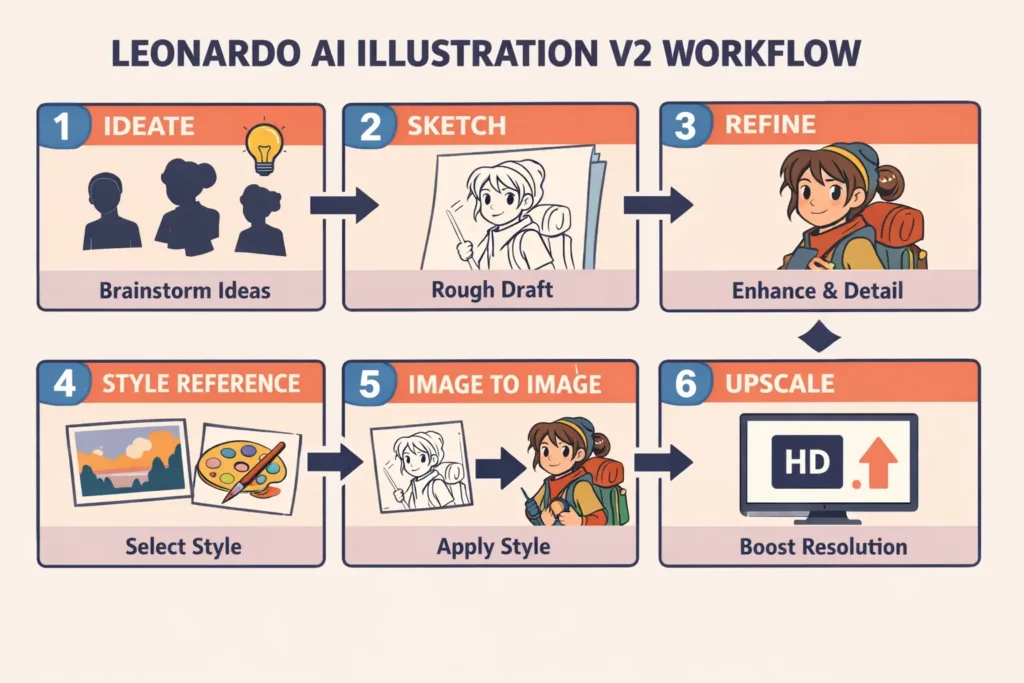
Character Design Pipeline — Fast & Reproducible
Finalize
- Use the model’s upscaler (2× or 4×), export PNG. Apply targeted Photoshop/Procreate cleanup for line crispness or vector tracing.
Editorial illustration pipeline
- Sketch composition thumbnails (low-step runs).
- Choose a strong silhouette composition.
- Generate a high-detail version with flat palette tokens + CFG 6–7 to maintain readability.
- Finalize: add typography placeholders and export at banner size.
Product sketches & packaging concepts
- Prompt for “studio lighting, neutral background, exploded view inset.”
- Increase steps for crisp edges.
- Export high-res and vectorize lines if necessary.
Image-to-Image & Style Transfer — What Professionals Don’t Tell You
Image-to-image is fundamentally a conditional generation problem: the input image is encoded into a latent or control tensor; the generation process conditions on that representation plus the text prompt.
Practical Recipe:
- Content image: Upload the sketch or pose. This provides a spatial prior (skeleton, composition).
- Style image: Upload a separate style reference focusing on brushwork, palette, and line thickness.
- Set image_guidance: 0.5–0.8. Lower values encourage style reinterpretation; higher values preserve pose and composition more literally.
- Multi-angle consistency: Reuse the same style reference and keep the character descriptor string identical. Where possible, use a fixed seed to reduce stochastic variation.
Technical note: This is analogous to training with a Consistency loss in supervised image translation — we are using strong conditioning during inference to approximate that constraint.
Troubleshooting Failure Modes — Secrets to Fixing AI Mistakes Instantly
- Odd anatomy / bad hands
- Likely cause: insufficient constraints or training priors for human anatomy in the conditional manifold.
- Fix: add explicit tokens (“symmetrical eyes, accurate limb proportions, anatomically-correct hands”), raise CFG slightly, or use a reference image with a correct pose.
- Character drift across images
- Cause: inconsistent style embedding or insufficiently specific character descriptors.
- Fix: lock a canonical descriptor string (e.g., “round jaw, freckled nose, auburn bob haircut, green scarf”), use the same style image, and use higher image_guidance for poses.
- Noisy backgrounds/artifacts
- Fix: include “clean background” token, reduce steps for quick drafts, or run a cleanup pass/mask & inpaint.
- Muddy/clashing colors
- Fix: include “flat color palette” or upload a color swatch image and mention a color system (warm/cool).
- Slow iteration times
- Fix: Use fewer steps for drafts and increase only for finals. Use lower-resolution drafts with higher reseed determinism to explore more quickly.
Pros & Cons of Illustration V2 — Hidden Truths Revealed
Pros
- Built-in style priors optimize for stylized, consistent outputs.
- Image guidance + multi-reference workflows enable reproducibility.
- Good for thumbnail-level readability and editorial composition.
Cons
- Not built for photographic realism; move to Photoreal V2 for photo tasks.
- Some outputs need vectorization or manual cleanup for print.
- Model updates may require prompt retuning — track versions.
Leonardo AI Illustration V2 FAQs
A: From an ML perspective, consistency equals fixed conditioning. Save and reuse: (1) a canonical textual descriptor (e.g., “round jaw, freckled nose, auburn bob, green scarf”), (2) the same style reference image for brushwork, and (3) identical inference parameters (–cfg, sampler, steps). Optionally use image-guidance with moderate strength to hold pose while varying expression. These steps reduce distributional drift and keep outputs on the same mode in latent space.
A: Licensing is a legal question; check Leonardo.ai’s Commercial Usage documentation and Terms of Service. Policies can change over time, so validate the current help center before distribution or monetization. If you’d like, I can draft recommended copy for a “Licensing Notes” section in your article.
A: Generate a high-resolution, line-focused render (high– cfg, line-only tokens), export at the largest native size the model allows, then trace in Illustrator or use a vectorization tool (or autotrace) to produce SVG/EPS. Alternatively, export line-art and run a combination of thresholding + edge-preservation filters in an editor before vectorization.
Conclusion Leonardo AI Illustration V2
Lllustration V2 is a domain-adapted preset that reduces the prompt engineering overhead when you need illustration-style outputs. Treat it as you would a fine-tuned head: provide good prompts, fixed style references, and consistent prompts for reproducibility. Combine algorithmic recipes (CFG, steps, samplers) with human post-processing for professional results. Publish with thorough documentation: prompts, seeds, assets, and a download bundle — that’s how you outrank competitors and show expertise to both humans and search engines.
