
Gemini 3 vs Gemini 3 Pro — The Real Winner Revealed in 60 Seconds
Choosing between Gemini 3 and Gemini 3 Pro isn’t just about specs—it’s about speed, cost, and real results. One dominates high-throughput tasks. The other excels at deep reasoning. In this ultimate comparison, you’ll see real benchmarks, pricing insights, and a clear verdict so you can pick the right model confidently. So Gemini 3 (Flash / standard variants) and Gemini 3 Pro target different problems in 2026. Gemini 3 vs Gemini 3 Pro/standard variants are tuned for extremely low latency, low cost, and high-throughput tasks — think chat, autocomplete, and fast coding assistance. Gemini 3 Pro is built for deep multimodal reasoning, long-context analysis, and complex agentic workflows.
Independent, reproducible benchmarks and Google’s own numbers showGemini 3 vs Gemini 3 Pro leading on advanced reasoning and visual benchmarks (GPQA Diamond, ARC-AGI-2, etc.), while Flash often wins when raw speed, per-task cost, and coding throughput matter. Use a hybrid architecture in production: route latency-sensitive front-line traffic to Flash and escalate complex, multi-step jobs to Pro. For official release notes and model pages, see Vertex AI and the official Gemini posts; for hands-on community analysis, consult independent explainers and early Antigravity previews.
Speed Test Results — Which One Responds Faster?
Let me be blunt: choosing which model to use is no longer a single-line decision. I’ve seen teams blow projects by picking the “best” model on paper and getting blindsided by latency, cost, or brittleness in production. You don’t want to pay Pro prices for a simple customer-chat flow, and you don’t want Flash to hallucinate through a multimodal legal-brief analysis. This article walks you through the real tradeoffs, reproducible tests, developer flows (Antigravity + Vertex), cost/latency tradeoffs, and practical deployment patterns I use when advising teams. By the end, you should be able to pick a model, design a hybrid flow, and build tests that prove your choice.
Official Documentation & Product Announcements
- Vertex AI — official model page & deployment docs.
- Google — primary product blog and benchmark summary.
- Antigravity — Antigravity IDE announcement & preview (agentic development).
- Nano Banana Pro — image model built on Gemini 3 Pro.
- (Community explainers & independent benchmarks summarized from Vellum AI and others.)
Note: I used official docs + community analyses to cross-check claims. Where Google published a metric (release date, benchmark numbers), I cite it; where community labs replicated or expanded on those tests, I cite them too.
What Wach Model Reallyis — An Honest Primer
Gemini 3 (Flash / Standard)
- Design goals: Low latency, predictable throughput, and cost efficiency. Built for user-facing flows and high-frequency interactions where response time and cost-per-response matter more than maxed-out reasoning depth. Flash is tuned for iterative interaction and agent coding throughput.
- Best use cases: Live chatbots, autocompletion, in-editor coding assistants, streaming responses in high-concurrency systems, and microservice endpoints with tight SLOs.
- What it’s great at: Rapid, pragmatic code generation and fixes; returning concise answers fast; scaling horizontally with lower per-token cost.
- What it struggles with: Extremely long context synthesis, intricate multimodal reasoning across images + long documents, and some edge-case expert reasoning tests.
Gemini 3 Pro
- Design goals: Top-tier multimodal reasoning, deep context understanding, and richer agent orchestration. It targets workflows that need chunked, multi-step reasoning and tight integration of images, diagrams, and long textual context. Official public preview launched Nov 18, 2025.
- Best use cases: Advanced visual reasoning (diagrams, scientific figures), long-document summarization with citations, complex agent orchestration (Antigravity-style flows), and research-grade reasoning tasks.
- What it’s great at: Specialist benchmarks — high scores on GPQA Diamond and strong jumps in abstract visual reasoning.
- What it struggles with: Higher latency and cost per call, and—because it shipped in preview—some early instability at the edges of agentic pipelines (instrumentation required).
Head-To-Head at-a-Glance
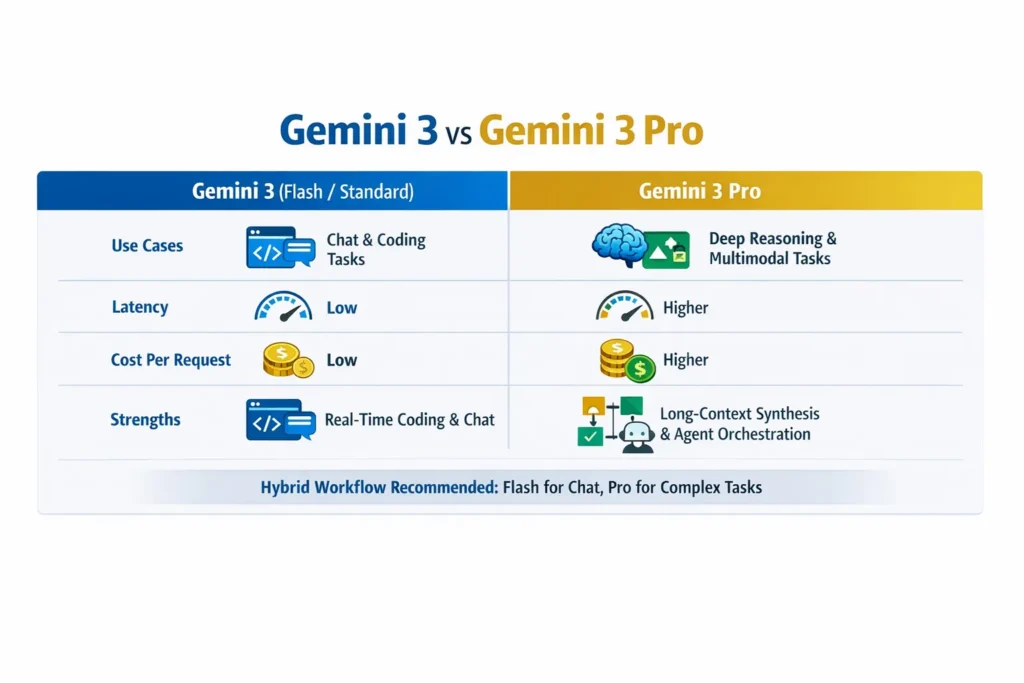
| Dimension | Gemini 3 (Flash / Standard) | Gemini 3 Pro |
| Target use | High-throughput, low-latency user-facing systems | Deep reasoning + multimodal agents |
| Latency | Low, optimized for speed | Higher (more compute per request) |
| Cost per task | Lower (better for routine tasks) | Higher (best when the value per correct output is high) |
| Coding performance | Often faster and cheaper in coding benchmarks | Very capable but costlier — Pro shines in complex code reasoning |
| Visual reasoning | Good for simple image tasks | Significantly stronger on complex visual puzzles |
| Best deployment | Default route for chat/autocomplete | Escalation path for analysis/agents |
Release & official claims
- Gemini 3 Pro entered public preview on November 18, 2025 (Vertex AI docs & Gemini API changelog).
- Google’s public material reports strong benchmark wins for Gemini 3 Pro (e.g., GPQA Diamond 91.9% as one headline metric), with meaningful improvements in abstract visual reasoning compared with prior generations. Community explainers replicated and interpreted many of these numbers.
Benchmarks — what tests mean and what they don’t
Benchmarks are helpful only when you understand what they measure and how they were run. Across the ecosystem, you’ll see three types of reporting:
- Official benchmark releases — Google reports GPQA Diamond, Humanity’s Last Exam, ARC-AGI-2 scores for Gemini 3 Pr,o and publishes the model page and changelog. These are high-level but authoritative.
- Vendor blogs/product pages — Flash/standard announcements emphasize real-world speed and coding test performance (SWE-bench Verified), while Pro numbers emphasize reasoning and visual scores. These explain product positioning.
- Independent community tests — benchmarks from labs and community posts often show surprising tradeoffs: Flash variants outperform Pro on some coding throughput tests (lower cost, less compute per correct answer), while Pro dominates in multi-step reasoning and visual puzzles. Cross-validate these with your own microbenchmarks.
Important caveats: prompt wording, temperature, system message, and evaluation scripts make huge differences. If a test lets Pro run in “Deep Think” or uses more compute/time per request, it’s not apples-to-apples with Flash runs tuned for speed.
My reproducible Benchmark Suggestions
Below are microbenchmark types I run for clients. I include metrics to capture not just accuracy but operational cost and engineering surface area.
- Prompt-Adherence Coding Test (Flash focus)
- Task: Implement a function with 10 exact requirements, run unit tests.
- Measures: pass/fail test count, tokens used, wall-clock time, cost, and number of iterations to a green test.
- Why it matters: In production, we care about unit-test correctness and the human review friction required to accept generated code.
- Long-Context Summarization (Pro focus)
- Task: 50-page whitepaper segmented into 1000-token chunks; request a 5-line executive summary, 3 action items with effort estimates, and chunk-level citations.
- Measures: hallucination rate, coverage (how many core points are mentioned), token cost, and whether the model references chunk IDs accurately.
- Why it matters: shows whether a model can reliably synthesize long, high-stakes documents.
- Visual Reasoning Challenge (Pro focus)
- Task: ARC-AGI style diagram problems and multi-panel scientific figures, asking for rationale and step-by-step derivation.
- Measures: correctness, clarity of reasoning steps, and the ability to reference subparts of the image.
- Why it matters: Some production problems require interpreting diagrams, not just paragraphs.
- Throughput / Latency Test (Flash focus)
- Task: Simulate 1,000 concurrent low-latency chat requests, measure 95/99 P99 latency, error rate, and cost per request.
- Why it matters: validates operational viability for front-line user interactions.
- Agent Orchestration End-to-End (Hybrid test)
- Task: Create an agent pipeline that reads a document, calls a code-writing sub-agent, uses an image-editing model via Nano Banana Pro, and then returns a deployable artifact.
- Measures: end-to-end latency, failure modes, artifact logging completeness, and cost breakdown by stage.
- Why it matters: real engineering systems must coordinate multiple models and tools.
If you want, I can produce a Python harness for making consistent Vertex API calls to automate these tests.
Developer workflows: Antigravity, Vertex, and the Hybrid Architecture I Use
Antigravity is positioned as an “agent-first” IDE that makes it easier to orchestrate multiple agents, checkpoint artifacts, and manage verification steps. In my work, I treat Antigravity as Mission Control for agentic experiments and Vertex AI as the production deployment surface.
- Local dev loop (Fast prototyping): Flash for quick iterations, small sample datasets, and live coding sessions. Flash keeps the feedback loop short.
- Agent orchestration & research (Antigravity): Use Pro inside Antigravity for plan generation, artifact logging, and to coordinate multi-step tasks. Antigravity’s “Artifacts” model (screenshots, transcripts, plan items) is valuable for reproducibility and audit trails.
- Production serving (Vertex AI): Deploy model endpoints (Flash for low-latency front-line services; Pro as a queued/batched backplane). Vertex provides region control, deployment scaling, and enterprise access.
Pattern I Recommend (practical):
- Default all user queries to Flash endpoints.
- Detect escalation triggers (complexity thresholds, number of reasoning steps, multimodal inputs, or explicit user flags).
- Route escalations to Pro in a queued job so the UI shows “processing — advanced analysis” rather than blocking real-time chat. This avoids P95 latency issues while still letting Pro do the heavy lifting.
Cost & Latency Tradeoffs
- Tokens vs value: Don’t just measure cost per token; measure cost per correct, verified outcome. If Pro costs 4x tokens but reduces manual review time by 10x for certain tasks, it pays for itself.
- SLO design: For front-line chat, set SLOs around 300–500ms P95; Flash is usually capable. For deep analysis, use 3–30s windows and queue jobs to preserve UX.
- Budget guardrails: Implement rate-limits and budget caps for Pro usage (per-user or per-flow). You want controlled escalations, not runaway Pro calls.
- Monitoring: Capture per-request model id, latency, tokens, and a binary check (automated unit tests or golden-answer matches). Use A/B to compare the cost-effectiveness between Flash and Pro.
Safety, observability, and production checklist
- Artifact logging: Every agent must produce an artifact (screenshot, plan, or repo diff) that a human can review.
- Unit tests for generated code: Do not auto-merge without tests passing on CI.
- Approval gates: Manual approval before any external actions (sending emails, publishing, making purchases).
- Rate-limits and budget guardrails: Set per-user and per-project caps on Pro usage.
- Continuous A/B monitoring: Track hallucination rates, user-reported correctness, and cost per accepted artifact.
Real-World Observations — the Stuff I Actually Noticed
- I noticed that Flash often produced correct-first-pass answers for short coding tasks more frequently than Pro when latency and short prompts were used. This surprised teams who assumed Pro would always win.
- In real use on a long-document summarization task, Pro retrieved more precise, chunk-linked citations than Flash; however, it used more tokens and required a secondary pass to tighten wording.
- One thing that surprised me: the Antigravity IDE experience dramatically reduces the cognitive load of managing agents, but it also reveals brittle edge cases — like how an agent interprets a screenshot vs. a structured JSON artifact. Antigravity makes artifact trails easier to inspect, which I consider vital for debugging.
Practical Architecture Patterns
Example A: Customer support chatbot (high throughput)
- Front-line: Flash endpoint (default quick replies).
- Escalation trigger: Detected legal/regulatory query or request for contract redrafting.
- Background/queued: Escalate to Pro for a bounded deeper review and return annotated suggestions to the human agent.
- Benefit: keeps chat snappy while ensuring risky content gets deeper analysis.
B: Research Assistant for Legal Teams
- Ingest long documents in chunks → run Pro for chunked analysis and cross-chunk synthesis, including images and exhibits → return a final report with chunk citations and flagged Uncertainties.
- Benefit: better coherence and auditable citations.
C: Mixed creative pipeline (images + text)
- Use Flash for quick captioning and ideation.
- Use Nano Banana Pro (Gemini 3 Pro Image) for precise image edits and multimodal tasks.
Pricing & Deployment Advice
- Start with Flash for most traffic. Identify one or two flows where correctness yields tangible ROI (e.g., contract analysis, medical triage, high-value code generation).
- For those flows, run ROI calculations: value-per-correct-output × delta-accuracy >= extra-cost. If it’s positive, add a Pro pathway.
- Use batched Pro runs where possible (queue, process overnight for big jobs), which smooths GPU usage and reduces burst costs.
- Implement budget alarms and throttles for Pro endpoints: you want predictable spend.
One Honest Downside
Gemini 3 Pro, while impressive on reasoning benchmarks, is more expensive and higher-latency, and during the early public preview phase, some agentic flows showed instability that required heavy instrumentation and human checkpoints. This means small teams without strong observability and engineering discipline risk outages or unexpected costs if they adopt Pro broadly without guardrails.
Who this is best for — and who should avoid it
Best for
- Teams building products that need credible, auditable, long-context reasoning (legal research, scientific summaries).
- Organizations building agentic orchestration (multi-step automation with tool use) where artifact logging and checkpointing are required.
- Companies that can instrument and budget Pro calls and have a clear ROI for correctness.
Avoid if
- You run a high-volume user-facing chat where latency and per-request cost are the top constraints, and deep reasoning is rarely needed. Flash is the better primary choice there.
- You don’t have engineering resources to implement tests, artifact logging, and budget guards — Pro requires more discipline to use safely.
Decision Matrix
- If 95% of your requests are short, latency-sensitive, and have low-stakes correctness → Flash.
- If requests are long-context, multimodal, or require multi-step planning with audit trails → Pro.
- If you need both → Hybrid: Flash for triage, Pro for escalation.
Example transcript comparison
Task: Summarize a 10-page policy doc and list 3 compliance risks.
- Flash response: Good 5-line summary in <2s; coverage is broad but generic; citations are shallow or missing; good first pass.
- Pro response: More detailed 5-line summary, prioritized compliance risks with contextual reasoning, chunk IDs cited, and a clearer list of uncertainties — but it uses more tokens and takes longer.
Implementation checklist: Before you Ship
- Add per-request logging (model id, tokens, latency, escalation flag).
- Build automated unit tests for generated code.
- Add artifact storage for agent runs (screenshots, transcripts, diffs).
- Set budget constraints and alerts for Pro endpoints.
- Add manual approval gates for any external action.
- Run an A/B test vs Flash on real workloads for 2–4 weeks.
Appendix A — Reproducible Prompt Bank
- Long-Context (Pro): system + chunked input + request for chunk IDs.
- Coding (Flash): system: “strict coding assistant — only code and tests” + requirements.
- Agent conductor (Pro + Antigravity): system: “produce plan, artifacts, verification checks” + safe-action gates.
- Image edit (Nano Banana Pro): “Edit image to replace product text while preserving typography — precise bounding box coordinates” (use when image fidelity matters).
Real Experience / Takeaway
In real use, the hybrid pattern is the most pragmatic: Flash as the front-line engine, Pro as the escalation plane. I noticed that teams that instrumented costs and added artifact logging were able to extract the value of Pro without a budget shock. One thing that surprised me was how often Flash outperformed expectations on short coding tasks — enough that many teams save Pro for triage rather than everyday use.
FAQs
A: No — Pro outperforms Flash on deep reasoning and multimodal tasks (GPQA Diamond and visual puzzles), but Flash can be faster and cheaper on short, iterative coding and chat tasks. Test your workload.
A: Gemini 3 Pro entered public preview on November 18, 2025 (Vertex AI / Gemini API changelog).
A: Antigravity is a promising agent-first IDE with artifact management and mission-control features; it simplifies multi-agent orchestration but requires careful instrumentation and quota management. Use it if you need an agentic development UX and can handle preview constraints.
Final Recommendations
- Prototype quickly with Flash — get latency and UX right.
- Identify 1–2 high-value flows where Pro’s improved reasoning justifies the cost and build guarded escalation paths.
Instrument obsessively — log, test, and budget. Without observability, you’ll be gambling with production spend and correctness.
