
Gemini 3 Pro vs Deep Think — Which AI Wins Your 2026 Tasks?
Gemini 3 Pro vs Gemini 3 Deep Think — which one should you actually use in 2026? One is lightning-fast, ideal for developers and production agents. The other dives deep into multi-step reasoning for research and engineering. In this guide, I’ll show you real-world differences, cost impact, and exactly when Deep Think is worth the wait. People keep asking the same messy question at standups and Slack threads: “Which Gemini 3 Pro vs Gemini 3 Deep Think should I pick?” That’s understandable — both models live under the same brand, they share capabilities, and marketing blur makes the trade-offs fuzzy. I wrote this guide because I’ve seen teams pick the wrong model, overspend, and still get flaky results. Below, I cut through the noise: simple definitions, hands-on prompts you can copy, plain explanations of benchmarks and cost, honest pros/cons, and a decision matrix so you can choose quickly and confidently.
I’ll be blunt: use this guide to avoid wasting compute and to match model Gemini 3 Pro vs Gemini 3 Deep Think selection to the work you actually have — prototypes, production agents, or heavy research experiments. This is written for beginners, marketers who need to understand tradeoffs, and developers who must ship.
Why Gemini 3 Pro or Deep Think Might Be Right — Or Wrong — for You
- Gemini 3 Pro = fast, multimodal, production-ready. Great for agents, content, and developer pipelines.
- Gemini 3 Deep Think = compute-heavy, research-grade reasoning engine. Best where multi-step logic, proofs, or scientific hypothesis testing matter.
Use Pro for ~80–90% of real work; bring in Deep Think only for tasks where extra reasoning accuracy materially changes outcomes.
What is Gemini 3 Pro?
Gemini 3 Pro is Google’s multimodal, production-oriented engine in the Gemini 3 family. It’s tuned to be fast, stable, and pragmatic across text, images, audio, video, and code. If your team needs low-latency responses for agents, reliable tool-calling, or high throughput for document understanding and developer workflows, Pro is the practical choice. It’s available across Google’s product surface and Vertex AI for enterprise deployment.
What is Gemini 3 Deep Think?
Gemini 3 Deep Think is the reasoning-first variant built to explore complicated, multi-hypothesis problems. Think formal proofs, multi-step scientific reasoning, and engineering simulations where each step matters. Deep Think intentionally spends more compute per query to evaluate alternative solution paths, validate candidate answers internally, and return more structured, verification-style outputs. Access can be more limited (e.g., premium tiers, research/Ultra subscriptions), and latency is higher as a tradeoff for deeper internal verification.
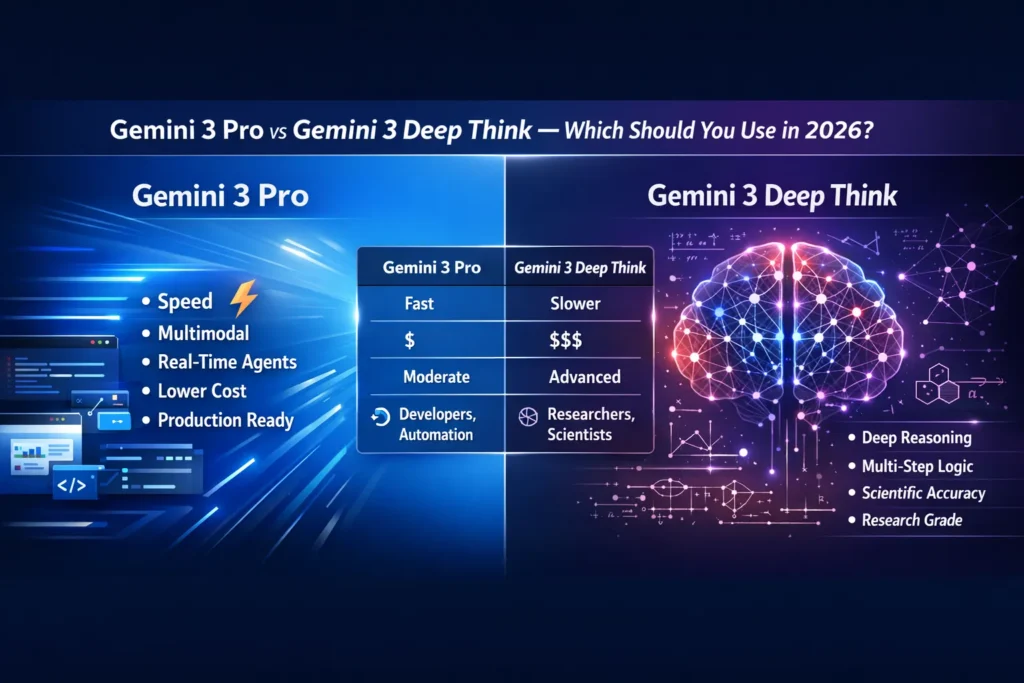
Core Differences — the short Table
| Capability / Concern | Gemini 3 Pro | Gemini 3 Deep Think |
| Primary focus | Multimodal production & agent workflows | Deep multi-step reasoning & verification |
| Latency | Low (real-time friendly) | Higher (compute-intensive) |
| Cost | Cost-efficient at scale | Premium per-query compute |
| Availability | Broad via Vertex AI and consumer tiers | Limited / premium/research tiers |
| Best fit | Developers, production agents, creators | Researchers, R&D, engineering proofs |
Benchmarks Explained
Benchmarks are useful signals, but they do not equal real-world performance. Here’s what I actually look for and what the benchmarks mean for you.
What benchmarks Measure Well
- Problem-solving score: Ability to follow multi-step reasoning tasks (e.g., ARC-style tests). Good for measuring “how many steps the model chain can correctly perform.”
- Coding metrics: Ability to generate compilable, runnable code and pass unit tests. Useful for developer workflows.
- Multimodal alignment: Understanding text+image or text+video context. Useful for summarization of lectures, document QA, and multimodal agents.
What Benchmarks don’t Capture?
- Latency under production load (how the model behaves at 10k requests/min)
- API cost per useful output (token cost × human post-edit time)
- Stability & observability (errors, timeouts, tooling integrations)
- Hallucination fa,intness in domain-specific data (benchmarks rarely use your internal docs)
Practical takeaway: Use benchmarks to shortlist models, not to finalize deployment decisions. Run a real workflow pilot.
Test 1 — Scientific reasoning
Prompt
You are a research assistant. Given two competing chemical reaction pathways with activation energies of 65 kJ/mol and 78 kJ/mol, under standard lab temperature (298 K), analyze which pathway is rate-limiting using the Arrhenius equation. Provide step-by-step reasoning, compute the relative rate constants, and propose two concrete experiments with expected observations to validate the hypothesis. Show numeric steps and assumptions.
What I Expect
- Deep Think: stepwise use of Arrhenius (k = A·e^(−Ea/RT)), relative k ratio, sensitivity to pre-exponential factor A, and experimental validation plans (e.g., measuring initial rates, using temperature variation & Eyring plot).
- Pro: concise explanation, correct high-level math, quicker summary, fewer edge-case caveats.
How I Grade
- Correct equations and numeric steps — 0–5
- Quality of experiment design — 0–5
- Total manual edit time needed — minutes
Why does this show differences
Deep Think will more often compute a stepwise numeric result and note assumptions about A; Pro will give a practical answer faster but may be briefer.
Test 2 — Production coding pipeline
Prompt
Build a production-ready Python CLI that converts a folder of MP4 lecture recordings into (1) speaker-separated transcripts, (2) a JSON with timecodes and speaker labels, and (3) a 500-word executive summary per lecture. Include unit tests, a Dockerfile, and instructions for deployment on a Linux server. Keep dependencies minimal and document required environment variables.
What I Expect
- Pro: complete working CLI scaffold, sensible dependency choices, pragmatic Dockerfile, test files, and a runnable README.
- Deep Think: May analyze edge cases, provide more abstract testing strategies, but slower delivery.
Why does this show differences?
Dev pipelines prefer Pro — pragmatic code and less “over-analysis.”
Test 3 — Multimodal executive summary
Prompt
Given 40 lecture slides (images) and a matching transcript (.txt), produce a 6-slide executive summary: slide titles, 2–3 bullet highlights each, timecodes mapping to the transcript, and speaker notes. Output the result as Markdown suitable for conversion into slides.
What I Expect
- Pro: Faster formatting, crisp bullets, timecode mapping aligned to transcript.
- Deep Think: Slightly more analytical framing and suggestions for alternative slide orders.
Why does this show differences?
Pro is tuned for formatting + speed in practical delivery; Deep Think adds more conceptual structure.
Pricing & Availability
Pricing changes rapidly — always verify before heavy rollout. As of early 2026, the trend is:
- Gemini 3 Pro: Broadly available across consumer and enterprise surfaces (Vertex AI) and included in widely distributed paid tiers. Pricing tiers are optimized for scale and generally have lower per-token costs than Deep Think.
- Gemini 3 Deep Think: Premium/limited availability, often accessible via high-tier subscriptions (e.g., Ultra) or research programs. Higher per-query compute costs due to longer internal thinking processes.
Practical cost strategy
- Prototype in Pro — make sure functionality is correct, and the API integration works.
- Identify critical reasoning tasks — locate the flows where outputs require deep verification or repeated human correction.
- A/B small tasks in Deep Think — measure delta in correctness vs. delta in cost & latency.
- Hybridize — route most traffic to Pro; selectively send verification-critical items to Deep Think. Use caching for verified outputs.
Why this matters: Many teams overspend by sending everything to Deep Think. Try to quantify the marginal correctness improvement and whether it actually changes decisions.
Head-to-Head Feature Breakdown
- Reasoning depth
- Pro: strong and practical.
- Deep Think: deeper, multi-hypothesis, internal verification loops.
- Latency & throughput
- Pro: low latency suitable for agents.
- Deep Think: longer response times and more computing.
- Multimodal capability
- Both: support text, images, audio, video; Pro optimized for throughput on multimodal tasks.
- Tooling & integration
- Pro: smoother integration with Vertex AI agent stacks and tool calling; often prioritized in SDKs and product features.
- Verification & trust
- Deep Think: built with verifier/reviser flows for candidate solutions (a more formal internal verification approach).
Pros & Cons
Gemini 3 Pro — Pros
- Fast responses for agents and interactive experiences.
- Cost-effective at scale.
- Strong developer ergonomics (tool-calling, code generation).
3 Pro Cons
- May be less exhaustive on deep academic proofs and multi-path hypothesis testing.
Gemini 3 Deep Think — Pros
- Strong at multi-step mathematics, formal reasoning, and hypothesis verification.
- Internal verifier flows reduce some classes of logical errors.
3 Deep Think — Cons
- Slower and more expensive.
- Access can be limited; it may require premium plans or research access.
Role-Based Recommendations
- Developers / Startups shipping agents → Gemini 3 Pro. Faster integration is better for productionizing.
- Researchers / R&D / Engineers → Gemini 3 Deep Think for deep model-based exploration and hypothesis testing.
- Content creators & marketers → Gemini 3 Pro for speed and multimodal pipelines.
- Enterprise teams (hybrid) → Use Pro for operations and Deep Think for specialized R&D projects.
Who should avoid Deep Think: Teams with tight latency budgets, or where outputs only need a reasonable human-level summary rather than formal verification.
Deployment & Migration Strategy
- Start with a scoping test (1–2 week pilot in Pro).
- Instrument everything: latency, tokens per request, human edit time, failure rates.
- Identify “reasoning delta” tasks: where Pro produces unacceptable errors.
- Pilot Deep Think on those tasks and compute corthe rectness gain vs cost.
- Implement hybrid routing: Pro handles customer-facing flows; Deep Think is used for offline or R&D pipelines.
- Cache verified outputs to reduce repeated Deep Think calls.
- Monitor drift — if Deep Think yields substantially different outputs over time, re-baseline periodically.
Decision Matrix
| Priority | Choose |
| Real-time agents / low latency | Pro |
| Lower cost at scale | Pro |
| Multi-step proofs / research | Deep Think |
| Enterprise R&D | Deep Think (selective) |
| Content & multimodal pipelines | Pro |
FAQs
No — it implements more build-in verification and multi-path evaluation, not merely delayed responses.
Availability can be limited to premium tiers and research programs; check the Gemini API and product pages for current access.
Pro is generally better for production coding workflows. Deep Think may dig into correctness proofs, but it is slower.
No model fully eliminates hallucinations. Deep Think reduces some error modes by internal verification, but human review and grounding remain essential.
Real Experience/Takeaway
- I noticed teams that migrated the wrong tasks to Deep Think saw compute bills double with marginal correctness gains.
- In real use, Pro solved >80% of production issues and reduced developer friction when integrated with agents.
- One thing that surprised me: Deep Think sometimes returned structurally different solutions that were more useful for research teams — not just “more correct” but reframed the problem in useful ways.
Honest limitation: Deep Think is not a panacea — when domain knowledge is wrong (bad data), deeper internal reasoning cannot compensate for poor grounding.
Decision Examples — Quick Scenarios
- Customer-facing chatbot with 200 ms SLAs → Pro
- Peer-reviewed paper drafting & checking proofs → Deep Think
- Automated content generation for marketing → Pro with human edit pass
- Designing engineering simulation verification → Deep Think for core verification + Pro for report generation
Sources & References
Authoritative sources used in this Guide:
- Google DeepMind — model cards and DeepMind posts on Gemini 3 family.
- Google AI Blog — announcements and product writeups (Gemini 3 Pro / Deep Think updates).
- Vertex AI — Vertex AI model and pricing docs.
- ARC-AGI — benchmark background (ARC, ARC-AGI-2)
Final verdict
Most teams: start, prototype, and operate on Gemini 3 Pro. Save Deep Think for R&D, formal verification, or mission-critical reasoning tasks where correctness gains are measurable and justify the cost.
