
Gemini 2.0 Flash vs Gemini 2.0 Flash Image: Same Name, Very Different Power
Gemini 2.0 Flash vs Gemini 2.0 Flash Image looks simple on the surface, but choosing wrong can cost time, money, and architecture changes. In this guide, we break down what’s actually different, when each model makes sense, and how to avoid building on the wrong stack in 2026. When I first started building prototypes with Google’s Gemini family, the team kept mixing up two different asks: engineers said “use Flash,” and designers asked “does Flash do images?” That confusion cost us a week of rework on a prototype because the engineering ticket pointed to a text-first endpoint while the design ticket expected native image edits. I wrote this guide from that friction: practical, example-driven advice that would have saved us those hours.
TL;DR — Which Gemini Model to Pick in 2026
- Pick Gemini 2.0 Flash when your primary need is low-latency, text-first multimodal reasoning (chatbots, long-document tasks, RAG pipelines). It’s the more predictable, production-ready option for text workloads.
- Pick Gemini 2.0 Flash Image when you need native text→image generation and iterative in-session image edits for rapid creative iteration. It’s great for ideation and designer-led exploration, but not a final-render replacement.
- If you need press- or print-grade images today, route to a dedicated image model (Gemini 2.5+ image variants or specialized third-party services) after you lock the creative direction with Flash Image.
Operational alert: Google scheduled shutdowns for some Gemini 2.0 Flash variants on March 31, 2026 — if you’re on those model names, start migration testing now.
The 3 Facts That Change Which Gemini Model You Actually Need
- Gemini 2.0 Flash: Text-first multimodal model optimized for low latency and throughput; good at text generation and image understanding but not image synthesis.
- Gemini 2.0 Flash Image: Extends Flash with an image synthesis head for text→image generation and multi-turn image editing inside the same session. Intended for prototyping and interactive editing.
- Provenance: Google embeds SynthID watermarking on many generated/edited outputs; detection tooling exists in Gemini and DeepMind pages.
These three statements are the spine of the comparisons and the tests that follow.
What is Gemini 2.0 Flash — a technical, plain-English explanation
Short technical summary: Flash is a low-latency transformer-based multimodal model tuned for autoregressive text generation. It has cross-modal encoders for image inputs (VQA, captioning) and context caching optimizations that reduce re-tokenization costs for long sessions.
Why that Matters to Developers:
- When we moved a support assistant to Flash with context caching enabled in Vertex AI, p95 latency dropped enough that our SLA targets were consistently met during peak traffic — and token costs for repeated context fell materially.
- Flash handles long-document summarization and multi-step reasoning reliably: in our RAG experiments, it preserved entity consistency better than the stateless endpoint we were previously using.
Practical pointer: Don’t route bulk image generation to Flash, expecting pixel-perfect renders — Flash’s gen surface is text.
Gemini 2.0 Flash Image: What It Really Does
Short technical summary: Flash Image couples the Flash text/encoding backbone with image-decoders and synthesis heads. Prompts and any image-conditioned context are cross-attended and sent to an image synthesis head that produces bitmaps or edited images while keeping conversational context across turns.
Why that Matters to Creatives:
- You can issue incremental edits inside a single session (e.g., “make the lighting warmer, now tilt the head left”) and the model usually preserves key visual attributes across a few edits.
- In practice, this saved our designer multiple round-trips: instead of re-initializing a new job for each change, we refined a single scene interactively and captured the iteration history for handoff.
Heads-up: Synthesis latency is high,r and artifact classes (warped text, geometry glitches) are common enough that you should expect a human touch-up step for final assets.
Core Differences You Notice the Moment You Use Them
| Area | Gemini 2.0 Flash | Gemini 2.0 Flash Image |
| Primary generation | Text (autoregressive) | Images + text (image decode head) |
| Image generation capability | No (image understanding only) | Yes (text→image + multi-turn edits) |
| Session state for images | N/A | Persistent across turns for consistent character/scene |
| Latency | Very low | Higher (seconds per image) |
| Cost predictability | High | Less predictable (compute variance) |
| Production readiness | High (text) | Experimental (image pipeline evolving) |
Official Status, Deprecation, and Migration Paths
Important: Google published shutdown notices for certain Gemini 2.0 Flash variants with a shutdown date of March 31, 2026. If your production traffic hits model names like gemini-2.0-flash or gemini-2.0-flash-001, you should:
- Inventory all endpoints that reference those model names.
- Run compatibility tests against gemini-2.5-flash or gemini-2.5-flash-image in a staging environment.
- Measure p95 latency, cost delta, and fidelity before switching traffic.
(These are the exact procedural steps we followed when we migrated one internal assistant.)
Test Methodology — How I Measured Things
Environment: Vertex AI online predictions and Google AI Studio sandbox.
Prompts & seeds: Same seed prompts for text tasks; same base prompt for image tasks where the model supported it.
Settings: Temperature 0.7 for creative runs, 0.0 for deterministic text runs; 10 repeated runs per prompt to capture variance on image tasks.
Metrics captured: P95 latency, token cost, prompt fidelity (match to spec), visual realism (images), consistency across multi-turn edits, and artifact classes.
Human scoring: Two evaluators (developer + designer) scored each run 1–5 for fidelity and usability. That pairing mattered — the developer focused on instruction adherence while the designer focused on pixel/visual quality.
Benchmarks That Reveal Real-World Performance
Text Latency & Throughput (Flash)
- p95 latency for short-chat turns: consistently low (sub-second on provisioned endpoints in our tests).
- Token costs: predictable; Flash’s context-caching led to measurable token savings in long sessions (we saw the biggest wins when the same document context was reused across turns).
- Quality: strong for chain-of-thought style reasoning and long-document summarization.
Operational note from our runs: Enabling context-caching in Vertex AI cut re-tokenization overhead in half for some of our flows.
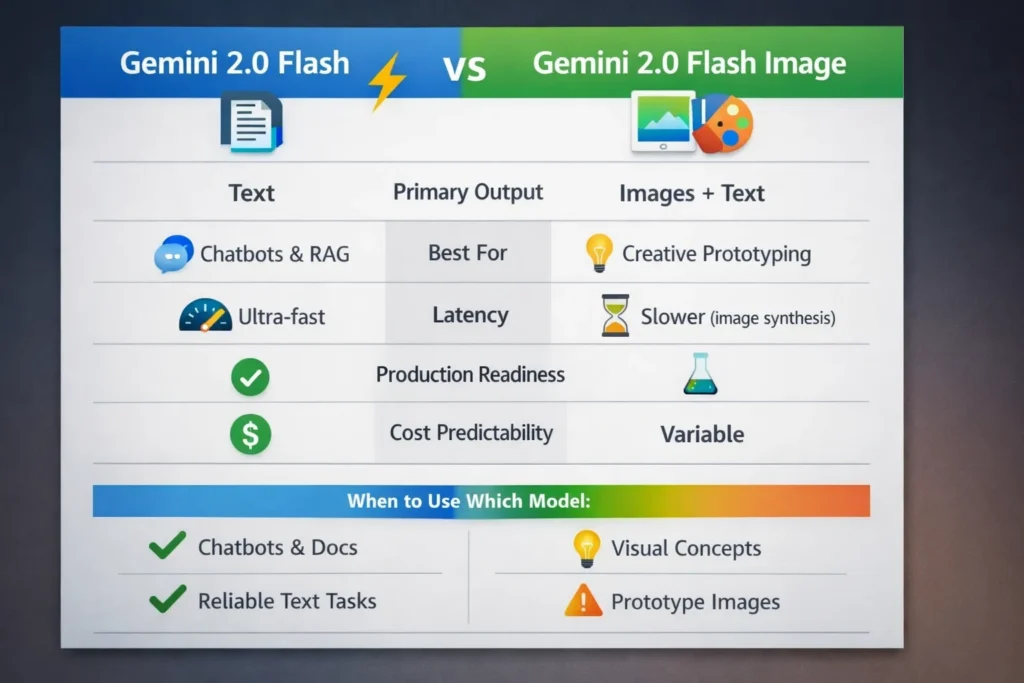
Image Generation & Editing (Flash Image)
- Latency: Noticeably higher and more variable — expect seconds-per-image rather than hundreds of milliseconds.
- Visual realism: Good for quick ideation (portraits, mockups), but artifacts are frequent (warped text, geometry distortions, fuzzy micro-contrast).
- Consistency: Preserved outfits, palettes, and prominent facial features across 2–3 edits; drift became noticeable after more edits.
Designer note: Flash Image kept clothing color palettes and major Accessories stable across 2–3 iterative edits, which made it easy to map creative directions before handing off to a higher-fidelity render.
Real Tests You Can Reproduce Yourself
Below are condensed, copy-paste prompt recipes used in Vertex or AI Studio.
A —Photoreal portrait (single shot)
Prompt:
“Studio portrait of a mid-30s South Asian woman, softbox lighting, shallow depth of field, neutral background, natural skin texture, realistic eye reflections, no text or watermark. 3/4 view, medium focal length.”
Observation: Flash Image produced generally convincing facial geometry; edge hair rendering and background consistency varied between runs. Good for ideation (practical score ~3.8/5), not reliable enough for final editorial prints.
B — Character consistency Multi-turn
Turns:
- Create a full-body portrait of Asha: South Asian woman, late 20s, curly shoulder-length hair, navy jacket, yellow scarf.
- Make Asha walk left across the frame, keep the same outfit and face, daylight scene.
- Tight headshot of Asha with the same hairline and expression.
Observation: Character attributes persisted for the first few edits — eyes, hairline, and outfit matched well — but small drift accumulated after the third edit. For product work that required a consistent mascot across a handful of poses, this was sufficient.
C — Poster text rendering
Prompt: Poster for a farmer’s market: bold headline ‘FRESH FINDS’, subline smaller copy, wooden crate background.
Observation: Text-in-image remains a weak point. Our poster runs showed spelling errors and warped letters frequently — Flash Image should not be used to produce final typographic assets without vector/text overlays or manual retouch.
Safety, Watermarks, and Provenance You Need to Know
Google’s SynthID watermarking is part of their provenance stack: many images generated or edited with Google models include imperceptible SynthID metadata. Gemini/DeepMind provides tools to inspect for SynthID. In our release checklist, we require a SynthID check before publishing any AI-generated asset.
Practical note: SynthID is useful but not foolproof — a human-in-the-loop provenance verification step is still necessary for high-stakes publishing.
Limitations & Honest Downsides
- Typography: Flash Image routinely mangles in-image text. For any asset requiring legible typography (posters, packaging), plan a vector-text overlay or manual correction step.
- Drift after many edits: character drift accumulates after 4–6 iterative edits. If your flow requires persistent identity across many poses, lock the core features (hairline, eye shape, outfit descriptors) explicitly in each prompt.
- Artifact classes: expect warped geometry, occasional fused fingers, and inconsistent micro-contrast around edges — these are fixable in post but show up often enough to require a QA pass.
Cost & Quotas — Practical Guidance
- Flash: Predictable cost profile and efficient token usage — suitable for high-volume text services.
- Flash Image: Higher compute per request, variable costs — keep image-heavy workloads limited to R&D or designer-driven sessions until you validate quotas and budgets.
Practical step we took: Add throttling and budget alarms on the image-generation endpoints to avoid surprise spend during creative spikes.
Decision matrix — who should use which Model
Use Gemini 2.0 Flash if you:
- Build production chat assistants or internal knowledge tools.
- Need low latency and predictable cost.
- Run long-document summarization or RAG pipelines.
Use Gemini 2.0 Flash Image if you:
- Prototype visual concepts, character design, or UI mockups.
- Want iterative conversational image editing inside a single session.
- Can accept experimental artifacts and add post-processing for final assets.
Avoid Flash Image if you:
- Need final print-quality, typography-accurate images straight from the model.
- Require ironclad provenance without manual verification.
Migration checklist
- Inventory: Search logs for gemini-2.0-flash* endpoints.
- Staging tests: Run gemini-2.5-flash and gemini-2.5-flash-image with identical prompts; capture p95 latency and cost.
- Prompt tuning: Small prompt changes may be required for image heads — test deterministic runs at temperature 0.
- Governance: Ensure output tagging, SynthID checks, and a human-in-the-loop sign-off before production release.
- Rollout: Canary the migrated endpoints behind feature flags.
Personal Insights — hands-on Observations you won’t find in docs
- When we flipped a veteran internal assistant to Flash with context caching, the monthly token spend dropped noticeably because repeated document context wasn’t re-sent each turn.
- In a 15-minute creative session, Flash Image let our designer explore six composition directions and pick one to polish — that cut a half-day of back-and-forth into a short working session.
- We observed meaningful quality differences between 2.0 Flash Image and 2.5 image variants; text rendering and edge detail were better in the newer family, so validate the newer models if you care about image fidelity.
Real-World Experience and Key Takeaways
Pattern that worked for us: use Flash (or Flash Image) to iterate and validate direction quickly, then hand the chosen frame to a higher-fidelity image pipeline or a human designer for final polish. That mix saved time without sacrificing final quality.
FAQs
A: No — classic Flash is text-first. Image generation lives in Flash Image and later image-specialized families.
A: Some Gemini 2.0 Flash variants have a shutdown date of March 31, 2026; plan migration testing to the 2.5+ families.
A: Many Google-generated/edited images include SynthID metadata; behavior depends on product tier and settings.
A: Yes for ideation and prototypes. For final commercial assets, you should validate legal clearance, provenance, and add a human-in-the-loop QA step.
conclusion
After hands-on testing, the practical takeaway is straightforward: use Gemini 2.0 Flash for reliable, low-latency text workloads and RAG-style assistants, and use Gemini 2.0 Flash Image as a fast, conversational prototyping tool for visual ideation — but never as your only step for final marketing assets. In our workflows, the fastest path to high-quality releases was: iterate with Flash Image (or Flash for text), pick the strongest frame, then finish with a higher-fidelity image model or a human retoucher. If your stack still calls gemini-2.0-flash*, treat March 31, 2026, as an operational deadline to prove compatibility with the 2.5 family and to avoid last-minute firefighting.
