
Gemini 2.5 Pro at a Glance — Can You Handle Its Power
Gemini 2.5 Pro — Can your systems survive an AI that thinks this big? With massive code analysis, long-document reasoning, and hidden multimodal powers, one wrong step could break workflows. Are you ready to unlock its full potential safely, or risk being left behind? Gemini 2.5 Pro is a major milestone in Google’s Gemini family: a “Pro-family” thinking model tuned for deep reasoning, multi-file code understanding, and working reliably across extremely long documents. If you operate production systems or mission-critical pipelines, you need to treat model selection and pinning as configuration decisions — know the exact GA model id to pin, the per-endpoint token/context limits, which API endpoints (Gemini Developer API vs Vertex AI) are available to you, and how to validate migration safely in CI and staging.
This guide explains the model id, token, and context limits, API naming and versioning trade-offs, quickstart code samples for common stacks, best practices, benchmarking checklist, migration steps, and practical recipes you can paste into a repository. Read this as a step-by-step operational playbook for adopting gemini-2.5-pro safely and efficiently.
Gemini 2.5 Pro at a Glance — Secrets You Didn’t Expect
- Model id (stable GA): Gemini-2.5-pro — pin this in production to avoid silent changes.
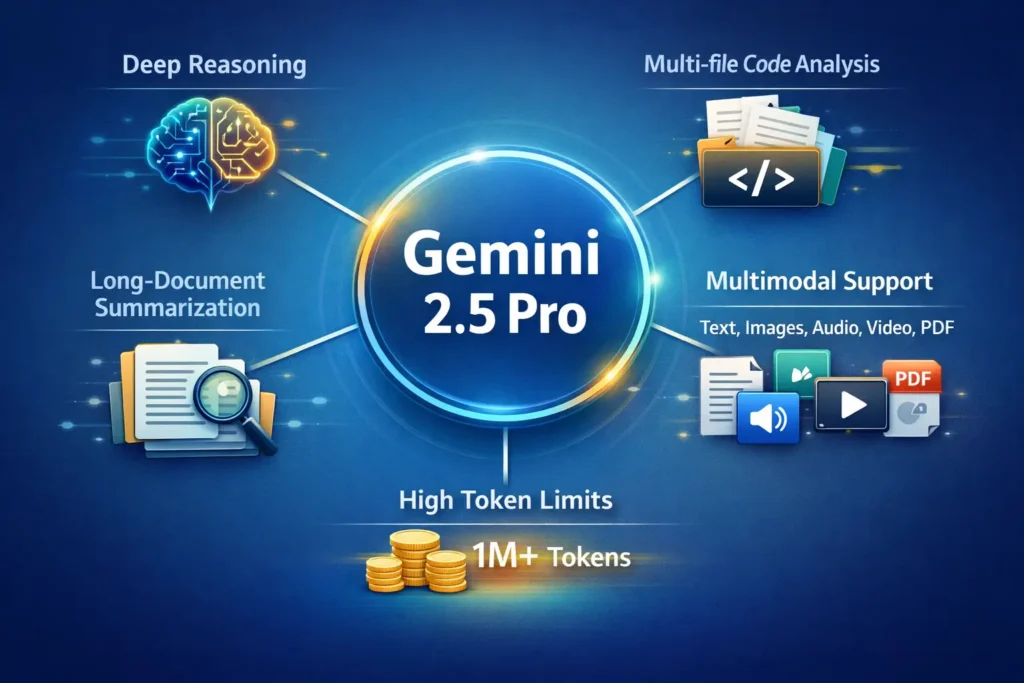
- Input (context) token limit: Up to 1,048,576 tokens for Pro-class configurations (endpoint-dependent).
- Output token limit: Up to 65,535 / 65,536 tokens in common Pro deployments (default output cap varies by endpoint).
- Multimodal inputs: Supports text, code, images, audio, and video (availability depends on endpoint and deployment).
- Best for: Deep code-base refactors, legal and long-document summarization, long-context Q&A, and multimodal research assistants.
Short practical note: Those huge token numbers are Pro-class reference values. Availability and caps can differ by endpoint (Gemini Developer API vs Vertex AI), region, and your subscription or enterprise quota — always verify the exact deployment details in the console or model reference page for the project you will use.
Gemini 2.5 Pro — The AI Thinking Bigger Than You Imagine
At a high level, Gemini 2.5 Pro is a “Thinking” Model in the Gemini family — designed and tuned to carry out multi-step, high-fidelity reasoning across long contexts and varied modalities (text, code, images, audio, video). It’s intended for workloads where correctness, context retention, and the ability to synthesize across many documents or files are primary concerns (rather than the absolute lowest latency per token).
Quick specs
- Stable GA id: Gemini-2.5-pro.
- Maximum input/context tokens: 1,048,576 tokens (Pro-class reference; confirm per endpoint).
- Output token limit: Typically up to 65,535 / 65,536 tokens (defaults can vary).
- Modalities: Text, code, images, audio, video (support varies by endpoint and deployment).
- Primary use-cases: deep-code assistance, document understanding and summarization at scale, multimodal research agents, and production jobs that require continuity across a very long context.
Why Gemini 2.5 Pro Could Outsmart Everything You Know About AI
Stronger reasoning and structured output: Pro models are trained and tuned for multi-step logic, complex instruction following, and producing structured outputs (JSON, diffs, patch lists). That makes them ideal for serious engineering assistants, legal summarization where internal consistency matters, and multi-stage analytical tasks.
Bigger context windows: The Pro family’s large context windows let you keep whole codebases, long legal briefs, or massive datasets “in memory” during a single request — this dramatically simplifies workflows that otherwise require external RAG orchestration.
Multimodal fusion: Pro variants accept and reason across mixed media: text + images + audio/video, where the endpoint exposes that functionality. This is valuable for multimodal research assistants and workflows where diagrams, screenshots, or recorded meetings complement textual material.
When to choose Pro vs Flash:
- Pick Pro when you need correctness, long-context reasoning, and structured outputs. Use it for heavy-lift backend jobs, batch analysis, or where human review is planned.
- Pick Flash when latency, throughput, and cost are top priorities (interactive chat UIs, consumer-facing front-ends). Flash is optimized for speed and cost-efficiency at scale.
Gemini 2.5 Pro Limits — Can Your Systems Keep Up?
Operational rule: Pin the explicit GA id gemini-2.5-pro in production. Aliases exist (e.g., gemini-pro-latest), but they can point to updated checkpoints and produce silent behavior changes. Pinning guards your runtime against regression and drift.
Documented Numbers you’ll commonly see:
- Input token limit: 1,048,576 tokens (Pro-class reference).
- Output token limit: ~65,536 tokens (default output cap in many Pro deployments).
Reality check: UI pages or consumer subscription screens sometimes report smaller caps for consumer or preview tiers — always verify the model details in the Developer API docs or the Vertex AI model page for the actual instance you plan to deploy. Endpoint specifics and region-based availability can change the effective limits.
Model IDs Exposed — Is Your AI Secretly Changing?
What you’ll see in the wild
- Explicit GA id: Gemini-2.5-pro — stable, predictable, reproducible. Use this to pin production workloads.
- Alias names (e.g., gemini-pro-latest) — convenient for automatically getting the newest checkpoint but risky if you rely on exact behavior. Use aliases in experimentation only, and gate their updates with regression checks.
Recommendation
- Production: pin gemini-2.5-pro.
- Dev/Experimentation: Use *-latest aliases only if you accept drift and have CI tests that gate production rollouts.
Practical CI pattern for alias safety
- Maintain a canonical prompt suite: A small set of prompts covering formatting, edge cases, hallucination checks, and logic tests.
- Automatically run this suite when an alias updates (or on a schedule) and compare outputs to the known-good baseline.
- If the alias introduces regressions, hold the alias in staging and pin the previously validated GA id in production until issues are resolved.
Vertex AI note
If you run via Vertex AI, follow the Vertex conventions: regional endpoints, deployment resources (replicas, autoscaling), IAM roles, and billing. The Vertex model page lists regional deployment details and the model’s context window for the publisher model garden entry you select.
Pro Tips Revealed — Are You Using Gemini 2.5 Pro the Right Way
Production checklist:
- Pin model id in configuration files (avoid *-latest for production).
- Add canonical regression prompts to CI to detect drift.
- Chunk long documents (with overlap), run staged summarization, and use the model for the unification step.
- Cache deterministic outputs (e.g., spec generation or canonical API responses) to reduce repeated Pro calls.
- Use function calling or structured outputs (JSON) when you need strictly machine-parseable results.
Cost control patterns
- Route non-critical interactions to Flash — reserve Pro for heavy-lift or high-value tasks.
- Implement feature flags to route requests by importance.
- Batch requests where practical, and simulate monthly cost using representative traces from staging.
Safety & Ground Truthing
- Add human-in-the-loop review for legal/medical/financial outputs.
- Use grounding (URL or search context) where supported to reduce hallucination. Vertex/GenAI features include grounding options and a limited number of “grounded prompts” under some pricing tiers (check your billing/pricing page for details).
Gemini 2.5 Pro Performance — What the Numbers Aren’t Telling You
What to Measure
- Task correctness on your proprietary data (not just leaderboards).
- Latency (median and 95th percentile) under expected traffic profiles
- Cost per successfully processed item
- Behavioral drift over time.
Benchmarking Gemini 2.5 Pro — Are You Measuring It Right?
- Define the tasks you care about (unit-test generation, cross-file refactoring, long-context QA).
- Publish prompts and evaluation scripts in your repo so runs are reproducible.
- Measure cost and latency alongside accuracy.
- Re-run periodically; model behavior and infrastructure performance can change.
Why reproduce benchmarks: public leaderboards and press can be informative, but they don’t reflect your data distribution, prompts, and production constraints. Re-run with your data and scoring to make a product decision.
“Upgrading to Gemini 2.5 Pro — Are You Risking Your Workflows
Step-by-step plan
- Audit current usage. Gather a list of model ids in configs, top prompts, CI tests, and request traces.
- Pin a test project to gemini-2.5-pro. Run canonical prompts and compare outputs to baseline.
- Measure latency & cost on realistic traces — Pro will often be higher-cost and potentially slower per token.
- Adjust timeouts & concurrency settings in your backend (Pro may need higher worker timeouts).
- Refactor prompts where necessary to tune verbosity and reduce hallucination.
- Roll out gradually using feature flags: 5% → 25% → 100% traffic. Monitor error metrics and user satisfaction continuously.
Pitfalls to watch
- Aliases causing silent changes — pin the model id.
- Token accounting mismatches — test per endpoint.
- Rate limit/resource exhausted errors — add backpressure or request quota increases when needed.
Gemini 2.5 Pro in Action — Real Tricks You Can’t Afford to Miss
Recipe: Multi-file Refactor Assistant
- Chunk repository into modules ≤ X tokens each (choose X based on testing).
- Provide a single index file that lists modules and short summaries.
- Ask Pro to propose refactor patches as structured JSON: {path, patch, reason}.
- Validate patches in CI by running unit tests.
Benefits: Pro keeps cross-file context and proposes consistent multi-file refactors.
Long-Document Summarization + Q&A
- Split the document into overlapping chunks.
- Generate per-chunk summaries.
- Merge summaries via a consolidation pass, asking for explicit citations to chunk IDs.
- Run a final Q&A pass against the unified summary and original chunk references.
Benefits: Reduces hallucination and provides a traceable citation trail.
Code Sssistant with Execution Validation
- Ask Pro to generate code and unit tests.
- Run tests in sandbox/CI.
- If tests fail, ask the model to patch failing areas and iterate.
Benefits: Automates a dev loop with human oversight and continuous validation.
Gemini 2.5 Pro Costs — Are You Paying More Than You Should?
Where to check pricing: Use the Developer API or Vertex AI pricing pages for production billing and quotas. Consumer app tiers (Gemini Advanced/Pro/Ultra) are not a substitute for production billing and often differ in rate limits or model availability.
Grounding and pricing nuance: Vertex pricing documentation sometimes notes free-grounded prompt quotas for certain models and charges beyond those thresholds — check pricing tables if you rely on grounded search or external context at scale.
Practical Advice
- Estimate costs using representative request traces from staging.
- Use Flash for high-volume front-ends, Pro for heavy-lift jobs behind feature flags.
- Plan for billing alerts and enterprise quota requests if you expect heavy, sustained usage.
Gemini 2.5 Pro Problems — Are You Falling Into These Hidden Traps?
- Symptom: Unexpected behavior after a model update
Cause: Using *-latest aliases.
Fix: Pin the GA id and re-run canonical tests. - Symptom: Token/context errors on big docs
Cause: Endpoint-specific token caps or payload construction errors.
Fix: Chunk + staged summarization + overlap. Test per endpoint. - Symptom: Costs are ballooning
Cause: Unchecked use of Pro where Flash would suffice.
Fix: Route by importance, cache outputs, batch calls. - Symptom: Resource exhausted / rate limit errors
Cause: Hitting enqueued token or batch quotas.
Fix: Add backpressure, smaller batches, or request quota increases.
Pro vs Flash — Which Gemini 2.5 Model Will Really Win
| Dimension | Gemini 2.5 Pro | Gemini 2.5 Flash |
| Best for | Complex reasoning, code, long docs | Fast chat, lower-cost interactions |
| Context window | Very large (Pro-class; up to 1,048,576 tokens) | Large but optimized for throughput |
| Latency | Higher on average | Lower — optimized for speed |
| Cost | Higher per token | Lower |
| Use cases | Code refactors, legal Summarization | Chatbots, consumer UI |
| Production advice | Pin explicit GA id | Use for high-volume front-ends |
FAQs
A: No. gemini-2.5-pro is an explicit GA id. Aliases like gemini-pro-latest may point to new checkpoints and can change behavior. Pin GA IDs in production.
A: Official docs list very large context windows for Pro-class models — examples show up to 1,048,576 input tokens and ~65,536 output tokens, but availability depends on endpoint/region. Confirm your deployment.
A: Use Pro for complex reasoning and long-doc analysis. Use Flash for low-cost, low-latency chat. A hybrid approach often works best.
A: Google’s Gemini API docs and Vertex AI quickstart pages are the official starting points. They include SDK examples and auth guidance.
Conclusion
Gemini 2.5 Pro is a powerful tool for heavy-lift tasks — code reasoning, long-document processing, and multimodal research. The single most important operational rule is: pin the GA model id (gemini-2.5-pro) in production and use *-latest aliases only in controlled testing. Verify token limits, pricing, and regional availability for the exact endpoint you plan to use (Gemini Developer API vs Vertex AI). Run reproducible benchmarks with your prompts, and add CI tests to detect drift. For most production stacks, a hybrid approach (Flash for front-ends, Pro for heavy-lift jobs) gives the best cost vs quality trade-off.
