

Introduction
Gemini-2.5-Flash If you run chatbots, realtime agents, document summarizers, or any high-volume AI pipeline, you need a model that balances inference fidelity, latency, and cost. This -centric guideGemini-2.5-Flash explains exact model identifiers, how Flash differs from Pro and Flash-Lite, production-ready code you can paste and run, a migration checklist, tuning heuristic.Gemini-2.5-Flash Read it as a single canonical piece developers, ML engineers, and product leads can use to make decisions and ship with confidence.
Quick Facts About Gemini-2.5-Flash Every Developer Must See
- Canonical model name: gemini-2.5-flash
- Positioning: Price-performance workhorse in Gemini 2.5 family — tuned for low latency and high throughput.
- Flash-Lite: Preview variant for extreme throughput and ultra-low cost; monitor changelogs for GA names.
- Long context: 2.5 family advertises very large token windows; prototype before building monolithic single-request designs.
- GA timeframe: Gemini 2.5 family (Pro & Flash) announced mid-2025; check vendor resources for the precise GA timeline for each region/endpoint.
Gemini-2.5-Flash Explained: The AI Model You Need to Know
gemini-2.5-flash is an inference engine variant designed to maximize tokens-per-second throughput for mid-complexity reasoning tasks. Architecturally, it trades a fraction of the highest-tier reasoning capacity (what Pro targets) for consistent, optimized latency and lower compute per token. So It still supports internal stepwise reasoning (think of it as controlled intermediate “thinking” or latent chain-of-thought) so that for most product tasks — multi-turn chat, summarization of medium-length documents, classification and short generation — Flash offers deterministic, cost-effective behavior..
Why Gemini-2.5-Flash Matters: Key Reasons You Can’t Ignore
- Price-performance: Flash is tuned to give acceptable generative quality and reasoning at a lower compute cost than Pro, which matters for high-volume inference.
- Latency & throughput: The model is engineered for lower per-request latency at short-to-medium context sizes, and for more stable p95/p99 behavior under load. That’s crucial for live chat, agents, and synchronous APIs.
- Controlled “thinking”: Flash exposes tunable internal reasoning steps (a managed chain-of-thought mechanism) so you can get better answers without always paying Pro-tier compute. In practice, this means you can enable limited multi-step reasoning budgets for planning/agent tasks.
- Large context support: It supports large windows for retrieval-augmented generation (RAG) and single-shot summarization of many documents. But large contexts increase cost and latency — use chunking + summarization.
- Operational stability: Flash variable compute and optimized lower GPU/TPU allocations make it easier to scale horizontally for many concurrent users.
Flash vs Pro vs Flash-Lite — Which Gemini-2.5 Model Wins?
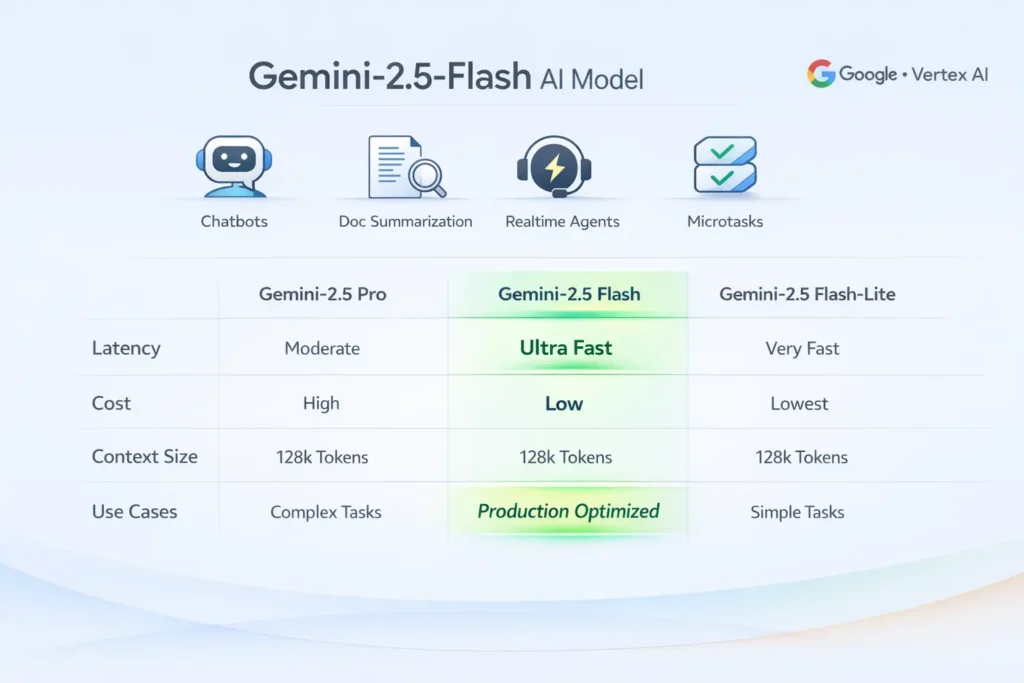
| Dimension | gemini-2.5-pro | gemini-2.5-flash | gemini-2.5-flash-lite (preview) |
| Primary goal | Peak reasoning & precision | Best price-performance for production | Extreme throughput & lowest cost |
| Best for | Research, deep code analysis, complex chain reasoning | Chatbots, realtime agents, high-traffic product surfaces | High QPS microtasks (classification, tiny prompts) |
| Latency | Higher (but high fidelity) | Lower (fast median & tail) | Lowest (sacrifices reasoning) |
| Cost | Highest | Mid | Lowest |
| Thinking support | Yes (full) | Yes (tunable) | Limited or optimized for microtasks |
| Context window | Very large (some configs) | Large (practical) | Large but constrained for efficiency |
Decision flow:
- Need the best possible reasoning accuracy? → Pro.
- Need fast, lower cost, good reasoning for product? → Flash.
- Need extreme throughput and minimal per-request compute for microtasks? → Flash-Lite (preview).
Gemini-2.5-Flash API Model IDs — Exact Names You Must Use
Why this Matters:
Model identifiers route to specific compute and billing tiers. A single character typo can route to a different model, lead to deploy failures, or cause unexpected cost.
Canonical IDs:
- gemini-2.5-flash — Flash workhorse.
- gemini-2.5-pro — Pro high-reasoning model.
- gemini-2.5-flash-lite or gemini-2.5-flash-lite-preview-<date> — Flash-Lite preview variants (watch changelogs).
Where to confirm IDs programmatically:
- Vendor model list endpoint (Gemini API / Google AI).
- Vertex AI Model Garden in Google Cloud Console.
- Google AI Studio model listing.
Practical tip: Always programmatically fetch the model listing at startup and validate that the target model ID exists and is not deprecated. Keep a small guard process to alert on ID changes.
Tokens, Context, Cost & Latency — What Gemini-2.5-Flash Really Costs
Token limits & the million-token headline: Vendors advertise very large context windows for some 2.5 variants (approaching 1,000,000 tokens in specific configurations). Practically, this is powerful for long-document summarization or big retrieval contexts, but it comes with linear (or worse) cost and latency. Always prototype.
Costs scale with token counts & compute tier: Longer input and larger model budgets increase cost. Treat token usage as a first-class metric in your system.
Latency considerations: As context grows, latency increases nonlinearly. Flash is tuned to be lower latency than Pro at comparable context sizes, but extreme contexts will still increase p95/p99.
Chunk + summarize pipeline:
Break documents into chunks, produce concise chunk summaries, then synthesize. This reduces peak token counts and distributes compute.
- RAG (retrieval-augmented generation): Retrieve top k passages and pass only the most relevant ones to the model instead of the full corpus.
- Hybrid architecture: Use Flash for the user-facing path (fast responses) and escalate to Pro for background validation or critical sections (e.g., legal-grade answers).
- Semantic caching: Cache outputs for semantically similar prompts (vector hash caches) to avoid repeated calls.
- Fallback routing: Route heavy or long requests to batch jobs or offline processors, and short requests to Flash.
Migration & Production Checklist — Don’t Miss a Step
- Confirm model IDs programmatically. Fetch the model list before deploy. Don’t hardcode values without verification.
- Define SLAs and budgets. Establish p50/p95/p99 latency goals and cost per 1M tokens.
- Prototype with representative payloads. Measure quality, token usage, and latency with your actual prompts. Compare Flash vs Pro.
- Implement retries & circuit breakers. Use Exponential backoff and failover to cheaper/cached responses if timeouts spike.
- Design context strategy. Choose chunk/summarize or RAG patterns and instrument token counts in logs.
- Grounding & retrieval. Add retrieval layers or external tools to reduce hallucination risk.
- Monitor & observability. Track token consumption, errors, latencies, and quality drift. Surface top-consuming prompts for optimization.
- Security & governance. Mask PII before model calls. Use private networks (VPCs) when required by policy.
- Cost control & throttling. Add per-user quotas, per-prompt token caps, and budget alarms.
- Canary & A/B testing. Route a small share of traffic to Flash and measure regressions vs Pro.
- Disaster & fallback planning. Maintain a cold-standby cheaper model and static content fallback for outages.
- Automate model lifecycle checks. Alert when models are deprecated or when pricing changes materially.
Performance & Tuning Tricks Every Dev Should Know
- System prompts: Keep them short and stable. Every extra token adds cost.
- Temperature selection: 0–0.3 for deterministic replies; 0.4–0.7 for creative or exploratory responses. Lower temperature reduces sampling variance (better for production tasks).
- Thinking budgets: If the model supports it, tune internal reasoning steps to trade compute for accuracy. Use minimal budgets for routine tasks.
- Streaming: Use streaming responses to improve perceived latency and start token rendering while compute continues.
- Token accounting: Log input, output, and total tokens per call. Use these metrics for budgeting and optimization.
- Vector caches: Keep a fast vector cache for repeated queries and near-duplicate prompts (helps reduce API hits).
- Batching & micro-batching: For offline/async work, batch many prompts to amortize overhead. For real-time, keep requests small.
- Load testing: Measure p50, p95, p99 latencies and token costs under 1x, 5x, 10x expected load.
- Fail closed vs fail open: Decide whether to return cached/heuristic responses (fail open) or a controlled error (fail closed) when the model is unavailable. Choose based on product safety needs.
Benchmark Plan & CSV Template — Test Like a Pro
What to Measure:
- Accuracy vs human labels (task dependent)
- Latency: mean, p50, p95, p99 at target RPS
- Token counts per request (input + output)
- Cost per 1,000 requests
- Failure / timeout rates
How to Run:
- Select 50–200 representative prompts per job.
- Run each prompt across gemini-2.5-pro, gemini-2.5-flash, and Flash-Lite (if available).
Score outputs via human raters or automated metrics (BLEU/ROUGE/custom rubrics). - Run load tests at incremental traffic levels..
FAQs Gemini-2.5-Flash
A: Use the documented model ID such as gemini-2.5-flash. Always confirm exact spelling in your account console (Gemini API or Vertex).
A: Google advertises very large contexts for some 2.5 models. Effective limits and behavior depend on the variant and platform. Prototype before designing a single huge-request architecture.
A: Choose Pro when accuracy and complex stepwise reasoning matter. Pick Flash for production with many users where you need a good balance of speed, quality, and cost. Use Flash-Lite for extreme throughput microtasks (if its preview works for you).
A: Yes — the 2.5 family includes image variants like gemini-2.5-flash-image for image generation and editing. Check AI Studio and Vertex for exact identifiers and policies (SynthID/watermarking).
A: Quarterly is a reasonable cadence. Re-run after any vendor announcements or pricing changes.
A: Yes — Flash is typically available in the Gemini API, Vertex AI (Model Garden), and Google AI Studio. Confirm availability in your console.
Conclusion Gemini-2.5-Flash
Gemini-2.5-Flash is the pragmatic production choice when you need cost-effective, fast, and capable NLP inference at scale. Use Pro where maximum reasoning accuracy and large budgets are necessary; use Flash for day-to-day product surfaces; evaluate Flash-Lite for ultra-high throughput microtasks.
