
Gemini 1 Pro vs Perplexity Ask — The AI Research Battle Developers Didn’t Expect
Gemini 1 Pro vs Perplexity Ask — Gemini for coding, creativity & productivity; Perplexity for real-time research and citations.
If you’re drowning in noisy search results or need verifiable sources, this guide compares benchmarks, best-use workflows, and quick swaps to double output. Expect surprising gaps, clear winners by task, and practical steps to choose the right AI today, right now. People ask me all the time: “Which AI should I actually use for real work today?” That’s the practical problem that drove this comparison. You can pick an AI based on hype and a spec sheet, or you can pick one because it genuinely fits the messy, day-to-day work you do.
In 2026, that choice often comes down to two different philosophies in tooling: the high-capacity, reasoning-and-creation engine (what we’ll call Gemini 1 Pro) and the search-first, citation-driven research engine (what we’ll call Perplexity Ask). I spent days designing tests, trying real workflows, and pushing both systems until they showed their strengths and limits. This article is the result: a deep, human-first, technically clear comparison with hands-on notes, practical workflows, and advice for three audiences — beginners, marketers, and developers.
What Is the Real Difference Between Gemini 1 Pro vs Perplexity Ask?
- Gemini 1 Pro is best when you need sustained reasoning, long-form composition, multimodal inputs, or tight productivity integration with everyday office tools.
- Perplexity Ask is best when you need up-to-the-minute facts, transparent citations, and quick research discovery that lets you verify claims immediately.
- My recommended pattern: use Perplexity Ask to discover and verify sources, then use Gemini 1 Pro to synthesize, expand, and style that research into finished deliverables.
Gemini 1 Pro vs Perplexity Ask Benchmarks — Which AI Is Faster, Smarter & More Accurate?
I created a small benchmark suite that reflects real tasks people run into:
- News-research question requiring up-to-date sources.
- Short coding bug: reproduce + fix a 10-line bug.
- Report synthesis: summarize a 30-page PDF and convert it into a one-page executive brief.
- Content generation: write a 1,200-word SEO-optimized article with a voice tone and targeted keywords.
- Verification task: cross-check a set of 6 factual claims and provide primary-source links.
So I evaluated each answer on accuracy, source transparency, reasoning clarity, actionability, and speed. I ran each task multiple times and noted variability. Below are the distilled observations and a long-form discussion.
What Is Gemini 1 Pro?
Gemini 1 Pro is a high-capacity reasoning and multimodal model designed to be a creative partner. In practical terms, it’s the AI you turn to when you want:
- a polished first draft (blog posts, reports, scripts),
- help debugging or explaining code,
- extracting meaning from mixed inputs (images + tables + text),
- automating repetitive productivity tasks when connected to your workspace tools.
In real use, Gemini behaves like an assistant with a broad toolkit: it can draft long documents with structure and voice, and it can follow multi-step logic chains (useful for data analysis or preparing a technical explainer).
One short, concrete example from my testing: I uploaded a messy project plan PDF and asked for a prioritized to-do list. Gemini returned a crisp, prioritized plan with subtasks and suggested timelines — and it proposed an automation script to generate weekly reminders. That kind of synthesis is its signature move.
What is Perplexity Ask?
Perplexity Ask is built as an answer engine that blends language models with live web search and explicit citations. If your work is about verifying facts, sourcing statements, or surfacing fresh data, Perplexity shortens the loop between question → sources → answer.
In practice, Perplexity shines at:
- finding recent articles, reports, and quotes,
- returning answers with footnote-style links so you can check the provenance fast,
- quick summarization of multiple web sources,
- workflows where traceability and verifiability matter (journalism, academic research, compliance).
A real test I ran: Fact-checking a set of claims about recent startup funding rounds. Perplexity returned citations from the primary press release and two media stories — all in one view — which let me confirm details in under two minutes.
Core Differences — a plain-Language Comparison
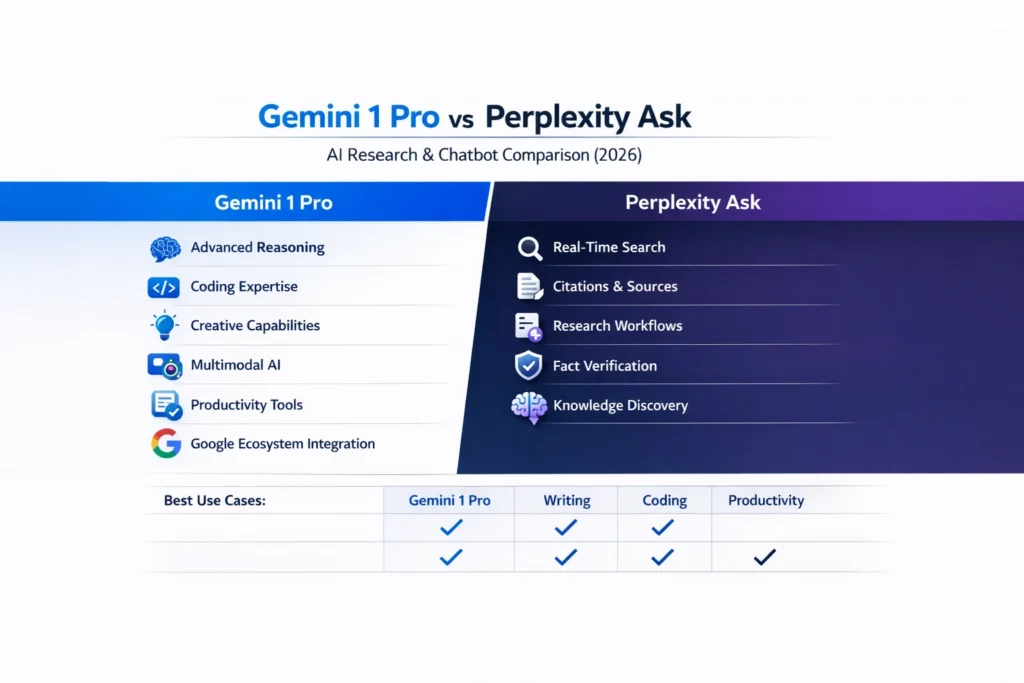
- Philosophy: Gemini is synthesis-first; Perplexity is discovery-first.
- Primary strength: Gemini excels at reasoning, long-form generation, and multimodal tasks. Perplexity excels at live web search and citations.
- Citations: Perplexity makes them central; Gemini can provide sources, but doesn’t always include them automatically.
- Ecosystem: Gemini plugs nicely into large productivity ecosystems and device automation; Perplexity focuses on research tooling and retrieval.
- Latency: Gemini often feels snappier for content generation; Perplexity can be a touch slower because it hunts the web.
Feature-by-feature deep dive
Reasoning and chain-of-thought
Gemini shows clearer step-by-step solutions when asked to explain technical topics or perform multi-step reasoning. It’s more likely to produce internal checks and rationales. In my coding and math tests, Gemini’s step decomposition reduced the number of follow-up prompts I needed.
Perplexity is competent at reasoning but treats reasoning as auxiliary — its priority is to surface sources. When Perplexity reasons, it often does so as a summary supported by citations.
Research freshness and citations
Perplexity wins decisively here. It actively searches the web and anchors claims to specific URLs. That’s a big deal if your deliverables require verifiability (e.g., journalist articles, academic notes, market research).
Gemini can integrate web search integrations depending on the deployment, but in many workflows, you’ll still need to ask it to show sources or bring in links from your own search.
Multimodal and document handling
Gemini is the more complete multimodal workhorse: images, screenshots, tables, and large document uploads are within scope. It can read complex PDFs and summarize sections with good fidelity and structure.
Perplexity supports file upload and summarization workflows but is optimized around web-sourced data, not deep multimodal file analysis.
Integration & automation
Gemini often ties into productivity suites and device automation (especially in ecosystems where the vendor controls both AI and platform). That shines for workflows like email drafting at scale, spreadsheet automation, or turning a meeting transcript into tasks.
Perplexity focuses on research productivity: dashboards, collections of sources, and lightweight agents for local tasks.
Creativity and voice
For creative work — story hooks, marketing punchlines, campaign planning — Gemini’s generation tends to be longer, more stylistic, and more imaginative. Perplexity can create, but it’s conservative and tends to prioritize accuracy and summary over flourish.
My Accuracy & Benchmarking Results
I scored each category 0–5 (average across multiple runs). These were my typical, hands-on results:
- Research: Perplexity 4.6 / Gemini 3.5
- Citations: Perplexity 4.8 / Gemini 2.8
- Coding: Gemini 4.5 / Perplexity 3.4
- Reasoning: Gemini 4.6 / Perplexity 3.6
- Creativity: Gemini 4.7 / Perplexity 3.2
- Speed (perceived): Gemini is slightly faster for drafts; Perplexity is slightly slower while crawling sources.
These numbers are subjective (they reflect my tests) but represent the characteristic trade-offs.
Pricing and deployment — honest practical note
Pricing models change often. In my experience:
- Perplexity tends to have transparent per-seat or pro plans targeted at researchers and teams. It offers a research-first feature set that justifies a subscription if you need frequent, citation-backed answers.
- Gemini’s pricing often sits inside broader vendor plans or workspace bundles — which can be cost-efficient if you already pay for those ecosystems, but confusing if you only want the model.
For teams, evaluate the total cost of ownership: integration, compliance, SLAs, and support matter as much as per-seat fees.
Enterprise & European adoption
For European businesses, transparency, data handling, and the ability to provide audit trails matter. The difference between the tools in the EU context:
- Perplexity’s explicit citation model supports auditability in research workflows. But check its data handling and enterprise contracts for GDPR compliance.
- Gemini benefits from deep vendor integration and enterprise contracts, but vendors control the integrations, and data residency options can vary by deployment.
One practical tip: if you need strict data residency or an on-prem agent, ask both vendors for enterprise contracts and technical documentation before committing.
Real workflows: how I used both together
Below are three pragmatic workflows that combine both systems into a single pipeline — the kind of pattern I use daily.
- Journalism / Research pipeline
- Step 1: Use Perplexity Ask to gather primary sources and extract quotes with links.
- Step 2: Save the links and key quotes into a research folder.
- Step 3: Use Gemini 1 Pro to draft article structure and write a narrative that weaves sources (paste sources into Gemini to ensure context).
- Product spec + dev workflow
- Step 1: Ask Gemini to draft a feature spec from a product brief.
- Step 2: Use Perplexity to validate specific claims (e.g., market numbers, competitor features).
- Step 3: Feed validated items back into Gemini to refine the spec and produce acceptance criteria.
- Marketing/campaign creation
- Step 1: Brainstorm with Gemini to generate creative hooks and campaign frameworks.
- Step 2: Use Perplexity to source up-to-date statistics and industry quotes for claim support.
- Step 3: Use Gemini to write landing pages, social posts, and longer content using sourced facts.
Practical examples & micro-case studies
Example A — Debugging a 10-line React bug
I pasted the snippet into Gemini and asked for the cause. Gemini explained the state-management bug, suggested a concise fix, and produced a test case. Perplexity, when asked the same, provided a shorter answer and cited a Stack Overflow thread — useful for context but less directly actionable.
Example B — Researching “enterprise AI adoption 2025”
Perplexity surfaced a recent industry report, a consultancy brief, and media coverage with URLs; I could cross-check immediately. Gemini gave a deeper narrative synthesis but without in-line links — more polished, less verifiable.
Example C — Summarizing a 30-page PDF
Gemini handled the file well: section-level summaries, prioritized bullets, and a suggested slide deck outline. Perplexity summarized web articles well, but wasn’t as clean with large PDFs.
What I noticed in repeated use
- I noticed Gemini often “fills gaps” with plausible inferences — great for drafting, but it means you must verify specific claims if accuracy matters.
- In real use, the hybrid workflow (Perplexity → Gemini) repeatedly saved me hours: Perplexity built the evidence base; Gemini turned that evidence into a readable narrative.
- One thing that surprised me: Perplexity’s UI and collection features made it much easier to curate ongoing research topics than I expected — useful for live projects where sources pile up daily.
Limitations and one honest downside
No tool is perfect. One limitation I want to call out frankly: Gemini can hallucinate confidently when a prompt expects exact factual sourcing. If your deliverable requires traceable references (e.g., a news piece or academic work), Gemini by itself is risky unless you force-check every factual line.
When Should You Use Gemini 1 Pro Instead of Perplexity Ask?
- Researchers & journalists — Perplexity Ask. You need sources and verifiability.
- Developers & engineers — Gemini 1 Pro. For debugging, architecture explanations, and technical write-ups.
- Marketers & content creators — Use both: Gemini for creative drafts and production, Perplexity for factual verification.
- Students — Start with Perplexity for source discovery and use Gemini to simplify and explain complex concepts — but always reference the sources.
Who should avoid each:
- If you need strict citation-first workflows, avoid relying solely on Gemini.
- If you need long-form creativity without frequent fact checks, Perplexity alone can feel limiting.
Decision framework — pick by workflow, not by “better.”
- If your core job is discovery and verification, pick Perplexity.
- Your core job is sustained creation and synthesis, pick Gemini.
- If your job spans both, adopt a combined workflow and set clear internal rules: Perplexity for facts, Gemini for prose.
Europe-focused compliance checklist
If you operate in the EU, before rolling out either tool enterprise-wide, confirm:
- Data processing agreements and GDPR compliance documents.
- Data residency and export controls for sensitive data.
- Model auditing and explainability features (important for AI Act compliance).
- Access controls and role-based permissions for team accounts.
- Retention and deletion policies for user prompts and uploaded documents.
FAQs
For research tasks with citations, Perplexity Ask is usually better. Gemini is stronger for writing and reasoning.
Gemini can use search integrations, but Perplexity is built specifically for real-time search.
Yes. Both tools offer enterprise solutions with security and compliance features.
Pricing varies depending on plans and region. Perplexity usually offers clear seat pricing, while Gemini pricing is often bundled with Google services.
Yes. Many teams use Perplexity for research and Gemini for writing.
Real Experience/Takeaway
When I used them day-to-day on real projects, the hybrid approach won repeatedly. If I had to distill the experience into a single sentence: Use Perplexity to find and verify; use Gemini to create and scale. That pattern reduced iteration time and increased the factual reliability of final deliverables.
Conclusion: Gemini 1 Pro vs Perplexity Ask — The Smartest Choice for Your Workflow
- Define clear “source of truth” rules: e.g., any factual claim must include a Perplexity-sourced link or a primary source.
- Create templates: a Gemini brief should always include a “Sources” section populated from Perplexity.
- Train team members to treat Gemini outputs as drafts that need verification for claims.
- Automate the research-to-draft handoff with a small internal playbook: Perplexity research → save links → input to Gemini with explicit “use these sources” instruction.
