
Introduction
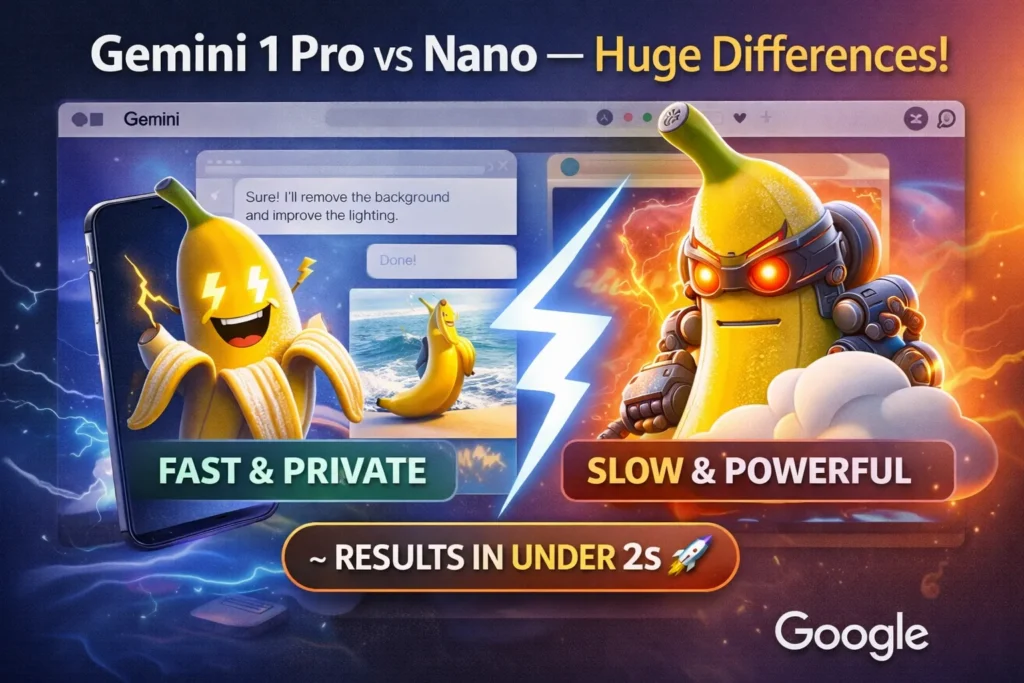
Gemini 1 Pro vs Gemini 1 Nano can transform your AI workflow. In just minutes, achieve faster responses, better reasoning, and privacy-first results. Explore both models, prototype instantly, and see real-world performance! Perfect for mobile or production tasks, this guide helps you choose the right AI efficiently. Choosing an AI model is an engineering and product-design decision, not just a quality-of-text contest. From an NLP systems perspective, this decision maps onto tradeoffs in compute topology (on-device vs cloud), model capacity (parameterization and context window size), inference latency, quantization & compression strategies, data governance, and operational cost per inference. Google’s Gemini family is intentionally bifurcated to cover this design space: Gemini 1 Nano is an efficiency-first, quantized variant engineered for on-device inference via Android’s AICore/NNAPI stacks; Gemini 1 Pro is a larger, cloud-hosted variant available through Vertex AI / Gemini API that supports expanded token windows, richer multimodal inputs, and tool orchestration.
This pillar article reframes the product decision in NLP terms: architecture, tokenization and context management, latency budgets, quantization tradeoffs, memory and NPU utilization, retrieval-augmented generation (RAG) integration patterns, telemetry and compliance boundaries, and cost modeling for tokenized workloads. It gives practitioners concrete experiments to run, telemetry to capture, benchmarks to compare, and a migration checklist for hybrid deployments. Wherever specifics are time-sensitive (model IDs, quotas, pricing), I point you to primary docs so you can verify them in your release window. Read this to make a practical, reproducible choice: prototype, measure, and pick based on empirical data.
Gemini 1 Pro vs Nano — Decide the Best in Half a Minute!
- Choose Gemini 1 Nano for ultra-low-latency on-device inference, offline-first UX, and stronger device-local privacy when you need quick image edits, instant assistant responses, or local captioning/filters. Nano uses quantization and NPU acceleration via Android AICore/NNAPI to meet tight latency budgets.
- Choose Gemini 1 Pro for server-side workloads requiring large-context reasoning, deep multimodal pipelines (many images, audio, or video), and enterprise integration (Vertex AI tooling, IAM, logging, and predictable token billing). Pro enables long-window transformers, retrieval-augmented flows, tool invocation, and deterministic scaling.
Most pragmatic path: A hybrid architecture — Nano for front-line, interactive features and Pro for heavy-lift batch or server-side tasks.
Gemini 1 Pro vs Nano — What Makes Each AI Tick?
Gemini 1 Nano
A compact, efficiency-oriented Gemini variant optimized for on-device inference. It’s been quantized and architecturally tuned to run within constrained memory and compute budgets on mobile NPUs via Android’s AICore service and NNAPI. From an NLP perspective, Nano prioritizes throughput and latency by reducing parameter precision, shrinking activation sizes, and optimizing attention windows for short-context, assistant-style tasks. Best for instant UIs, offline editing, and privacy-sensitive local operations.
Gemini 1 Pro
A cloud-hosted, high-capacity Gemini variant available via Vertex AI / Google AI Studio / Gemini API. Pro targets workloads needing substantial context windows, advanced multimodal fusion, complex chain-of-thought-style reasoning, or integration with backend services and tools. It supports larger token windows, higher numerical precision, and pipeline tooling for embeddings, RAG, and tool orchestration.
Gemini 1 Nano vs Pro — Technical Face‑Off & Specs Showdown
Note: Model names, token limits, and pricing change often. Treat this as a snapshot and verify model IDs and pricing in Google’s docs before shipping.
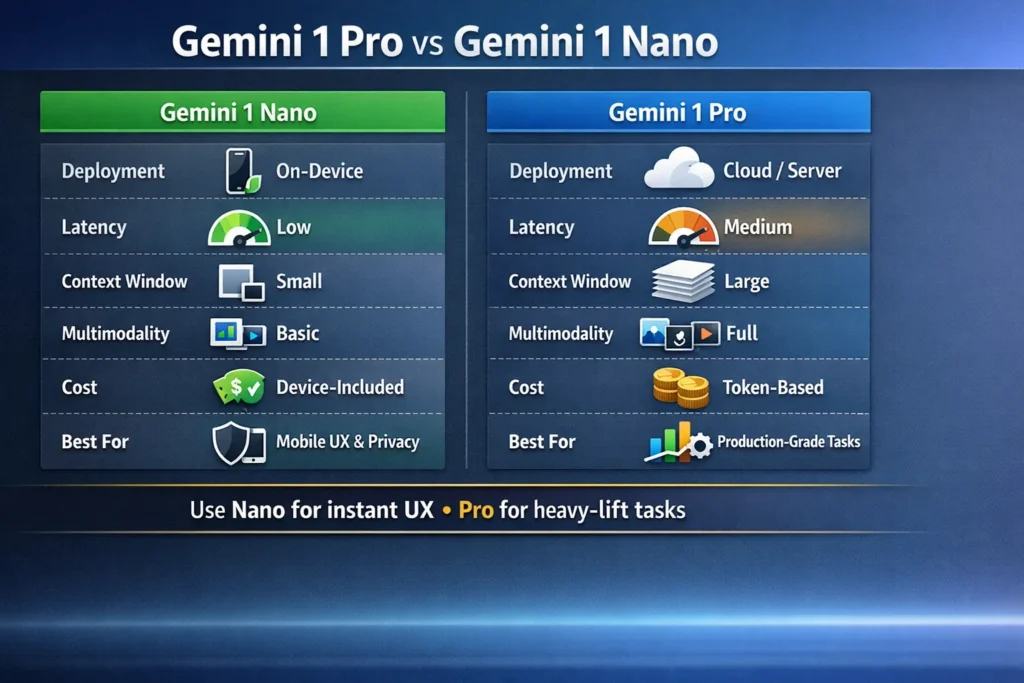
| Dimension | Gemini 1 Nano | Gemini 1 Pro |
| Primary deployment | On-device via Android AICore/NNAPI | Cloud (Vertex AI / AI Studio / Gemini API) |
| Typical use cases | Instant assistant UX, quick image edits, offline flows | Long documents, heavy multimodal pipelines, server-side code/research |
| Latency | Very low (local NPU inference; ms-range) | Higher (network + cloud processing; 100s ms to seconds) |
| Context window | Small (device-constrained windows; optimized chunking) | Very large (Pro variants support large/huge windows) |
| Multimodal support | Image + text optimized for quick edits (low-res/high-efficiency) | Full multimodal: images, audio, video, structured tool outputs |
| Cost model | Device-included (no token billing for local inference) | Token-based billing via Vertex/API |
| Access | Android AICore / Pixel features | Vertex AI, Google AI Studio, Gemini API |
| Best for | Privacy-first mobile features, fast UX | Production-grade services, research, analytics |
NLP notes: Nano often uses smaller attention spans and fixed, well-tuned prompt patterns. Pro variants allow multi-stage RAG, long-context transformers with sliding-window attention, and model composition (chain-of-thought or tool pipelines).
Real‑World AI Showdown — Speed, Scope & Multi‑Input Power
Latency: Nano wins
Because Nano performs inference locally and exploits device accelerators (NPUs via NNAPI/AICore), it offers near-instant responses for short prompts and on-the-fly image operations. For interactive UX, this reduces perceived latency (time-to-first-byte for results) and increases retention. From a systems view, low-latency on-device inference reduces round-trips and network jitter, and allows optimistic UI updates (partial outputs, progressive decoding).
What to measure (Nano):
- Cold vs warm model load time (ms).
- Inference latency (median, p95) for common prompts.
- Energy usage (mJ per inference) and thermal throttling over long sessions.
- Memory footprint and swap rates.
Large Context, Smarter Decisions — Where Pro Pulls Ahead
Pro supports larger token windows and often higher numerical precision, enabling long-form summarization, multi-document synthesis, and complex code analysis. Architecturally, larger models maintain more internal state across attention layers and allow longer cross-attention across documents; Pro can be combined with retrieval-augmented generation to scale beyond the raw window size.
What to Measure (Pro):
- Latency vs input token length (ms).
- Throughput (requests/sec) under realistic concurrency.
- Cost per request given typical input/output tokens.
- Accuracy/utility for chain-of-thought tasks vs distilled variants.
Nano vs Pro: Who Handles Text, Images & More?
- Nano: tuned for device-friendly image operations — fast segmentation, quick background removal, captioning, or small image-to-text tasks. Nano is designed to produce outputs optimized for immediate display and typically uses lower-resolution fusion to keep inference cheap.
- Pro: built for heavy multimodal payloads — many images, audio tracks, and video frames. Pro supports structured outputs for pipelines (JSON, tool calls), integrates with orchestration systems, and is suited for generating high-fidelity media or multi-document explanatory outputs.
Developer Access & Cost Explained — Nano vs Pro
How Nano Affects Cost
End-user cost: On-device inference is effectively “device-included” — there’s no per-request token billing to Google for local Nano runs. This dramatically lowers the marginal cost for high-frequency features (captioning every photo, instant filters).
Developer costs: Shift from per-request billing to engineering and device support costs: compatibility testing across SoCs and NPUs, handling different NNAPI driver behaviours, managing thermal and battery budgets, and a slower update cadence tied to OS-level distribution.
Operational implications:
- Fewer cloud costs but increased QA matrix complexity.
- Need for robust telemetry that respects user privacy to measure feature reliability.
Gemini Pro Pricing — How Your Tokens Really Add Up
Gemini Pro is billed via tokenized pricing on the Vertex AI / Gemini API. Everything is metered by input and output tokens, and advanced features (image/audio inputs) may carry extra fees. There are quotas, rate limits, and reserved capacity constructs.
Practical pricing tip (simulation)
Monthly cost ≈ (avg input tokens × requests/day × days × input_unit_cost) + (avg output tokens × requests/day × days × output_unit_cost) + image/audio fees + margin
Model your token traffic and build cost alerts. Use distilled or flash variants for high-throughput paths.
Nano Privacy Secrets — Why On-Device AI Protects You
Local Processing Reduces Surface Area
On-device inference keeps raw user data, especially images and private text, on the device. This reduces exposure to cloud logging, cross-account data leaks, and server-side retention policies. From a compliance perspective, local inference simplifies adherence to data residency constraints and reduces scope for certain regulatory reviews.
Tradeoffs and Caveats
- Partial privacy: Local inference reduces server exposure but does not Automatically guarantee full privacy. Telemetry, analytics, crash reports, or optional cloud sync still create vectors where data can leave the device.
- Update cadence: On-device models update through OS-level services (AICore/Google Play), which can slow emergency fixes or model patches.
- Device heterogeneity: Model behavior can vary by SoC, NNAPI driver, and thermal profile, which affects consistency across users.
Engineering recommendations: Implement consent-first flows, local differential privacy (where appropriate), and a minimal telemetry footprint for debugging. Provide clear user settings for cloud-sync and opt-in features.
Nano or Pro? Decide Which Gemini Fits Your Needs
Pick Nano if:
- Your app requires sub-200ms responses for interactive features (camera-based edits, assistant suggestions).
- You need offline capability or local-only processing for privacy-sensitive data (medical images, private notes).
- You expect extremely high request counts per user (every photo gets captioned), and want to avoid cloud variable costs.
- You target Android devices with AICore and supported NPUs.
Pick Pro if:
- You need to process long documents, multi-file bundles, or run deep reasoning and RAG at scale.
- Your product is server-first (SaaS) and integrates with backend data stores and tools.
- You require advanced multimodal features (high-res images, audio/video processing) that exceed Nano’s device constraints.
- You need enterprise governance: IAM, logs, predictable scaling, and integration with cloud analytics.
Most teams: Start hybrid — ship Nano for instant UX and Pro for heavy-lift jobs. Build a cloud fallback for capability cliffs.
Benchmarks and Example workflows
Benchmarks vary by device, network, and model version. Use these examples as starting points and add profiling for your target environment.
How Nano Handles Image Editing on Your Device
- User captures photo.
- App constructs a compact prompt + metadata and sends it to Android AICore/Nano via NNAPI.
- Nano returns a fast edit (background removal, lighting tweak) in ~100–800 ms on supported NNAPI hardware (device-dependent).
- App displays edit; user confirms; optionally sync final asset to cloud.
Remove background from this selfie; apply soft studio lighting; preserve hair strands and natural skin tone.
Instrumentation to collect:
- P50/P95 latency for edit.
- Memory and CPU usage during a batch of 10 edits.
- Battery delta per 10 edits.
Performance Metrics You Should Track for Gemini AI
For Nano:
- Latency (ms): P50, P95. Cold vs warm starts.
- Frames-per-second for image processing: throughput for real-time features.
- Battery drain per N edits: energy profile.
- Model drift across devices: behavioral variance across SoCs.
For Pro:
- Average response time (ms): network + processing.
- Tokens per request & cost per 1k requests.
- Error/retry rates and timeouts.
- Concurrency saturation points (requests/sec).
Feature Showdown — Which Gemini AI Excels?
Where Nano excels
- Near-instant response times for compact inference tasks.
- Strong privacy posture for sensitive on-device data.
- Low marginal cost per interaction (no token billing).
- Excellent for feature discovery loops: users get immediate feedback.
Where Pro excels
- Large context windows and deeper reasoning capability.
- Rich multimodal fusion (audio, video, many images).
- Server-side orchestration: IAM, logging, monitoring, and integration with data pipelines.
- Predictable scaling and enterprise governance.
Nano to Pro: Step-by-Step Integration Guide
- Define the UX boundary
- Map flows by latency sensitivity and privacy constraints.
- Mark flows to the edge (Nano) vs the cloud (Pro).
- Benchmark on target hardware
- Nano: test Pixel and other Android devices; measure latency, activation memory, and thermal throttling.
- Pro: test tokenized requests for latency, cost, and throughput.
- Design cloud-fallback
- If Nano can’t satisfy accuracy/size, route to Pro with graceful UI messaging.
- Implement queueing/backoff and optimistic UI.
- Token & cost simulation (Pro)
- Estimate tokens per feature at different input sizes and multiply by expected traffic.
- Privacy & compliance
- Decide which data stays local vs uploaded. Update policies and consent forms.
- Monitoring & telemetry
- Pro: logging, traces, cost alerts.
- Nano: privacy-aware local metrics, aggregated minimal telemetry.
- Model updates & rollout
- Nano: coordinate with AICore / Play updates; have rollback path.
- Pro: staged rollouts and canary testing on Vertex.
- Testing matrix
- Device families, network conditions, token sizes, and boundary conditions.
Nano Banana — The Surprising Secret Behind Irresistible Image UX
So Nano Banana” is a product concept that demonstrates the viral potential of instant, in-app image edits. In NLP and multimodal engineering terms, it’s a case study in reducing model invocation latency, minimizing token payloads (transfer size), and optimizing on-device quantized models for image-to-image and image-to-text transforms.
- Hook: Quick, delightful edits that require minimal cognition from the user.
- Monetization path: Free instant edits via Nano, premium high-res exports, or advanced filters performed by Pro.
- Hybrid design: The device does the preview and quick edit; the cloud does the final high-res render or advanced style transfer.
Practical takeaway: Fast, local image edits increase engagement. Use Nano for previews and Pro for premium high-fidelity outputs.
Monitoring & cost-control patterns
- Cache outputs for deterministic requests (e.g., standard image filters or repeated prompts).
- Use distilled/flash variants for throughput-sensitive paths to reduce token cost.
- Tiered monetization: Heavy outputs billed to premium users.
- Fallback throttling: Use device-based rate limits to prevent spikes in cloud invocation.
Pros & Cons
Gemini 1 Nano — Pros
- Ultra-low latency enabling instant UX.
- Device-local inference reduces data egress and exposure.
- Low marginal cost per interaction.
Nano — Cons
- Smaller capacity → weaker on complex reasoning tasks.
- Hardware-dependent performance and driver variability.
- Slower update cadence (OS/Play distribution).
Gemini 1 Pro — Pros
- High capacity for complex multimodal reasoning.
- Large context windows and integrated tooling for enterprise.
- Predictable server-side scaling and governance.
Pro — Cons
- Higher latency versus on-device.
- Token-based pricing can become expensive without optimization.
Nano to Pro — Proven Migration Patterns Explained
UX-First Hybrid
- Nano: Handles basic assistant interactions and instant image previews.
- Pro: Invoked when the user requests a long summary, complex generation, or high-res export.
- Flow: Local quick result → user toggles “high-quality export” → backend Pro call.
Edge compute + cloud
- On-device pre-process: Mask PII, downsample media, prefilter prompts.
- Selective cloud calls: Only upload the minimal necessary context to Pro for heavy-lift generation.
Cost-Optimized Fallback
- Use distilled Pro variants for high-volume features; reserve full Pro for premium or complex tasks.
FAQs
No. Pro variants are cloud-oriented and accessed via Vertex/AI Studio or the Gemini API. For on-device needs, use Gemini Nano.
On-device inference reduces the amount of data sent to the cloud, which improves privacy. But full privacy depends on your app’s telemetry, logs, and cloud sync settings. Implement clear consent flows.
Estimate average input/output tokens per request, multiply by expected volume, and apply model-specific unit costs on Vertex. Add image/audio fees and buffer for spikes. See Vertex pricing pages for exact numbers.
Nano Banana is the quick, casual image model for fast edits. Nano Banana Pro (or Nano Banana Pro features) are higher-fidelity, studio-grade features built on Pro-level tech for better text rendering, advanced controls, and higher resolution outputs.
Closing
Selecting between Gemini 1 Nano and Gemini 1 Pro is fundamentally a systems-and-product architecture decision. From an NLP-engineering standpoint, your choice should be driven by latency budgets, privacy constraints, expected token volumes, and the multimodal complexity of the tasks you need to support. Gemini 1 Nano is the natural choice when instant, private, and low-cost-per-interaction experiences matter; it excels at local, short-context tasks and real-time image/edit flows. Gemini 1 Pro is the right fit for long-context reasoning, RAG-enabled pipelines, high-fidelity multimodal generation, and enterprise-grade server-side integrations. For most organizations,s a hybrid approach — Nano for immediate UX and Pro for heavyweight processing — strikes the best balance between performance, cost, and user experience. Prototype both, instrument heavily, and use empirical metrics (latency, battery, cost per 1k requests, accuracy on held-out tasks) to determine which model or mix optimally meets your product goals.
