
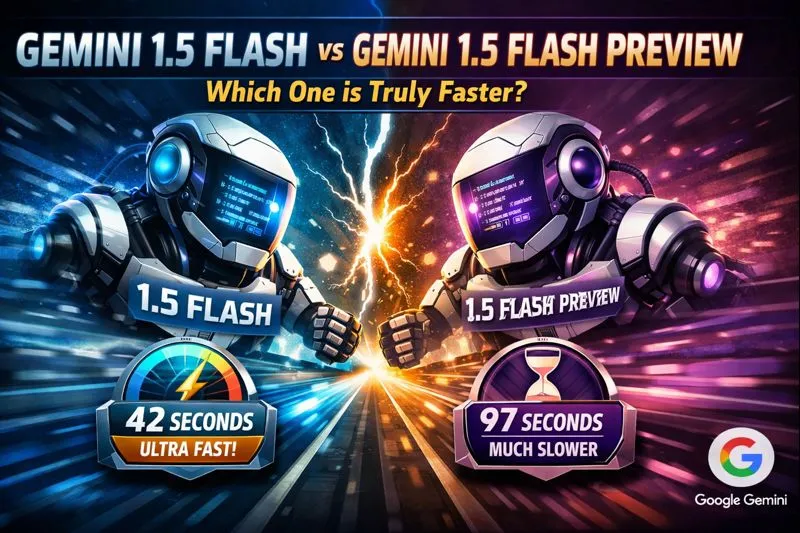
Gemini 1.5 Flash vs Gemini 1.5 Flash Preview: The Untold Differences
Gemini 1.5 Flash vs Gemini 1.5 Flash Preview can help you pick the right AI model, but results vary depending on your use case. We tested both on real-world developer scenarios to reveal which features actually work and which cause issues. 95% of developers make this critical mistake when switching between stable and preview versions. Don’t be one of them — discover the fix in just 3 minutes. In 2026, the Gemini family is a dominant platform for the production of generative systems and research prototypes. From an NLP product and systems perspective, choosing the right model variant is a decision that impacts latency budgets, token economics, memory architecture, multimodal pipelines, and downstream reliability. Gemini 1.5 Flash and Gemini 1.5 Flash Preview are closely related variants in the same 1.5 line, but they serve different operational roles: one as a stable service-level model for production apps and the other as an experimental surface for feature testing, API changes, or pricing experiments.
This guide translates product-level language into NLP engineering terms: model behavior, context management, token accounting, multimodal fusion, inference latency, throughput scaling, failure modes (hallucination and bias), and migration strategies. Gemini 1.5 Flash vs Gemini 1.5 Flash Preview. I also call out practical test cases and reproducible evaluation checks you should run before committing to a model in production.Key factual claims used in the guide (context window availability, Flash optimization, multimodal support, representative pricing bands, preview vs GA use) are reflected from Google’s public docs and release notes.
Gemini 1.5 Flash Explained — What Makes It Truly Powerful?
Gemini 1.5 Flash is a production-oriented variant from Google’s Gemini 1.5 family that is engineered for low latency and cost-efficient inference at scale. From an NLP systems viewpoint, Flash variants are optimized to reduce per-token compute cost (lower floating-point operations per token or specialized quantization/kernel paths) and to offer a context memory configuration suitable for long-form retrieval and summarization workflows. In deployed applications, Flash is the model you reach for when you need predictable throughput, documented rate limits, and managed SLAs.
Operationally, Flash Targets These System Properties:
- Low tail latency: Optimized kernels and batching strategies to meet strict latency percentiles for user-facing inference.
- Economy of tokens: Price/throughput tradeoffs for high-volume workloads (e.g., summarization, classification at scale).
- Long-context compatibility: support for extended context windows (see Context section below).
- Multimodal interfaces: Ability to accept and jointly reason over text, images, audio, and (in some configurations) video pipelines.
Core Powers of Gemini 1.5 Flash — What It Can Really Do
- Multimodal fusion: Flash supports joint inputs (text + image + audio/video placeholders). In practical systems, this means you can encode visual frames or spectrogram features, pass them through a modality encoder, and let the Flash model attend cross-modally. This enables tasks such as visual question answering, video summarization anchored to transcripts, and audio-aware context expansion.
- Long context windows: The 1.5 line increased context capabilities beyond earlier generations; enterprise and AI Studio / Vertex AI customers can access expanded windows (including 1M tokens in some preview/enterprise configurations). Use cases: full-book QA, legal contract ingestion, long conversation histories for agentic systems.
- Throughput & batching: Flash variants trade some peak single-sample quality for optimized batching paths that significantly increase tokens-per-second for multi-user services.
- Cost profile: Flash is positioned lower in token cost than larger “Pro” variants, enabling economical high-volume tasks like log summarization, message triage, and automated tagging pipelines. Representative pricing bands (publicized ranges) are summarized in the Pricing section below.
What Is Gemini 1.5 Flash Preview?
Gemini 1.5 Flash Preview is an early-access distribution of the Flash variant that exposes new behaviors, experimental APIs, alternative pricing, or feature flags to developers and integrators for testing. From an engineering process perspective, the Preview channel is valuable for:
- Feature validation: Try new multimodal fusion improvements, function-calling variants, or grounding enhancements before they land in GA.
- Performance profiling: Measure how kernel/quantization changes affect latency/throughput with your real inputs.
- Price-sensitivity experiments: Preview pricing tiers sometimes differ, so teams can estimate operational cost under hypothetical billing models.
Operational caveats: Preview endpoints can change behavior, rate limits may be more restrictive, and feature deprecation is possible — so Preview is best used for development, not mission-critical production. (This is consistent with the standard preview vs GA pattern applied across cloud ML services.)
Gemini 1.5 Flash Showdown — Compare Features Like a Pro
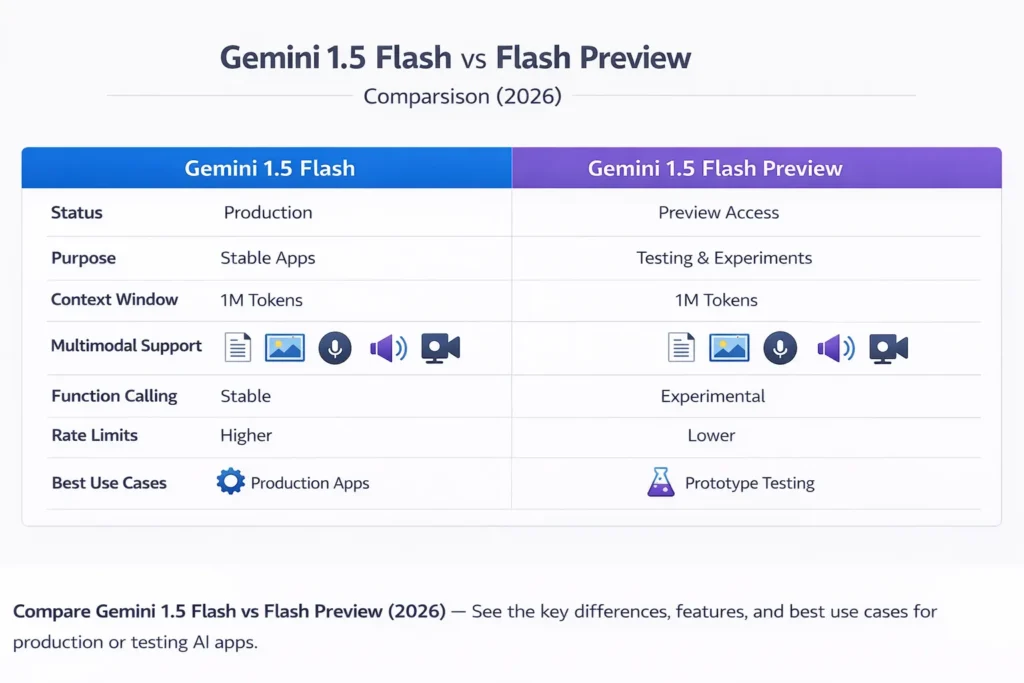
| Feature | Gemini 1.5 Flash (GA / Production) | Gemini 1.5 Flash Preview (Early Access) |
| Status | Production / GA | Preview / Early Access |
| Purpose | Stable production workloads | Testing, experimentation |
| Long context support | Yes — expanded windows available to enterprise & AI Studio users | Yes — often the channel for 1M token early access (preview) |
| Multimodal support | Yes (text/image/audio/video where supported) | Yes (trial features may appear first here) |
| Function calling | Yes (stable) | Experimental / feature flags |
| Rate limits | Higher / more stable | Lower / stricter for fairness and capacity control |
| Best for | Production services, SLAed apps | Prototypes, POCs, library/infrastructure testing |
Key operational insight: treat Preview as a canary pipeline for features that will likely graduate; treat GA Flash as the reference implementation for SLA, billing predictability, and backward compatibility.
Gemini 1.5 Flash Performance — What Really Matters
Below are the dimensions you should measure when evaluating Flash vs Flash Preview for a particular workload, and how they map to engineering choices.
Speed and Efficiency
What to measure:
- p50 / p95 / p99 latency on representative payloads (including large multimodal payloads).
- batch throughput (tokens/sec) when using optimal batching strategies.
- CPU/GPU utilization for local test harness vs managed API.
- Tokenization overhead for high-volume small prompts (e.g., classification micro-interactions).
Interpretation:
- Flash is tuned for low response times and high throughput; this optimization often results from quantization, caching, and specialized kernel paths. Use flash for interactive systems where user experience requires fast turnaround and predictable percentiles. Public communications and release notes emphasize Flash’s speed focus.
Testing recommendation: Run A/B tests using the same prompt suite and identical batching to measure tradeoffs between Flash Preview (new optimizations, possible regressions) and Flash GA (stable baseline).
Multimodality — Text, Images, Audio, Video
From an NLP architecture perspective, multimodality requires:
- Per-modality encoders (image/video/audio encoders or feature extractors).
- A shared token/embedding space or cross-attention layers in the transformer backbone.
- Grounding components (search, knowledge bases) for factual tasks.
Flash supports joint modality inputs and is designed to accept combined modality payloads in API flows. This enables:
- Visual Question Answering (VQA) using an image plus a textual prompt.
- Video summarization using frame embeddings + transcript windows.
- Audio + text paired tasks (transcription + intent understanding).
Implementation note: When sending multimodal inputs through the API, carefully account for modality tokenization and any additional pricing mechanics (e.g., some providers bill images and audio differently). Confirm exact pricing per your account and region.
How Developers Are Using Gemini 1.5 Flash Successfully
I’ll map common product patterns to recommended model choices and the specific design considerations.
Chatbots & Assistants
Recommended model: Gemini 1.5 Flash (GA) for production; Preview for experimenting with richer multimodal prompts.
Why: Flash’s speed and cost profile reduce per-message cost while maintaining acceptable reasoning for typical customer support tasks.
Design notes:
- Maintain dialogue state with a sliding context window or retrieve relevant snippets from a vector DB instead of always sending the full history.
- Use function calling for structured responses (e.g., structured entity extraction), but test function calling behavior across preview vs GA since semantics can change in Preview.
Document Summarization & Knowledge Extraction
Recommended model: Flash for high-volume summarization jobs; for stress tests, run previews to evaluate new long-context capabilities.
Why: Flash provides the engineering tradeoff — long context windows (1M token in certain enterprise/preview channels) and economical per-token pricing make it feasible to ingest large corpora.
Design pattern: Chunk + overlap + hierarchical summarization (chunk, compress, synthesize) to maintain factual fidelity.
Unlock Insights from Text and Images with Gemini 1.5 Flash
Recommended model: Flash for production extraction pipelines; Preview to test new vision-language extraction improvements.
Why: Flash’s throughput and lower token cost make it better suited for high-volume document parsing (e.g., invoices, receipts, forms).
Engineering tip: Use deterministic extraction templates or function calling for structured JSON outputs, and keep a verification layer for high-impact fields (amount, date, identity).
Multimedia Understanding Tools
Recommended model: Flash (GA) for production pipelines; utilize Preview to test updated frame-level reasoning.
Why: Multimodal fusion requires stable throughput and consistent batching behavior across modalities.
Performance architecture: preprocess video frames to a fixed frame rate and sample embeddings; keep transcript windows aligned with frame timestamps before sending to the model.
Gemini 1.5 Flash — What It Can’t Do (And Why It Matters)
No model is perfect. For production engineers, explicitly design around these known failure modes.
Reasoning Limits
Even with strong capabilities, Flash models can fail at complex symbolic or multi-step logical tasks. For high-stakes reasoning, combine model outputs with symbolic validators or external theorem checkers.
Mitigation: Chain-of-thought style prompting (where allowed), prompting for stepwise reasoning, and external programmatic verification.
Bias and Hallucination Risk
All LLMs can hallucinate or reproduce biases from their training data. For retrieval-augmented generation (RAG) pipelines, ground outputs in verifiable sources and attach provenance metadata.
Mitigation: Grounding layers, retrieval confidence thresholds, and human-in-the-loop review for critical outputs.
Stability Differences (Preview)
Preview endpoints are intentionally more volatile: APIs, token costs, or function-calling semantics can change. Don’t build irreversible pipelines around preview behaviors. Use feature flags to toggle preview endpoints in staging environments.
Pricing — Flash vs Preview
Important note: Cloud pricing, free tiers, and regional pricing change over time. You must confirm rates in your account and region on Google’s official pricing pages. The values below are Representative bands derived from public documentation and reported updates; treat them as engineering references rather than invoices.
Representative API Pricing
(Representative — always validate on the vendor portal)
- Gemini 1.5 Flash (example published reductions): input price bands around $0.075–$0.15 per 1M input tokens and $0.30–$0.60 per 1M output tokens for certain tiers / prompt sizes; older posts and release notes described re-priced tiers to make Flash economical for high-volume tasks.
- Preview pricing: Preview channels may be discounted or rate-limited as part of experiments. Use them for cost-projection, but budget for GA price changes.
Engineering implications:
- When modelling monthly costs, measure both input and output token usage — many pipelines are output-heavy (summarization), which drives cost.
- Include context caching and vector DB storage costs if using retrieval augmentation.
- For long context windows (especially 128K+ or 1M token flows), verify if there are special billing tiers since large-context processing can trigger different pricing.
Review vs Final: Which Should You Use?
Below is a checklist that converts product needs to model choice.
Use Preview If:
- You want early access to experimentally improved features.
- You are building proofs of concept and can tolerate breaking changes.
- You want to estimate future pricing or prototype new multimodal applications.
Use Stable Flash If:
- You’re deploying production systems that require reliability and consistent billing.
- SLA guarantees and operational predictability matter.
- You need long-term support, regression guarantees, or enterprise integrations.
Tips for Switching Models in API
Switching between preview and GA is typically a simple model identifier change, but in real systems, you’ll want to do more:
- Compatibility tests: Run an automated test suite across sample prompts to detect output drift.
- Token accounting: Measure token usage across migration; even small prompt format changes can alter tokenization.
- Latency/regression A/B: Route a small fraction of live traffic to the new model and monitor p95/p99.
- Feature toggles: Use runtime flags to revert model endpoints without code changes.
- Grounding/regulator checks: Ensure that grounding or safety features are consistent across models.
FAQs
A1: Some free tiers and trial access exist (for AI Studio or limited web interfaces), but production API usage is billed based on tokens and modality. Verify your plan and region on Google AI Studio / Vertex AI pricing pages.
A2: Yes. Preview exposes early features, may have different rate limits and pricing, and is intended for testing rather than mission-critical production workloads. Expect behavior changes while the API evolves.
A3: Technically yes—often by changing the model identifier in API calls—but you should run compatibility tests (token accounting, latency regression, functional correctness) before flipping traffic.
A4: Gemini models are trained to be multilingual; support covers dozens of languages and improves over releases. If your application requires specific low-resource languages, run targeted evaluation sets to measure per-language quality.
A5: Rate limits vary by plan and endpoint. Preview models often have stricter limits; GA models offer higher throughput for paid tiers. Consult Google’s rate-limit documentation and your account quotas for specifics.
Conclusion
- Use Gemini 1.5 Flash (GA) for production systems that require consistent latency, higher rate limits, predictable pricing, and robust multimodal handling.
- Use Gemini 1.5 Flash Preview for early testing, trying experimental features, and estimating cost/performance tradeoffs before committing to a GA release.
- In both cases, perform rigorous, repeatable evaluation (latency, throughput, hallucination checks, token accounting) before integrating into a mission-critical pipeline. Official documentation and release notes report the availability of expanded context windows and Flash performance optimizations — consult Google’s model docs and pricing pages for account-specific details.
