
ChatGPT vs Claude (2026) — Which AI Actually Wins for Your Workflow?
ChatGPT is the better all-round choice, while Claude wins in deeper writing and coding tasks. ChatGPT vs Claude is no longer a vague AI debate—it is a decision about speed, depth, research, and daily workflow fit. In this guide, you will see the real winner by use case, pricing, context, and team needs, so you can choose smarter today. The ChatGPT vs Claude discussion in 2026 is no longer about vague impressions, brand loyalty, or which AI “sounds smarter” in a single prompt. The real question is much more practical and much more valuable: which assistant is the better semantic match for your workflow, your task complexity, and your output goals?
That shift matters. In terms, the comparison is no longer about surface-level fluency alone. It is about intent alignment, context retention, task orchestration, multimodal grounding, and the ability to transform raw input into usable output with minimal friction. In other words, the best model is the one that best maps to the cognitive job you need done.
OpenAI currently positions ChatGPT as a broad AI workspace: search, file handling, projects, tasks, canvas, Codex, deep research, image creation, higher-tier video generation, and business controls all sit inside one ecosystem. Anthropic positions Claude around deep reasoning, coding, long-context work, research, connectors, artifacts, and file/code execution. Those two design philosophies are not identical, and that difference is exactly why the answer depends on use case.
Which AI Should You Choose Right Now (ChatGPT or Claude)?
This article is built to answer the real user question at a practical level: which AI should you use for writing, coding, research, and daily work? Based on the current official feature sets described in the source text, ChatGPT is the stronger all-round platform, while Claude is the stronger specialist for deep, structured, high-context work. That is an inference from the product direction and feature emphasis, not a universal law.
For bloggers, marketers, founders, developers, analysts, and Europe-based teams, the smartest decision is not always “pick one forever.” In many professional workflows, the highest-output stack is ChatGPT for breadth and speed plus Claude for depth and structural refinement.
ChatGPT vs Claude — Core Differences That Actually Matter
ChatGPT wins when you want one AI to function like a full daily work hub. It is strong for drafting, search, file uploads, projects, tasks, custom GPTs, agentic workflows, multimedia production, and team collaboration. OpenAI’s pricing and plan structure highlight that breadth across Free, Go, Plus, Pro, Business, and Enterprise tiers.
Claude wins when the work leans toward long reasoning, large documents, disciplined analysis, and serious coding. Anthropic’s current pages emphasize Claude Code, Research, Projects, Artifacts, web search, connectors, and file/code execution. Claude Opus 4.6 is also described as the strongest orchestration model Anthropic has used for complex multi-agent work, with improved coding, debugging, and a 1M-token context window in beta on the Claude Developer Platform.
If You Need a simple Memory Hook, use this:
ChatGPT = breadth, speed, and daily utility
Claude = depth, structure, and careful reasoning
That simple framing captures most of the practical difference without hiding the nuance.
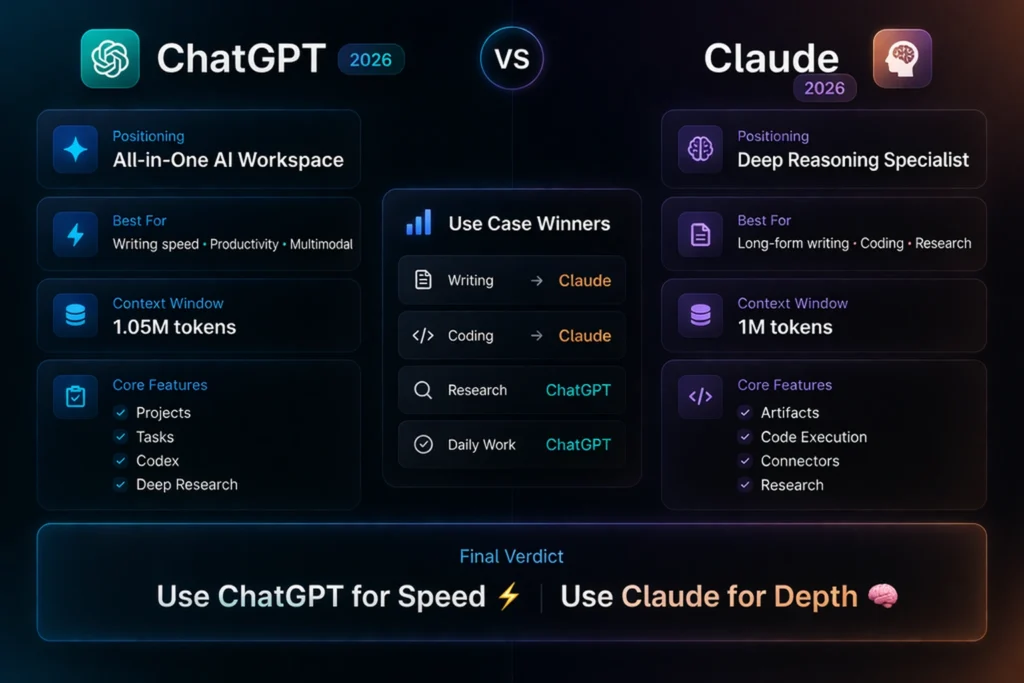
ChatGPT vs Claude — Winner by Use Case at a Glance
| Use case | Clear winner | Why |
| Long-form writing | Claude | Stronger long-context handling, structural continuity, and focus on document work |
| Fast content creation | ChatGPT | Better as an all-in-one content hub with projects, tasks, search, and multimedia workflows |
| Complex coding / refactors | Claude | Anthropic explicitly positions Opus 4.6 for coding, debugging, larger codebases, and long-running agent tasks |
| Quick scripts / automation | ChatGPT | Codex, projects, tasks, and agent features make it easier to move from idea to action quickly |
| Research and synthesis | ChatGPT | Deep research is built for multi-step research and cited, structured outputs |
| Daily productivity | ChatGPT | Broader consumer tooling, memory, tasks, canvas, apps, and file/library workflow |
| Enterprise team work | Tie, depends on stack | Both offer strong business controls; the best fit depends on governance, connectors, and workflow design |
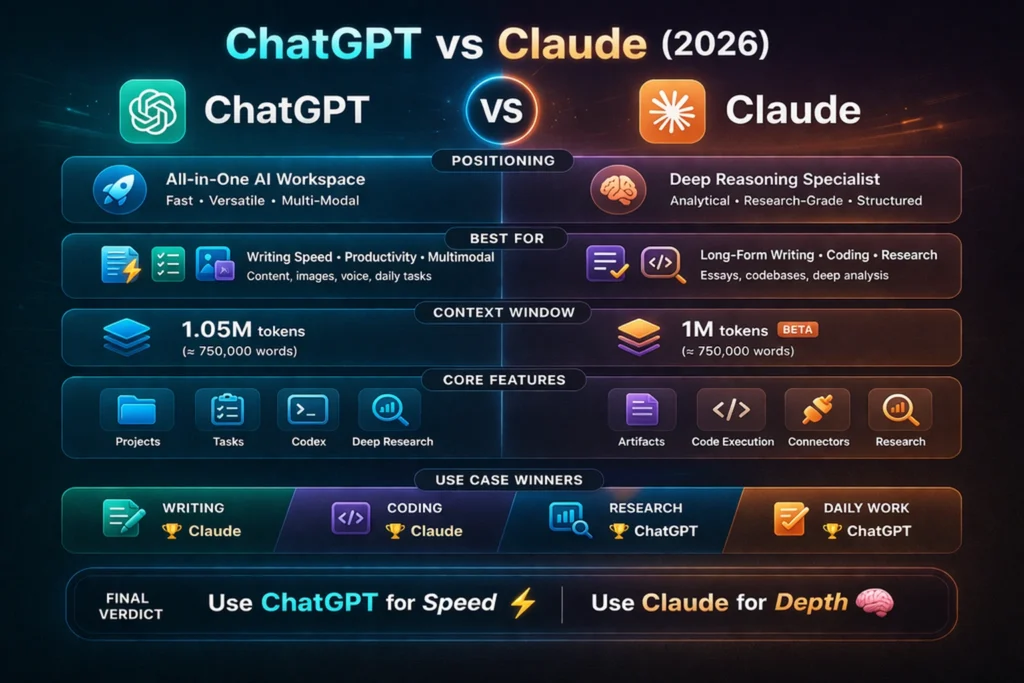
ChatGPT vs Claude — Core Difference Explained Simply
The cleanest way to understand the distinction is to think in terms of task semantics and workflow topology.
ChatGPT is a broad AI platform. It is built for everyday work, search, file handling, projects, tasks, coding, images, video, voice, and team workflows. OpenAI’s current pages show access to search, canvas, projects, shared projects, tasks, file uploads, GPTs, deep research, and agent features across its paid plans.
Claude is a deep-thinking assistant. Its current feature set emphasizes coding, research, web search, memory, connectors, artifacts, projects, voice, and code execution. Anthropic’s Opus 4.6 release also stresses stronger planning, longer-running tasks, better debugging, and stronger performance on larger codebases.
If you think in NLP terms, ChatGPT is optimized for broad contextual transformation across many output types, while Claude is optimized for dense contextual reasoning with stronger persistence over long inputs. That is why one often feels more like a workbench and the other feels more like a research-minded collaborator.
ChatGPT vs Claude — Feature Comparison Table
| Feature | ChatGPT | Claude |
| Main positioning | Broad AI workspace for everyday tasks, content, research, and work | Deep reasoning, coding, research, and structured knowledge work |
| Latest model direction | GPT-5.4 Pro is positioned for premium reasoning, files, deep research, agent mode, and Codex access on higher tiers | Opus 4.6 is described as Anthropic’s smartest model for agents and coding, with improved debugging and orchestration |
| Context window | GPT-5.4 supports up to a 1.05M token context window in the API | Claude Opus 4.6 and Sonnet 4.6 have a 1M-token context window in beta on the Claude Developer Platform |
| Multimodal support | Text, image, file uploads, voice, and video-related workflows on higher tiers | Text and image input, voice mode, web search, and document/code workflows |
| Tool ecosystem | Search, canvas, projects, tasks, GPTs, deep research, record mode, Codex, Sora, apps, and business controls | Claude Code, Cowork, Research, Artifacts, Projects, Connectors, web search, and code execution |
| Business/security | Business includes SAML SSO, MFA, GDPR support, SOC 2 Type 2 alignment, and no training on business data by default | Team and Enterprise include SSO, audit logs, SCIM, access controls, custom retention, and enterprise admin features |
This is where the product architecture becomes visible. ChatGPT is optimized for breadth of action, while Claude is optimized for high-coherence reasoning over larger semantic units.
ChatGPT vs Claude — Pricing Overview
Pricing should be read through the lens of workflow fit, not as a simplistic “cheaper versus expensive” contest. A lower monthly fee is meaningless if the tool creates extra cognitive overhead or requires more manual stitching between steps.
ChatGPT currently offers Free, Go, Plus, Pro, Business, and Enterprise plans. The public pricing page highlights that higher tiers unlock deeper reasoning, more uploads, faster image creation, deeper research, agent mode, projects, tasks, custom GPTs, Codex access, and Sora video generation.
Claude currently offers Free, Pro, Max, Team, and Enterprise. On the public Claude pricing page, Pro is shown at $17 per month with annual billing or $20 monthly, Team Standard at $20 per seat per month with annual billing or $25 monthly, and Max starts at $100 per month. Claude’s free tier already includes web search, memory across conversations, file creation, code execution, and connectors in the current pricing page text.
For solo users, the decision is usually simple: ChatGPT is the broader platform, while Claude Pro often feels like the cleaner specialist buy. For teams, the decision usually depends on admin controls, data handling, collaboration, and whether your work is dominated by research, documents, coding, or integrations.
Who Wins by Use Case?
1) Writing and content creation
Winner: Claude
Claude is usually the better choice for long-form writing because its current direction is built around large-context reasoning, document continuity, and careful structure. Opus 4.6 is explicitly described as stronger on coding, debugging, and long-running tasks, and Claude’s current product pages emphasize Artifacts, Projects, Research, Memory, and file/code execution. Together, those features make it highly effective for essays, reports, pillar articles, editorial drafts, and high-density written work.
Claude is especially useful when the document must preserve a coherent thesis across many sections. In NLP terms, it performs well when the output must maintain discourse consistency, referential integrity, and hierarchical structure across a long span of text.
ChatGPT still wins when the job is speed and variation. If you need fast ideation, headlines, social captions, multi-format repurposing, image creation, or a draft that must quickly become something else, ChatGPT is the more flexible production hub. Its current plan structure puts projects, tasks, custom GPTs, deep research, image creation, and Codex in the same workspace.
Practical takeaway: use Claude for the first serious long-form draft, then use ChatGPT to reshape it into SEO sections, social posts, and content variants. That workflow is an inference from the current tool strengths.
2) Coding and software work
Winner: Claude
Claude is currently positioned very strongly for complex coding. Anthropic says Opus 4.6 improves coding skills, planning, long-running agent tasks, larger codebase reliability, and debugging. Anthropic also calls Claude Opus 4.6 its best orchestration model for complex multi-agent work, which is a strong signal for deep engineering tasks.
This matters because coding is not only about generating syntactically valid lines. It is about debugging, refactoring, state tracking, dependency awareness, and keeping the architecture stable while the codebase grows. Claude appears especially strong in exactly those dimensions.
ChatGPT is still excellent for coding, especially when the task is broader than code alone. OpenAI’s current ChatGPT plans emphasize Codex, agent mode, projects, tasks, file uploads, and long-context reasoning. OpenAI also introduced the Codex app for managing multiple coding agents in parallel, which makes ChatGPT very attractive for developers who need planning, execution, and follow-up work in one place.
Practical takeaway: use Claude for large refactors, careful code review, and debugging across big repositories. Use ChatGPT for quick scripts, automation, and moving from explanation to implementation faster. That is an inference from the official product positioning and features.
3) Research and analysis
Winner: ChatGPT for broad research; Claude for document-heavy research
ChatGPT’s deep research feature is designed for multi-step online research and produces cited, structured outputs. OpenAI also says deep research can work with uploaded files, search the public web or specific sites, and use connected apps. That makes ChatGPT very strong when research needs to become a report, strategy memo, or article outline quickly.
Claude is also strong at research, especially when the task involves long documents, workplace connectors, or web plus workspace search. Anthropic’s research materials and web search tool show a system built for real-time web access, citations from search results, Google Workspace-style integration, and multi-agent research. Claude also includes Research, Projects, and memory across conversations on the current pricing page.
In practical terms, ChatGPT is often better when the research output needs to be packaged and distributed quickly. Claude is often better when the research task is layered, document-heavy, and requires sustained interpretive coherence.
Practical takeaway: choose ChatGPT when you want research that quickly becomes a deliverable. Choose Claude when the research is dense, layered, and document-heavy.
4) Daily work and productivity
Winner: ChatGPT
ChatGPT is better for everyday work because it behaves more like a full productivity platform. OpenAI currently highlights Search, Canvas, Projects, Shared Projects, Tasks, Data Analysis, File Uploads, GPTs, Record mode, apps, and business collaboration in the plan comparison. That is a very broad daily-work toolkit.
Claude is also very capable for daily work, especially because it includes web search, memory, projects, artifacts, voice, and connectors. But the current product feel is still more specialist than all-purpose. That is an inference from the official feature emphasis.
If your workday involves switching between drafting, brainstorming, search, note-taking, file review, quick analysis, and repeated small tasks, ChatGPT often becomes the smoother operating layer. In workflow terms, it acts more like a general-purpose control surface.
Practical takeaway: if one AI has to sit open all day as your main assistant, ChatGPT is usually the better default.
5) Multimodal work
Winner: ChatGPT
ChatGPT has the stronger consumer multimodal story. OpenAI highlights image creation, voice, video generation on higher tiers, file uploads, image input, and search in the same product family. That makes it especially useful for teams that mix text, visuals, slides, voice notes, and fast content repurposing.
Claude absolutely supports text and image analysis, voice mode, and tool use, but its public positioning still centers more on reasoning, documents, and coding than on broad consumer media workflows.
This distinction matters because many modern workflows are not purely textual. They involve screenshots, product visuals, slide decks, transcripts, briefs, and multimodal synthesis. ChatGPT has the broader end-to-end surface area for that kind of work.
Practical takeaway: For multimodal daily work, ChatGPT wins.
ChatGPT vs Claude Pricing — Which One Gives Better Value?
Claude is likely to produce a more linear and cohesive long-form draft because its official direction emphasizes long-context performance, large documents, and careful reasoning. Opus 4.6 and Sonnet 4.6 also show a 1M-token context window in beta, which is useful for keeping a long article consistent from start to finish.
ChatGPT is likely to produce a faster first draft and help more with reshaping the article into many formats afterward. That fits OpenAI’s current focus on deep research, projects, tasks, canvas, and Codex.
Best move: draft in ChatGPT, deepen structure in Claude, then finish SEO formatting back in ChatGPT. That is an inference based on the current official feature mix.
Task: Debug a medium-to-large codebase
Claude is the stronger starting point because Anthropic explicitly says Opus 4.6 is better at coding, debugging, code review, and working in larger codebases. It also says the model can sustain agentic tasks for longer and manage multi-agent work better.
ChatGPT remains very strong when the task becomes operational: generating helper scripts, walking through follow-up steps, or using Codex to coordinate agents. OpenAI’s Codex app release and current plan features make that path very practical.
Task: Turn research into a presentation
Claude is good at the research and structure stage because it can search the web, use connectors, execute code, and organize work into projects and artifacts. That makes it very good for building the raw thinking behind a presentation.
ChatGPT is usually better for the final production side because it adds canvas, file handling, image workflows, tasks, and business collaboration in one workspace. That makes it easier to turn research into a polished deliverable.
Pros and Cons
ChatGPT Pros
ChatGPT is broad, fast, and easy to use as a daily work hub. It combines search, projects, tasks, canvas, file uploads, deep research, Codex, image creation, and video generation on higher tiers. Its Business plan also includes GDPR support, SSO, MFA, apps, and no training on business data by default.
ChatGPT is particularly strong when the goal is throughput. It reduces friction by keeping more stages of the workflow inside one environment, which lowers context switching and makes execution faster.
ChatGPT Cons
Because ChatGPT does so many things, it can feel less specialized than Claude for deep, careful, long-form work. It also has more moving parts, which can be a downside if you just want one clean writing or coding companion. That is an inference from the current product design.
Claude Pros
Claude is a strong specialist for reasoning, coding, long documents, web search, research, and structured work. Its current pages also highlight Artifacts, Projects, Connectors, memory, code execution, and a 1M-token beta context window on Opus 4.6.
Claude tends to feel more disciplined in tasks that need semantic continuity, structural rigor, and careful handling of long input spans.
Claude Cons
Claude is a little less “everything-in-one-place” than ChatGPT for casual users, and its premium usage tiers can feel expensive for heavy users. That is an inference from the current plan layout.
Should You Use ChatGPT, Claude, or Both Together?
The best workflow for many serious users is not ChatGPT or Claude. It is ChatGPT + Claude.
Use ChatGPT to brainstorm, outline, search, draft, and move fast across formats. OpenAI’s current tool stack is built for exactly that kind of work. Use Claude to deepen logic, improve continuity, refine structure, and review large bodies of work. Anthropic’s latest model and feature pages strongly support that kind of long-form, careful work. Then use ChatGPT again to repurpose the finished work into social posts, visual prompts, short summaries, or team-ready outputs. That hybrid flow is especially useful for agencies, publishers, founders, and Europe-based teams that need both speed and quality.In practical NLP terms, this stack creates a better pipeline: broad generation, deep refinement, and final transformation.
Europe-Focused Advice
For Europe-based users, the biggest practical issues are usually privacy, collaboration, document handling, and value for money. OpenAI’s Business plan currently highlights GDPR support, SSO, MFA, and no training on business data by default, while the Enterprise plan adds data residency in ten regions. Anthropic’s Team and Enterprise plans highlight SSO, audit logs, SCIM, custom retention controls, connectors, and enterprise search.
For European content teams, ChatGPT is usually the better choice when you need broad content production, multimedia tasks, and a flexible daily assistant. Claude is usually the better choice when the work is heavier on analysis, code, and long-form documentation. That is an inference from the current product design.
A simple rule works well:
Use ChatGPT for speed.
Use Claude for depth.
That framing is concise, memorable, and highly usable for day-to-day decision-making.
How to Choose the Right Tool
Use ChatGPT when you need:
- fast ideation
- multi-format content
- image and voice workflows
- search plus action
- tasks and automation
- daily productivity support
Use Claude when you need:
- deep analysis
- long document handling
- careful coding help
- better structure across large work files
- long reasoning sessions
- research across web and connected work tools
The key is matching the tool to the workload. In other words, you are not just choosing a chatbot. You are choosing a cognitive interface for a specific information-processing task.
Tips for Better AI Comparison Captions
If you are writing captions for a blog graphic, social card, or feature image, keep them short and direct:
- Best AI for fast content creation
- Best AI for coding and deep reasoning
- ChatGPT vs Claude: which one fits your workflow?
- Use ChatGPT for speed, Claude for depth
These work because they align with user intent. People searching this topic usually want a decision, not a feature catalogue. They want a recommendation that reduces uncertainty and shortens the path to action.
FAQs — ChatGPT vs Claude
Claude is often better for deep reasoning, long documents, and complex coding. ChatGPT is often better for multimodal work, speed, and all-in-one productivity. That is the clearest practical reading of the current official feature sets.
Claude currently has the stronger public focus on coding, debugging, larger codebases, and long-running agent work. ChatGPT is still very strong for general coding, automation, and moving from plan to action quickly.
Claude is usually stronger for long-form structure and continuity. ChatGPT is better for fast drafts, marketing content, and turning one idea into many outputs.
Yes. A hybrid workflow is often the smartest option: use ChatGPT for drafting and speed, Claude for depth and refinement, then ChatGPT again for formatting and repurposing.
For Europe-based teams, the best choice depends on the job. ChatGPT is usually better for broad content and multimedia workflows, while Claude is often better for long-form analysis, document-heavy work, and code-heavy tasks.
Final Verdict — ChatGPT vs Claude (What You Should Do Next)
ChatGPT vs Claude comes down to this: use ChatGPT for speed, productivity, and multimodal work; use Claude for long-form writing, coding, and deep analysis. This comparison shows where each tool truly wins, what most users miss, and how to avoid choosing the wrong AI for your workflow. The real ChatGPT vs Claude answer in 2026 is not that one tool is always better. It is more useful than that. ChatGPT is the stronger all-rounder because it combines search, tasks, projects, files, canvas, Codex, deep research, and multimedia workflows in one place.
Claude is the stronger specialist because it is built around reasoning, coding, long-context work, research, and structured analysis. For most serious users, the best strategy is to use both. Use ChatGPT to move quickly. Use Claude to go deeper. Then publish, ship, or present the final work with more confidence and less friction. That is the most practical workflow for creators, agencies, developers, analysts, and business teams in Europe and beyond.
