
AI Tools for Business Productivity — Stop Tool Chaos & Build One System That Saves 10+ Hours
AI Tools for Business Productivity — overwhelmed by too many tools? Learn how to build one smart workflow that saves 10+ hours a week and actually works. Most businesses don’t have a productivity problem—they have a system problem. This guide shows how to connect tools into a simple, powerful system. They have a workflow problem. That is the real issue I keep seeing again and again. Teams buy a tool because it looks smart, then another tool because it promises automation, then one more because someone on LinkedIn called it “the future.” A few weeks later, everyone is busy, everyone is tired, and nothing actually feels smoother.
I noticed something simple but important: the companies that move fastest are not the ones collecting the most AI apps. They are the ones building a clean system around a few tools that actually talk to each other. That is the difference between trying AI Tools for Business Productivity and using AI properly. A lot of “best AI tools” content stops at the surface. It names tools, lists features, and moves on. But in real work, a tool by itself is rarely the winner. The win comes from the sequence:
Think → Organize → Automate → Execute → Review
When that chain is working, productivity starts to compound. Emails get answered faster. Meeting notes stop disappearing. Tasks move without constant follow-up. Reports get drafted in minutes instead of hours. People spend less time chasing information and more time doing actual work.
That is what this article is about.
A real system.
And because this topic is especially useful for beginners, marketers, and developers, I’m going to keep it practical, direct, and useful for people who actually need better output, not just more software.
Why Most Businesses Still Feel Unproductive
AI tools for business productivity are software tools that help teams work faster, stay organized, reduce repetitive work, and make better decisions with less manual effort.
That sounds simple, but the impact is bigger than it looks. A good AI tool can help a team:
- draft content faster
- summarize meetings
- automate routine tasks
- connect different apps
- organize knowledge
- analyze data
- generate reports
- support better decision-making
But the bigger shift in 2026 is this: AI tools are no longer just assistants. They are becoming part of the operating system of work.
That matters because the businesses getting the most value are not asking, “Which AI tool is best?” They are asking, “What job does this tool do inside the system?”
Why Most AI Tools’ Content Fails in Real Life
Here is the uncomfortable truth: most AI tools articles sound useful, but fail the moment a real team tries to use them.
They usually follow the same pattern:
- List a few popular tools
- describe features
- mention pricing or integrations
- end with a generic conclusion
That is not enough.
1) They focus on tools, not workflow
A tool is not a strategy. A stack is a strategy. This is where most content breaks down. A team can buy ChatGPT, Notion, Zapier, Copilot, Gemini, and a dozen more apps, but if nobody knows the order of use, the result is chaos. The work may look modern, but it still feels messy.
2) They ignore business context
A startup does not need the same setup as a SaaS company. An agency does not need the same workflow as a local business. A developer team does not need the same structure as a marketing team. That means “best tool” is not universal. The best tool depends on the job, the team size, the type of work, and how much process already exists.
3) They underestimate system thinking
One AI tool may save 20 minutes. A connected workflow can save 10+ hours every week. That difference is the entire story. In real use, productivity comes from the chain, not the single app. Once the chain is tight, small time savings turn into a serious operational advantage.
The 5-Part AI Stack Every Business Needs
This is the core framework. If someone understands this section, they can build a practical AI system instead of a random tool pile.
1) The AI Brain: your thinking layer
This is the part that helps you think clearly.
Use it for:
- research
- brainstorming
- strategy
- rewriting
- planning
- decision support
Best tools in this layer include:
- ChatGPT
- Claude
- Gemini
- Microsoft Copilot
Think of this layer as your digital strategist.
This is where you ask better questions, compare options, and move from vague ideas to usable direction. For marketers, this layer helps with content angles, audience research, and campaign planning. Developers, it helps with debugging, architecture brainstorming, and documentation. For beginners, it reduces the fear of the blank page. One thing that surprised me was how often this layer is not used for “writing” at all. It is used for clarity. Sometimes the biggest productivity gain is simply getting unstuck faster.
2) The Knowledge Workspace: your memory layer
This is where your business stores useful information.
Use it for:
- SOPs
- notes
- briefs
- project details
- client information
- meeting summaries
- internal references
Best tool:
- Notion
Without this layer, AI becomes forgetful and disconnected. A business needs memory just as much as it needs intelligence. If the team keeps asking the same questions, rewriting the same processes, or losing the same notes, the problem is not the AI brain. The problem is that knowledge is scattered.
I noticed that teams feel more confident when their notes, tasks, and processes live in one place. It removes mental friction. People stop wondering, “Where is that file?” and start actually moving forward.
3) The Automation Layer: your execution engine
This is where productivity becomes scalable.
Use it for:
- connecting apps
- automating repeated steps
- moving information between tools
- triggering actions
- assigning tasks
- sending updates
Best tool:
- Zapier
This is the part most businesses underestimate. A lot of work is not hard. It is just repeated too often. When the same action happens daily or weekly, automation pays off quickly. That includes lead routing, form handling, task creation, email follow-ups, client onboarding, content handoff, and status updates.
The point is not to automate everything. The point is to automate the parts that feel like friction.
4) The Communication Layer: your time leak zone
This is where many businesses lose the most time.
Use it for:
- emails
- meetings
- team updates
- follow-ups
- internal communication
- document drafting
Best tools:
- Google Workspace with Gemini
- Microsoft 365 Copilot
A large chunk of business time disappears into communication overhead. People are not always doing the work. They are talking about the work, asking for updates about the work, or searching for the latest version of the work.
This layer becomes powerful when AI helps sort inboxes, summarize meetings, draft responses, and keep communication moving without constant manual effort.
5) The Execution Layer: your output layer
This is where tasks are actually completed.
Use it for:
- project tracking
- task management
- delivery
- scheduling
- publishing
- progress monitoring
Best tools:
- Notion
- Microsoft Copilot
This layer matters because ideas alone do not create results. Execution does. Even the smartest AI setup will fail if tasks are not tracked clearly and shipped consistently.
For marketers, this might mean content calendars and campaign execution.
developers, this might mean sprint tasks, issue tracking, and release coordination.
For beginners, this might simply mean having one place where work is visible and not lost.
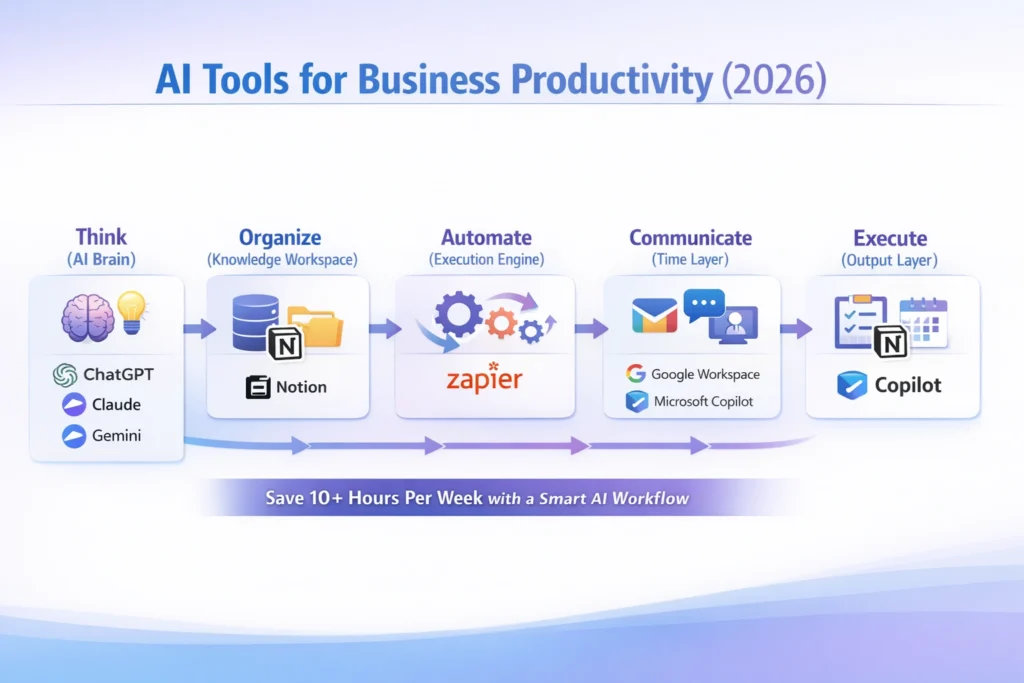
Best AI Tools for Business Productivity in 2026
Below is a practical view of the most useful tools and what they are best at.
| Tool | Best For | Role in the Stack | Why It Matters |
| ChatGPT Business | Strategy, writing, analysis | AI Brain | Strong for idea generation, drafting, and structured thinking |
| Claude | Deep thinking, writing | AI Brain | Useful for long-form reasoning and cleaner writing |
| Microsoft 365 Copilot | Office teams | Communication + Execution | Helpful inside email, docs, meetings, and workflows |
| Google Workspace + Gemini | Collaboration | Communication Layer | Strong for daily teamwork and document-based productivity |
| Notion | Docs, SOPs, knowledge management | Knowledge Workspace | Central place for team memory and process building |
| Zapier | Automation | Execution Engine | Connects apps and reduces repetitive work |
The important part is not the tool name. The important part is the role each tool plays. A lot of businesses make the mistake of choosing tools based on hype instead of function. That is why they end up with overlapping apps that do the same thing in slightly different ways. The smarter approach is to choose the minimum stack that actually covers your workflow.
How to Build the Right AI Stack for Your Business Type
Different businesses need different setups. That is where most generic recommendations fall apart.
For startups
Startups need speed. A simple stack usually works best:
- ChatGPT or Claude
- Notion
- Zapier
- Google Workspace
The goal is not perfection. The goal is momentum. Startups often do better with fewer tools, fewer decisions, and faster execution. Too much structure too early can slow the team down.
For agencies
Agencies need repeatability. A stronger setup looks like this:
- ChatGPT or Claude
- Notion
- Zapier
- Google Workspace
The real focus for agencies is client workflow, project handoff, and delivery consistency. When the same work happens for different clients, systems create leverage. That is where AI becomes useful beyond just content writing or idea generation.
For SaaS teams
SaaS teams need structure. A practical stack may include:
- Microsoft Copilot or ChatGPT
- Notion
- Zapier
- Claude
The focus here is internal efficiency, documentation, communication flow, and team coordination. SaaS teams often deal with product changes, bug reports, release notes, and cross-functional communication, so clarity matters a lot.
For small businesses
Small businesses need ROI.
Start with:
- one AI brain
- one workspace
- one automation tool
- one communication tool
That is enough to create a strong foundation. I noticed small business owners often get the fastest wins because they are not trying to solve ten problems at once. They just want to save time and avoid repetitive work. That makes the setup easier to use and easier to stick with.
How AI Tools Actually Save Time in Business
AI does not save time magically. It saves time when the work is repeatable. That is the part people often miss. If a task changes every time, AI may help, but it will not create huge savings. If a task happens every week in nearly the same format, then AI can become a real advantage.
The biggest time-saving areas are usually:
- email replies
- meeting summaries
- content drafting
- report generation
- task creation
- data handling
- follow-up messages
- research summaries
These tasks are not glamorous, but they happen constantly. And because they happen constantly, they are the best place to start. A smarter business does not ask AI to do everything. It asks AI to do the repeatable work first.
The Best Workflow: a Step-by-Step System That Actually Works
This is the part that turns tools into a system.
Step 1: Capture input
First, collect the raw material.
That could come from:
- calls
- emails
- client feedback
- meeting notes
- support tickets
- ideas from the team
If the input is messy, the output will be messy too. Good systems begin by capturing information cleanly.
Step 2: Turn input into context
Next, move the information into a workspace where it can be used properly.
For example:
- store notes in Notion
- organize by project
- tag by client, task, or priority
- Keep the structure consistent
This step matters because AI works better when the information is organized. Context is fuel.
Step 3: Use the AI brain
Now ask the model to think about work.
You can use it to:
- summarize
- plan
- analyze
- rewrite
- structure
- compare options
- Create a first draft
This is where marketers get help with campaigns, developers get help with technical writing, and beginners get help with reducing overwhelm.
Step 4: Automate tasks
Once the work has a structure, connect tools to reduce manual effort.
For example:
- Send form responses into Notion
- Create tasks from emails
- trigger reminders automatically
- move information between apps
- Assign follow-up steps without manual copying
This is where time-saving becomes visible.
Step 5: Human review
This part is non-negotiable.
AI speeds things up, but humans still need to check the quality.
That means reviewing for:
- accuracy
- tone
- business fit
- risk
- clarity
The best systems are not fully automated. They are intelligently reviewed. That is a much safer and more effective model.
Real Ways Businesses Use AI Productivity Tools
Let us make this practical.
For marketers
Marketers can use AI to:
- brainstorm content angles
- summarize competitor pages
- draft outlines
- create campaign variations
- repurpose content across channels
- organize editorial workflows
In real use, AI is especially helpful when the marketer already knows the audience and needs speed, not guesswork. It helps with volume, structure, and consistency.
For developers
Developers can use AI to:
- explain code
- draft documentation
- create test cases
- debug problems
- summarize technical discussions
- speed up repetitive coding tasks
One thing that surprised me is how often AI helps developers outside of coding itself. It helps with documentation, explanation, and translation between technical and non-technical thinking.
For beginners
Beginners often need clarity more than complexity.
AI can help them:
- learn faster
- summarize content
- organize work
- write better drafts
- understand workflows
- reduce decision fatigue
This group benefits a lot from simple systems. Too many tools can create confusion, so a small stack is usually the best starting point.
The Biggest Mistakes to Avoid
A lot of businesses make the same mistakes when adopting AI tools.
1) Using too many tools
Too many tools create fragmentation. Instead of feeling productive, the team feels busy managing software.
2) Not building workflows
A tool on its own is not enough. Without a workflow, the tool becomes another tab in the browser.
3) Writing weak prompts
AI output often reflects the quality of the input. Clear instructions create better results. Vague prompts create vague output.
4) Skipping review
Automating bad output does not help. It just makes the bad output faster.
5) Focusing on features instead of outcomes
The question is not, “What can this tool do?” The question is, “What business problem does this solve?”That shift changes everything.
One honest downside
Here is the limitation I think people should take seriously: AI Tools can create dependency if a team never learns the underlying process.
If people rely on AI without understanding the workflow, they may move faster for a while but stay weak on judgment, editing, and process ownership. That is a real downside. The fix is simple: use AI to accelerate the process, not replace the thinking.
Who This Is Best For
This article and this style of workflow are best for people who want practical gains, not just tool collecting.
It is especially useful for:
- beginners who need simplicity
- marketers who want faster content and campaign execution
- Developers who want better support for repetitive technical work
- agencies that need repeatable systems
- small businesses that need ROI fast
- Teams that are tired of tool chaos
Who Should Avoid It
This approach is not ideal for people who:
- want one magic tool to solve everything
- They are not ready to keep processes organized
- avoid documentation completely
- expect full automation with zero review
- like switching tools every week
If someone does not want structure, they probably will not get the full benefit of an AI productivity system.
Real Experience / Takeaway
The strongest productivity gains usually do not come from the flashiest tool.
They come from removing friction. In real use, the biggest improvement often happens when one small task stops bouncing between the inbox, notes, chat, and task manager. That single fix can change the feel of the whole workday.
I noticed that once a team has one clean place for knowledge and one reliable way to move work forward, the conversations get shorter and the output gets cleaner.
In practice, that is what AI should do.
Do not create more noise.
Do not add more tabs.
Not to make work feel futuristic.
Pros and Cons of Using AI Tools for Business Productivity
Pros
- faster work
- better consistency
- less manual effort
- stronger organization
- scalable operations
- easier delegation
- clearer workflows
Cons
- Too many Tools can create confusion
- Poor prompts lead to poor output
- Automation can fail if systems are messy
- Human review is still needed
- Some tools are expensive for small teams
The good news is that most of these problems are fixable. The biggest win is not avoiding all problems. It is designed around them early.
How to Write High-CTR AI Tool Content
If you are building content around this topic, the angle matters a lot. Here are some hooks that tend to perform better:
1) Outcome-based
Save 10 hours a week using AI
This works because it promises a real result.
2) Problem-solution
Stop tool chaos — build one system
This speaks to a pain people already feel.
3) Audience-based
For startups that need speed
This makes the article feel more specific and more relevant.
4) Use case-based
Turn emails into tasks automatically
This is concrete and easy to imagine.
5) Future hook
AI is moving from assistant to agent
This gives the article a forward-looking angle without sounding fake. For SEO, curiosity works best when it is tied to actual usefulness.
FAQs About AI Tools for Business Productivity
The best tools include ChatGPT, Claude, Microsoft Copilot, Google Gemini, Notion, and Zapier. These tools cover thinking, organization, automation, and execution.
Microsoft 365 Copilot, Google Workspace, and Notion are best for teams because they support collaboration and shared workflows.
Yes, but only when used with proper permissions, security settings, and review processes. Always check compliance policies before using AI tools.
They save time by automating repetitive tasks like writing, summarizing, reporting, and managing workflows.
Use fewer tools with better integration. A focused stack is more powerful than a large, disconnected setu.
Conclusion: Build a System, Not a Tool Stack
AI tools by themselves will not make a business productive.
That is the mistake too many teams make.
Real productivity comes from building a system that supports the way work actually happens:
- think with AI
- organize knowledge
- automate repetitive steps
- execute in a visible workflow
- review with human judgment
