
Absolute Reality v1.6 vs Lucid Origin — Pixel Truth Revealed
Absolute Reality v1.6 vs Lucid Origin isn’t just another model comparison — it’s a real-world showdown. I tested both using identical prompts, seeds, and settings to see what actually changes. Which one delivers sharper portraits, cleaner text, and faster usable results? Let’s break it down honestly. If you want predictable, classic photorealism tuned from the Stable Diffusion 1.5 lineage and prefer portrait reliability, Absolute Reality v1.6 is a top pick. If you need vibrant Full-HD output, stronger prompt adherence, and cleaner text/layout results out of the box, Lucid Origin is the better all-rounder. Below, I give Absolute Reality v1.6 vs Lucid Origin reproducible tests, copy-paste prompt recipes, Absolute Reality v1.6 vs Lucid Origin practical tips, a role-based decision matrix, and a publishing checklist so readers can verify everything themselves.
Who Should Choose Absolute Reality v1.6 — And Why
I run experiments for a living: quick marketing banners one hour, editorial portraits the next, then design mockups for publishers. Two models kept showing up in my workflows during 2025–2026: Absolute Reality v1.6 (a community finetunes based on Stable Diffusion 1.5) and Lucid Origin (a native model from Leonardo.ai). These two behave differently in ways that matter day-to-day: one gives skin and micro-texture that photographers love; the other gives punchy Full-HD output and handles text/layout tasks with fewer prompt tricks. That matters because your choice changes how much prompt work you do, how many post-edit minutes you spend, and how many credits or compute-hours you burn. In this article, I’ll show exactly how I compared them — seeds, samplers, CFG, upscalers, face-refiner steps — so you (and your readers) can reproduce the experiments and judge for yourselves.
Lucid Origin — When It Becomes Your Secret Weapon
Absolute Reality v1.6 — SD1.5 lineage, community finetune
Absolute Reality v1.6 is a finetuned checkpoint built on the Stable Diffusion 1.5 family. It was assembled and refined by community contributors (notably Lykon and related maintainers) and is distributed through common community model hosts such as Hugging Face and Civitai. The finetune approach means the model uses SD1.5’s diffusion backbone and scheduler behavior but has been trained on curated photographic datasets and conditioning signals to favour photorealistic faces, plausible skin microtexture, and classic photographic tone. This makes its generative prior biased toward traditional photography—nice filmic color balance, accurate skin grain, and predictable studio lighting responses. Hugging Face.
Lucid Origin — an “aesthetic generalist” from Leonardo.ai
Lucid Origin is a native model developed and deployed by Leonardo.ai. It was designed to be an aesthetic generalist: built for vibrancy, Full-HD native outputs, and stronger prompt adherence. Because it’s native to the platform, it comes with tooling, API access, and curated defaults that reduce prompt engineering for many marketing/design tasks. Lucid Origin also emphasizes text and layout fidelity — a practical win for quick thumbnails and mockups.
Quick comparison at a glance
| Feature / metric | Absolute Reality v1.6 | Lucid Origin |
| Lineage/base | SD1.5 finetune (community) | Native Leonardo.ai model |
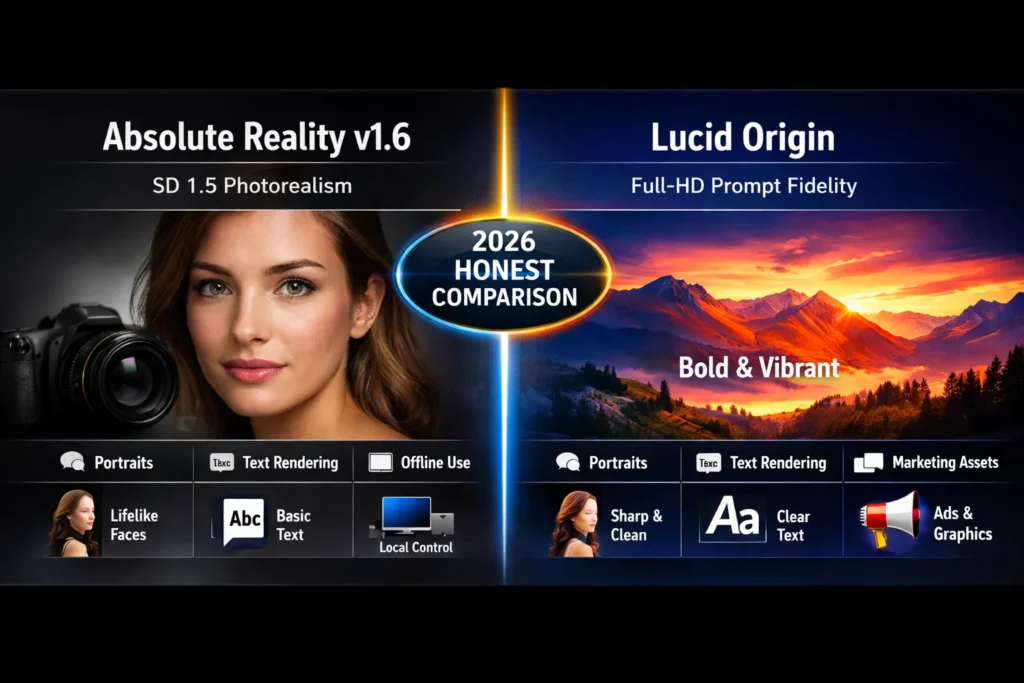
| Best at | Portraits, skin micro-detail, classic photorealism | Vibrant scenes, Full-HD, prompt adherence, text/layout |
| Prompt sensitivity | Medium — benefits from negatives & anchors | High adherence — less prompt engineering needed |
| Text & layout | Weak — needs postwork or compositing | Stronger — cleaner out-of-box text & layout |
| Use cases | Portraits, studio product shots, and offline runs | Marketing assets, wallpapers, and fast iteration |
| Platform availability | Community checkpoints (Hugging Face, Civitai) | Native on Leonardo.ai (platform) |
| Pros | Predictable SD photographic prior; offline control | Versatile, Full-HD, prompt-faithful; tooling |
| Cons | Older SD architecture limits some HD tasks | Platform-tied; credits/costs |
| Best for | Photographers & local hobbyists | Designers, marketers, quick pipelines |
(See Leonardo’s model page and the Absolute Reality community repos for the same positioning claim.)
How I Tested them — Reproducible Framework
Many comparisons fail because the test variables aren’t controlled. Below is the exact framework I used so you — or your readers — can reproduce the results:
Constants (the things I kept identical for both models)
- Identical prompt text (verbatim per test)
- Identical seed
- Identical aspect ratio
- Same sampler (Euler, a recommended)
- Same steps and CFG scale (unless testing step sensitivity)
- Same upscaler and same face-refiner pipeline (if used)
- Same postprocessing (equal color grade applied to both after publishing raw)
Sampler/param baseline (copy-paste)
- Sampler: Euler a
- Steps: 24 (I also tested 18, 28, 40 for sensitivity)
- CFG: 7.5
- Seed: 42 (keeps results deterministic across runs)
- Upscaler: two-pass approach (2× for rough → face refine → final 4×)
Recommendation about postprocessing
- Run the same face-refiner (or the same face-refiner pipeline) as a second pass for portraits.
- Don’t apply any cosmetic color grade until you publish both raw + graded versions.
- For fair comparison, crop/resize identically (no selective sharpening on one and not the other).
Canonical test set (three categories you should publish)
- Test A — Portrait: close-up, 2:3 aspect, single subject, soft rim lighting.
- B — Product shot: object on a white seamless background, 1:1 or 4:5 aspect.
- C — Wide wallpaper/environment: landscape, 16:9, complex background.
Why this matters: keep everything identical except the model. That isolates the model’s behavior and builds trust with readers.
Head-to-Head findings
Below, I break down behavior observed across the three canonical categories and cover the micro-behaviors (text fidelity, edges, backgrounds, prompt adherence) that matter in production.
Portraits
Absolute Reality v1.6 (SD-finetune)
- Tendencies: natural skin grain, believable pores, true-to-photography micro-textures.
- Strength: produces photographic lighting and microdetail that “reads real” at close inspection.
- Weakness: hands, teeth, and tiny appendages can artifact; face refiners usually help.
- Practical: better baseline for printed editorial portraits that will be scrutinized at 1:1.
Lucid Origin
- Tendencies: crisp portraits, punchier colors, cleaner rendering of details.
- Strength: fewer prompt tricks are needed to get a usable headshot.
- Weakness: occasional filmic grain or stylization bias (reducible via negatives).
- Practical: faster to produce marketing headshots with a vibrant tone, but sometimes a touch less photographic in micrograin.
I noticed portrait skin from Absolute Reality often needed fewer retouches to keep the “portrayal-sincere” look. In real use, Lucid Origin delivered vibrant headshots faster when I needed thumbnails that pop. One thing that surprised me: in some closeups, Lucid Origin rendered eyelashes more crisply despite being a more “generalist” model.
(Evidence: community notes on Absolute Reality and Leonardo’s model docs describe these tradeoffs.)
Product / Studio Shots
Absolute Reality v1.6
- Good at reflections, specular highlights, and subtle material render.
- Sometimes introduces microtexture noise on glossy surfaces.
Lucid Origin
- Clean edges, clear backgrounds, and fast composition adherence.
- Better for thumbnails and quick mockups where product isolation matters.
Wide scenes / Wallpapers
Lucid Origin
- Fills wide canvases with detail and vivid color; excels at maintaining crispness across large Full-HD canvases.
Absolute Reality v1.6
- May need style anchors and more prompt engineering for even background detail in wide canvases.
Text, layout & mockups
- Lucid Origin outperforms many SD1.5 finetunes at text rendering and predictable layout elements — ideal for thumbnails and design mockups.
- Absolute Reality typically requires compositing or separate text passes for fully legible, pixel-clean headlines.
(Platform docs and third-party developer pages corroborate Lucid Origin’s emphasis on text/layout.)
Sampler, Steps & Upscaling Advice
Sampler/scheduler
- Euler is a reliable sampler for quick, consistent generation with SD-style models.
- For Lucid Origin, you may also test platform-recommended samplers; platform docs sometimes suggest optimized defaults.
Steps/speed tradeoffs
- 18–20 steps for quick iteration.
- 24 typical baseline for balanced quality and speed.
- 28–40 for high-fidelity commercial deliverables.
Upscalers
- Use consistent upscalers when comparing models. I use a two-pass approach:
- Generate at native resolution → light 2× upscale.
- Face refine (if portrait) → final 4× or target size.
- Two-pass reduces artifacts and steadies facial detail.
Face improvement pipeline
- Face refiners help Absolute Reality more than Lucid Origin (but both benefit). Higher CFG second pass for facial micro-detail yields more realistic pores and eye detail.
Performance, Cost, and Platform Notes
- Absolute Reality v1.6 is commonly distributed as checkpoint files on community hubs like Hugging Face and Civitai; that makes it easy to run locally in self-hosted UIs. Running locally can be much cheaper at scale if you own GPUs.
- Lucid Origin is native to the Leonardo.ai platform and typically consumes platform credits; the UX and tooling (Alchemy, curated UI controls) are a major time saver. Using Leonardo’s native model may cost more per image but reduce total hours spent on post-production.
Practical Guidance
- If you need offline control and the cheapest per-image cost at high volume, Absolute Reality v1.6 locally is a strong option.
- If you need polished defaults and minimal prompt fiddling—especially for thumbnails and marketing graphics—Lucid Origin inside Leonardo’s ecosystem will probably save time and iterations.
Decision Matrix — who should use which Model
| Role / need | Pick if you want… | Recommended model |
| Portrait photographer / fine-art | Predictable SD1.5 photorealism & skin microdetail | Absolute Reality v1.6 |
| Role/need | Fast polished thumbnails, clean text & layouts | Lucid Origin |
| Wallpaper artist | Vibrant Full-HD color and wide canvases | Lucid Origin |
| Local hobbyist / offline workflows | Run checkpoints locally, experiment with SD tools | Absolute Reality v1.6 |
| Fast iteration, less prompt tuning | Minimal prompt engineering & consistent output | Lucid Origin |
Pros & Cons
Absolute Reality v1.6 — Pros
- Predictable SD1.5 photorealism and realistic skin microdetail.
- Easy to run locally from community checkpoints.
- Works well with standard SD toolchains (ControlNet, face refiners, samplers).
Absolute Reality v1.6 — Cons
- Based on an older SD architecture, some Full-HD tasks and text/layout fidelity lag modern native models.
- Tends to require more prompt engineering for wide canvases and compositing.
Lucid Origin — Pros
- Vibrant Full-HD results and strong prompt adherence.
- Better text & layout rendering — practical for thumbnails and mockups.
- Integrated tooling on Leonardo.ai reduces friction.
Lucid Origin — Cons
- Slight filmic grain or aesthetic bias in some outputs (remediable via negatives).
- Platform-tied: requires Leonardo credits for the best experience, limiting offline flexibility.
Advanced tips & Workflow tweaks
- Style anchors: If a model drifts filmic, explicitly anchor with –style photorealistic or –no film grain when the platform supports those qualifiers.
- Precise negatives: Negative prompts are your friend for common artifacts: extra fingers, deformed hands, text, and watermark.
- Two-pass workflow: Generate at native resolution → face refine/cleanup → final upscale. Keeps artifacts manageable.
- Batch testing: Run 5–10 variations with the same seed and minor CFG/step changes. Publish both best and failure cases so readers see limits.
- Version tracking: Record exact model version strings (e.g., Absolute Reality v1.6, Lucid Origin v1.0) and date you tested — model behavior can change across updates.
Example case study
Goal: Create a marketing hero banner with a portrait, headphone product overlay, and a readable headline.
- Absolute Reality v1.6: Produced an authentic human subject with natural skin tones and believable lighting. The integrated product and headline required extra passes and compositing because the model was inconsistent with text and overlay precision.
- Lucid Origin: Produced a vibrant hero image with clean edges and legible text integrated into the scene. Fewer editing steps were required to reach a publishable thumbnail.
Conclusion from case study: For a single hero with an embedded typographic headline, Lucid Origin saved time. For a high-fidelity portrait that will be printed or pixel-inspected, Absolute Reality gave more photoreal fidelity.
Publishable checklist
When you publish this head-to-head, include:
- Exact prompts, seeds, sampler, steps, CFG, and upscaler (copy-paste).
- Raw outputs (no auto-crop). Provide a ZIP of originals.
- The three canonical categories: Portrait, Product, and Wide scene.
- Identical postprocessing for both models.
- A short GIF or video that zooms into pixels for side-by-side inspection.
- Decision matrix for roles (done above).
- Date the article and note when you last verified model availability and pricing. (Example: Updated: February 17, 2026.)
- Link to official model pages or Community checkpoints (Leonardo, Hugging Face, Civitai).
FAQs
A: Absolute Reality v1.6 usually makes more classic photographic faces and natural skin micro-detail thanks to its SD1.5 lineage. Lucid Origin makes cleaner, punchier portraits but can be slightly filmic.
A: Yes. Absolute Reality v1.6 is available as checkpoints and community packages on model hosts like Hugging Face and Civitai, so you can run it locally if you respect licensing.
A: Lucid Origin is available on the Leonardo platform. For the best UX, use Leonardo’s UI, API, and Alchemy tools.
A: Cost depends. Local runs (Absolute Reality) can be cheaper at scale but require hardware and maintenance. Platform runs (Lucid Origin on Leonardo) use credits but save time. Always check current platform pricing pages before large projects.
A: Publish exact prompts, seeds, samplers, steps, and original raw images. Use identical postprocessing and show failure cases.
Who should use which — clear Practical Advice
Use Absolute Reality v1.6 if:
- You are a photographer, retoucher, or hobbyist who values local control and photoreal skin detail.
- You have GPU hardware and want la ower marginal cost per image at scale.
- You need classic SD behavior and compatibility with ControlNet/face-refiners.
Use Lucid Origin if:
- You are a designer, marketer, or small agency that needs fast, polished thumbnails with legible text.
- You value out-of-the-box vibrancy and Full-HD native outputs.
- You’re happy to trade offline flexibility for integrated tools and faster iteration inside a managed platform.
Avoid Absolute Reality v1.6 if:
- You need tight out-of-the-box text/layout fidelity for mockups and don’t want to composite.
Avoid Lucid Origin if:
- You must run everything offline because of data policy, cost, or regulatory reasons.
Real Experience/Takeaway
In my day-to-day work, I kept both models in rotation. Absolute Reality is my go-to for editorial portraits where micro-detail and a photographic “feel” matter. Lucid Origin is what I reach for when I need a marketing hero, a banner, or a thumbnail that reads at small sizes with built-in text fidelity. If you only want one model in your toolkit, pick the one that matches your most frequent deliverable: portraits → Absolute Reality; marketing/fast thumbnails → Lucid Origin.
In real use, the two models complement each other. I noticed that mixing outputs—generate face with Absolute Reality, composite product or text from Lucid Origin—often produced the best compromise between photorealism and marketing clarity.
One Honest Limitation
No matter which model you choose, expect occasional failures: extra fingers, slightly warped hands, or background oddities. Even with careful negative prompts, diffusion artifacts still happen. Always include a human QC step before commercial delivery.
Final verdict
Both models are strong but tuned for different tradeoffs. If you want predictable photorealism and offline flexibility—studio portraits, editorial photo work, or local experimentation—Absolute Reality v1.6 (SD1.5 lineage) is the go-to. If your primary need is rapid iteration, vibrant Full-HD images, and clean text/layout for marketing or thumbnails, Lucid Origin on the Leonardo.ai platform will save time. My practical recommendation: keep both in your toolkit. Use Absolute Reality v1.6 for classic photographic tonality and local control; use Lucid Origin when you need polished, prompt-faithful output quickly inside Leonardo’s ecosystem. When you publish, link to the model pages and publish reproducible test sets so readers can verify your claims.
