
Gemini 1.5 Pro vs Gemini 1.5 Flash: Which AI Saves You Money Without Failing?
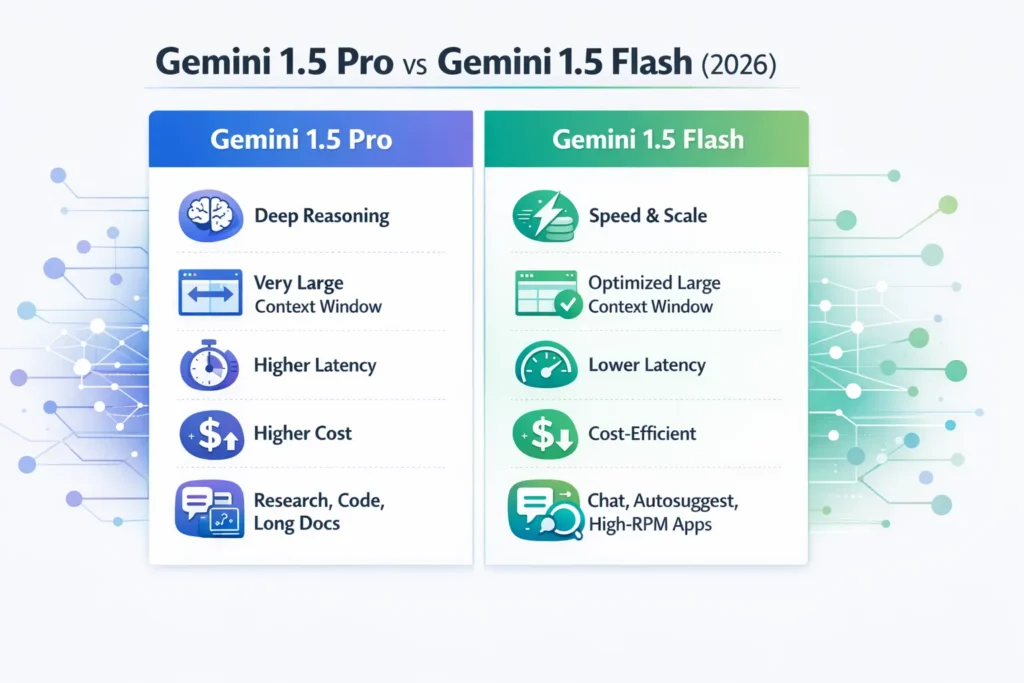
Gemini 1.5 Pro and Gemini 1.5 Flash are Google’s top AI models, tuned for different priorities. Pro excels in deep reasoning, code generation, and huge-context tasks, while Flash is faster, cheaper, and optimized for high-volume APIs. Choosing the right model depends on accuracy, latency, cost, and your product’s real-world needs. Gemini 1.5 Pro excels as a precision-oriented model ideal for detailed sequential logic, precise programming, extended input processing, and meticulous responses with minimal errors, whereas Gemini 1.5 Flash prioritizes velocity and mass deployment, suiting rapid dialogues, automatic completions, and high-volume scenarios where affordability and swift outputs outweigh flawless precision.
For typical groups, the most reliable strategy involves a combined configuration that employs Flash for routine operations and shifts to Pro during validation or fixes. Gemini 1.5 Pro vs Gemini 1.5 Flash Instrument, benchmark, and gate escalations with validators (unit tests, schema checks, or lightweight verifiers) to control cost and preserve correctness.
Speed vs Brains: When Flash Outruns Pro and When It Fails
From an NLP/ML engineering perspective, the Gemini 1.5 family provides two operationally distinct inference artifacts optimized along orthogonal axes: Pro trades compute and latency for representational fidelity, long-range context coherence, and stronger reasoning; Flash trades a fraction of peak problem-solving fidelity for substantial gains in serving efficiency, throughput, and cost-per-token.
For product engineers, SREs, and ML platform teams, this is not a binary “which is better” question — it’s an SLO-to-model fit question. Build the instrumentation to measure where your user journeys require Pro-level fidelity (code correctness, legal/medical language, long-document reasoning) and where Flash is fine (short chat, autocomplete, real-time suggestion). The rest of this guide reframes the comparison in NLP-first language, offers reproducible tests, gives formulas and worked examples for cost/latency planning, and provides ready-to-copy prompts, pseudocode, and runbooks you can drop into an SRE/ML Ops workflow.
Quick Comparison: What You Really Need to Know First
| Dimension | Gemini 1.5 Pro | Gemini 1.5 Flash |
| Primary focus | Representation fidelity, stepwise reasoning, multimodal fusion, long-context receptive fields | Serving efficiency, reduced per-token compute, low-latency response, high throughput |
| Best for | Research-grade reasoning tasks, long-document Q&A, complex code generation with unit-test validation | Chat UI, inline suggestions, autosuggest, telemetry-heavy consumer features |
| Context window | Very large (designed/validated for very-long contexts in advanced modes) | Large, engineered for efficient attention/serving tradeoffs |
| Serving posture | Conservative RPMs, higher p50/p90 latency | High RPMs, lower p50/p90 latency |
| Typical tradeoff | Higher compute per token, better for chain-of-thought and multi-step inference | Lower compute, more batching, and quantization-friendly |
| Where to use | Gemini Advanced, high-stakes inference pipelines, unit-test gated code generation | Default production endpoints for scale-focused UIs |
Note: Exact rate limits, checkpoint names, and pricing are vendor-controlled and change with releases. Use this guide for architectural decisions and run your own benchmarks on your provisioned model checkpoints.
Under the Hood: How Pro and Flash Are Built Differently
High-Level Philosophies
- Pro: A fidelity-first model family: More capacity allocated toward careful attention patterns, longer-range Dependencies, and optimization targets that favor precise decoding and reduced hallucination. Pro variants generally accommodate thought-chain approaches better and generate results that more reliably uphold formal precision (calculations, scripts, rigid rules).
- Flash: A productivity-leading lineage: Execution-phase optimizations (precision-tolerant parameters, reduced-accuracy operations, refined focus partitioning, and backend mini-grouping) to boost queries/sec and shrink median delay.
Training & Tuning Signals
- Pro checkpoints are typically tuned with higher-weighted supervised/REINFORCE-style rewards on correctness tasks and may keep internal mechanisms (e.g., auxiliary heads or position encodings) geared to maintain long-term context fidelity.
- Flash checkpoints focus more on being robust under quantized runtime and reduced-latency retrieval patterns. They may be tuned to produce concise tokens and to be resilient to truncated contexts.
Tokenization & Context Management
Both models share tokenization ecosystems, but Pro will often include techniques to handle long-context stitching (sliding window, hierarchical chunking) with stronger semantic anchoring across segments.
Flash is optimized for efficient context caching and may use truncated position encodings or compressed global tokens to reduce work on repeated short prompts.
Inference-Engine Considerations
- Batching: Flash yields better throughput gains with larger micro-batches; Pro gains less from micro-batching because single-inference fidelity matters more.
- Quantization: Flash is more likely validated for aggressive quantization (INT8/4-bit) at inference, improving cost and latency. Pro can be quantized too, but some correctness-critical tasks may degrade under lower precisions — validate.
- Caching/hot path: Flash is ideal for caching frequent prompts and using response caching strategies; Pro is for cold-path heavy reasoning.
Blind Test Results: Gemini 1.5 Pro vs Flash Exposed
Public blog posts often show cherry-picked metrics. Build a benchmark suite that mirrors real traffic and includes:
Test categories
- Multi-step reasoning: Chain-of-thought style problems; measure exact correctness and hallucination types. Use controlled prompts that request step-by-step outputs and then evaluate final answers.
- Code generation: Problems with unit tests (HumanEval-style or your internal test harness). Measure pass@1, pass@k, and deterministic output behavior (with temperature=0).
- Math & symbolic reasoning: Finite-domain arithmetic and symbolic manipulation (GSM8K-style or your own bank).
- Instruction following & formatting: Structured JSON outputs, schema-validated responses (test with schema validators).
- Latency & throughput: 1k request batches across short (10–50 tokens), medium (200–700 tokens), and long (2k+ tokens) payloads. Capture p50/p90/p99 latencies.
- Large-context behavior: Ingest a long (50k–100k token) document and perform summarization, targeted Q&A, and contextual cross-references.
- Robustness tests: Adversarial prompts, noisy OCR transcripts, code with errors. Measure error modes.
Reproducibility Checklist
- Fix model checkpoint tags (e.g., gemini-1.5-pro-002, gemini-1.5-flash-002) — lock to exact versions.
- Fix region/deployment zone and client library versions.
- Log exact prompts, token counts, temperature, sampling params, and seeds where applicable.
- Run tests multiple times at different day parts and under a synthetic background load to measure variance.
Metrics to publish
- Task accuracy (exact-match, F1, BLEU where relevant).
- pass@k for code tasks.
- Hallucination rate (per-class measurement: fabrication, unsupported inference, spurious details).
- Latency distribution (p50/p90/p99).
- Cost per 1k tokens and cost per successful task.
- Throughput (req/s, tokens/s).
Reporting format
- For each test: include raw prompts, raw outputs, deterministic seeds, token counts, and machine configs. Publish anonymized datasets and scripts to reproduce results.
Latency & Budget Secrets: What Google Doesn’t Tell You
This section gives copy-paste formulas, a worked example, and advice for building a spreadsheet.
Key Formulas
Monthly token cost
monthly_cost = requests_per_day * avg_tokens_per_request/1000 * cost_per_1k_tokens * 30
Where:
- avg_tokens_per_request = avg_prompt_tokens + avg_response_tokens
Requests per minute (RPM) headroom
required_rpm = peak_rps * 60
Latency SLO probability (example)
- If p95 < 800 ms is your SLO, compute p95 from latency samples and fail deployments where p95 exceeds the target.
Worked Example
We will compute the monthly cost for a hybrid routing pattern (Flash default; 10% escalate to Pro) using example numbers. Do the math carefully, digit-by-digit.
Assumptions (example — substitute real billing numbers):
- Total requests per month: 1,000,000 requests
- Flash share: 90% → Flash_requests = 1,000,000 * 0.90
Calculate: 1,000,000 × 0.90 = 900,000 requests - Pro share (escalations): 10% → Pro_requests = 1,000,000 * 0.10
Calculate: 1,000,000 × 0.10 = 100,000 requests
Average tokens:
- Avg tokens per Flash request = 200 tokens
- Avg tokens per Pro request = 1,200 tokens
Token totals:
- Flash_tokens_total = Flash_requests × avg_tokens_per_flash
= 900,000 × 200
Step: 9 × 10^5 × 2 × 10^2 = 9 × 2 × 10^7 = 18 × 10^7 = 180,000,000 tokens - Pro_tokens_total = Pro_requests × avg_tokens_per_pro
= 100,000 × 1,200
Step: 1 × 10^5 × 1.2 × 10^3 = 1.2 × 10^8 = 120,000,000 tokens
Convert to thousands:
- Flash_tokens_k = 180,000,000 / 1,000 = 180,000 (thousands of tokens)
- Pro_tokens_k = 120,000,000 / 1,000 = 120,000 (thousands of tokens)
Example cost-per-1k (example numbers — replace with your billing):
- Flash cost per 1k tokens = $0.003
- Pro cost per 1k tokens = $0.01
Compute costs:
- Flash_cost = Flash_tokens_k × Flash_cost_per_1k
= 180,000 × $0.003
Step: 180,000 × 0.003 = 180,000 × 3 / 1000 = 540
So Flash_cost = $540 - Pro_cost = Pro_tokens_k × Pro_cost_per_1k
= 120,000 × $0.01
Step: 120,000 × 0.01 = 120,000 / 100 = 1,200
So Pro_cost = $1,200
Total monthly combined cost:
- Combined = Flash_cost + Pro_cost = $540 + $1,200 = $1,740
Interpretation: With these example rates, the 10% escalation to Pro (though a minority of requests) contributes the majority of the monthly cost because Pro uses higher tokens per request and a higher per-1k price. Any small increase in escalation percentage can dominate cost — instrument carefully.
Engineering Guidance
- Unit allocation: Employ instruction shrinking, key pulling, and search-boosted creation (RAG) to cut units dispatched to Pro.
- Pre-inspect: Deploy inexpensive inspectors (patterns, structure exams, module-exam frameworks) to prevent needless Pro upgrades.
- Grouping versus delay: Flash gains more from grouping; Pro typically demands solo-query accuracy.
Who Should Use Pro vs Flash? Real Use Cases Explained
Developers & Startups
- Flash: Use for MVPs and scale-first features that must be fast and cheap.
- Pro: Reserve for premium, paid features that run unit tests or where a tiny error is costly.
Product Teams & Consumer Apps
- Flash: Best default for chat, assistants, and on-device/near-edge agents.
- Pro: Escalate for “explain this” flows or any paywalled correctness feature.
Enterprises (legal, medical, finance)
- Pro: Default for closed-loop human-AI workflows and compliance/error-audited flows. Add human-in-the-loop review and logging.
- Flash: Use for low-risk consumer touchpoints (notifications, summaries that are flagged for verification).
Data Scientists & Researchers
- Pro: Use for controlled LLM experiments that require long-context ablation or chain-of-thought analysis.
- Flash: Use for large hyperparameter sweeps and throughput experiments.
Pro ⇄ Flash Migration Checklist Every Developer Needs
This checklist helps you migrate models or implement a hybrid routing system.
Migration: Pro → Flash
- Benchmark representative traffic on both models.
- Tag prompts where Pro materially outperforms Flash.
- Create validation gates: JSON schema checks, unit tests, or fuzzy-score validators.
- Implement fallback flow: default to Flash → if validator fails, route to Pro.
- Adjust client rate limiters to exploit Flash’s higher RPM safely.
- Monitor A/B metrics: user satisfaction, error escalation rate, cost-per-successful-task.
Migration: Flash → Pro (goal: improve accuracy)
- Identify high-value flows and run A/B tests against Pro.
- Budget and cost approvals: compute the estimated delta in monthly costs.
- Route only escalations to Pro; use targeted replays of failure cases.
- Iterate prompts to be Pro-friendly (ask explicitly for chain-of-thought).
- Measure outcome quality improvements: pass@k, hallucination reductions.
Integration Best Practices
- Centralize prompt templates and version them.
- Log prompts & outputs with redaction of PII.
- Use short structured prompts for Flash and chain-of-thought prompts for Pro.
- Add lightweight pre-checks to avoid unnecessary token spend.
- Provide audit trails and tie model calls to SLO and budget dashboards.
Pros/Cons
Accuracy & reasoning: Pro > Flash
Latency: Flash < Pro
Throughput / RPM: Flash > Pro
Cost per inference: Flash < Pro
Context window: Pro often supports longer explicit windows in advanced builds
Pros & Cons
- Gemini 1.5 Pro — Pros: Best representation fidelity, better multi-step reasoning, more robust with huge contexts.
- Gemini 1.5 Pro — Cons: Higher latency and cost; fewer RPM headroom by default.
- Gemini 1.5 Flash — Pros: Low-latency, cheap at scale, higher RPMs, excellent for consumer touchpoints.
- Gemini 1.5 Flash — Cons: Slightly lower peak reasoning accuracy on the hardest tasks; long-context behavior is optimized differently and may need chunking.
FAQs
A: Not exactly. Flash trades small accuracy differences on hard reasoning tasks for big wins in latency and cost. For many production use cases (chat, autosuggest), Flash is the pragmatic choice.
A: Historically, Google’s free Gemini uses Flash variants in many cases, while Gemini Advanced used 1.5 Pro with larger contexts and added features. Always verify current docs because Google may change defaults.
A: Yes. Hybrid routing (Flash default; escalate to Pro) is common. Use validators and cost observability to control escalations. See pseudocode above.
A: Yes — Google released stable checkpoints such as gemini-1.5-pro-002 and gemini-1.5-flash-002. Locking to a version tag helps avoid unexpected behavior changes.
A: Google announced tuning support for Flash variants (tuning timelines have shifted in announcements), so check current docs for exact availability.
Conclusion
Gemini 1.5 Pro alongside Gemini 1.5 Flash represent crafted compromises within the identical lineage: one emphasizes accuracy and broad-input deduction; the other stresses delay and expansion. For typical practical setups, the optimal tactic involves a sensible mixed dispatch method that starts with Flash and upgrades to Pro for checked failure instances. That tactic delivers steady delay and expense alongside a safeguard for critical paths.
