
Exposed Keys? Secure, Rotate & Protect Your Perplexity API Key Now
Perplexity API key: if your Perplexity API key is exposed, attackers can drain credits and access sensitive prompts. Secure and rotate per-service keys now to reduce risk and keep uptime — follow our 5-step checklist to fix it, and discover why up to 83% of common leaks are preventable. This guide explains — in Natural Language Processing (NLP) terms — how to create, provision, rotate, and protect Perplexity API keys used to call Sonar chat/completions. We’ll map operational steps to model-serving concepts (tokens, inference, latency, quotas), include copy–paste examples (curl, Python, TypeScript/OpenAI client), show a zero-downtime rotation script that reduces inference disruption, provide troubleshooting checks, secrets-storage best practices, and a publishable checklist. Language kept clear so a 15-year-old can follow, but framed for engineers familiar with model deployment and NLP inference.
Exposed Risks? Learn How to Secure & Use Your Perplexity API Key Fast
- A Perplexity API key is the bearer token used at the transport layer to authenticate requests to Perplexity’s Sonar / Chat Completions endpoints. Treat it like a private cryptographic secret; leaking it lets callers submit prompts, consume compute, and potentially exfiltrate data.
- Primary chat endpoint (example): https://api.perplexity.ai/chat/completions. Perplexity’s API supports an OpenAI-compatible Chat Completions interface, so many OpenAI clients can be reused with a baseURL change.
- Programmatic key creation: POST /generate_auth_token. Programmatic revocation: POST /revoke_auth_token. These endpoints let you mint short-lived tokens and retire old tokens as part of automated rotation flows.
- Keep keys in a proper secret manager (AWS Secrets Manager, HashiCorp Vault, GCP Secret Manager). Rotate often, monitor usage, and limit per-key privileges (least privilege).
Security Risk? Protect and Manage Your Perplexity API Key Today
In a system, the model server is the inference engine: it receives a sequence of tokens (prompt), computes internal representations, and emits logits → tokens (response). The API key is the gatekeeper for that inference surface. From an operational lens:
- Authentication: The key authenticates the client identity to the model-serving gateway. Without it, the gateway refuses the request (401).
- Authorization & quotas: Keys map to API groups/tiers that control model availability, concurrency, and rate limits (affecting throughput and latency). If a key lacks access to a model, inference returns model-not-found or authorization errors.
- Auditability: Per-key logging lets you attribute inference calls to services. This matters for analysis (who sent prompts that produced unexpected outputs?) and for billing allocation.
- Security blast radius: In deployments, a leaked key is like leaking a GPU slot — the attacker can run streams of prompts, inflate compute costs, and potentially query private content. Use per-service keys to reduce blast radius.
Because modern LLM interaction mixes user content and sometimes external documents (PDFs, web grounding), keys also protect data-in-flight and downstream retrieval operations.
Confused: Where to Begin? Secure & Manage Your Perplexity API Key — 5 Steps
- Create a Perplexity account and set up API Groups (Production, Staging, Dev) to separate inference workloads and billing.
- Decide per-service key strategy: one key per service or one per environment for least-privilege control.
- Secret store: AWS Secrets Manager, HashiCorp Vault, GCP Secret Manager, or similar. Don’t store keys in source control.
- Local dev: use .env files and a local secret shim (make sure .gitignore excludes them).
- Keep a master/admin (vault) token only in a high-security vault. Use it only to call generate_auth_token and revoke_auth_token from trusted CI/CD.
Struggling to Generate Keys? Quickly Create & Use Your Today
Console (UI) — create and provision
- Log into Perplexity and open the API Portal → API Groups / API Keys.
- Create or select an API Group (e.g., prod-llm-2026) — groups map to billing and model access controls.
- Click Generate / Create Key. Give it a descriptive name (e.g., svc-replier-prod-2026-01). Copy the raw token shown — many consoles only show this once. Immediately save it into your secret manager.
- NLP analogy: creating a key in the console is like registering a new client identity with the model router and giving it credentials to submit token sequences for inference.
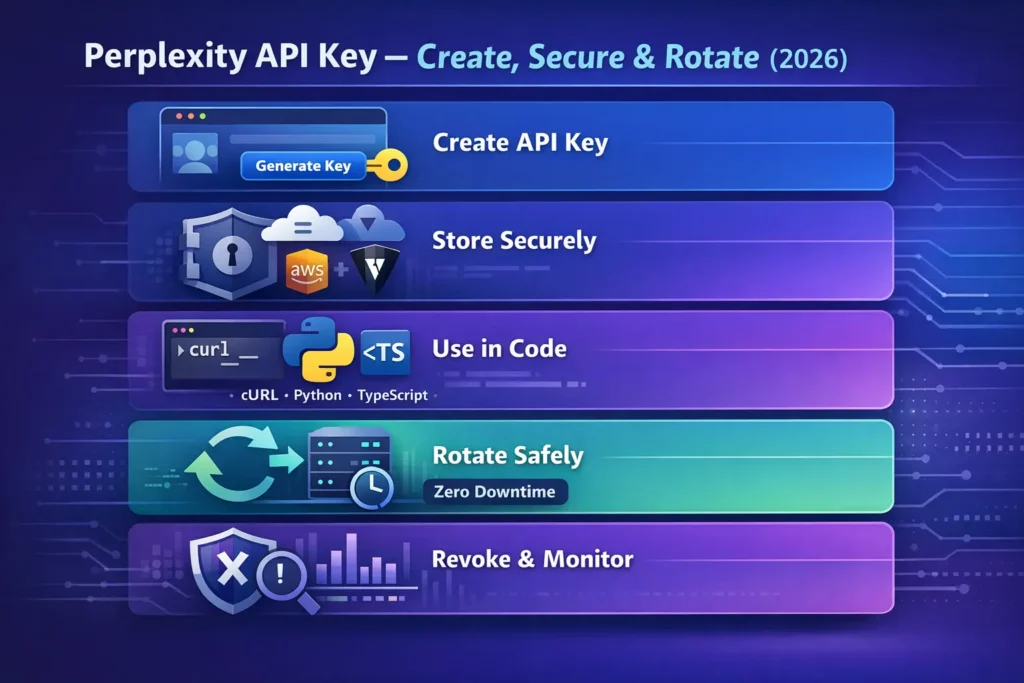
Programmatically
When you automate key creation, you treat generate_auth_token as a minting endpoint. That allows ephemeral-token strategies and CI-driven rotation.
Worried About Lost Keys? Master Key Management Endpoints for Your Perplexity API Key Now
Perplexity exposes lightweight key-management endpoints that let you implement secure automations:
- POST /generate_auth_token — create a new API Token (returns auth_token, name, created timestamp). Use the master/admin token to authorize this.
- POST /revoke_auth_token — revoke an existing token; once revoked, the token is unusable. This is the final step in the rotation to ensure old tokens cannot be replayed.
These endpoints are the building blocks for short-lived token patterns (mint-and-use) and for zero-downtime rotation flows.
No Downtime? Rotate Your Perplexity API Key Safely
When a production service is serving inference to users, rotation must avoid dropping active inference jobs or creating inconsistent model access. The high-level flow:
- Mint a new token with generate_auth_token (still using the master/admin token).
- Provide the new token to your secret manager (update secret value for the service).
- Reload or trigger a rolling rollout of your service so that pods/processes pick up the new token. Use rolling restart strategies that drain connections (e.g., Kubernetes readiness probes) , so in-flight inference completes.
- Smoke test using the new token: run chat/completions health-prompts, check streaming behavior, verify logits-to-text correctness, and latency.
- Revoke the old token via revoke_auth_token. If smoke tests fail, rollback the secret value to the old token.
/serving notes: Rolling restarts should be configured to maintain concurrency and to let active streaming responses complete. If you have stateful streaming sessions, consider a graceful-drain window longer than your typical streaming session length.
Worried About Exposure? Store Your Perplexity API Key Safely
Good options (recommended):
- Managed secret stores: AWS Secrets Manager, Azure Key Vault, GCP Secret Manager — encrypt-at-rest, rotation triggers, RBAC, audit trails. These integrate well with cloud-native model-serving stacks (EKS/GKE/Azure AKS) and CI/CD.
- HashiCorp Vault: dynamic secrets, lease/renew patterns, and integration with Kubernetes via the Vault CSI provider. Great for short-lived token patterns where you mint tokens and lease them.
- CI/CD secrets: GitHub Actions Secrets, GitLab CI variables — fine for CI pipelines but avoid exposing them to builders that persist logs. Use ephemeral runner tokens.
- Local dev: .env files with .gitignore set; consider a developer secret shim (e.g., direnv or aws-vault) to avoid committing credentials to disk.
Bad Patterns:
- Hardcoding keys in source code or public repos.
- Committing secrets to Git (or Gists).
- Sharing keys in email or chat.
- Storing keys in shared unencrypted spreadsheets.
Unsure When to Rotate? Protect Your Perplexity API Key Regularly
- High-sensitivity / production: Rotate automatically every 14–30 days; use short-lived tokens if supported.
- Normal production: Rotate every 60–90 days.
- After personnel changes or compromise: rotate immediately.
- Short-lived tokens: Mint tokens with a lifetime measured in minutes/hours and provision them dynamically to ephemeral workers; this reduces the window of compromise but requires robust orchestration (token minting service, high-availability master token).
Why rotate? In an inference-heavy environment, logs and third-party integrations can accidentally capture a token. Frequent rotation reduces the effective lifetime of a leaked secret — lowering the chance an attacker can use captured prompts or drain compute.
Facing Errors? Fix Your Perplexity API Key Issues Fast
| Error | Likely cause | Quick fix |
| 401 Invalid API key | Wrong header format, token revoked, typo | Ensure Authorization: Bearer <token> and that token is active; regenerate if needed. |
| 429 Rate limit exceeded | Too many requests/concurrency above per-key quota | Implement exponential backoff, reduce concurrency, batch prompts, or request a higher tier. |
| model not available | Key lacks model access (group/tier) | Check API group & model access in API portal; ensure correct model name. |
| Empty citations in output | Calling an offline model or wrong flags | Use an online Sonar model and appropriate output flags. |
| Streaming disconnects | Too many simultaneous streams or network jitter | Reduce concurrent streams, add reconnect logic, or upgrade the plan. |
Worried About Limits? Understand Pricing & Quotas
Perplexity enforces usage tiers and quotas per API group and per token. These affect concurrency, allowed models, and throughput. Always inspect your API account settings to know the exact per-key limits. If planning heavy inference (multiple simultaneous streaming sessions or high QPS), contact Perplexity sales for enterprise tiers or increased quotas.
Security checklist
- Keep the master/admin token in a high-security vault.
- Use per-service keys (one key per microservice).
- Use API groups for environment separation (dev/staging/prod).
- Enforce least privilege: give model access only to keys that need it.
- Automate rotation via generate_auth_token / revoke_auth_token.
- Monitor key usage and set billing/spend alerts.
- Audit revocations and key creation logs.
- Block public access and avoid embedding keys in client applications.
Need Extra Security? Use Short-Lived Perplexity API Key Tokens
For large organizations, pair a secure master token with a minting service that produces short-lived tokens for each worker or user session. This pattern:
- Minimizes blast radius (each token expires quickly).
- Pairs well with HashiCorp Vault (dynamic credentials) or cloud vendor IAM token exchange.
- Requires a secure, auditable master token stored in a vault and a high-availability token-minting service.
Flow summary: client/service requests short-lived token from internal token-mint service → mint service calls generate_auth_token → mint service returns short-lived token to client → client uses it for inference → token naturally expires or is revoked.
Confused About Options? Compare Perplexity API Key Management Patterns
| Pattern | When to use | Pros | Cons |
| Single global key | Small dev projects | Simple setup | Large blast radius; hard to audit |
| Per-service keys | Microservices/prod | Least privilege, easier rotation | More keys to manage |
| Short-lived tokens via master key | Large orgs & ephemeral compute | Low blast radius, easy rotation | Requires a secure master token and orchestration |
| HSM + Vault | Regulated Environments | Highest security & compliance | More complex & costly |
Recommendation: Use per-service keys + automated rotation with generate_auth_token and revoke_auth_token as your baseline for production.
FAQs
A: Use https://api.perplexity.ai/chat/completions with Authorization: Bearer <PERPLEXITY_API_KEY> header. This OpenAI-compatible endpoint accepts message lists, sampling hyperparameters (temperature, top_p), and streaming flags.
A: Yes — Perplexity’s Sonar API is OpenAI-compatible; set your OpenAI client’s baseURL to https://api.perplexity.ai and pass your Perplexity key. This compatibility lets you reuse existing tooling and prompt engineering patterns.
A: Use POST /revoke_auth_token with an admin token to revoke the compromised key immediately. Once revoked, the token cannot be used again.
Conclustion
A Perplexity API key is more than just a token — it’s the security and rule layer for every AI request your application makes. By creating per-service keys, bottling them in a secure secrets manager, and rotating them regularly using generate_auth_token and revoke_auth_token, you minimize risk while keeping the environment stable. Follow least-advantage access, monitor usage, automate rotation, and your Perplexity-powered apps will remain secure, scalable, and decent in 2026 and beyond.
