
Introduction
DreamShaper v6 is best understood as a conditional generative model whose conditioning channel (text prompts) and latent dynamics were tuned to produce stylized photoreal outputs. From a lens, prompts are sequences of tokens that the model encodes to a vector-conditioned prior; “DreamShaper v6 (Leonardo AI) model variants behave like finetuned language models with different priors and inductive biases.
This guide reframes DreamShaper v6 through concepts (embeddings, adapters, fine-tuning, transfer learning, loss surfaces, and evaluation metrics) so technical publishers and power users can reproduce, evaluate, and extend results transparently. “DreamShaper v6 (Leonardo AI) You’ll get: an architectural and training overview, principled guidance on when to select v6, exact reproducible runs (prompt tokens, sampler scheduler, step counts, seeds), adapter (LoRA) stacking recipes, ControlNet conditioning strategies, a publishable benchmark plan (metrics + CSV format), troubleshooting mapped to diagnosis and corrective actions, and a checklist of assets that make your piece link-worthy. Include seeds and exact model filenames, and your readers can replicate runs deterministically — the strongest form of reproducibility in generative model reporting.
DreamShaper v6: Secrets Behind Stunning AI Portraits.
DreamShaper v6 is a community-finetuned diffusion checkpoint in the Stable Diffusion family. In NLP terms, imagine a base backbone (the U-Net + diffusion scheduler + VAE) analogous to a Transformer language model; DreamShaper v6 is a targeted domain finetune that shifts the learned conditional distribution p(x∣y)p(x \mid y)p(x∣y) where yyy is the text embedding vector (produced by a text encoder like CLIP or another encoder used by the pipeline). The finetune pushes the generator toward a region of image space with smoother skin, more coherent facial structure, and an inductive bias toward polished portrait lighting. It behaves like a language model fine-tuned for a specific register or genre.
DreamShaper v6 Training & Architecture Explained
- Conditioning tokens → Embeddings: Prompts are tokenized and mapped to embedding vectors; those embeddings modulate the denoising U-Net via cross-attention. Treat prompt design like prompt engineering in NLP: token order, explicit descriptors, and negative conditioning matter.
- Adapters (LoRA) → Low-rank parameter additions: LoRAs are analogous to adapter modules in Transformer NLP models — low-rank updates that alter behavior with minimal parameter additions. They let you steer style or identity without full retraining.
- ControlNet → External conditioning network: ControlNet acts like an auxiliary encoder that injects structural constraints (pose, lines, depth) so the generator respects external signals — similar to adding a grounding encoder into a text model.
- Guidance / CFG → Decoding weight: Classifier-free guidance (CFG) is the scalar that amplifies the influence of text conditioning vs. the unconditional prior. It’s like adjusting temperature and top-k/top-p with additional weighting for conditional prompts.
- Samplers (Euler a, DPM++ 2M Karras) → Decoding schedulers: Samplers are sampling strategies over the reverse diffusion process — equivalent to different decoding algorithms in NLP (e.g., beam search vs. nucleus sampling) that trade diversity vs. fidelity.
- Seeds → Deterministic RNG state: As in NLP experiments where a PRNG seed fixes initialization, seeds fix the noise drawing for diffusion sampling, enabling exact reproduction.
When to choose DreamShaper v6 top u”When & Why DreamShaper v6 Shines — Key Use Cases”se case
- High-fidelity portrait generation (task: conditional image generation for single-subject distribution): v6 yields a high probability mass around polished portrait features — skin texture, rim lighting, and photographic lenses.
- Stylized photoreal character design (task: controlled creativity with photoreal prior): v6 acts like a register-tuned model that sits between realism and illustrative stylization.
- Single-subject shots (task: high-detail conditional sample for person/object): The model’s inductive bias reduces the need for heavy post-processing.
- Rapid prototyping for client art (task: minimize downstream retouching): v6’s outputs often need fewer editing operations.
When Not to Use v6:
- Strict photogrammetry / forensic realism (task: literal reproduction of real-world product attributes): For hyper-literal realism (product textures, measurable color), special-purpose checkpoints trained on photogrammetric datasets (absolute realism variants) often yield distributions closer to the target.
- Pure traditional anime / cell-shaded line art (task: classic line-art style generation): Anime-trained models or diffusion checkpoints with explicit anime priors outperform v6 on that regime.
DreamShaper v6 Availability — Where Experts Download & Use It
- Hugging Face model cards: Many community variants and the canonical Lykon/dreamshaper-6 model card. Always capture the model filename, SHA/commit, and license lines from the model card.
- Civitai / community-hosted pages: Variant builds, inpainting models, and authors’ upload notes add important context (inpainting masks, training dataset granularity).
- Leonardo.ai / hosted UIs: Hosted endpoints Leonardo, Dezgo, Mage. space, etc.) often offer convenience but can hide variant differences and transform/element stacks; record the platform, model alias, and any platform-side elements or upscalers used.
License & Compliance:
Treat model cards as contract text. Community builds vary — CreativeML, OpenRAIL, or custom licenses may differ on commercial usage, output ownership, and attribution. For publishing commercial or client work, verify licensure and keep a screenshot or cached copy of the model card used.
Quick Comparison — DreamShaper v6 vs Alternatives
Think of each checkpoint as a model variant with different priors. Below is a short feature matrix (style vs literalness vs adapter friendliness).
| Feature | DreamShaper v6 | DreamShaper v5 | Realistic Vision / AbsoluteReality |
| Photorealism | High (stylized photoreal) | Good (older noise profile) | Very high (literal realism) |
| Adapter (LoRA) compatibility | Very good | Good | Good |
| Best for (task) | Portraits, stylized photoreal | Portraits (older tone) | Product shots, hyperreal faces |
| Typical samplers | Euler a / DPM++ 2M Karras | Euler a | DPM++ / Euler variants |
Short Decision Rule: choose v6 when your downstream evaluator favors stylized photographic quality over literal physical accuracy.
DreamShaper v6 Settings That Actually Work
Below is a baseline hyperparameter recipe, written as both UI settings and their NLP/diffusion parallels. When publishing, include the model filename, platform, and RNG seed — these three are necessary for reproducibility.
Baseline Recipe :
- Model: DreamShaper v6 — specify exact filename or Hugging Face identifier.
- Sampler: Euler a OR DPM++ 2M Karras. (Sampling scheduler choice affects the reverse process trajectory; treat it like choosing an optimizer schedule.)
- Steps: 20–40 (start at 28–30). More steps refine the sample, but increase the computation.
- CFG / Guidance Scale: 6.5–8.5 (raise toward 10 for tighter prompt adherence). CFG is the conditional weight in classifier-free guidance.
- Resolution: 1024×1536 (portrait) or 1536×1024 (landscape). For determinism, always render at the same pixel dimensions.
- Upscaler: Leonardo universal or ESRGAN variants (post-processor) — record upscaler name and strength.
Why These Values:
Euler and DPM++ 2M Karras offer a balanced trajectory through latent noise space that preserves structure while converging to photoreal details. Steps in the 20–40 range hit a sweet spot between denoising fidelity and diminishing returns. CFG regulates the gradient from text-conditioning — too low leads to under-conditioning, too high yields overfitting to the prompt tokens and occasional artifacts.
DreamShaper v6 — LoRA & ControlNet Mastery
View LoRAs as low-rank adapters inserted into cross-attention or MLP layers — they are parameter-efficient modulators.
LoRA stacking :
- Add identity/pose/style LoRAs at 20–50% strength. Strength is a multiplier applied to the adapter outputs.
- Start low (≈20%) and increase in +5–10% steps while visually inspecting for style collapse.
- When stacking multiple LoRAs, log exact strengths and seed; LoRA effects are multiplicative and may interact nonlinearly.
- For identity consistency, pin a subject LoRA and use image2image with a low denoising to retain identity.
Control Net:
- Use ControlNet to enforce pose or finger positions (HED/edge, pose, depth).
- For hand correctness, use a hand-specific pose/heatmap ControlNet; treat it as an external pose encoder feeding a structural prior into the denoiser.
- Use low-denoising image2image runs (denoising strength 0.2–0.4) to lock structural constraints without collapsing fine detail.
Platform Elements (Leonardo-style):
- On hosted platforms, elements behave like pipeline augmentations (e.g., upscalers, film-grain layers). Add one element at a time and note the seed and element strength in your CSV.
DreamShaper v6 Troubleshooting Made Easy”
- Symptom: Weird hands / extra fingers
Diagnosis: Model hallucination in hand distribution or insufficient structural conditioning.
Fix: Increase steps (32–40), use hand-specific ControlNet / hand LoRA, or run a low-denoising image2image pass to correct anatomy. - Symptom: Plastic / over-smoothed skin
Diagnosis: Over-regularized texture distribution; model overfits to smooth skin prior.
Fix: Lower CFG slightly (6–7), add tokens like “natural skin pores”, “micro skin texture”, or apply a texture LoRA; alternate approach: small amount of synthetic film grain or high-frequency pass in upscaler. - Symptom: Style collapse (too anime or too photoreal)
Diagnosis: Overapplied LoRA or overstrong CFG.
Fix: Explicitly include “photoreal” or “illustration” token as needed, or reduce LoRA strength. - Symptom: Identity drift / inconsistent faces across runs
Diagnosis: Weak identity conditioning or high denoising in image2image.
Fix: Use a reference image with image2image at low denoising, or pin identity LoRA, or add subject embedding tokens. - Symptom: High-res artifacts at large canvases
Diagnosis: Model trained primarily at smaller resolutions; upscaling introduces artifacts.
Fix: Render canonical base resolution (e.g., width 1024) then upscale with ESRGAN / Leonardo upscaler; tile-render for very large canvases and recomposite.
Benchmark Your DreamShaper v6 (Leonardo AI)Results.
A pillar article gains authority when experiments are reproducible. Treat evaluation like NLP model comparisons: fixed prompts, controlled hyperparameters, and multiple seeds.
Suggested:
- Dataset: 10 diverse prompts spanning portraits, fashion, fantasy, environment, and hybrid 2.5D styles. Save literal prompts verbatim.
- Model variants: DreamShaper v6, DreamShaper v5, Realistic Vision / AbsoluteReality. Record exact filenames and download SHAs.
- Controlled variables: Keep sampler, steps, resolution, and seed identical across models. If a model is incompatible with a sampler, note the adaptation.
- Metrics:
- LPIPS (perceptual similarity) to a human reference dataset when applicable.
- FID computed on generated distributions vs. the real dataset when possible.
- Human blind preference (n = 5–10 reviewers) with forced-choice comparisons.
- Deliverables to publish: Table of metric scores, thumbnails with seed overlays, downloadable ZIP of raw outputs, and CSV with columns: prompt, seed, model_id, sampler, steps, cfg, resolution, filename.
Why this wins: Many community guides omit seeds and raw outputs; including these, plus metric tables, gives verifiability and reproducibility.
DreamShaper v6 (Leonardo AI) Pricing, Platforms & Access Tips
Where to Run v6:
- Leonardo.ai: Hosted finetunes, elements, and upscalers — good for non-technical users; capture the platform’s model alias and element settings.
Hugging Face Endpoints: Use inference endpoints for programmatic runs; note per-run compute costs and latency. - Community-hosted UIs / Spaces: Dezgo, Mage. space, etc. May offer free or paid runs; platform variability impacts exact samples (post-processing, default samplers).
DreamShaper v6 (Leonardo AI)Pricing Overview
| Platform | Model Access | Typical cost (approx) |
| Leonardo.ai | Hosted finetune + upscaler | Pay-per-run or subscription (verify on site) |
| Hugging Face Endpoints | API or run locally | Varies — endpoint compute + inference cost |
| Civitai / Model downloads | Community files | Free download (donations common) — watch license |
Publish tip: Replace “Typical cost” with live numbers at publication time; include platform URLs and snapshot the pricing terms.
DreamShaper v6 Comparison Table
| Feature | DreamShaper v6 | DreamShaper v5 | AbsoluteReality / Realistic Vision |
| Photorealism | High (stylized photoreal) | Good (older noise) | Very high (literal realism) |
| LoRA stacking | Very good | Good | Good |
| Best for | Portraits, stylized photoreal | Portraits, older look | Product shots, hyperreal faces |
| Sampler | Euler a / DPM++ 2M Karras | Euler a | DPM++ / Euler variants |
Caveat: Implementation details and training datasets affect final quality — always cite model cards for each run and include the exact model file used.
Pros & Cons DreamShaper v6 (Leonardo AI)
Pros
- Produces polished portraits with a stylistic photoreal bias — useful for high-level feature generation.
- Strong compatibility with LoRA adapters and ControlNet conditioning — parameter-efficient customization.
- Widely available across community hubs and hosted platforms.
Cons
- Not the absolute top for strict photogrammetry-level realism.
- Variant quality varies across community builds; model card diligence is required.
- Complex multi-subject scenes may require heavy ControlNet + LoRA tuning.
DreamShaper v6 Portraits Made Easy.
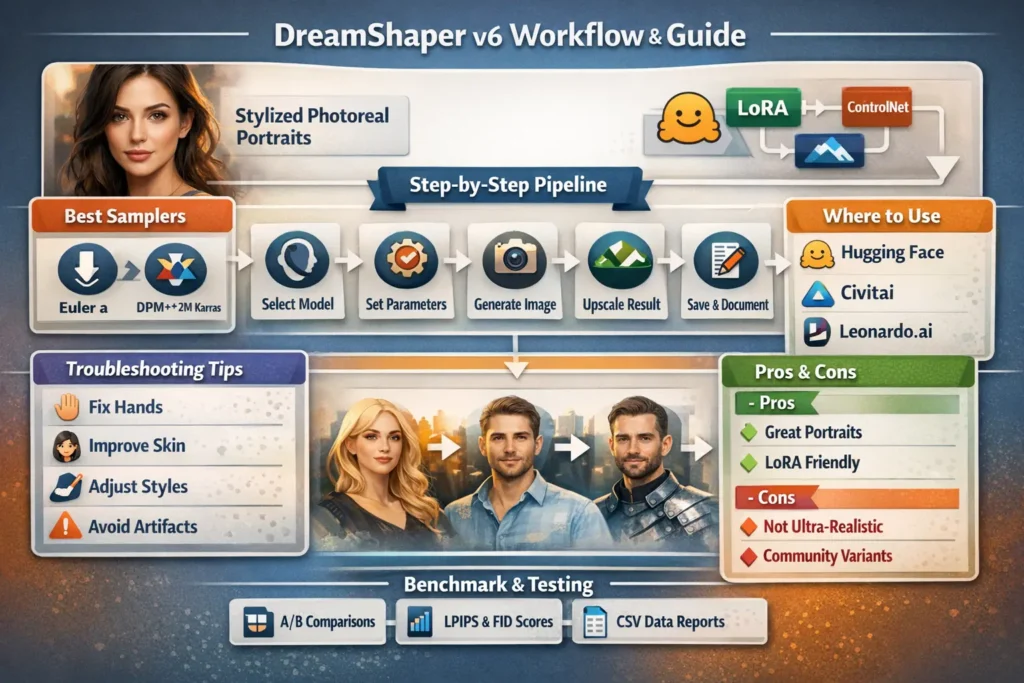
- Choose model file & platform — pick exact DreamShaper v6 variant (cite model card).
- Set canvas — 1024×1536 for portrait (exact pixels).
- Paste reproducible prompt — the cinematic portrait prompt above.
- Sampler & steps — Euler a, Steps = 30, CFG = 7.5.
- Seed — 123456 for exact replication.
- Run & inspect — fix hands or artifacts via LoRA/ControlNet & re-run with adjusted seed.
- Upscale — ESRGAN or Leonardo universal upscaler.
- Save & document — write seed, model variant, and settings to your CSV.
AI Portrait Creation Process Table
| Step | Action | Why |
| 1 | Select model + file | Reproducibility |
| 2 | Canvas size 1024×1536 | Optimal portrait resolution |
| 3 | Paste prompt | Exact replication |
| 4 | Sampler & steps | Balances speed & quality |
| 5 | Fix artifacts | LoRA / ControlNet |
| 6 | Upscale | Final polish |
FAQs DreamShaper v6 (Leonardo AI)
A: Yes, for hybrid 2.5D / anime-like looks. For pure cell-shaded classic anime, use anime-trained checkpoints.
A: Hugging Face, Civitai, and some hosted platforms like Leonardo.ai (model availability varies). Always check the model card and license.
A: Euler a and DPM++ 2M Karras are common recommendations — test both and publish the results.
A: Use hand LoRAs, ControlNet pose/depth/edge maps, increase steps, or use low-denoising image2image passes.
A: Yes — DreamShaper variants are published under different licenses. Always check the model card for terms before commercial use.
Conclusion DreamShaper v6 (Leonardo AI)
DreamShaper v6 occupies a targeted conditional distribution that favors polished portraiture and stylized photorealism. Framing the model in terms of conditioning embeddings, adapter modules, and decoder sampling schedules) clarifies how prompts, LoRAs, and ControlNet components interact. To make a publishable, authoritative pillar article: include exact model identifiers, deterministic seeds, sampler & step settings, downloadable prompts and CSVs, and blind human evaluations. That combination converts a generic how-to into reproducible science and builds.
