

Introduction
This guide reframes Gemini 2.0 Flash’s image-preview capabilities in natural language processing and generative-model terminology. It explains the preview model gemini-2.0-flash-preview-image-generation, shows copy/paste API examples, presents prompt engineering as conditioning strategies, outlines latency/throughput trade-offs, provides concrete production and MLOps recommendations, and gives troubleshooting and migration patterns.
What is Gemini 2.0 Flash (image preview)?
In generative-model terms, Gemini 2.0 Flash is a high-throughput multimodal generative model family optimized for fast conditional image synthesis and conversational multimodal conditioning. The preview variant gemini-2.0-flash-preview-image-generation exposes text→image synthesis and masked conversational editing via a stateful inference interface. Architecturally, think of it as a multimodal transformer stack with optimized attention patterns and inference kernels that trade some per-sample compute depth for lower latency and higher concurrency.
Key specs & Quick Facts
Model id (preview): Gemini-2.0-flash-preview-image-generation
- Primary capabilities: conditional image generation (text-conditioned), multimodal conditioning (image+text), conversational/iterative editing (mask-inpainting and follow-up conditioning).
- Context handling: Family-level support for very large contexts (enables extensive multimodal state & instructions across turns).
- Release: Preview announced May 7, 2025 (preview lifecycle—treat as non-permanent).
- Design trade-off: Lower inference depth for latency/throughput — ideal where many quick edits are required rather than the last ounce of absolute perceptual fidelity.
Why Gemini’s image preview Matters For Product Teams
- E-commerce (data augmentation problem): Condition on SKU metadata + base photo → generate multiple photorealistic variants. Treat generation as a conditional data augmentation pipeline where the model is a stochastic oracle producing high-variance candidate images for A/B evaluation.
- Ad localization (translation + layout preservation): Condition on base image + textual localization instructions; use spatial constraints (mask/region conditioning) to preserve reflective properties and perspective — essentially constrained generation with alignment conditions.
- Design collaboration (human-in-the-loop conditioning): Iterative conditioning loop: user instruction → generated candidate → user refinement → next-step conditioning. Model stateful turns act like a short-context memory for the session.
- Interactive apps (low-latency inference): Flash’s throughput minimizes round-trip time for conversational edits, allowing real-time UX affordances for non-design users.
When to pick Flash vs Pro (NLP decision rule): Choose Flash if your objective function prioritizes latency and throughput (many quick edits, real-time UX). Choose Pro or larger image-focused models if your metric requires best-possible perceptual quality or complex cross-modal reasoning.
Limits, Rate-Limits & Cost Considerations
In the language of computation and ML ops, costs and quotas are functions of model compute, batch size, and response size. Treat image generation as a compute-heavy inference operation with per-image energy and time costs.
What to Expect:
- Quotas & rate limits: Preview Endpoints may have higher per-minute throughput for Flash, but exact quotas are project-specific. Query your cloud console to get real quotas.
- Billing model: Billing can be per-image, per compute-unit, or per-token (text + encoded image tokens). Estimate by running small test batches and measuring consumed billing units.
- Cost-reduction strategies:
- Pre-generate and cache stable assets.
- Batch multiple variants in a single call when supported.
- Use lighter text models for heavy text tasks; reserve image generation for image-only work.
- Employ lower-resolution drafts and post-upscale only winning variants.
Retirement & migration note (operational planning): preview models can be deprecated; maintain versioned integration and plan migration (example: target gemini-2.5-flash-image or a stable image model).
Benchmarks & How Flash Compares To Alternatives
Key Image Quality Metrics Gemini 2.0 Flash:
- FID (Fréchet Inception Distance): A perceptual distance metric between model distribution and real images.
- IS (Inception Score): Measures classifiability and diversity.
- CLIP score: Cross-modal alignment between text prompt and image.
- Human evaluation: Human perceptual assessment for task-specific fidelity (e.g., product compliance).
Latency & Throughput Metrics:
- Time-to-first-pixel (TTFP): Important for UX.
- End-to-end latency: Includes network, storage, and postprocessing.
- Images-per-second (throughput): key for bulk pipelines.
How Flash stacks up :
- Strength: Low TTFP and higher throughput vs. heavier Pro models. Better for interactive editing and bulk generation.
- Weakness: May lose marginal perceptual fidelity in tasks requiring deep reasoning or ultra-high detail. Always A/B against a quality baseline.
Troubleshooting & Quality Tuning Gemini 2.0 Flash
Problem: Edits bleed into protected areas (mask leakage)
Fix: Use hard masks (alpha channels), explicitly constrain tokens: “DO NOT alter the product; only alter pixels outside bounding box.” Consider applying tighter spatial priors in the prompt and increasing mask fidelity.
Problem: Images look oversharpened or synthetic
Fix: Prompt for photographic realism (“natural film grain, less sharpening, shot with 50mm lens, f/1.8”), use image postprocessing (denoise/soften), or pass the output through a style-transfer/regression that smooths high-frequency artifacts.
Problem: Repeatability & determinism
Fix: Use seeds (if available) and log everything (prompt, mask, seed, model version). When seeds aren’t supported, store the canonical prompt+output asset pair.
Sampling Strategies:
- Temperature/stochasticity control: Lower temperatures → less random, more conservative outputs. Use for brand compliance.
- Top-k / nucleus (top-p): Control tail behavior of token distribution.
- Latent-space postprocessing: Use upscalers/super-resolution pipelines for final polish.
Upscaling & production quality: If preview endpoint limits native resolution, generate base images, then run dedicated SR model (GAN-based or diffusion upscaler) for final delivery.
Image Rights, Licensing & Safety
- Confirm model terms of use for preview variants; preview licenses can include extra restrictions on redistribution/commercial use.
- Avoid generating protected logos or recognizable celebrity likenesses unless cleared.
- Implement safety filters: Automated detectors for disallowed content, plus human moderation for edge cases.
- Decide whether to label content as AI-generated per local law or platform policy.
Safety tooling: use server-side safety modules to scan generated images for nudity, hate symbols, or other disallowed content and gate publishing to humans when uncertain.
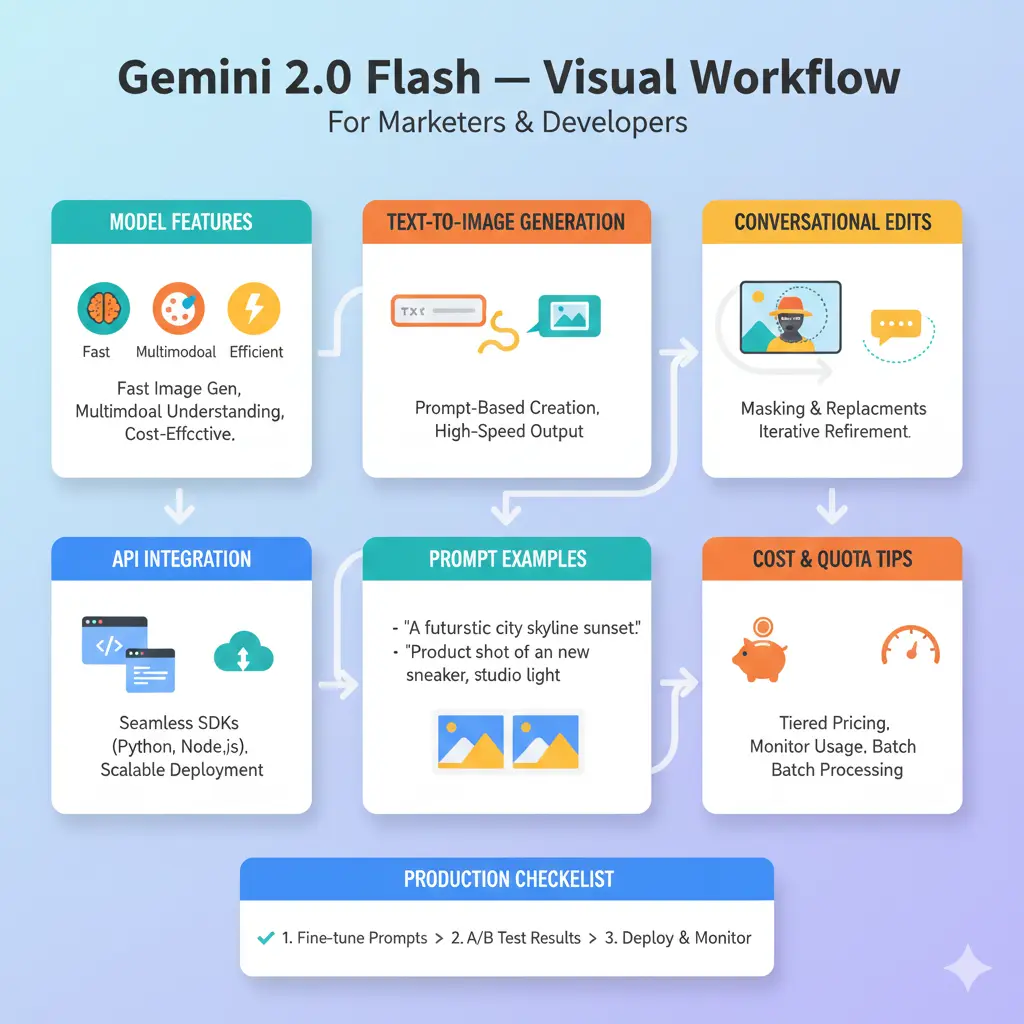
Production checklist Gemini 2.0 Flash
Pilot phase (0 → 500 images)
- Run a pilot of 100–500 images to collect latency, cost, and quality telemetry.
- Measure: latency percentile (p50/p95), cost per image, human quality score.
Operational controls
- Caching & fingerprinting: Store outputs keyed by hashing prompt+mask+seed.
- Metrics: Instrument per-image latency, cost, error rate, and content quality.
- Backfills & fallback: Queue jobs and provide fallback placeholder images for spikes.
- Human-in-the-loop QA: Human review for brand-critical images.
- Versioned prompts & change control: Maintain prompt versions and mapping to assets for reproducibility.
- Migration plan: Monitor model lifecycle and plan migration to the next stable model when preview endpoints retire.
Deployment patterns
- Batch generation pipeline: Schedule nightly batches for stable content.
- Real-time editing API: Low-latency path optimized with autoscaling and request throttling.
- Edge caching + CDN: Serve final assets via CDN to minimize repeat inference.
Pros & Cons Gemini 2.0 Flash
Pros
- Fast inference & high throughput — good for interactive and bulk generation.
- Conversational editing — iterative stateful conditioning without full re-uploads.
- Large context handling — accommodates long multimodal sessions and instruction histories.
Cons
- Preview lifecycle risk — plan for deprecation/migration.
- Slightly less fidelity compared to heavier Pro or specialist image models for the highest-quality demands.
- Cost can ramp if not cached and batched.
FAQS Gemini 2.0 Flash
A: The image generation preview for Gemini 2.0 Flash was announced on May 7, 2025.
A: Yes — the preview supports targeted conversational editing with mask support so you can change background or specific elements and keep the rest unchanged.
A: Gemini models in the family support very large contexts (documentation references up to ~1,000,000 tokens), which helps long multimodal sessions and agentic workflows.
A: No. Preview models can be retired. Vertex docs advised migration and listed retirement cautions for preview image endpoints; plan for migration (example migration target: gemini-2.5-flash-image).
Conclusion Gemini 2.0 Flash
Gemini 2.0 Flash (image preview) converts image generation and conversational editing tasks into a low-latency conditional inference service — ideal when throughput and interactive editing are required. Operational success requires robust MLOps: caching, metrics, human review, and migration planning. Start with a pilot, measure cost/quality, and iterate.
