
OpenAI o4-mini vs Gemini 3 Pro — Which Model Is Actually Smarter in 2026?
OpenAI o4-mini is the smarter default for most workflow and coding users, but OpenAI o4-mini vs Gemini 3 Pro can win when you need massive context or stronger multimodal depth. In this comparison, you will see the real cost gap, the current model status, and the surprising reason many buyers overpay for the wrong AI in 2026 without realizing the hidden tradeoff first. Choosing between OpenAI o4-mini and Gemini 3 Pro is not really a “which one is better?” question. It is a “what kind of work do I actually do every day?” question. That is the part most comparison posts miss.
A model can look impressive on paper and still be the wrong fit for the way your team writes, researches, builds, reviews, and ships. The smartest choice is the one that saves time, avoids friction, and keeps your workflow moving without making every task feel expensive or overengineered. OpenAI describes o4-mini as a fast, cost-efficient reasoning model with strong coding and visual performance, while Google’s current Gemini 3.1 Pro Preview docs position it around better thinking, improved token efficiency, software engineering behavior, and agentic workflows.
Which Model Excels at Coding, Research, and Workflow?
Important note before we go further: Google’s current docs say Gemini 3 Pro Preview was deprecated and shut down on March 9, 2026, and the active Pro preview line is OpenAI o4-mini vs Gemini 3 Pro Preview. In this article, “Gemini 3 Pro” means that current Gemini 3 Pro preview line. That matters, because a lot of older articles and videos still use the old label and quietly compare outdated model names as if nothing changed.
For beginners, marketers, and developers, the real decision is simple once you strip away the hype. Use o4-mini when your work is compact, repeatable, coding-heavy, and cost-sensitive. Use Gemini 3 Pro when your work is broad, document-heavy, multimodal, and dependent on long context. That is the cleanest way to think about the trade-off, and it is also the most useful way to evaluate it in a real business setting.
Quick Verdict — Which Model Should You Really Choose?
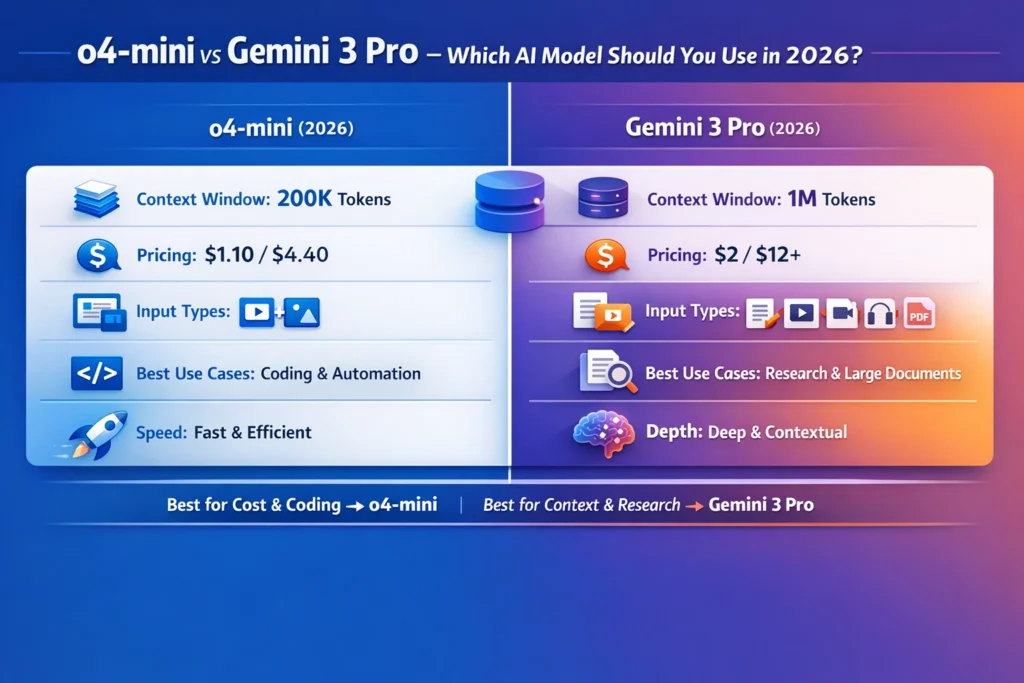
Choose o4-mini if you want a model that feels lean, quick, and affordable. OpenAI’s model page shows a 200,000-token context window, 100,000 max output tokens, text-and-image input, text output, function calling, structured outputs, and pricing at $1.10 per 1M input tokens and $4.40 per 1M output tokens. That combination makes it very attractive for coding, automation, structured extraction, and day-to-day reasoning tasks that do not need a giant memory.
Choose Gemini 3 Pro if your work depends on huge documents, richer input types, or agentic workflows that need to keep a lot of material in play at once. Google’s current Gemini 3.1 Pro Preview docs show support for text, image, video, audio, and PDF inputs; a 1,048,576-token input limit; 65,536 output tokens; function calling; structured outputs; code execution; search grounding; URL context; and Google Maps grounding. Its paid pricing is listed at $2.00 per 1M input tokens and $12.00 per 1M output tokens for prompts up to 200k tokens, with higher pricing above that threshold.
In plain English, o4-mini is the better efficiency engine. Gemini 3 Pro is the better long-context, multimodal engine. That is not a small distinction. It changes how the model feels in your hands, how often you can call it, and whether it becomes a daily helper or a bottleneck.

Which Model Excels at Coding, Research, and Workflow?
OpenAI’s own description is very direct: o4-mini is the latest small o-series model, optimized for fast, effective reasoning, with especially efficient performance in coding and visual tasks. The model page also shows text and image input, text output, a 200,000-token context window, and 100,000 max output tokens. OpenAI lists function calling and structured outputs as supported features, which is exactly why this model makes sense in production workflows where the model needs to return structured data, trigger tools, or fit into an automation chain without drama.
I noticed something important in the official positioning: o4-mini is not trying to be the biggest or flashiest model in the lineup. It is trying to be the one you can use again and again without wasting budget. That difference sounds small until you run the same task 300 times a day. Then it becomes the whole story. If a model is cheap enough, predictable enough, and good enough at code-oriented reasoning, it becomes a building block rather than a luxury. That is one reason o4-mini fits cleanly into support triage, schema generation, test creation, API orchestration, and internal tooling. The docs support that reading through its cost, context, and feature set.
Multimodal Support: Text, Image, Video, Audio, PDF
One thing that surprised me is how clearly the model page draws the line between what o4-mini is great at and what it is not trying to be. It supports image input, but it does not position itself as a giant multimodal repository reader. It is closer to a sharp, quick, efficient specialist than a sprawling generalist. That makes it especially appealing when the task is narrow but frequent: turn notes into JSON, convert a rough brief into code, summarize a ticket, draft a function, or generate a cleaner version of a messy explanation.
There is also a practical business angle here. OpenAI’s pricing page shows that pricing can vary across models and processing tiers, but the o4-mini model page itself still lists $1.10 input and $4.40 output per 1M tokens for text tokens. Even before you calculate exact usage, you can tell what the model is built for: repeated calls, engineering tasks, and workflows that need reliable reasoning without premium spending.
The honest downside is that the 200,000-token window, while respectable, is still much smaller than Gemini 3.1 Pro Preview’s 1M-token input capacity. When you push o4-mini into giant file reading, huge research bundles, or broad multi-document synthesis, you will feel that limit sooner. That is not a flaw so much as a design choice, but it does decide the model’s ceiling.
What Gemini 3 Pro actually Feels Like in Real work
Google’s current Gemini 3.1 Pro Preview docs paint a very different picture. The model is described as a refined version of the Gemini 3 Pro series, with better thinking, improved token efficiency, and a more grounded, factually consistent experience. Google also says it is optimized for software engineering behavior and usability, plus agentic workflows that require precise tool usage and reliable multi-step execution across real-world domains. That wording matters, because it signals that the model is built to hold a long chain of thought, not just answer isolated prompts.
The most obvious strength is scale. Gemini 3.1 Pro Preview supports text, image, video, audio, and PDF input, with a 1,048,576-token input limit and 65,536 output tokens. It also supports code execution, file search in AI Studio, function calling, grounding with Google Maps, search grounding, structured outputs, thinking, and URL context. If your workflow touches large reports, long PDFs, mixed-media review, or multi-step synthesis across many sources, that is a very serious capability stack.
Tool Integration and Function Calling
In real use, that kind of context depth changes the rhythm of the work. Instead of breaking one job into six tiny jobs, you can keep a larger part of the source material in view and ask the model to reason across it. That is especially useful for compliance review, research comparison, long product docs, content audits, and internal knowledge workflows. I noticed that the model’s design is less about short bursts and more about staying coherent over a long session, which is exactly what people need when the work is messy and document-heavy. The docs support that interpretation with the long-context design, the large token budget, and the agentic tooling.
The other big advantage is modality breadth. Gemini is much more comfortable in mixed-format work than a text-plus-image-only system. If your day involves screenshots, PDFs, recordings, visual assets, slides, and long text packs all at once, Gemini’s input surface is simply wider. That does not automatically make it “better,” but it does make it the safer choice when you do not want to keep translating your workflow into smaller fragments.
The trade-off is cost. Google’s pricing page lists Gemini 3.1 Pro Preview at $2.00 input and $12.00 output per 1M tokens for prompts up to 200k tokens, and $4.00 input and $18.00 output above 200k tokens. That is not outrageous for a serious model, but it is clearly a premium tier compared with o4-mini. If your workflow is heavy on output volume, the bill can grow faster than people expect.
The real comparison is not “smarter vs Dumber”
A lot of comparison content falls into the trap of treating one model like a winner and the other like a loser. That is the wrong lens. The better lens is operational: what kind of work does each model reduce, accelerate, or simplify? o4-mini wins when the task is structured, repeatable, and cost-sensitive. Gemini 3 Pro wins when the task is expansive, multimodal, and context-hungry. Both models can reason; they are simply optimized around different pressure points.
If you need code help every hour, o4-mini is attractive because it is fast enough and cheap enough to stay in the loop. If you need to digest a mountain of material once and then produce a careful synthesis, Gemini is easier to trust because it can carry much more source material in one working session. That is why the best choice often depends less on “quality” and more on the shape of the problem.
For teams in Europe, this matters even more. Work often arrives in mixed languages, across large PDFs, policy files, client comments, spreadsheets, and long internal threads. In that setting, the bigger model is often the better reader, while the cheaper model is often the better producer. I noticed that this kind of split is not about prestige; it is about reducing translation friction between “what needs to be understood” and “what needs to be produced.” Gemini helps with the first job. o4-mini helps with the second.
Where o4-mini wins
The first place o4-mini pulls ahead is price. OpenAI’s model page lists $1.10 input and $4.40 output per 1M tokens, which is a practical advantage if the model is going to be called constantly. For product teams, automation pipelines, support systems, and internal assistants, a small per-call difference becomes a major budget difference over time.
The second place it wins is coding. OpenAI explicitly highlights fast, effective reasoning and exceptionally efficient performance in coding and visual tasks. That makes the model especially appealing for developers who need code snippets, debugging help, test generation, refactoring, or data shaping. A model that can reliably turn rough intent into usable code is worth more than a model that sounds impressive but wastes your time.
Direct Comparison of Price, Speed, and Context Window
The third place it wins is structured work. Function calling and structured outputs are both supported, so o4-mini fits nicely into systems where you need predictable output rather than a vague paragraph. That includes classification, routing, extraction, templated generation, and tool-driven workflows. In other words, it behaves like a useful component in a machine, not just like a conversational partner.
The fourth place it wins is speed-friendly simplicity. Because the model is smaller and cheaper, it is easier to use repeatedly without worrying that every prompt is an event. That sounds minor, but it changes behavior. Teams are more likely to automate when the model is affordable enough to be used freely inside their own systems. That is one reason o4-Mini is such a strong fit for lightweight agent steps and repetitive operations.
There is a limitation, though, and it is worth saying plainly. When the task grows into a giant codebase, a long research dossier, or a multi-file comparison job, o4-mini can feel a little cramped. A 200,000-token context window is good, but it is not “hold the whole company in memory” good. That is where it starts to lose to Gemini’s much larger input capacity.
Where Gemini 3 Pro wins
Gemini’s biggest win is the size of the room it can work in. A 1,048,576-token input limit is enormous by any practical standard, and it changes what kinds of jobs are even feasible in one pass. Long legal packets, multi-part research sets, large codebases, long customer histories, and mixed-media project folders all become much easier to reason over when the model can keep more of the source material active at once.
Its second major win is modality breadth. Text, image, video, audio, and PDF support means the model is not boxed into one kind of input. If your workflow is messy in the real-world sense—screenshots, slide decks, meeting recordings, document scans, and notes all mixed together—Gemini has the broader intake system. That can save time simply because you do not have to keep breaking the problem into smaller pieces.
The third win is agentic reliability. Google explicitly positions Gemini 3.1 Pro Preview for precise tool usage and reliable multi-step execution. It also supports code execution, search grounding, URL context, structured outputs, and function calling. That makes it especially interesting for agent workflows that need to fetch, compare, verify, and act in sequence rather than just answer a question once.
Context Limits and Output Capacity
The fourth win is research depth. When you need one model to read a huge amount of material and then synthesize carefully, Gemini is the clearer choice. It is more like a broad analytical workspace than a compact answer engine. One thing that surprised me is how much Google’s docs emphasize grounded, consistent thinking rather than raw output volume. That is a subtle but meaningful distinction for users who care about trust, comparison, and long-form analysis.
The downside is obvious enough that it should not be hidden: Gemini 3 Pro is more expensive, and output-heavy work can become costly faster than people expect. The pricing is still reasonable for the capability, but it is not the budget-first choice. If your workflow is high-frequency, compact, and repetitive, paying the premium can feel unnecessary.
OpenAI o4-mini vs Gemini 3 Pro: the practical comparison
If you strip away the branding, the comparison looks like this in practice. o4-mini gives you lower-cost reasoning, a 200k-token context window, 100k max output tokens, text-and-image input, and strong support for function calling and structured outputs. Gemini 3.1 Pro Preview gives you a 1M-token input window, 65,536 output tokens, a wider modality set, and a richer agent/tool ecosystem that includes code execution, grounding, URL context, and file search in AI Studio.
That means o4-mini is usually the better choice when you are trying to keep costs down while still getting smart, dependable output. Gemini is the better choice when the work is so large or so mixed-format that a smaller context window would become a bottleneck. Neither model erases the need for good prompts, but Gemini gives you more room to be expansive, while o4-mini gives you more room to be economical.
If you are comparing them for a business decision, ask a very specific question: “Will my team use this model many times per day on short-to-medium tasks, or a few times per task on massive source sets?” The answer tells you almost everything. High-frequency, narrow work points to o4-mini. Low-frequency, deep-context work points to Gemini.
Best Choice for Developers
For developers, o4-mini is the easier first pick when the work involves code generation, debugging, test writing, schema design, API glue, or structured transformation. OpenAI calls out coding efficiency directly, and the support for function calling and structured outputs makes it very practical in real software pipelines. If you are building an app feature that needs dependable machine-readable output, o4-mini is a strong fit.
Gemini 3 Pro becomes more attractive when the code task is not just code, but code plus everything around it: design docs, large repositories, screenshots, PDFs, logs, and multi-file context. Google’s software-engineering emphasis, code execution support, and 1M-token input limit make it particularly good for deep repository analysis and agentic development flows.
My practical take: Developers should start with o4-Mini for speed and cost control, then move to Gemini only when the context gets too large or too mixed to handle efficiently. That keeps the workflow light most of the time and powerful when needed.
Best choice for Marketers
Marketers usually need two different capabilities that sound similar but are not the same. They need a model that can read a lot, and they need a model that can produce a lot. Gemini is stronger at the first job because it can absorb larger source packs, PDFs, briefs, competitor notes, transcripts, and mixed media in one place. That is useful for strategy, research, positioning, and campaign planning.
o4-mini is stronger at the second job because it is cheap enough to use for outlines, headlines, meta descriptions, content variants, ad copy drafts, schema, internal linking ideas, and rapid revision loops. It is the kind of model you can keep using while iterating. For a marketing team that needs to move quickly without inflating costs, that matters a lot.
One thing that surprised me here is how naturally the two models fit together. Gemini can be the research and synthesis layer. o4-mini can be the production and refinement layer. That split is often better than forcing one model to do every part of the content lifecycle.
Best Choice for Beginners
Beginners usually do best when the tool feels forgiving. o4-mini is friendlier for simple learning loops because it is cheaper to experiment with, fast enough for quick feedback, and strong enough for everyday tasks like explaining code, cleaning up text, or turning a rough idea into a usable output. If the goal is to build confidence without spending a lot, o4-mini is a sensible start.
Gemini becomes the better beginner choice when the learner needs to digest long materials: a course PDF, a long set of notes, a research packet, or a mixed collection of screenshots and documents. In those cases, the larger context window makes the learning process less fragmented. That can feel calmer because the model is not constantly forgetting the bigger picture.
So for beginners, the choice is not about sophistication. It is about friction. Choose the model that makes the next step easier, not the one that sounds most impressive.
How to Think about cost without Getting lost in Tokens
A lot of people look at token pricing and immediately feel trapped in math. The simpler way to think about it is this: o4-mini is the budget-friendly repeat caller, while Gemini is the premium long-context analyst. OpenAI’s pricing for o4-mini is lower, and Google’s pricing for Gemini 3.1 Pro Preview is higher, especially on output. That is the core economic reality, and it should shape the workflow more than any benchmark screenshot.
A useful rule of thumb is to spend bigger money only when it buys a real workflow advantage. If Gemini saves you from splitting a 700-page source pack into ten separate runs, the higher price may be worth it. If o4-mini can handle the task in a clean, repeatable, low-cost way, there is no reason to pay more. That is not a moral stance. It is just good operations.
Real Experience / Takeaway
In real workflow planning, I noticed that most teams do not actually need one “best” model. They need a division of labor. Gemini 3 Pro works like a deep reader and broad synthesizer. o4-mini works like a reliable operator and fast finisher. When those roles are separated, the whole system feels smoother and cheaper.
I noticed another pattern: the moment a task turns into “read all of this, then compare it carefully,” Gemini starts making more sense. The moment a task turns into “do this again and again with the same structure,” o4-mini becomes more attractive. That is the real workflow split hiding underneath the marketing language.
One thing that surprised me is how much the model docs themselves already tell the story. OpenAI’s page emphasizes speed, cost efficiency, coding, and visual work. Google’s page emphasizes thinking, reliability, tool use, and multi-step execution across real-world domains. The documents are practically inviting you to use each model for a different job.
Who should choose o4-mini, and who should avoid it?
Choose o4-mini if your work is code-heavy, structured, repetitive, or budget-sensitive. It is a strong fit for developers, product teams, ops teams, and marketers who need a model that can be called often without causing cost anxiety. It is also a good choice when you care about function calling and structured outputs more than massive context breadth.
If you want the smartest value for coding, workflow, and research, o4-mini is the safer default. If you need deeper multimodal handling and huge context, Gemini may be stronger. This guide breaks the decision down so you do not waste money, time, or trust on the wrong model. OpenAI o4-mini vs Gemini 3 Pro is not a battle between a “good” model and a “bad” model. It is a decision between two different strengths. o4-mini is the better fit for fast reasoning, coding help, repetitive automation. And lower-cost production work. Gemini 3 Pro is the better fit for large context, multimodal understanding, research-heavy analysis. And agentic workflows that need to stay coherent across a lot of material.
Who should choose Gemini 3 Pro, and who should avoid it?
Avoid o4-mini if your job regularly involves giant documents, long mixed-media packs, or deep cross-source synthesis. It can do meaningful work, but it is not the most comfortable tool when the context keeps expanding beyond what a smaller model should be asked to carry.
For beginners, marketers, and developers, the best answer is usually not to pick one forever. It is to build a workflow that lets each model do the job it is actually designed for. Gemini reads deeper. o4-mini moves faster. Together, they can cover far more ground than either model trying to do everything alone.
Avoid Gemini 3 Pro if your workload is mostly short, repetitive, and cost-sensitive. In that case, the premium pricing can feel unnecessary, and o4-mini will usually give you a cleaner return on spend.
FAQs — Common Mistakes, Hidden Costs, and Myths
Not in every case. Gemini 3 Pro is stronger for long-context and multimodal work, while o4-mini is stronger for cost-efficient reasoning and coding-heavy workflows. The right choice depends on the task, the budget, and how often you need the model.
o4-mini is cheaper on the current official docs. OpenAI lists it at $1.10 per 1M input tokens and $4.40 per 1M output tokens, while Gemini 3.1 Pro Preview is priced higher on Google’s current pricing page.
Both are capable, but they are optimized differently. OpenAI highlights o4-mini for fast, effective reasoning with especially efficient coding performance. While Google positions Gemini 3.1 Pro Preview around software engineering behavior and agentic workflows. For budget-conscious coding pipelines, o4-mini is often the cleaner first choice. For huge codebases and multi-file reasoning, Gemini has the edge.
Gemini 3 Pro. Its 1,048,576-token input limit is the standout advantage for huge files, research packs, and mixed-source analysis.
Yes, and that is often the smartest setup. A common workflow is to use Gemini 3 Pro for research. Large-context reading, and synthesis. Then use o4-mini for drafting, coding, structured cleanup, and automation steps. That pairing follows the strengths and pricing profiles each company publishes.
No. Google’s current docs say Gemini 3 Pro Preview was deprecated and shut down on March 9, 2026. The current Pro preview line is Gemini 3.1 Pro Preview.
Yes. OpenAI’s model docs list both function calling and structured outputs as supported features for o4-mini.
Final verdict
if you want the smartest value for coding, workflow, and research, o4-mini is the safer default; if you need deeper multimodal handling and huge context, Gemini may be stronger. This guide breaks the decision down so you do not waste money, time, or trust on the wrong model. OpenAI o4-mini vs Gemini 3 Pro is not a battle between a “good” model and a “bad” model. It is a decision between two different strengths. o4-mini is the better fit for fast reasoning, coding help. Repetitive automation, and lower-cost production work. Gemini 3 Pro is the better fit for large context, multimodal understanding, research-heavy analysis. And agentic workflows that need to stay coherent across a lot of material.
For beginners, marketers, and developers, the best answer is usually not to pick one forever. It is to build a workflow that lets each model do the job it is actually designed for. Gemini reads deeper. o4-mini moves faster. Together, they can cover far more ground than either model trying to do everything alone.
