
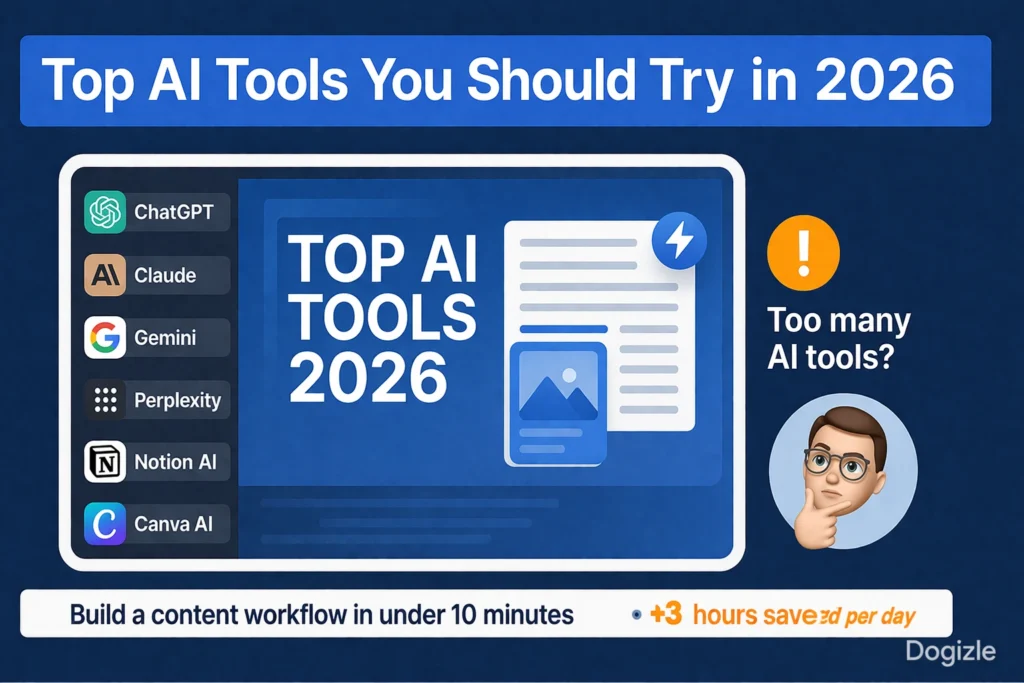
Top AI Tools You Should Try in 2026: The Smart Stack for Writing, Research, Design, Coding, and Automation
Top AI Tools You Should Try in 2026 — Struggling to find the right AI tools that actually save time and boost results? In this guide, you’ll discover a hidden stack that skyrockets productivity, simplifies workflows, and unlocks smarter ways to work. Prepare to be surprised by tools most experts rarely reveal! That shift matters because the role of AI has changed.
The strongest tools today do not just generate text. They interpret intent, detect patterns, summarize large content sets, retrieve relevant information, maintain context across longer conversations, and connect with other systems. In other words, they are moving from simple responders to workflow partners. In terms, they are becoming better at understanding entities, relations, semantic structure, user intent, discourse flow, and context-aware generation. That is the real story of AI in 2026. The value is no longer in asking, “Which tool is the most famous?” The better question is, “Which tool best matches the task, the format, the complexity, and the workflow?”
This article is built for exactly that question.
You will not find a random directory of shiny apps here. Instead, you will get a decision framework, a practical comparison of the most useful AI platforms, and a working stack you can adapt for content creation, research, operations, design, coding, and automation. The goal is not to overload you with options. The goal is to help you choose fewer tools, use them more intelligently, and get better results with less friction.
Why Most AI Tools Articles Fall Short
A lot of AI roundups look useful at first glance, but they fail in the places that matter most. They often read like shopping lists instead of strategy guides. These mention names, but not functions. He describe features, but not workflows. They compare products, but not decision paths.
Here is where those articles usually go wrong.
They Present a Generic list with no Reasoning
Many articles simply stack tools one after another:
- ChatGPT
- Claude
- Gemini
- Perplexity
- Notion AI
- Canva AI
That may sound comprehensive, but it does not answer the real question. A user does not wake up asking for a tool list. They wake up asking for help with a task: write a brief, extract insights from a document, design a thumbnail, summarize research, build a funnel, or debug code. Without a task-based structure, the article becomes forgettable.
They ignore the sequence of work
Real work is sequential. First you define the goal. when you gather information. so you draft. Then you refine. Then you package.
Most AI articles ignore that chain. They treat every tool as if it lives in isolation, when the real performance boost comes from orchestration. A high-performing stack is not about using one “best” tool. It is about using the right tool at the right stage.
They do not explain tool switching
AI users often need to switch tools based on output quality, context length, file type, and specificity. A good article should explain when to start with one model and when to hand off to another. For example:
- research first, then writing
- drafting first, then restructuring
- coding first, then explanation
- design first, then repurposing for social formats
That handoff logic is where the real productivity gain appears.
hey leave out the layer
The newest AI systems work better because they handle language at a deeper level. They extract intent, classify requests, compress long inputs into summaries, generate semantically aligned outputs, and retrieve information based on patterns rather than exact keyword match.
That means the best article about AI tools in 2026 should not only name the tools. It should explain how they behave from a language-processing perspective: how they preserve context, where they hallucinate, which ones are strong at retrieval, which ones are better at planning, and which ones work best for transformation tasks such as rewriting, shortening, expanding, translating, or structuring.
The New Way to Choose AI Tools in 2026
Do not start with the question, “Which AI tool is best?”
Start with the question, “What outcome do I want?”
That simple reframing changes everything because different tools optimize for different outputs. Ai tools are better at generative writing. so are better at source-based retrieval. somehow are better at structured reasoning. Some are excellent for multimodal inputs such as documents, images, slides, or large files. Others are built for workflow environments where notes, tasks, files, and teams all live together.
Here is the clearest way to think about the modern AI landscape:
| Goal | Best First Tool | Why It Fits | Best Second Tool |
| Write articles, ads, scripts | ChatGPT | Flexible generation and fast ideation | Claude |
| Research with sources | Perplexity | Retrieval with citations | Gemini |
| Long-form documents | Claude | Strong structure and coherence | ChatGPT |
| Large files and multimodal work | Gemini | Big context handling | Perplexity |
| Notes and team docs | Notion AI | Workspace + AI + organization | ChatGPT |
| Design and graphics | Canva AI | Fast visual creation | Runway |
| Coding | GitHub Copilot | Strong code completion and assistance | Claude |
| Video creation | Runway | Advanced AI video generation | Canva AI |
| Office productivity | Microsoft Copilot | Deep Microsoft 365 integration | ChatGPT |
The major insight is this: you do not need twenty tools. In most cases, you need three to five tools that work cool clean.
That smaller stack remove context switching, subscription fatigue, and choise bust. It also improves output quality because each tool is used where it is dominate.
The Top AI Tools You Should Try in 2026
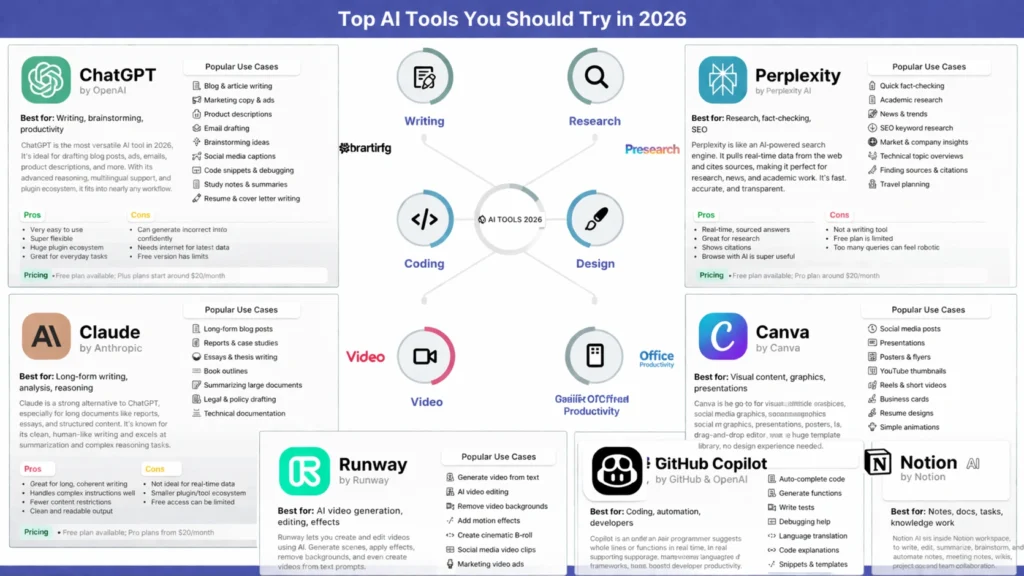
Below is a deeper look at the tools that matter most in 2026 and why they belong in a serious AI workflow.
ChatGPT — The Most Versatile All-Purpose AI Tool
ChatGPT debris one of the most flexible general-purpose AI systems free. It is useful because it can support a wide fieldof tasks without forcing you into a narrow use case. For many users, it come the first layer in the workflow: the tool used toplan, draft, rewrite, outline, recap, and plan.
Best for
- Blog writing
- Content ideation
- Marketing copy
- Brainstorming
- Productivity tasks
- Draft creation
- Rewriting and expansion
- Summaries and simplification
Why it stands out
ChatGPT is strong when the task is open-ended. It can transform vague ideas into structured content, convert rough notes into polished text, and assist with multiple writing styles. In NLP terms, it is especially effective when the prompt gives enough semantic signal to infer intent, register, audience, and desired tone.
It is also useful because it can switch between creative generation and practical reasoning. That makes it a convenient starting point for people who need quick iteration. You can use it to generate first drafts, compare angles, test headlines, create outlines, and refine language.
Watch-outs
ChatGPT can become broad if the workflow is not controlled. Because it is so flexible, users sometimes expect it to behave like a specialist research engine or a strict technical editor. It is not always the best option for citation-heavy research on its own, and it can drift if the prompt is too loose.
Smart use
Use ChatGPT for first-pass generation, idea expansion, and content shaping. Pair it with a research tool when factual accuracy matters.
Perplexity — The Best AI Tool for Research and Source-Based Discovery
Perplexity is one of the most useful tools when your goal is grounded research. It is especially valuable because it presents answers with references, which makes it easier to verify claims, trace sources, and build fact-based content briefs.
Best for
- Research
- Fact-checking
- Market scanning
- SEO discovery
- Topic validation
- News summaries
- Content briefs
- Source-backed answers
Why it stands out
Perplexity behaves more like a retrieval-first assistant than a pure generator. It is designed to help you search, synthesize, and cite. That means it is powerful when your task depends on evidence rather than imagination.
From an NLP perspective, it is useful because it can combine retrieval and synthesis. Instead of producing text from memory alone, it connects user intent to a search process, then assembles an answer from available sources. This is especially helpful for topical articles, competitive analysis, and any content where trust and traceability matter.
Watch-outs
Perplexity is not the best place to write long-form content from beginning to end. It is also not the most design-oriented tool. Its strength is discovery and evidence, not artistic expression.
Smart use
Use Perplexity first when you need sources, references, trend checks, or topic validation. Then move the findings into ChatGPT or Claude for drafting and structuring.
Claude — The Best Tool for Long-Form Writing and Structured Thinking
Claude is one of the strongest tools for lengthy, coherent, structured writing. It performs especially well when the task requires clean organization, thoughtful transitions, and a calm, editorial tone. It is often chosen for long documents, research synthesis, reports, internal docs, and carefully layered explanations.
Best for
- Long-form articles
- Reports
- Research synthesis
- Structured writing
- Editorial cleanup
- Analysis
- Summarization of long inputs
- Thoughtful rewrites
Why it stands out
Claude is valuable because it tends to produce well-ordered outputs that feel more deliberate and less chaotic. When a project involves multiple sections, complex arguments, or dense source material, Claude often helps maintain coherence.
NLP-wise, one of its best strengths is discourse-level consistency. It tends to preserve a topic thread across paragraphs more reliably than some tools that excel at short-form creativity. That makes it a strong choice when you want logic, continuity, and readability.
Watch-outs
Claude is not usually the first choice for visual design work. It can be excellent for writing, but users who want highly flexible brainstorming, rapid copy variants, or broad experimentation may still prefer ChatGPT for some tasks.
Smart use
Use Claude when the draft needs structure, flow, and clarity. It is particularly useful after research has already been gathered.
Gemini — The Best AI Tool for Large Context and Google-Centric Workflows
Gemini is especially useful for people working inside the Google ecosystem or handling large files and extended context. It is a practical choice for users who need multimodal understanding, document processing, or integration with familiar productivity tools.
Best for
- Large files
- Google Docs-related workflows
- Multimodal work
- Research support
- Data-heavy tasks
- File analysis
- Workspace-oriented productivity
Why it stands out
Gemini is attractive because it can process large amounts of information and fit naturally into a Google-based environment. That matters if your workflow is already built around Docs, Gmail, Sheets, Drive, and collaborative editing.
For NLP tasks, context window size is not just a technical detail. It affects how much text the model can keep active while generating a response. Gemini’s ability to handle bigger input sets makes it useful for longer documents, compound instructions, and multi-file analysis.
Watch-outs
The best experience often comes when you are already using Google tools. If your workflow is not built around that ecosystem, the advantage may be less obvious.
Smart use
Use Gemini when you need broad context, file handling, or Google-native productivity support.
Notion AI — The Best Workspace Tool for Notes, Knowledge, and Team Systems
Notion AI is less about one-off generation and more about building a knowledge environment. It helps with notes, task organization, team documentation, planning, and structured information management.
Best for
- Notes
- Knowledge bases
- Team documentation
- Planning
- Meeting notes
- Task systems
- Internal workflows
Why it stands out
Notion AI becomes powerful when your work is not just about producing content but about managing content. In many teams, the bottleneck is not writing a paragraph. It is organizing scattered ideas, connecting documents, and keeping internal knowledge accessible.
NLP-wise, this matters because the tool is useful for transforming unstructured notes into structured summaries, action lists, and document hierarchies. It helps convert raw language into usable work artifacts.
Watch-outs
Notion AI is strongest when your workspace is already well organized. Without structure, the system can feel underused. It is also not the ideal replacement for deep research engines.
Smart use
Use Notion AI as the memory layer of your workflow: the place where ideas, drafts, tasks, and reference material are stored and reused.
Canva AI — The Best Tool for Visual Content and Fast Design
Canva AI is one of the easiest ways to turn ideas into visual assets. It is especially useful for people who need thumbnails, social graphics, presentation slides, simple brand visuals, and quick campaign assets without a steep learning curve.
Best for
- Social media graphics
- Thumbnails
- Presentations
- Brand visuals
- Quick layouts
- Content repurposing
- Visual storytelling
Why it stands out
Canva AI wins because it is practical. It lowers the technical barrier between idea and design. Instead of spending hours in advanced design software, you can generate, edit, and publish visual materials quickly.
It also fits well into content workflows because it turns a text-based idea into a visual output that can be reused across platforms. That is especially useful for marketers, creators, solopreneurs, and small teams.
Watch-outs
Canva AI is not meant for deep research or highly complex design systems. It is excellent for speed and convenience, but less suited to advanced visual production.
Smart use
Use Canva AI for rapid design execution after the content idea has already been finalized.
GitHub Copilot — The Best AI Tool for Coding and Developer Productivity
GitHub Copilot is a major productivity layer for developers. It assists with code completion, debugging, code explanation, and repetitive programming tasks. For developers, it can reduce friction and speed up execution significantly.
Best for
- Writing code
- Debugging
- Refactoring
- Automation
- Code suggestions
- Learning code patterns
Why it stands out
Copilot behaves like an assistant embedded directly in development flow. That means it is not only generating suggestions; it is doing so inside the coding context where the work already happens.
From a language perspective, the tool is especially strong at pattern completion. It predicts likely code continuations based on surrounding syntax and project context, which makes it highly valuable for speed and consistency.
Watch-outs
This tool is mainly for developers or technical users. It will not be useful to people who are not working with code.
Smart use
Use Copilot when you want to reduce repetitive coding effort and keep your development flow moving.
Runway — The Best Tool for AI Video Creation
Runway is one of the most interesting tools for creators who want to make video content with AI. It is especially useful for visual storytelling, motion-based content, short-form video ideas, and experimental media production.
Best for
- Video generation
- Short-form content
- Reels
- TikTok-style clips
- Visual storytelling
- Experimental video
- Creative media workflows
Why it stands out
Runway is powerful because it opens the door to fast video creation without requiring a full traditional production pipeline. For creators, that means faster iteration and more room to test ideas.
In NLP-adjacent workflow terms, Runway is often the final transformation layer: a place where text concepts become motion-based content. That makes it a valuable tool in a broader content system.
Watch-outs
Video generation can be credit-based, which means costs may rise as usage increases. It also works best when the concept is planned properly before generation begins.
Smart use
Use Runway after the concept, script, or visual direction is already clear.
Microsoft Copilot — The Best AI Tool for Office Work and Enterprise Productivity
Microsoft Copilot is a strong option for users who spend most of their time in Microsoft 365. It is especially useful for email, Excel, PowerPoint, document drafting, and meeting-related workflows.
Best for
- Office tasks
- Emails
- Presentations
- Spreadsheets
- Meetings
- Document workflows
- Enterprise productivity
Why it stands out
Microsoft Copilot is valuable because it integrates with tools many professionals already use every day. That makes adoption easier and reduces the need to jump between separate platforms.
From a productivity viewpoint, it shines when the work is embedded in the Microsoft ecosystem. It can help summarize, draft, reframe, and speed up common office tasks.
Watch-outs
Its usefulness is strongest inside Microsoft’s environment. Outside that ecosystem, the advantage is less compelling.
Smart use
Use Microsoft Copilot if your daily work already lives inside Word, Excel, Outlook, and PowerPoint.
The Best AI Tools in 2026 at a Glance
Here is a compact comparison of the major tools and what they are best suited for.
| Tool | Best Use Case | Strength | Limitation | Pricing Style |
| ChatGPT | Writing and productivity | Flexible and fast | Too broad for some tasks | Free + Paid |
| Perplexity | Research | Source-backed answers | Less creative for drafting | Free + Pro |
| Claude | Long content | Strong structure | Less visual | Free + Paid |
| Gemini | Large data and context | Broad context handling | Ecosystem-dependent | Free + Paid |
| Notion AI | Workspace and docs | Organized knowledge | Needs setup | Paid |
| Canva AI | Design | Easy visuals | Limited depth | Free + Paid |
| GitHub Copilot | Coding | Fast developer support | Technical use only | Paid |
| Runway | Video | Creative generation | Credit usage | Free + Paid |
| Microsoft Copilot | Office work | Deep integration | Best inside Microsoft | Paid |
This table is useful, but the real benefit comes when the tools are combined into workflows instead of used in isolation.
The Best AI Workflows for 2026
A smart stack is not a pile of apps. It is a sequence. Below are some practical combinations that reflect how real work gets done.
1) Content Creation Workflow
ChatGPT → Perplexity → Claude → Canva AI
Here is the logic:
- ChatGPT helps generate ideas, angles, and a first draft.
- Perplexity adds source-based research and factual grounding.
- Claude reorganizes, expands, and refines the content into a cleaner long-form version.
- Canva AI turns the final concept into visuals, carousels, thumbnails, or graphics.
This workflow works well for bloggers, agencies, marketers, and solo creators because it respects the full lifecycle of content production.
2) Business Workflow
ChatGPT → Perplexity → Notion AI → Microsoft Copilot
This is a strong path for strategic work:
- ChatGPT helps shape ideas and initiatives.
- Perplexity validates facts, market claims, and industry references.
- Notion AI stores the knowledge, meeting notes, and process documentation.
- Microsoft Copilot supports execution inside office tools.
This is ideal for founders, managers, and teams that want organized decision-making instead of scattered prompts.
3) Creator Workflow
ChatGPT → Canva AI → Runway
This sequence is built for creators who publish across platforms:
- ChatGPT scripts the concept or caption.
- Canva AI creates the graphics or slides.
- Runway converts the idea into motion content or video assets.
This is efficient for short-form platforms, campaign content, and brand storytelling.
4) Developer Workflow
GitHub Copilot → Claude → Perplexity
This stack is especially useful when coding and explanation need to work together:
- Copilot helps write and complete code.
- Claude explains the logic, structures the documentation, or rewrites technical notes.
- Perplexity helps research libraries, frameworks, and current implementation details.
This combination supports both execution and understanding.
Pros and Cons of Using Multiple AI Tools
The biggest mistake many users make is either relying on only one tool for everything or collecting too many subscriptions without a process.
Benefits of multiple tools
- Better specialization
- Higher-quality output
- More flexibility
- Stronger workflows
- Better task matching
- Less compromise on output format
Drawbacks of multiple tools
- Cost increases
- More switching between apps
- More setup overhead
- Fragmented context
- Decision fatigue
- Duplicate effort
The answer is not to avoid multiple tools altogether. The answer is to use a small, intentional stack.
The rule to follow
Start with one core tool, add one research tool, then add one output or specialist tool. Expand only when the workflow clearly needs it.
How to Use These AI Tools Step by Step
If you are building your stack from scratch, use this simple sequence.
Step 1: Choose one core tool
Start with either ChatGPT or Claude.
Why? Because both tools can handle a wide range of writing, planning, and explanation tasks. They are excellent starting points for general use.
Step 2: Add a research layer
Bring in Perplexity whenever accuracy, source checking, or topical depth matters.
This gives you a way to verify, compare, and ground the content before you generate the final version.
Step 3: Add a specialist output tool
Pick the tool that matches the output format:
- Canva AI for design
- Runway for video
- GitHub Copilot for code
- Microsoft Copilot for office work
This is where your workflow becomes real instead of theoretical.
Step 4: Store your process
Use Notion AI or a similar workspace to save prompts, drafts, notes, outlines, and reference material.
That way your process becomes repeatable instead of starting from scratch every time.
Step 5: Review the final output
Never trust the first draft blindly. Check for:
- Accuracy
- Tone
- Clarity
- Formatting
- Audience fit
- Redundancy
- Consistency
- Structure
AI works best as an accelerator, not a substitute for judgment.
Why Thinking Matters When Choosing AI Tools
This is where 2026 differs from earlier AI waves. The most effective users are not simply typing prompts. They are thinking like workflow designers.
terms help explain why:
- Intent recognition: understanding what the user really wants
- Entity extraction: pulling out names, places, tools, products, or topics
- Context window management: handling longer input without losing thread
- Semantic matching: producing outputs that match meaning, not just keywords
- Retrieval augmentation: grounding answers in documents or external sources
- Summarization: compressing large text into usable notes
- Paraphrasing and rewriting: changing the wording while preserving meaning
- Classification: sorting tasks by type, urgency, or category
- Discourse coherence: keeping the content logically connected
- Multimodal processing: working across text, images, slides, and video
When you understand those functions, the tool choices become easier.
For example, a research-heavy article needs retrieval and source validation. A thought leadership post needs long-form coherence. A thumbnail campaign needs visual speed. A coding task needs syntax-aware completion. A meeting system needs structured knowledge capture.
Europe-Focused Use Case
If your audience or operation is centered in Europe, the most practical stack often looks like this:
- ChatGPT or Claude for writing and planning
- Perplexity for research and source checking
- Canva AI for visuals and social media assets
- Notion AI for organization and team documentation
That combination is especially helpful for:
- Travel planning
- Multilingual content preparation
- Small business operations
- Marketing content
- SEO workflows
- Remote collaboration
The advantage of this stack is simplicity. It gives you strong language support, organized knowledge handling, and easy content production without forcing you into a complex enterprise setup.
Caption Ideas for Promotion
Here are a few high-click caption angles you can use for this topic:
- Best AI tools for writing in 2026
- ChatGPT vs Claude vs Gemini
- 3 AI tools you actually need
- Free vs paid AI tools in 2026
- My AI workflow stack for content and business
- The smartest AI tools for research and productivity
- The AI stack that saves time every day
These titles work because they promise clarity, comparison, and practical value.
Suggested Internal Linking Topics
To build topical authority, this article can connect to related content such as:
- Best AI tools for productivity
- AI tools for content creation
- ChatGPT vs Claude
- AI tools for business automation
- AI tools for research
- Best AI tools for SEO
- Best AI tools for students
- AI writing workflows
- AI tools for social media content
- AI tools for beginners
Internal linking helps users move deeper into your topic cluster and strengthens the overall SEO structure of your site.
FAQs
The top tools include ChatGPT, Perplexity, Claude, Gemini, Notion AI, Canva AI, GitHub Copilot, and Runway.
Perplexity is best because it provides real-time sources and citations.
Claude is strong for long-form writing, while ChatGPT is better for flexible tasks.
No, but paid plans give:
Better performance
More features
Faster workflows
Start with:
ChatGPT + Perplexity + Canva
Conclusion
The best AI Tools in 2026 are not necessarily the loudest or the most hyped. They are the ones that fit the task, preserve context, reduce friction, and support a real workflow from the first idea to the final output. The future of AI use is not about collecting more apps. It is about choosing a small number of tools that complement one another. A strong system usually looks like this:
1 general-purpose tool + 1 research tool + 1 specialist tool
That simple combination is enough to transform AI from a random experiment into a practical productivity engine.
