
AI Tools for Writing Essays — The Hidden Workflow Most People Miss
AI Tools for Writing Essays help you brainstorm faster, draft smarter, and edit with less stress. If blank pages, weak structure, or endless rewrites slow you down, this guide shows the workflow behind better essays, not just the tools. The surprising part: the biggest boost comes from how you use AI. AI Tools for writing essays have moved far beyond “nice to have.” In 2026, they are part of the normal writing routine for students, marketers, founders, researchers, and even developers who need to explain ideas clearly. Some people use them to brainstorm faster. Others use them to clean up messy drafts. AI Tools for Writing Essays lot of people use them just to reduce the mental friction that comes with staring at a blank page for too long.
Why Most AI Essay Tools Fail (And What You’re Doing Wrong)
A good essay is rarely the result of pressing one button and getting something publishable. The real win comes from using the right tool at the right step, with the right human judgment layered on top. That is where most generic “best AI tools” lists fall apart. They name tools, but they do not explain the writing process. They do not show you how the pieces fit together. They do not help you decide what to use for ideas, what to use for rewriting, what to use for grammar, and what should still be done by a human.
That gap matters.
Because when people treat AI like a magic essay machine, the result usually sounds flat, generic, and over-edited. When they use AI like a writing partner instead, the result is faster, cleaner, and more useful. The difference is not subtle.
I have seen this pattern again and again in real use. A student opens ChatGPT for an outline, pastes the result into a document, then tries to make it sound “academic” with random edits. The essay ends up technically okay but emotionally empty. Another person uses ChatGPT to explore the topic, then uses Grammarly to tighten the language, QuillBot to smooth a clunky section, and Paperpal for references. The second draft usually feels more coherent because the workflow is doing the heavy lifting, not just the tool.
The Real Problem Isn’t the Tool — It’s the Workflow
What You’ll Learn in This Guide
This guide is built to answer the questions people actually ask before writing with AI:
- Which AI tools are best for writing essays?
- Which tool should be used at each step?
- How do you avoid writing that sounds robotic?
- What is ethical use versus lazy copy-paste?
- Which free tools are enough, and which paid tools are worth it?
- How do beginners, marketers, and developers use AI differently?
Instead of giving you a random list, this article breaks the process into practical stages and shows where each tool fits. That way, you can build a workflow that feels natural rather than forced.
What AI Tools for Writing Essays Actually Do
The phrase “AI tools for writing essays” gets used very loosely, but in practice, these tools usually serve one of five jobs:
They help you generate ideas when you are stuck.
They help you turn a rough thought into a structured outline.
They help you draft faster, so you are not starting from zero.
They help you rewrite awkward sentences into smoother language.
They help you polish grammar, tone, and formatting before submission or publication.
That may sound simple, but it is a big deal. Most writing problems are not really “writing” problems. They are structure problems, clarity problems, confidence problems, or momentum problems. AI is useful because it reduces those friction points.
I noticed something important when testing different tools: the best AI writing systems do not always produce the most impressive first paragraph. They produce the most usable next step. Sometimes that next step is a thesis statement. Sometimes it is a better section heading. Sometimes it is a cleaner sentence that helps you keep going.
That is why the best tools are not necessarily the ones that sound smartest. They are the ones who move the work forward.
The Best AI Tools for Writing Essays in 2026
Rather than ranking everything by hype, it helps to separate the tools by function.
ChatGPT — Best for Ideas, Outlines, and Drafting
ChatGPT remains one of the most flexible tools for essay work because it can move across so many stages of the process. You can use it for brainstorming, planning, rewriting, summarizing, and even testing arguments against each other.
What makes it especially useful is the conversational format. You are not forced to get everything right on the first prompt. You can push, refine, simplify, and ask again. That matters a lot for essay writing, because a good essay usually emerges through iteration, not instant perfection.
In real use, ChatGPT is strongest when you treat it like a thinking partner instead of a ghostwriter. Ask for several thesis options. Ask it to explain a topic in plain language. Ask it to give you a counterargument. It turns a rough note into a more organized paragraph. Those small exchanges usually create better writing than one giant “write my essay” request.
One thing that surprised me is how useful it becomes when you use it for tension, not just output. For example, asking, “What is the strongest objection to this argument?” often produces more useful material than asking to simply write a clean introduction.
Best for: brainstorming, outlines, rough drafts, argument testing, rephrasing ideas
Not ideal for: final factual accuracy without review, highly specialized academic references, automatic citation trust
Grammarly — Best for Grammar, Tone, and Clarity
Grammarly is not trying to be a creative partner. It is trying to make your writing cleaner, more direct, and easier to read. That makes it extremely valuable near the end of the process, especially when you already know what you want to say but need the wording to sound sharper.
Best for: grammar correction, tone improvement, clarity, final polishing
Not ideal for: deep research, argument development, complex rewriting
QuillBot — Best for Rewriting and Paraphrasing
QuillBot is especially useful when a sentence has the right meaning but the wrong rhythm. A lot of writers know what they want to say, but the sentence ends up stiff, repetitive, or too close to the original phrasing. That is where QuillBot is valuable.
Its paraphrasing strength is useful for both students and content creators. It can make a paragraph sound more natural, help remove repetition, and improve flow when a section feels mechanically assembled. It is also helpful when you are trying to break out of “AI voice” and make a draft sound more human.
But QuillBot has a very specific role. It is a rewriting tool, not an idea engine. That distinction matters. If you start with weak ideas, QuillBot will just help you write weak ideas more elegantly. That is not a win. It is just better packaging.
One thing that surprised me in real use is that QuillBot is most valuable after the rough draft stage, not before it. It works best when the substance is already there, and the language just needs to become more natural.
Best for: paraphrasing, sentence smoothing, reducing repetition, rewording awkward sections
Not ideal for: original argument building, research depth, citation handling
Paperpal — Best for Academic Writing and Citations
Paperpal is built with a more academic audience in mind. That makes it especially useful for students, researchers, and anyone writing essays that need a more formal, source-aware structure.
Claude — Best for Long Essays and Deep Thinking
Claude stands out when the project is long, layered, or conceptually dense. If you are working with a large set of notes, a long reading list, or a complex topic that needs careful organization, Claude can be very useful.
Its biggest advantage is that it tends to handle extended context well. That makes it a strong choice when you need to compare ideas across many paragraphs, keep track of multiple arguments, or work through a more thoughtful outline.
In real use, Claude often feels less like a quick answer generator and more like a patient drafting environment. That makes it attractive for essays where nuance matters more than speed. If the assignment requires depth, trade-offs, or careful reasoning, Claude can be a strong fit.
One thing that surprised me is how well it can help with conceptual structure. It is often better at keeping a long argument organized without losing the thread.
Best for: long essays, complicated arguments, large notes, conceptual organization
Not ideal for: quick one-line edits, ultra-simple drafting, users who want the most lightweight tool
A Better Way to Compare the Tools
Instead of asking, “Which tool is best overall?” ask a better question:
Which tool solves the exact problem I have right now? That small change makes the decision easier. Essay writing is not one task. It is a sequence of smaller tasks. Different tools shine at different moments.
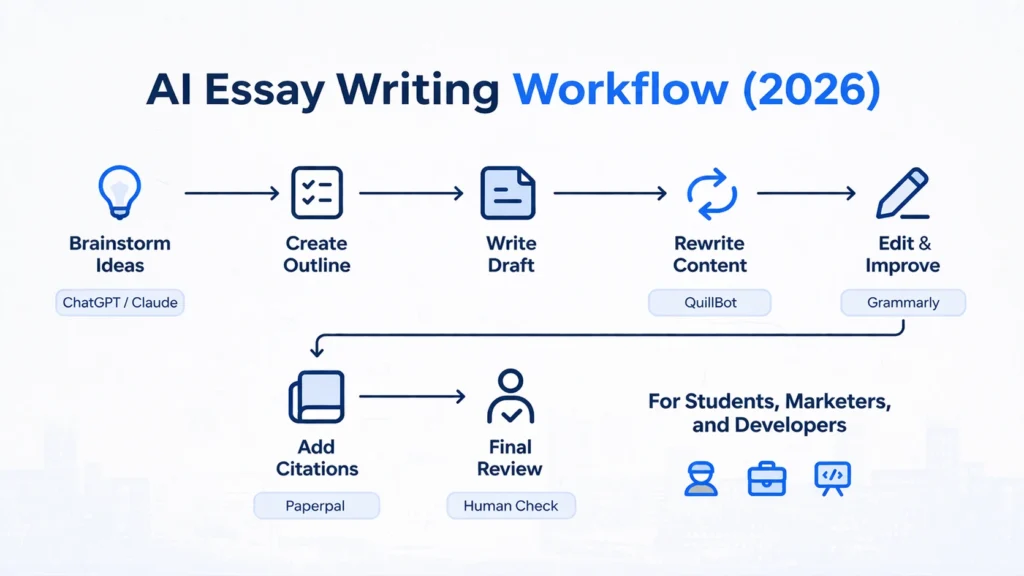
ChatGPT helps you think.
Claude helps you expand and organize.
QuillBot helps you reshape.
Grammarly helps you clean up.
Paperpal helps you formalize and cite.
That is the real logic behind a strong AI writing stack.
The Smart AI Essay Workflow That Actually Works
This is the part that matters most.
A lot of people use AI in the wrong order. They begin with drafting before they know what they want to say. Or they start editing before they have a structure. Or they keep rewriting the first paragraph over and over instead of finishing the core argument.
A better workflow looks like this.
1) Start with the Topic, Not the Tool
Before opening any AI app, define the question you are answering.
What is the central topic?
What is the assignment actually asking?
What perspective are you taking?
What is the result supposed to be: analysis, comparison, explanation, reflection, or argument?
This is where many essays go wrong. The problem is not weak writing. It is a weak direction.
Use ChatGPT or Claude to explore the topic if you need momentum. Ask for possible angles. Ask for a thesis. Ask for a few outline options. The goal is not perfection. The goal is clarity.
2) Build an Outline That Gives the Essay Shape
An essay without structure becomes a pile of paragraphs. AI is very useful here because it can help you create the skeleton before you fill in the body.
A practical outline usually includes:
- introduction
- main argument or key points
- counterargument or limitation
- conclusion
For a longer essay, you may also need subpoints, evidence blocks, and a place where your own reflection appears.
In real use, an outline saves more time than people expect. It prevents you from writing something good in the wrong place. It also helps you avoid unnecessary repetition. I noticed that once an outline is solid, the actual writing becomes much less stressful.
3) Draft Fast, But Keep the Draft Ugly on Purpose
This sounds strange, but it helps.
Do not try to make the first draft beautiful. Try to make it complete. AI is useful at this stage because it can help you expand section by section. You can feed in a heading, a note, or a rough idea and ask it to turn that into a draft paragraph. The point is to get language on the page so the essay has material to work with.
A common mistake is polishing while drafting. That creates perfection paralysis. You end up rewriting the same sentence for twenty minutes instead of finishing the paragraph. The smarter approach is to keep momentum.
4) Rewrite Weak Sections Instead of Rewriting the Entire Essay
Once you have a full draft, go back and identify the weak parts. Maybe one paragraph feels too repetitive.
Maybe another sounds too stiff.
Maybe a section is technically correct but emotionally flat.
Maybe the transitions are clumsy.
This is where QuillBot or a similar rewriting tool becomes useful. Do not use it blindly. Use it surgically. The best results come when you already know what feels wrong and you use the tool to solve that specific problem.
I noticed that selective rewriting produces much better output than forcing AI to “improve everything.” When you over-automate the entire essay, the result becomes oddly uniform. When you improve only the weak spots, the essay keeps its personality.
5) Polish Grammar, Flow, and Tone
After the structure and meaning are in place, run the draft through Grammarly or a similar editor.
This is the stage where you check:
- sentence clarity
- grammar
- punctuation
- tone consistency
- awkward repetition
- accidental wordiness
This is also the stage where small improvements can have a big effect. A sentence that is 90 percent fine can often become much stronger with one tiny adjustment. That is especially true in essays, where tone and precision matter.
6) Add References, Evidence, and Academic Structure
If the essay requires citations, this step should never be skipped. Use Paperpal or your preferred reference workflow to keep things organized. Even if AI helps you phrase something, the evidence still needs to be real and checked. This is one of the most important ethical lines in AI-assisted writing: the tool can assist with wording, but it should not invent your proof.
For academic writing, the quality of the essay depends heavily on the reliability of the source base. AI can help you move faster, but it cannot replace your responsibility to verify.
7) Do a Human Review Before You Submit
This final step is where your actual voice comes back into the piece.
Ask yourself:
- Does this sound like something I would really say?
- Is the argument actually mine?
- Are there any claims I have not checked?
- Does the essay feel balanced and specific?
- Is there anything too generic or too polished?
This is where many people underestimate the value of human judgment. AI can create a clean sentence. Human judgment decides whether that sentence belongs in the essay at all.
The Best Workflow for Different Types of Users
Not everyone uses AI essay tools in the same way. Your role changes the workflow.
For Beginners
If you are just getting started, keep it simple. Use ChatGPT for brainstorming, Grammarly for cleanup, and QuillBot only when a paragraph feels awkward. Beginners often try to use too many tools at once, which creates confusion. Simplicity wins.
For Marketers
Marketers often need essays that sound persuasive, organized, and useful for readers who scan quickly. In that case, ChatGPT is excellent for outlining, Claude is useful for longer conceptual pieces, and Grammarly helps keep the language crisp. Marketers should care a lot about tone, structure, and clarity because those qualities affect trust.
For Developers
Developers often write essays, technical explainers, tutorials, or thought pieces about systems, AI, product design, and workflow. For that audience, Claude and ChatGPT can be especially helpful for organizing technical ideas into a readable form. Grammarly can clean up dense language, while Paperpal is helpful when the content leans academic or research-based.
Developers sometimes struggle not with knowledge, but with translation. They know the subject deeply, but the writing becomes too compressed. AI can help translate technical thinking into reader-friendly language without dumbing it down.
The Ethical Way to Use AI for Essays
This topic matters more than many people admit.
AI is useful, but the ethical line is simple: use AI to assist your thinking, not replace it.
A responsible workflow looks like this:
- Use AI for idea generation
- write your own arguments
- verify facts and citations
- Revise the output in your own voice
- Understand every section before submitting it
That is the safe approach.
The unsafe approach is much lazier:
- Copy the entire AI draft
- avoid checking sources
- try to disguise machine-generated text
- Submit work you do not understand
That second approach causes more problems than it solves. It can hurt learning, weaken credibility, and make writing feel detached from actual understanding.
One honest limitation worth saying out loud: AI can make an essay look more polished than it really is. That means weak thinking can hide behind good formatting. The essay may look impressive at first glance while still being shallow underneath. That is why human review is not optional.
Free vs Paid AI Tools — What Actually Changes?
A lot of people assume free and paid tools are just about “more features.” That is partly true, but the practical difference is bigger than that.
Free tools are usually enough if you are:
- testing AI writing for the first time
- writing occasionally
- working on short essays
- trying to build a basic workflow
Paid tools make more sense if you:
- write often
- need higher consistency
- deal with longer, more complex drafts
- Care about stronger editing support
- want fewer interruptions in your workflow
The best setup is not always the most expensive one. Many users get great results from a simple combination of ChatGPT, Grammarly, and QuillBot. For academic writing, Paperpal can be a useful addition. For longer thinking and note-heavy work, Claude can become the most valuable piece.
The real question is not “Which plan is cheapest?” It is “Which combination saves me time without reducing quality?”
Common Mistakes People Make With AI Essay Tools
A lot of frustration comes from preventable mistakes.
1) Using only one tool for everything
No single tool is best at every stage. If you ask one app to brainstorm, draft, rewrite, edit, cite, and polish all at once, you are asking it to do too much.
2) Copying the output too quickly
AI text can look finished even when it is not. That illusion is dangerous. It tempts people to stop too early. A better habit is to treat the first output as a starting point, not an endpoint.
3) Ignoring source quality
If the Essay is factual, the quality of the sources matters. AI can support your wording, but it cannot guarantee truth. That still belongs to you.
4) Over-editing the voice out of the essay
Sometimes the essay becomes so “clean” that it loses personality. Readers can feel when a text has been sanded down too far. A little voice is good. A little roughness is human.
5) Using AI to avoid learning
This is probably the most serious mistake. If AI prevents you from understanding the topic, then it has become a shortcut to weakness instead of a support for growth.
Why AI Essay Tools Matter for Search, Learning, and Real Work
There is a reason this topic keeps growing in relevance. For students, AI tools reduce stress and help them organize thoughts before the deadline panic kicks in
For developers, they help turn technical knowledge into readable explanations that other people can actually follow. For all three groups, the core benefit is the same: less friction. But friction is not always bad. A little friction forces deeper thinking. So the goal is not to remove all difficulty. The goal is to remove the wrong kind of difficulty, like formatting problems, repetitive sentence cleanup, and staring at a blank page for too long. That is why the best AI use case is not “write everything for me.” It is “help me move from idea to finished draft without losing my own judgment.”
Who This Is Best For
This approach is best for people who want to write faster without losing control of the final result.
It works especially well for:
- beginners who need structure
- students who need a drafting and editing system
- marketers who want speed plus clarity
- Developers who need to explain complex ideas clearly
- researchers who want support with academic style and organization
It is also useful for anyone who struggles with:
- writer’s block
- messy first drafts
- repetitive wording
- grammar anxiety
- time pressure
Who Should Avoid Relying on It Too Much
AI essay tools are not the right answer for everyone.
You should be careful if you:
- want to avoid learning the subject
- plan to submit AI output without understanding it
- write in a context where originality and independent thought are essential
- expect the tool to replace reading, reasoning, and source checking
If your goal is growth, AI should support the process. If your goal is to bypass the process entirely, the quality usually falls apart.
Real Experience / Takeaway
One thing that surprised me most in real use is that the best results often come from using AI less aggressively, not more. The strongest essays are usually not the ones where AI touched every sentence. They are the ones where AI helped at the right moments: the opening idea, the outline, the difficult paragraph, the final cleanup.
I also noticed that the tone improves dramatically when the writer adds one or two personal judgments or observations. Even a small sentence like “What stands out here is…” or “The interesting part is…” makes the essay feel more grounded and less mechanical.
And honestly, the biggest limitation is still the same: AI can speed up the work, but it cannot think for you. It can arrange language beautifully, but it cannot replace your perspective. That is why the best essays in 2026 still feel human. They just get there with better support.
FAQs About AI Tools for Writing Essays
ChatGPT is the best all-around tool for ideas, drafting, and feedback. It is flexible enough to help at multiple stages of the essay process, which is why many people start there. It is especially strong when you need to brainstorm a topic, test a thesis, or turn a rough concept into a structured outline. The real value comes from using it interactively rather than treating it like a one-click essay machine.
QuillBot is best for paraphrasing and improving clarity. It is especially useful when a paragraph already has the right meaning, but the wording feels stiff, repetitive, or unnatural. QuillBot does not replace original thought, but it is very effective at making a draft flow better and sound more polished.
Yes, but it should not be used as the final output without editing. AI can generate a complete draft, but that draft still needs human review for accuracy, voice, structure, and originality. A full essay written entirely by AI often lacks depth or feels too generic unless it is carefully revised. The best use of AI is as a drafting assistant, not a final authority.
Yes, if used ethically and responsibly. That means using AI to help with planning, rewriting, and polishing while still doing your own thinking, checking sources, and making sure the final work reflects your understanding. It becomes unsafe when people rely on AI to replace learning or submit work they do not understand.
Final Takeaway — The Real Advantage Isn’t the Tool, It’s the Workflow
AI Tools for Writing essays are powerful, but the power is not in the tools alone. It is in how you use them. The smartest workflow in 2026 is not about depending on one app to do everything. It is about matching the right tool to the right stage of writing. Use ChatGPT or Claude to think clearly. Use QuillBot to smooth the rough edges. Use Grammarly to tighten the language. Use Paperpal when academic structure and citations matter. Then step back and make sure the essay still sounds like a real person wrote it.
