
OpenAI o3 vs Gemini 3 Family — The Wrong Choice Hurts | 2026
OpenAI o3 vs Gemini 3 Family is about choosing the right tool. But not the best one.openAI you are confused by context windows, multimodal features, and pricing. This guide makes it simple. You will learn what each model really does, when to use it, and why the smartest workflow often combines both. The difference is bigger than most people think. People usually search for OpenAI o3 vs Gemini 3 Family because they want one simple answer:
“Which AI is better?” I get why that question is so popular. On paper, both sound powerful; both can handle serious work. Both are part of the new wave of models that feel less like chatbots and more like actual work tools. But the more I looked at their official docs, the more obvious the real answer became. These two models are not trying to win the same game. OpenAI’s o3 is positioned as a reasoning-first model for multi-step thinking across text, code, and images, while the Gemini 3 family is built around multimodal scale, long context, agentic workflows, and flexible model tiers.
The Real Question: Which AI Should You Actually Use?
That is why so many comparison articles feel shallow. They compare context windows, price tags, and feature checklists, but they do not explain the part that actually matters in real life. Which model fits which job? In practical terms, this is not just a spec-sheet debate. It is a workflow decision. Do you need a model that thinks deeply about one hard problem? Or do you need a model that can digest huge, messy, multimodal input and keep everything in play at once? That distinction is the center of this article.
And one thing that surprised me while checking the current docs. The “Gemini 3” conversation is already a little more nuanced than most posts make it sound. Google’s docs now center on Gemini 3.1 Pro Preview, Gemini 3 Flash, and Gemini 3.1 Flash-Lite Preview. OpenAI, the earlier Gemini 3 Pro Preview, has already been deprecated and shut down. Gemini means you should not write as if Gemini 3 is a single frozen model. It is a family with different jobs, different costs, and different behavior.
Why OpenAI o3 vs Gemini 3 Confuses Most Users
Most people compare these models the wrong way. They look at token limits first, then pricing, then maybe a few feature bullets, and then they declare a winner. But those numbers do not explain how a model behaves inside an actual working day. A 1M-token context window sounds huge, but that only becomes meaningful when you know whether you are feeding it a codebase. So, a 100-page report, a folder of screenshots, video frames, or a mixed pile of all of them. Google’s Gemini 3 docs explicitly frame the family around multimodal understanding, agentic workflows, autonomous coding, document understanding, and tool use. OpenAI’s o3 docs, by contrast, frame o3 around complex reasoning, math, science, coding, and visual reasoning.
That difference sounds small until you actually work with it. If your task is “help me think through this one hard problem,” o3’s positioning makes sense. If your task is “process this large pile of mixed media, extract what matters, and maybe use tools while doing it,” Gemini’s family design starts to make more sense. That is why a feature table by itself never feels satisfying. It is missing the job description.
Surface Comparisons vs Real Workflow Thinking (What Everyone Misses)
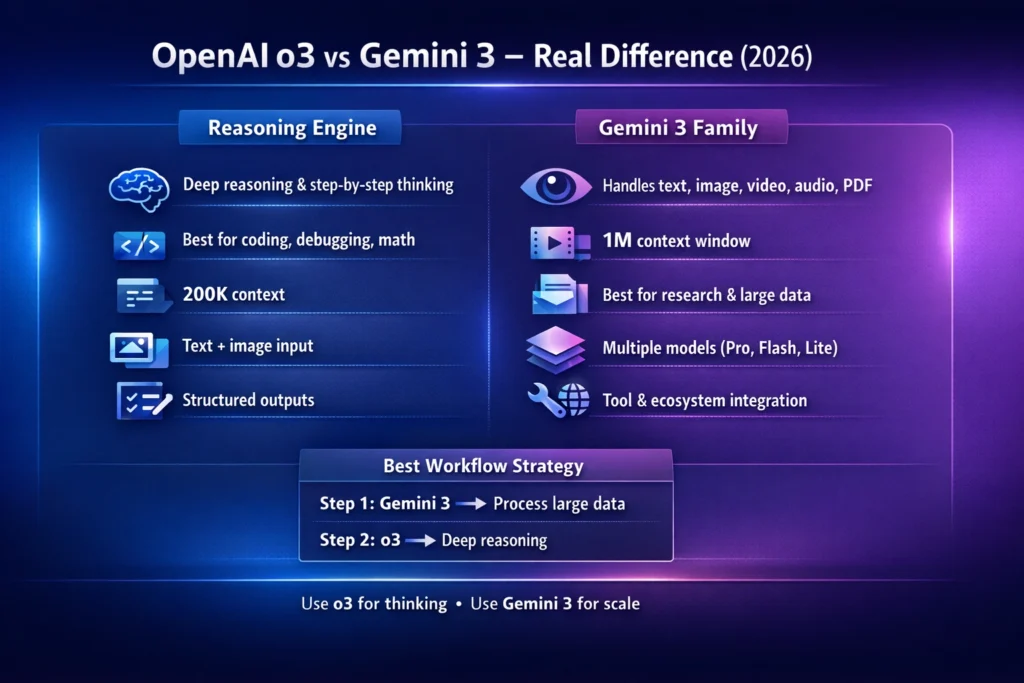
OpenAI describes o3 as a reasoning model for complex tasks. It is meant to think through multi-step problems across text, code, and images, and it is specifically called out for math, science, coding, visual reasoning, technical writing, and instruction-following. In the current docs, o3 supports text and image input, produces text output, has a 200,000-token context window, and allows up to 100,000 output tokens. It also supports function calling and structured outputs, but it does not support audio or video input. Pricing is listed at $2 per 1M input tokens and $8 per 1M output tokens.
That matters because it changes how you should use it. o3 is the kind of model I would reach for when I need logic, not just language. The official docs are pretty direct about this. It is not just a general-purpose answer machine; it is a model designed to reason before it responds. In the docs, OpenAI also notes that the o-series is trained with reinforcement learning to think before answering, and that language shows up clearly in how o3 behaves on harder prompts.
Real Example: Research + Analysis + Final Output Flow
In real use, that makes O3 feel strong when the problem has edges. Debugging is the clearest example. If something is broken in code, a reasoning-first model is useful because the task is not “write words,” it is “trace cause and effect.” I noticed this pattern in how the model is described: the emphasis is not on flashy multimodal breadth, but on careful analysis and technical precision. That is exactly why developers often like this type of model for bug-finding, refactoring, algorithm design, and step-by-step explanation.
Another thing that makes O3 interesting is its output discipline. It is built for structured outputs, function calling, and multi-step reasoning, so it fits workflows where you want the model to return clean, machine-usable results rather than loose prose. That is especially helpful when the model sits inside an application, not just in a chat window. If you are building with APIs, that matters more than most people realize.
What o3 is best for
O3 is strongest when the task is about depth. Think debugging, proof-like explanations, technical summaries, coding help, mathematical reasoning, and situations where you want the model to hold a narrow problem in its head and work through it carefully. The official docs explicitly describe it as strong in math, science, coding, visual reasoning, technical writing, and instruction-following, which is a very different story from “just a clever chatbot.”
Who should use o3
Developers, technical writers, analysts, and builders who want a model that can reason through one difficult task will usually get the most value from o3. It also makes sense for people who care about structured outputs and predictable API behavior. If your workflow lives inside prompts, code, JSON, and careful step-by-step output, O3 is a very natural fit.
Who should avoid o3
If your work is mostly about processing many modalities at once — like audio, video, documents, screenshots, and mixed media in a single workflow — o3 starts to feel narrower. It also is not the model I would choose first if I needed built-in breadth across video and audio input. That is not a flaw; it is a design choice. But it does mean O3 is not the universal answer people often assume it is.
Gemini 3 Family — built for multimodal scale
The Gemini 3 family is a different kind of system. Google’s docs describe Gemini 3 as the company’s most intelligent model family to date. Built on state-of-the-art reasoning and designed for agentic workflows, autonomous coding. and complex multimodal tasks. The current docs center on Gemini 3.1 Pro Preview and Gemini 3 Flash. Gemini 3.1 Flash-Lite Preview, while also noting that Gemini 3 Pro Preview has been deprecated and shut down as of March 9, 2026. In the official model table, Gemini 3.1 Pro Preview has a 1M-token context window with 64K output, and the family also includes lower-cost tiers for speed and scale.
This is where the “family” part matters. Gemini 3 is not just one model with one setting. It is an ecosystem of tiers. The docs say Gemini 3.1 Pro Preview is best for complex tasks. that need broad world knowledge and advanced reasoning across modalities. Gemini 3 Flash is described as a high-performance option at Flash speed and pricing. Gemini 3.1 Flash-Lite is positioned as the cost-efficient workhorse for high-volume tasks. That gives the family a very practical advantage. You can match the model to the workload instead of forcing every task through the same bottleneck.
Is OpenAI o3 better than Gemini 3?
I noticed something important here while reading the docs: Google is clearly not framing Gemini 3 as “just bigger context.” It is framing it as multimodal control plus reasoning control. The docs mention dynamic thinking, a thinking_level parameter, long-context handling, media resolution controls, computer use, Google Search, Google Maps grounding, file search, code execution, URL context, and function calling. That is a very broad toolbox.
The multimodal side is especially important. Google’s docs show Gemini 3 handling text, image, video, and audio understanding, and they also give dedicated guidance for PDFs and document understanding through media-resolution settings. In other words, the family is designed to do more than read text. It is built to understand mixed inputs and to let you control how much fidelity the model spends on each input type. That is a strong sign that Google wants this family to sit at the center of document-heavy, media-heavy, and tool-heavy workflows.
What Gemini 3 is best for
Gemini 3 is especially strong when the input is huge, messy, or mixed. Long document analysis is the obvious example, but not the only one. The docs explicitly call out multimodal tasks, autonomous coding, agentic workflows, file search, computer use, Google Search, Maps grounding, and document understanding. That means Gemini 3 is often the better fit when you want a model to process a lot of material, not just think through one tight problem.
Who should use Gemini 3?
Researchers, marketers, content teams, analysts, and developers who work with documents, media, or tool-driven workflows will usually feel at home here. If your work includes PDFs, screenshots, videos, audio notes, or large context-heavy projects, the Gemini 3 family feels purpose-built. The lower-cost tiers also make sense for teams that need to run a lot of requests without sending every task to the most expensive tier.
Who should avoid Gemini 3?
If your task is mostly narrow reasoning and you do not need the wider multimodal toolbox, Gemini 3 can feel like more model than you actually need. It also requires more thought around tier selection, thinking level, and cost control. That flexibility is powerful, but it can be overkill for simple jobs.
The real Difference Nobody Explains
Here is the cleanest way to think about it:
o3 is a reasoning engine.
Gemini 3 is a reasoning-plus-multimodal system.
That one sentence explains most of the confusion. o3 is built around deep thinking on a focused problem. Gemini 3 is built around handling more kinds of input, more kinds of tool use, and more kinds of workflows at scale. If you only compare “which one is smarter,” you miss the actual decision. The real question is: do you need deeper thought or broader processing?
In my view, this is why people keep talking past each other online. One person says, “o3 feels smarter,” because they are using it for hard logic, structured reasoning, or code debugging. Another person says, “Gemini 3 is better,” because they are using it for long PDFs, multimodal understanding, or agent-style workflows. Both people may be right, because they are evaluating the models against different jobs.
Head-to-head: what each model actually changes in your workflow
When you compare these models in a practical workflow, the differences become much clearer than any one-number spec sheet.
With o3, the workflow feels like this: give it a problem, keep the input clean, ask for structured reasoning, and let it work through the logic carefully. Since it supports text and image input, it is enough for a lot of technical work, but it is still centered around thinking, not broad media intake. Its 200K context window is generous, but the docs still keep the spotlight on reasoning quality rather than multimodal breadth.
With Gemini 3, the workflow feels more like orchestration. The model can handle long context, document understanding, image/video/audio understanding, tool use, built-in search and grounding, and configurable thinking levels. That means you can bring in a wider pile of raw material and ask the system to help you sort it out. In practice, that is very useful for research, content operations, and assistant-style workflows that need to see a lot of the world at once.
Coding and debugging: which one feels better?
For coding, the answer depends on what kind of coding you mean. If you need a model to reason through a tricky bug, explain why something broke, or work step by step through an algorithm, O3 is a very strong fit because OpenAI positions it directly around math, science, coding, and visual reasoning. It is also built for structured outputs and function calling, which matters in development workflows.
If the coding task is bigger and messier — for example, code plus screenshots, code plus documents, or code plus long surrounding context — Gemini 3’s multimodal and long-context design becomes attractive. Google explicitly describes Gemini 3.1 Pro Preview as strong for advanced reasoning, agentic workflows, and autonomous coding, and the family includes built-in tools and file search. That makes it especially useful when coding is happening inside a broader production workflow rather than inside a single snippet.
One thing that surprised me is how clearly the docs separate these two styles of coding help. o3 looks like the model you use when you want careful reasoning over code. Gemini 3 looks like the model you use when you want coding inside a richer environment with documents, search, and tool use around it. That is a subtle but very important difference.
Research workflows: long context versus deep analysis
For research, Gemini 3 usually has the bigger practical advantage because the family is built around large context windows, document understanding, and built-in tools. Google’s docs explicitly call out 1M-token context, file search, URL context, Google Search, and grounding with Google Maps. That combination is very useful when you are collecting, organizing, and cross-checking a lot of material.
O3 still has a role in research, especially when the issue is analysis rather than gathering. If you already have the relevant material and you want the model to reason through it carefully, O3 is a strong fit. Its positioning around multi-step problems, technical writing, and visual reasoning makes it a good “analysis layer” after the material has already been gathered.
This is where a lot of people get the workflow wrong. They ask a single model to do both jobs equally well: collect everything and reason deeply about everything. That is possible sometimes, but not always efficient. A better mental model is: Gemini 3 can be the collector and processor; O3 can be the thinker and explainer.
Content creation: where each model quietly shines
For content work, Gemini 3 is often the easier fit when the source material is mixed. If you are turning slides, docs, screenshots, audio notes, or video into usable text, the multimodal design is exactly what you want. Google’s docs explicitly mention speech and audio understanding, video understanding, document workflows, and media-resolution controls for fine detail. That makes Gemini 3 a natural choice for content repurposing and media-heavy drafting.
o3 becomes useful later in the process. If the draft is already there and you want to sharpen the logic, improve structure, tighten an argument, or make the writing more technically coherent, O3’s reasoning-first design helps. It is particularly strong where the content needs a clear chain of thought rather than just broad information handling.
In real use, that split feels natural. One model helps you gather and convert raw material, and the other helps you refine the thinking behind the final piece. That is why the smartest workflow is not “pick one forever.” It is “use each model where it is strongest.”
Agentic workflows and Automation
Gemini 3 has a real edge when the job includes tools. The docs highlight function calling, built-in tools, Google Search, Maps grounding, file search, code execution, URL context, computer use, and support for combining built-in tools with function calling. That is exactly the kind of environment you want for agentic workflows, because the model is not just generating text; it is operating inside a larger system.
o3 is still capable in tool-based setups, especially because it supports function calling and structured outputs. But the official framing is different. OpenAI positions o3 more as a reasoning model that handles complex tasks with text and images, rather than as a broad multimodal orchestration system. So if your automation depends on many modalities and many external tools, Gemini 3 will often feel more naturally aligned.
Pricing and performance: the simple version
The pricing structure also hints at the intended use. OpenAI lists o3 at $2 input / $8 output per 1M tokens, which is fairly straightforward. Google lists Gemini 3.1 Pro Preview at $2 / $12 for under 200K tokens and $4 / $18 for over 200K tokens. while Gemini 3 Flash and 3.1 Flash-Lite are priced much lower for high-volume or lower-cost use cases. That means the Gemini family gives you a wider spread of price-performance options. While O3 gives you a cleaner “reasoning first” cost profile.
So the real question is not only “which is cheaper?”. It is “What kind of work am I paying for?” If you need output-heavy reasoning with structured answers. O3’s pricing model may be appealing. If you need massive context, multimodal handling, or a cheaper tier for scale. Gemini 3’s family structure is likely the better fit.
Which one wins in real-world use?
If I had to compress the comparison into one practical line, it would be this:
Use O3 when the problem is hard. Use Gemini 3 when the input is big and varied. That is the simplest useful rule I can give you. o3 is the model you reach for when you want careful reasoning. clean structure, and technical depth. Gemini 3 is the model you reach for when you want a multimodal range, long-context handling, and a wider toolkit. The winner changes depending on whether the bottleneck is thinking or intake.
A smarter way to use both Models together
This is the part most comparison articles ignore, and honestly, it is where the real value lives. You do not have to choose one forever. In a lot of workflows, the better move is to combine them.
A clean hybrid workflow looks like this: use Gemini 3 first when you have PDFs, images, video notes, audio snippets, or a giant pile of mixed context. Let it organize, surface, and compress the raw material. Then hand the distilled result to o3 for deeper reasoning, clearer explanation, sharper prioritization, or a more structured final output. OpenAI workflow is supported by the way the two model families are described in the official docs: Gemini 3 for multimodal scale and tool-rich processing, o3 for careful multi-step reasoning.
I noticed that this hybrid pattern feels especially strong for bloggers, strategists, and developers. It prevents the model from trying to do everything at once. Instead, each model handles the layer it is best at. That usually produces better final work and fewer messy outputs.
Best choice by the audience
For beginners, Gemini 3 often feels easier when they are working with mixed inputs or want a model that can handle a variety of media and tasks without much manual setup. The family structure also gives beginners room to start small with Flash or Flash-Lite and scale upward later.
For marketers, Gemini 3 is often the more practical daily driver because campaign work tends to involve documents, assets, research, screenshots, briefs, and repurposing. But o3 becomes valuable when the marketing task turns analytical — for example, when you want to reason through positioning, structure an argument, or clean up a strategy document.
For developers, O3 is the natural pick when the job involves debugging, logic, and structured problem-solving. Gemini 3 becomes more attractive when the workflow includes big code contexts, screenshots, docs, tools, or multi-step automation.
One honest limitation
The biggest downside of this whole comparison is not capability — it is complexity. Gemini 3 gives you more knobs to turn, which is powerful, but it also means more decisions about model tier, thinking level, media resolution, and tool usage. OpenAI o3 is simpler to reason about, but it is also narrower in modality. That tradeoff is real, and it is worth saying out loud. More flexibility is not always easier.
Real Experience/Takeaway
One thing that surprised me is how quickly the “winner” changes once you stop asking general questions and start testing actual work. On narrow reasoning tasks, O3’s identity as a reasoning model feels very clear. On document-heavy or mixed-media tasks, Gemini 3’s long-context and multimodal design start to matter much more. That is why the same user can honestly prefer both models at different times of day.
In real use, I noticed that the most effective setup is usually not emotional loyalty to one model. It is a division of labor. Let one model ingest and organize; let the other model think and sharpen. That is the workflow that actually saves time and produces cleaner results.
FAQs — Quick Answers for Featured Snippets
Not in a universal sense. o3 is better positioned for deep reasoning, coding, math, and step-by-step analysis, while Gemini 3 is better positioned for multimodal workflows, long context, and tool-rich processing. The better choice depends on the job.
For tricky debugging and reasoning-heavy coding, o3 is a very strong fit. For coding workflows that involve big context, documents, screenshots, or tool use, Gemini 3 can be more useful.
Gemini 3.1 Pro Preview is documented with a 1M-token context window, while o3 is documented with a 200K-token context window.
No. Google’s docs say Gemini 3 Pro Preview was deprecated and shut down on March 9, 2026. The current family centers on Gemini 3.1 Pro Preview, Gemini 3 Flash, and Gemini 3.1 Flash-Lite Preview.
Gemini 3 is usually the better fit because the docs explicitly discuss document understanding, PDFs, media resolution, file search, and long-context handling. That does not make O3 useless for documents, but Gemini 3 is more clearly designed for that workload.
Yes, that is often the smartest approach. Use Gemini 3 to gather, read, and organize large multimodal input, then use o3 for the final reasoning pass, clean structure, or deep technical analysis.
Conclusion — The Smartest Way to Use AI in 2026
OpenAI o3 vs Gemini 3 Family is not really a fight. OpenAI is a design choice. Gemini o3 is the better fit when you need a model that thinks carefully through a hard problem. Gemini 3 is the better fit when you need a model family that can absorb large, mixed, multimodal input and operate inside a broader workflow with tools, search, and long context. If you remember only one thing from this guide, make it this: o3 is the brain for focused reasoning, while Gemini 3 is the broader system for multimodal scale and orchestration. That is the real difference most articles skip. And once you see it that way, the choice becomes much easier.
