
AI Tools for Coding — The Stack That Ends Tool Confusion
AI Tools for Coding help you choose the right setup without wasting time on hype. In this guide, you’ll learn which tools fit beginners, developers, and teams, how to combine them into a smart stack, and why the wrong choice slows you down more than you expect in 2026. A lot of people talk about AI tools for coding as if the answer is simple: pick one “best” tool and let it do everything. In real projects, that is usually where the trouble starts. The actual problem is not a lack of tools. It is too much overlap, too much hype, and too little clarity about what each tool is really good at. Some tools are brilliant at autocomplete. Some are better at understanding a messy codebase. Therefore are designed to review, secure, or govern code before it reaches production. how GitHub Copilot now supports inline suggestions,.
That is why the smartest way to choose AI tools for coding is not by asking, “Which one is the strongest?” It is by asking, “Which combination matches the way I work?” For many developers, the best setup is a stack: one tool for thinking, one for writing, one for reviewing, and one for security or governance.
Why Most Developers Choose the Wrong AI Tools
By the end, you will know what AI coding tools really are, how the major categories differ, which tools fit which kind of work, and how to build a stack that feels useful instead of noisy. You will also see where each tool can help, where it can mislead you, and why a human review still matters even when the AI feels impressively smart. That last part is not a warning for drama; it is the difference between moving faster and moving carelessly.
The Real Problem — Too Many Tools, No Clear Workflow
AI tools for coding are not just “smart autocomplete.” That description is too small for what they have become.
Today, they can help you understand unfamiliar code, explain logic, draft functions, refactor files, propose changes across multiple files, run commands, review pull requests, scan for security issues, and support cloud-specific workflows. GitHub Copilot documents chat, inline suggestions, edits, and agent mode. So Codex can read, edit, and run code, and its cloud agent workflow is built around tasks that run in parallel. Claude Code is explicitly built for codebase understanding, multi-file edits, and command execution. Gemini Code Assist provides code completion, generation, chat, and local codebase awareness. Amazon Q Developer offers code chat, inline completions, net-new code generation, refactoring, upgrades, and security scanning.
The main categories of AI coding tools
Inline code completion tools
These are the tools that sit quietly in your editor and guess what you are about to type. GitHub Copilot is the most familiar example, and its current documentation shows that it goes beyond single-line completion into chat, edits, and agent mode. Tabnine also belongs here, especially for teams that care about deployment flexibility and privacy.
Where these tools shine is momentum. They are excellent when you already know what you want and you want less friction writing the obvious parts. They are less magical when the task is fuzzy, architectural, or spread across many files. That is why they are great at accelerating work, but not great at replacing judgment.
Chat-based assistants
This is the category most people start with because it feels familiar. You ask a question, paste code, describe a bug, or sketch a feature, and the assistant responds with explanation, logic, or code.
OpenAI’s Codex and Anthropic’s Claude Code both go beyond plain chat, but the chat mindset still matters because these tools are strongest when you use them to reason before you execute. Codex is positioned as a cloud-based software engineering agent; Claude Code is designed to understand your codebase and handle multi-file work. In practice, they are especially useful when you are still shaping the problem and do not want to jump straight into implementation.
Agentic coding tools
This is where the category gets interesting. Agentic tools do not just answer; they act. They read a repository, make changes, coordinate across files, and sometimes run commands or work in background sandboxes. Codex, Claude Code, Cursor, and Windsurf all position themselves in this direction, though each one does it with a different feel.
Agentic tools are powerful because they reduce the “last mile” between an idea and a finished change. The tradeoff is that they also need tighter supervision. The more autonomy you give a tool, the more important your prompts, your tests, and your review discipline become. That is not theory; it follows directly from the fact that these tools are built to read, edit, run, and coordinate real code changes.
Code review and security tools
Not every AI coding tool is meant to write code. Some are meant to keep bad code out. Qodo focuses on code review at scale and context-aware quality workflows directly in the IDE. Snyk Code focuses on real-time static analysis and actionable security insights across IDEs, repositories, and CI/CD pipelines. These tools are more valuable than many people realize because they catch the mistakes that speed-focused coding tools can easily miss.
Cloud and vendor-integrated assistants
Some tools are strongest because they fit naturally into a cloud ecosystem. Gemini Code Assist is tied closely to Google Cloud workflows and offers code completion, generation, chat, and local codebase awareness in supported IDEs. Amazon Q Developer is similarly deep in AWS workflows and is built to help with code generation, refactoring, debugging, upgrades, and security scanning.
This category matters because a lot of developers do not work in abstract. They work in a platform. If you live in Google Cloud or AWS, an integrated assistant can save more time than a shiny general-purpose tool that feels smart but lacks ecosystem context.
Best AI tools for coding in 2026
GitHub Copilot — the daily driver
Copilot remains one of the most useful everyday coding tools because it fits naturally into the editor and covers the boring parts of coding well. Its official documentation highlights inline suggestions, chat, edits across multiple files, and agent mode. That combination makes it a strong default for routine development, especially if you spend most of your day inside VS Code, Visual Studio, or JetBrains.
Where Copilot feels especially good is in the middle of a task. You are not always asking it to invent something huge. Often, you are just trying to move faster through repetitive code, small refactors, or edits that would otherwise drain time. I noticed that this is where the tool stops feeling like a novelty and starts feeling like a real work habit.
The downside is simple: it is excellent at helping you work, but it is not automatically the best choice for deep repo-wide orchestration. If your task is broad, multi-step, or architecture-heavy, Copilot alone may not feel complete. That is where agentic tools or a separate reasoning assistant come into play.
ChatGPT / Codex — the thinking layer
OpenAI’s Codex is presented as a cloud-based software engineering agent that can work on many tasks in parallel. OpenAI also says Codex can write features, answer questions about codebases, fix bugs, and propose pull requests for review, while the IDE extension lets you use it side by side in your editor or delegate tasks to Codex Cloud.
This is the tool you reach for when the problem is not “type faster” but “understand better.” It is useful for feature planning, bug analysis, architecture discussion, and debugging logic. In real use, that kind of assistant often saves more time than flashy code generation because it helps you avoid the wrong solution before you write it. One thing that surprised me is how much value comes from simply asking for the plan first and the code second.
The limitation is obvious if you have used these systems seriously: a good explanation does not automatically equal a good implementation. That is why Codex works best as the reasoning layer in a stack, not as a blind replacement for review or testing.
Claude Code — deep codebase work
Claude Code is built for exactly the kind of task that makes many developers sigh: “Please understand this whole repository and change it without breaking three other things.” Anthropic describes it as an agentic coding tool that reads your codebase, edits files, runs commands, and integrates with development tools. Its docs also emphasize multi-file edits and codebase-wide understanding.
This makes Claude Code especially good for large projects and features that touch more than one layer of the stack. I noticed that tools in this category tend to feel most valuable when the codebase is already noisy, because they are trying to reduce context overload rather than just generate more code. In practice, that can be a huge difference.
The downside is that it can feel like more tool than a beginner needs. If someone is still learning the basics, a full agentic workflow can be a bit much. It is powerful, but not always the calmest starting point.
Cursor — the AI-first editor
Cursor is not just a plugin; it is a full editor centered around AI-assisted development. Its product pages describe planning, clarifying questions, background execution, and agentic development. Cursor also supports automation-style workflows and can run triggers from tools like Slack, Linear, GitHub, PagerDuty, and webhooks.
What makes Cursor attractive is that it turns AI from an extra panel into part of the working environment. Instead of constantly switching mental modes, you can stay in the same place while the editor helps plan, edit, and execute. That flow matters more than people realize, especially for builders who like momentum.
The honest limitation is the learning curve. AI-first editors are efficient once you adapt, but the first few sessions can feel unfamiliar if you are used to a classic IDE and a separate chatbot.
Windsurf — the flow-state builder
Windsurf leans heavily into the idea of keeping developers “in flow.” Its editor page describes Cascade as an agentic engine with deep codebase understanding, planning mode, inline commands, browser previews, and live code actions. Windsurf also offers plugins for several editors and positions Cascade as the core of its coding workflow.
One thing that surprised me here is how much the product emphasizes not just code generation, but the surrounding workflow: previews, commands, contextual actions, and project-wide understanding. That matters because coding is rarely just typing functions. It is also checking, fixing, previewing, and iterating. Windsurf seems very aware of that reality.
The downside is the same one shared by most agentic environments: they can feel amazing when they match your rhythm and mildly overwhelming when they do not. That is not a flaw unique to Windsurf; it is part of the category.
Gemini Code Assist — best for Google Cloud workflows
Gemini Code Assist is aimed at developers who want AI support across the software development lifecycle, with code completion, generation, chat, and local codebase awareness in supported IDEs. Google’s docs also place it in VS Code, IntelliJ, and other supported JetBrains IDEs, and note that it integrates across Google Cloud workflows.
This is the kind of Tool that makes the most sense when your work already lives near Google Cloud. It feels less like an isolated assistant and more like a native part of the stack. For teams already committed to that ecosystem, that fit can matter more than raw novelty.
Amazon Q Developer — best for AWS-heavy teams
Amazon Q Developer is described by AWS as a generative AI assistant for software development that can chat about code, provide inline completions, generate new code, scan for security vulnerabilities, and help with upgrades, refactoring, debugging, and optimization. AWS also documents IDE support and separate setup for Builder ID or IAM-based authentication.
For AWS teams, this matters because it reduces the constant back-and-forth between coding, AWS understanding, and operational work. Instead of using one tool to write and another to figure out the cloud part, Q Developer tries to bridge both.
Tabnine — best for privacy and control
Tabnine is the tool I would point to when privacy, deployment control, and compliance are non-negotiable. Its official site says it can be deployed in the cloud, on-prem, or in air-gapped environments, and its privacy page emphasizes zero data retention and secure deployment options.
That is a very different selling point from “look how clever the AI is.” It is about who controls the environment, where code can live, and how much organizational risk you are willing to accept. For regulated teams, that is often the real buying decision.
Qodo — best for code review at scale
Qodo focuses on code review, not just code generation. Its documentation and site describe context-aware, automated review workflows that live in the IDE and help teams detect issues, enforce standards, and validate fixes as they write. That makes it particularly useful when quality is the bottleneck rather than raw output.
This is one of those tools that does not get enough attention outside team environments. If your organization already moves quickly, review is often where the real slowdown happens. A review-focused AI layer can sometimes save more time than another code generator.
Snyk Code — security-first AI for production-minded teams
So Snyk Code is a developer-first SAST solution that scans code in real time and gives actionable insights directly inside the development workflow across IDEs, repositories, and CI/CD pipelines. Snyk also documents pull request checks and pipeline security controls that help catch vulnerabilities before merge or release.
This is especially useful when AI-written code starts moving faster than human review capacity. It is easy to celebrate velocity; it is harder to maintain trust. Security tools like Snyk exist to keep that trust from eroding quietly in the background.
Which AI tool should you choose?
The best answer is not a single product. It is a role.
So you want speed inside the editor, Copilot is a strong default. you want reasoning and feature planning, ChatGPT/Codex makes sense. you are dealing with a big repo or complex multi-file changes, Claude Code and Cursor are very strong candidates. so you want to stay in a flow-heavy editor with previews and commands, Windsurf deserves attention. however you live in Google Cloud or AWS, Gemini Code Assist and Amazon Q Developer become more attractive because they fit the ecosystem. you care deeply about privacy, Tabnine stands out. review quality matters more than generation, Qodo is the smarter choice. If security is the priority, Snyk belongs in the stack. That is the big shift in 2026: the conversation is no longer “Which AI tool is the best?” It is “Which combination creates the least friction for my actual work?” That is a better question, and it leads to better decisions.
The smartest AI coding workflow in 2026
The strongest workflow is usually layered.
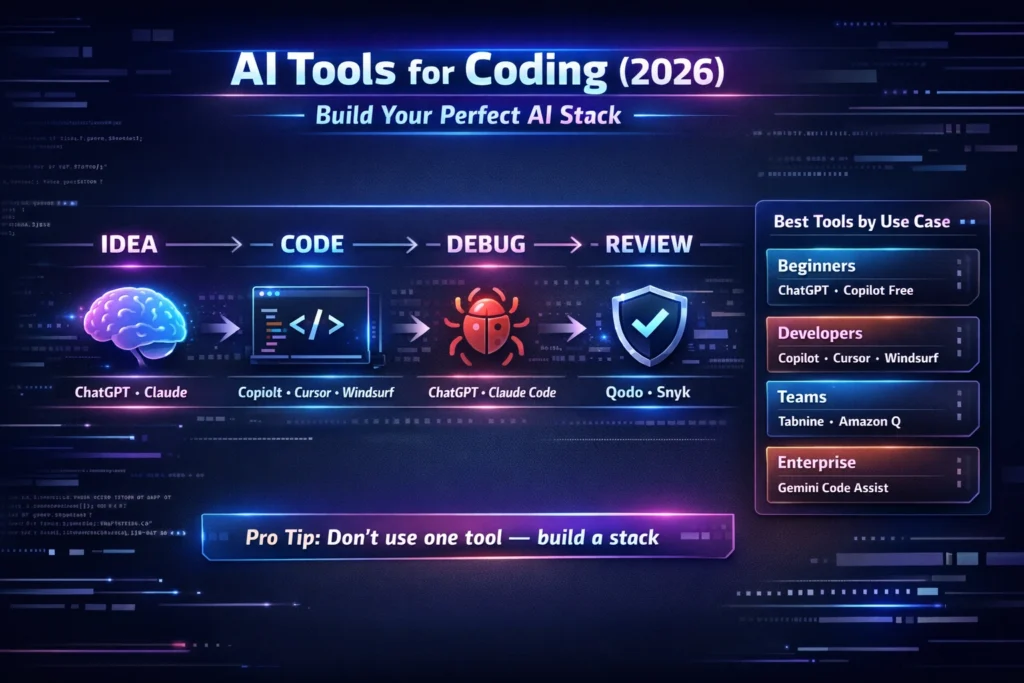
Start with a reasoning tool like ChatGPT or Codex when the task is still blurry. Use it to shape the plan, surface edge cases, and break the problem into steps. Then move to a coding environment such as Copilot, Cursor, Claude Code, or Windsurf to actually implement the change. After that, push the result through a review layer like Qodo or a security layer like Snyk before you trust it. That stack matches the core strengths each product publicly emphasizes: reasoning, editing, execution, review, and security.
I noticed that people get the best results when they stop expecting one tool to carry the entire workflow. The “one app solves coding” fantasy is attractive, but real coding has too many stages for that to be realistic. Planning, implementation, validation, and review are different jobs. The tools are better when they respect that difference.
What to use based on your situation
For beginners
Start with ChatGPT or Copilot. That combination keeps the learning curve gentle while still teaching you how to think through code and write it faster. Copilot gives you editor-time help, while ChatGPT/Codex helps explain mistakes and build understanding.
For developers
Use Copilot, Cursor, Claude Code, or Windsurf depending on your style. They are you like classic editor flow, Copilot is easy to adopt. If you want an AI-first workspace, Cursor or Windsurf may feel better.Feel like you need deep repo work, Claude Code is a strong fit.
For teams
Focus on governance, review, and security. sowhat means Tabnine for privacy-sensitive environments, Qodo for review workflow, Snyk for security, and sometimes Gemini Code Assist or Amazon Q Developer if you are deeply tied to Google Cloud or AWS. Teams usually do better when they buy control, not just convenience.
Common mistakes developers make
The first mistake is expecting one tool to do every job equally well. That almost always leads to disappointment. The second mistake is trusting generated code without verification. The third mistake is choosing a tool because it is popular instead of choosing it because it matches the real bottleneck in the workflow. The fourth mistake is ignoring security and privacy requirements until a team is already dependent on a tool that cannot meet them. The current docs for review and security tools like Qodo and Snyk make it very clear that review and scanning are not optional extras; they are part of the workflow.
Why this matters for Europe-based developers
For Europe-based developers and teams, the conversation is rarely only about speed. It is also about privacy, governance, and where data lives. Tools like Tabnine matter because they offer cloud, on-prem, and air-gapped deployment options with privacy-focused positioning. Security tools also matter because they help teams keep guardrails in place while adopting AI more aggressively.
Real Experience / Takeaway
My biggest takeaway is that the best AI coding setup is usually a mix, not a monolith. One tool helps you think, another helps you write, and another helps you trust the result. Once you stop searching for a single magic app, the whole workflow becomes calmer and much more effective.
One thing that surprised me is how much better the process feels when the editor itself becomes part of the AI experience. Cursor and Windsurf are especially interesting here because they do not treat AI like an extra add-on; they try to make it part of the daily development rhythm. That is a subtle difference, but it changes how you work.
The honest downside is that AI can still produce plausible-looking mistakes. That means your job does not disappear; it changes. You spend less time typing from scratch, but more time guiding, validating, and deciding. That is a good trade if you are aware of it. It is a bad trade if you are not.
Who this is best for
This approach is best for beginners who want faster learning, marketers who want to understand what developers are actually using, and developers who want a practical stack instead of a hype-driven app collection. It is also a strong fit for teams that need to balance productivity with review, security, and privacy.
Who should avoid it
If someone want a single tool that writes, reviews, secures, deploys, and never needs human judgment, they are likely to be disappointed. AI coding tools are strong assistants, not a replacement for engineering discipline. They work best when the user already has a workflow and wants to make it sharper.
FAQs About AI Tools for Coding
There is no single best tool. Copilot is strong for daily use, Claude Code and Codex are better for complex tasks, and Cursor or Windsurf are great for AI-first workflows. The best choice depends on whether your main problem is writing faster, thinking clearer, or managing bigger changes across files.
ChatGPT is better for explaining, reasoning, and debugging conversations. Copilot is better for fast coding inside the editor, especially when you want inline help while you type. They solve different problems, so the better answer is often to use both in different parts of the workflow.
Copilot Free and ChatGPT are usually the easiest starting point. They give beginners support without forcing them into a heavy agentic workflow too early.
Yes, but only with proper testing and human review. Security and review tools such as Snyk Code and Qodo exist precisely because production code should not depend on blind trust.
Tabnine is one of the strongest options for privacy-focused teams because it supports cloud, on-prem, and air-gapped deployment, with zero data retention and security-oriented positioning.
Final Takeaway — Stop Chasing Tools, Start Building a Stack
AI Tools for Coding in 2026 are no longer simple helpers. They are becoming part of how software is planned, written, reviewed, secured, and shipped. The best results do not come from chasing the loudest brand. They come from choosing a stack that fits your real workflow.
Use a reasoning tool when the problem is unclear. an editor-based tool when the work is repetitive or broad. Use a review tool when quality matters. Also use security tool when production risk matters. That combination is not just smarter; it is more realistic. And in coding, realistic usually wins.
