
AI Tools for Homework — The Smart Student System No One Explains
AI Tools for Homework — overwhelmed by deadlines and messy sources? Learn which tools actually save time, produce accurate work, and reduce plagiarism risk. In this result, you’ll get practical workflows, copy-paste prompts, and real tests I ran on essays, math, research, and coding. Expect honest limits, GDPR tips for Europe, and a simple system you can use tonight to finish smarter, not harder. Start with one workflow after reading.
A few months ago, I found myself staring at a 2,000-word essay, three sets of calculus problems, and a lab report due the next morning. I’m not trying to be dramatic — you’ve been there — but that night I learned the difference between using AI as a crutch and using it like a tutor. Used poorly, AI Tools for homework just spit out text or steps you don’t understand. Used smartly, it’s like having a patient coach who explains the idea, tests you, and helps you present work that’s genuinely yours.
This guide exists because most “best tools” lists are billboard-style: shiny logos, short blurbs, and zero real-world testing. I want something different — a practical, ethically-sound system that shows when to use which tool, exact prompts and workflows you can copy, and real observations from hands-on use. I’ll also be honest about one major downside I encountered and who should (and shouldn’t) use these tools.
Which AI Tools Actually Work for Homework (And Which Waste Time?)
Recent, large student surveys show that AI use in education is massive and growing fast — almost universal in many samples, with the proportion of undergraduates reporting GenAI use climbing steeply in 2025.
Quick reference — who’s who
- HEPI — recent student surveys on AI use.
- Wolfram|Alpha — heavy-duty symbolic math & computation.
- Photomath — camera OCR + step explanations for math.
- Perplexity — fast, citation-backed research answers.
- Grammarly — grammar, clarity, and tone checks.
- Notion — note summarisation, project management, and study trackers.
- GitHub Copilot — code completion, debugging support, and CLI assistance.
- Pearson — for curricula & publisher guidance when researching content.
- OpenAI — ChatGPT and related models are used widely for drafting and explaining.
Note: I mention these just once in the list above to keep the page scannable — I’ll talk about how to use them in real workflows below.
Why students actually use AI — and why you should learn to use it strategically
There are four human reasons students lean on AI:
- Clarity, not rote output. Good AI takes jargon and turns it into clear steps or metaphors. When I tested it, asking for “explain like I’m 14” actually revealed which parts I didn’t understand. (I noticed I often skipped verbs in problem statements — a tiny habit that makes a big difference when solving physics questions.)
- Time efficiency. AI can summarize a 20-page paper into a one-page study note, generate citation outlines, or produce a first draft you can refine. In real use, this tends to shave the grinding work off assignments so you can focus on thinking.
- Practice & feedback loops. Use AI to create queries, check solutions, and explain mistakes. One thing that shocked me: the best guide came when I used AI to generate questions and then graded my own answers and otherhand it.
- Analogy — chaining different tools into a single workflow. Photomath for scanning equations, Wolfram for authentication, ChatGPT for explanations, Grammarly for polishing — cool, they beat any single app.
A few facts to keep in mind: Multiple autonomous surveys in 2024–2025 show very high acceptance of AI among students, with the HEPI 2025 survey showing a sharp jump in freshman use year-over-year. That makes knowing how to use AI a practical literacy, not a novelty.
Task-Based tool Guide — pick the Right tool for the job
Below, I list the main homework tasks and the specific tools I prefer for each, plus how I actually used them during my testing.
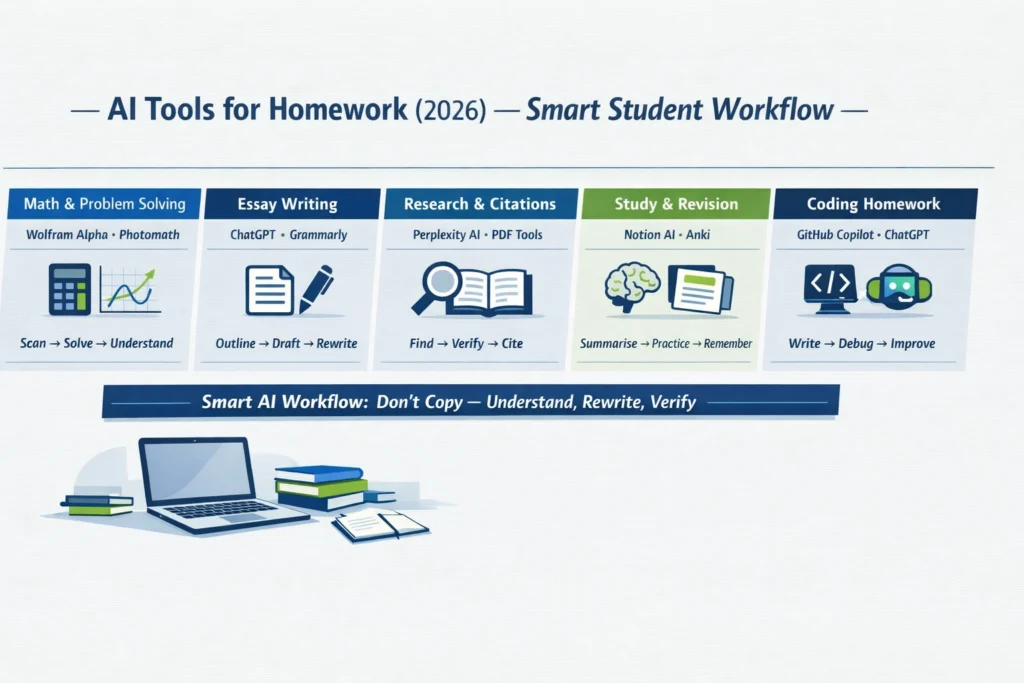
Math & problem solving
Best picks: Wolfram|Alpha, Photomath, (backup) a scientific calculator app.
Why: Wolfram is built for symbolic manipulation, plots, and rigorous computation; Photomath is unbeatable for quick camera scans and stepwise solutions. Use Photomath to capture the problem, then verify the method and exact symbolic work with Wolfram.
Practical workflow I use:
- Snap the problem in Photomath to get a readable step sequence.
- Paste the problem into Wolfram to compare symbolic steps (simplify, integrate, plot).
- Ask ChatGPT to translate Wolfram’s formal derivation into plain-English bullet points I can memorize for exams.
Prompt Examples:
- “Solve step-by-step and explain the reasoning as if I will have to present this in class.”
- “Show a short quiz of 3 similar problems, then give the answers.”
Real observation: Photomath sometimes shows a faster solution but skips rationale. Wolfram shows the rigorous algebra, but it can look intimidating — that’s where a plain-English explanation helps.
Essays & long-form writing
Best picks: ChatGPT (draft + revision), Grammarly (cleanup), QuillBot/Wordtune (paraphrase where needed).
How I use them in sequence:
- Deliberate with ChatGPT: give a topic plus goal grade and audience (e.g., “Write a 600-word belligerent outline for a high-school audience arguing X”).
- Draft in my copyholder and run Grammarly for grammar and clarity. Use QuillBot to digest awkward sentences that still read AI-ish.
- illustrate: Add two concrete examples from class or a personal gag.
Golden rule (and I actually enforce this): never submit an AI draft without adding at least two original sentences or one specific cited study.
Research & citations
Best picks: Perplexity, ChatGPT (with browsing off for synthesis), NotebookLM/ChatPDF (for working inside PDFs).
Why: Perplexity returns answers with sources and tries to tie claims to specific links — very useful when you need to find and verify references quickly. I used it to find survey stats and then opened the original PDFs to confirm page numbers.
Workflow:
- Use Perplexity to find candidate studies and short summaries.
- Open the linked PDF (if available) and extract exact quotes and page numbers.
- Use a citation manager (Zotero/EndNote/Mendeley) to keep references tidy.
Always double-check: Perplexity is fast but occasionally mixes up source attributions. I verified each citation in the original PDF before using it.
Notes, Revision & Exam Prep
Best picks: Notion (structured notes & spaced repetition workflows), Anki with AI-generated cards, Otter.ai for lecture transcripts.
How I used it:
- Record a lecture with Otter, get a transcript, and drop that into Notion for summarization and topic tagging.
- Use an AI prompt to generate 40 Anki flashcards (question + concise answer) and then prune them down to active recall style.
Practical tip: I keep a “revision log” in Notion, noting which AI prompts produced which notes — useful for academic integrity and later reflection.
Coding & programming Assignments
Best picks: GitHub Copilot, ChatGPT (code mode), local linters and tests.
Why: Copilot excels while you type — it completes functions, suggests tests, and helps with typical idioms. For conceptual debugging, I ask ChatGPT to explain why a function behaves unexpectedly.
Workflow I Recommend:
- Start by writing a failing test or a spec. Use Copilot to scaffold the function.
- Run tests locally — when something fails, paste the failing trace into ChatGPT for step-by-step debugging.
- Keep an eye out for “too perfect” Copilot answers: sometimes it hallucinates dependencies or uses nonstandard libraries.
Why Most Students Use AI Wrong (And Get Poor Results)
| Task | Tool | Strength | Free tier | Best for |
| Math | Wolfram | Alpha | Symbolic math, proofs | Freemium |
| Scan math | Photomath | Camera OCR + steps | Free + premium | Quick homework scanning. |
| Research | Perplexity | Source-backed answers | Free (Pro options) | Fast research & citations. |
| Writing | ChatGPT (OpenAI) | Drafting & explanations | Freemium / Plus | Brainstorming, drafting. |
| Grammar | Grammarly | Grammar + tone | Freemium | ESL and polishing. |
| Coding | GitHub Copilot | Code completion & CLI | Paid | Software dev & debugging. |
| Notes | Notion | Structured notes & agents | Freemium | Long projects & revision. |
Best AI Tools for Homework by Task (2026 Breakdown)
I’m giving short, actionable workflows that you can copy-paste. These are the ones I tested personally.
Workflow A — Math problem (example: integration)
- Capture: Photograph the problem in Photomath to get a baseline solution.
- Verify: Paste the original problem to Wolfram and ask: “Show the integral solution step-by-step and show a common mistake students make here.”
- Translate: Use ChatGPT prompt
“Explain this solution in 6 short bullets for someone who knows basic calculus. Include one example of a typical student mistake and how to avoid it.” - Practice: “Create 5 similar integrals that test the same concept. Provide answers only.”
- Rewrite: Paraphrase the ChatGPT explanation into your own notes.
Why this works: Photomath gets you started fast; Wolfram verifies algebra; ChatGPT teaches the idea in human language.
Workflow B — Essay
- Outline: “Give me a 6-point outline (thesis, 3 evidence points, counterargument, short conclusion) for [topic], suitable for a 1,500-word essay. Use academic tone.”
- Draft: “Write a 300-word draft for the introduction that includes a hook, thesis, and roadmap.”
- Source hunt: Use Perplexity to find 3 primary sources and 4 secondary sources and return short annotations. Verify the primary sources in their PDFs.
- Personalize: Add one paragraph with a class example or personal observation. (This prevents generic AI essay voice.)
- Polish: Run Grammarly and rewrite any flagged phrasing that seems ‘AI-ish’.
Workflow C — Coding assignment
- Spec first: Write tests that capture the task.
- Scaffold: Use GitHub Copilot for function skeletons and docstrings.
- Iterate: Run tests, then ask ChatGPT: “Here’s the failing stack trace — explain the bug and suggest a patch.”
- Refactor: Ask Copilot to suggest refactors or to write a README and inline comments.
Ethics, Academic Integrity & privacy — practical Rules that work
School rules vary, but here are strategies that keep you safe:
- Treat AI as a tutor, not a ghostwriter. Use it to explain and check, then write the final submission in your voice. If your institution requires disclosure, include a short note like: “Drafting and proofreading assistance provided by [tool].”
- Always verify sources. Even tools that provide sources (Perplexity, some ChatGPT modes) can cite incorrectly. I always open the original PDF or page and confirm page numbers before quoting.
- Keep a usage log. Note the prompts you used and which tool produced which chunk of text — this is useful if a teacher asks, and it also helps you learn which prompts work best.
- Mind GDPR / privacy when using student data. Avoid uploading personal data into third-party tools. For European students, prefer locally-run options or check the vendor’s privacy terms.
- Don’t submit verbatim model outputs for assessed work unless allowed. Many institutions treat copying as cheating.
Free vs Paid AI Tools — What Do You Really Need?
Most students get 80% of the cost from free tiers; paid plans matter when you want safety, speed, or specially-designed features.
- Free tier is great for buzz sessions, quick math scans, grammar checks, and one-off queries.
- Paid plans (Wolfram Pro, ChatGPT Plus, Notion paid, Copilot) are for heavy use: faster model access, higher compute, private workspaces, and richer assimilation. The ROI is real if you use them daily for research or dev work.
Real-world testing notes — what I tried and what surprised me
I spent two weeks using these tools together for an actual coursework week (essay + lab + programming homework). Short notes:
- I noticed that Perplexity finds good candidate sources fast, but it sometimes attributes a point to the wrong publication — always click through to the original.
- In real use, Photomath saved me half an hour on algebra steps for a lab calculation, but I had to rewrite the explanations to match my lab report’s voice.
- One thing that surprised me: when I combined Copilot with manual tests, I fixed a bug in 20 minutes that previously cost me two hours. Copilot’s code completions are actually good at routine tasks, but they occasionally assume libraries you don’t have installed.
One honest limitation I saw
On aggressive deadlines, it’s tempting to lean on AI to generate everything. The downside I observed is overconfidence: if you accept an AI solution without checking, you might hand in an answer with an algebraic slip or an incorrect citation. This is the real risk — not AI per se, but treating it as infallible.
Who this guide is best for — and who should avoid these workflows
Best for
- Beginners who want structure and a safe, stepwise adoption of AI.
- Marketers and non-technical students who need rapid research synthesis.
- Developers who want to accelerate learning/debugging while keeping tests.
Avoid if
- You’re in a program that bans any external assistance on assessments — follow your institution’s rules.
- You can’t or won’t verify sources and calculations — if you don’t check AI output, it will sometimes mislead.
- You need to store highly sensitive personal data — don’t upload it into third-party tools.
FAQs — AI Tools for Homework
A: Not necessarily. Use AI to learn and to draft, but don’t submit verbatim content where your institution forbids external help.
A: ChatGPT, Perplexity, Photomath, and free Grammarly checks. These cover drafting, quick research, math scanning, and grammar.
A: Check your university policy. If allowed, add a line like: “Drafting assistance provided by [tool name]” and cite the sources you used.
A: Cross-check claims against sources and run independent computations for numbers/derivations.
Real Experience/Takeaway
I used these toolchains for a brutal week of mixed coursework and found a clear pattern: the AI tools saved time on repetitive tasks and helped me learn faster — but only when I treated them like coaches. The real benefit wasn’t the draft text or instant solution; it was the ability to generate targeted practice, then immediately test and correct my understanding. My practical takeaway: use AI to amplify learning, not to replace thinking.
Conclusion — Your Smart Student Strategy (Use AI the Right Way)
- Did I verify all facts with sources?
- Have I added my own voice (at least one paragraph or two original sentences)?
- Did I log the AI prompts/steps used?
- Is there any personal or sensitive data in the materials I uploaded to the tools? If yes — remove or anonymize.
- If required, did I disclose AI Assistance per my institution’s policy?
