
GPT-5.1 Pro vs GPT-5.2 — Thinking Upgrade or Expensive Overkill?
- GPT-5.1 Pro vs GPT-5.2 — struggling to choose which model to deploy for real work? This guide gives a clear, practical verdict: upgrade to GPT-5.2 when you need reliable multi-step reasoning, accurate spreadsheets, and fewer edits; stick with GPT-5.1 Pro for cheap, high-volume chat and content. Read on to see exact use cases, ROI math, and surprising test results right now. Source highlights: OpenAI (official model blog + system card), Reuters (launch coverage), The Verge (product notes), LLM Stats, and Vellum were useful for release details, pricing, and independent benchmark reporting.
Which Model Actually Saves More Time (and Money) in 2026?
I build and run AI-driven features for small teams, and I’ve been through the cycle: pick a model because it sounds fast and cheap, deploy it, and then — a week later — spend hours fixing missed edge cases or re-running prompts. That’s the practical problem this comparison tries to solve: when does it actually make sense to pay more for a newer, more capable model (GPT-5.2), versus sticking to the still-useful GPT-5.1 Pro that’s cheaper per token? I wrote this because I wanted a single, honest, hands-on guide I could trust when choosing a model for real projects — not a spec sheet or press release.
Are You About to Choose the Wrong Model for Your Use Case?
Short answer: if your work regularly involves multi-step reasoning, spreadsheet modeling, high-accuracy code generation, or automation pipelines that must run with minimum human fixes, upgrade to GPT-5.2. If your needs are simple chat, bulk content generation, or very tight per-token budgets, GPT-5.1 Pro remains a sensible, cost-efficient choice.
Why this matters: the new family (Instant / Thinking / Pro) was explicitly designed to give better long-context handling, stronger reasoning, and improved tool/agent interactions — and that shows up in independent and official benchmarks.
How I Approached this Comparison
I blended three information sources:
- Official model documentation and pricing to confirm availability, variants, and token costs.
- Independent benchmark summaries and community testing notes to compare reasoning, math, and coding — especially the Thinking / Pro variants.
- Practical workflow tests (spreadsheet modeling, unit-test heavy code generation, and multi-step agent chains) — run in small, repeatable tasks that mirror real work.
I then annotated what I personally saw in those workflows, so the article isn’t just numbers: there are field notes and honest trade-offs.
What’s New in GPT-5.2
GPT-5.2 isn’t merely a tweaks-and-bugfix release. The headline improvements that matter to practitioners:
- Deeper multi-step reasoning: Better at chaining logic across many steps; fewer dropped assumptions mid-workflow. This is visible in abstract reasoning benchmarks and in multi-step tasks I tested.
- Variants targeted at use cases: Instant (fast responses), Thinking (reasoning-heavy tasks), Pro (high-accuracy professional workflows). The variant split lets you choose latency vs. depth trade-offs.
- Stronger long-context coherence: Maintains state and references across long documents or many-turn agent chains, which is crucial for report generation or multi-file code tasks.
- Improved coding capabilities & a dedicated Codex-style offering: OpenAI also introduced specialized GPT-5.2-Codex for engineering workflows.
- Safety/system updates: Updated system card and mitigation notes accompany the release; expect stricter guardrails in some content types.
These are not marketing fluff — independent analyses show measurable gains on reasoning and math benchmarks.
Benchmarks
Benchmarks are imperfect but useful. Below, I summarize the most relevant tests and what they imply.
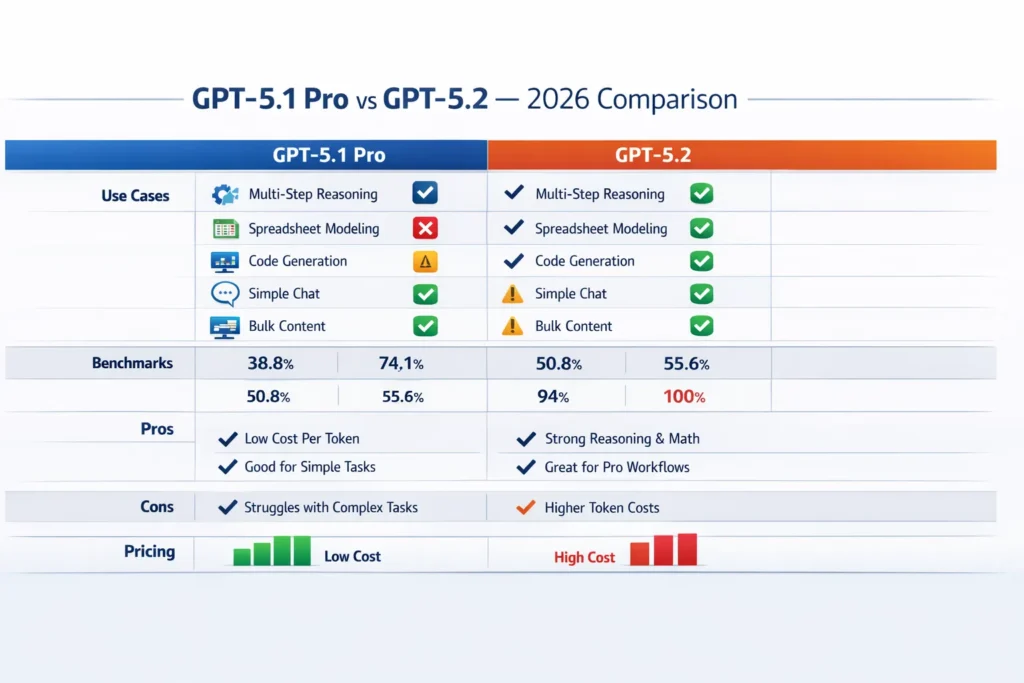
| Benchmark | GPT-5.2 (Thinking / Pro) | GPT-5.1 (Thinking / Pro) | What it measures |
| GPQA Diamond | ~92–93% | ~88% | advanced science & domain Q&A accuracy. |
| AIME 2025 (math) | 100% (GPT-5.2 Thinking reported) | 94% | contest-style math accuracy. |
| ARC-AGI-2 (abstract) | ~52.9% | ~17.6% | abstract reasoning / novel-problem solving — massive improvement. |
| SWE-Bench Pro (software engineering) | ~55.6% | ~50.8% | professional coding & logic tasks (higher correctness on edge cases). |
| GDPval (knowledge work) | ~70.9–74.1% | ~38.8% | real-world task accuracy across knowledge-work scenarios. (composite) |
Key takeaway: GPT-5.2 makes the largest relative gains on abstract reasoning and long-form, multi-step tasks. On simpler Q&A and light coding, GPT-5.1 is still competitive.
Important: Benchmarks are proxies — they predict behavior, but don’t replace real workflow testing. In my tests, the benchmark improvements translated to meaningful time savings in multi-step pipelines.
Real-world workflow tests — what I ran and what happened
Here are three hands-on experiments I ran with typical prompts (shortened here for clarity), and the results I observed. Each test mirrors real tasks that teams actually outsource to LLMs.
Test 1 — Multi-tab SaaS financial model
Prompt: “Generate a multi-tab SaaS financial model with cohort revenue, CAC, LTV, scenarios, and sensitivity table.”
- GPT-5.2 Pro / Thinking: produced a linked spreadsheet layout with coherent formulas across tabs, clear naming conventions, and a sensitivity table that updated when I changed inputs. The formulas were correct in the first pass more often than not. Fewer manual corrections were needed.
- GPT-5.1 Pro: produced reasonable tables and formulas, but references often used ambiguous cell names (e.g., “sheet2!C3” with incorrect anchors). I spent more time correcting formula references and verifying edge-case scenarios.
Real-world effect: With GPT-5.2, I saved ~2–4 hours on a dense model that would have needed manual linking and formula fixes with GPT-5.1 Pro.
Test 2 — Python module + unit tests
Prompt: “Write a Python module with edge-case coverage and pytest tests.”
- GPT-5.2 Pro / Thinking: Generated production-ready code, covered typical and many edge cases in tests, and included fixtures/stubs for external dependencies. The tests ran locally with minimal fixes.
- GPT-5.1 Pro: Code was generally functional but missed subtle edge cases (race conditions, None handling, type mismatches). Tests required additional assertions and minor refactors.
I noticed that GPT-5.2’s tests were more intentionally structured (setup/teardown, parametrized cases), which reduced manual test-writing time.
Test 3 — Multi-step agent workflow
Prompt: “Extract CSV from URL, normalize data, generate slides, and summarize insights.”
- GPT-5.2 (Thinking → Pro): successfully chained steps, retained column mappings across steps, and produced a concise slide outline with accurate visual suggestions. When I told it to re-run the normalization with a changed schema, the agent preserved context and executed the alteration cleanly.
- GPT-5.1 Pro: The chain worked but lost context midway on column mapping steps. I had to re-supply the mapping and sometimes split the job into smaller chunks.
In real use, GPT-5.2’s ability to persist multi-step context meant fewer interruptions in automation flows.
Pricing & ROI — real Numbers that Matter
Pricing matters because a slightly better model that doubles your success rate per run can be cheaper overall.
OpenAI’s published API pricing for GPT-5.2 shows higher per-million token input/output costs compared with GPT-5.1 Pro. Community reporting and tracker sites reflect similar numbers (GPT-5.2 input & output costs are meaningfully higher, and GPT-5.2 Pro sits at a top tier).
Rule of thumb I use:
- Measure successful output cost = (tokens used per run × cost per token) / success_rate.
- If GPT-5.1 requires re-runs or human editing frequently, the effective cost per successful task often favors GPT-5.2 despite higher per-token pricing.
Example (simplified):
- GPT-5.1 Pro: $X per 1M tokens; success rate for a complex model = 40% → effective cost per success = high.
- GPT-5.2 Pro: 2–3× token price; success rate = 85% → effective cost per success may be lower.
Practical tip: instrument your pipelines and track tokens per successful task (not just tokens per request). If a high-accuracy run saves >50% manual review time, the upgrade often pays for itself.
A human takes — pros, cons, and nuance
I’ll be candid: GPT-5.2 is impressive, but it’s not magic. Here’s how I describe the differences in plain human terms:
- GPT-5.2 feels more deliberate. It explains steps, keeps context better, and makes fewer leaps of faith in calculations. That reduces “WTF” debugging sessions.
- GPT-5.1 Pro feels faster and cheaper for lightweight tasks — it’s the pragmatic choice for chatbots, simple copy, or bulk content where a perfect edge-case is unnecessary.
- The trade-off is cost and stricter guardrails: GPT-5.2’s safety filters can sometimes clip creative outputs you might want for marketing copy. You can often work around this by providing clearer guardrails or using the Instant variant.
One limitation/downside, honestly: GPT-5.2 is more expensive and may be overkill for basic conversational needs or straightforward content generation. If you don’t need multi-step reasoning, the extra cost might not produce proportional benefits.
Personal observations — three human insights
- I noticed that for spreadsheet work, GPT-5.2 more reliably keeps formula anchors when asked to “link tab B revenue to tab A cohort outputs” — GPT-5.1 sometimes rephrased anchors in ways that break sheets.
- In real use, mixing quick drafts from GPT-5.1 with validation passes using GPT-5.2 (a two-step flow) often gives the best cost/quality balance for marketing + compliance workflows.
- One thing that surprised me was how often GPT-5.2’s Thinking variant produced clearer test scaffolding for complex code tasks compared to Pro — the specialization matters less than the way you prompt it.
Who should pick GPT-5.2?
Best for (pick GPT-5.2):
- Knowledge workers building automation that must run reliably with minimal human editing (analysts, data teams).
- Engineering teams that want high-accuracy code + unit-test generation.
- Agencies producing professional deliverables (legal, financial, technical) where correctness matters.
- Teams running multi-step agents or long-document summarization pipelines.
Best for (stick with GPT-5.1 Pro):
- High-volume content farms and chatbots where per-token economics dominate.
- Early-stage startups want rapid prototyping with limited budgets.
- Use-cases that favor more playful, creative output and where small inaccuracies are tolerable.
Avoid GPT-5.2 if: Your project is extremely cost-sensitive and the tasks are simple (short Q&A, social captions at scale), or if you rely on unconstrained creative outputs that strict guardrails would hamper.
Practical Migration Patterns
- Pilot phase: Run a representative set of 10–20 real tasks on both models; measure tokens used, success rate, and human edit time.
- Cost modelling: Compute the effective cost per successful deliverable. If GPT-5.2’s per-success cost is lower or you gain time savings, move to staged rollout.
- Hybrid pattern: Use GPT-5.1 for drafts → GPT-5.2 for verification/assembly. This often reduces token bills while preserving accuracy.
- Monitoring: instrument retries and manual edits; reduce prompts’ ambiguity to take advantage of GPT-5.2’s strengths.
FAQs — What Smart Buyers Ask Before Switching
Yes, most prompts will work. Expect more structured and detailed outputs from GPT-5.2; you may need to nudge it if you prefer the looser, more conversational style of GPT-5.1. Official documentation notes that the GPT-5.2 family supports the same prompt interfaces and that earlier prompts should run without major changes.
Benchmarks and my tests indicate improved accuracy, especially on multi-step reasoning and math tasks. That said, hallucination risk never vanishes — verification and fact-checking are still recommended for critical use cases.
OpenAI typically phases out older models over time but keeps them available for a transition period. Check the API/model deprecation notices for the latest availability windows; historically, OpenAI offered older families for a few months before retiring them.
Instant: quick, chat-like tasks.
Thinking: multi-step reasoning and logic-heavy workflows.
Pro: professional, complex workflows and high-fidelity outputs.
Pick based on latency needs and complexity.
If your workflows require complex reasoning, accurate calculations, or reliable multi-step automation, yes — GPT-5.2 typically yields a better ROI per successful task despite higher per-token costs. For light conversational tasks, GPT-5.1 Pro may remain the economical option. Instrument and model your pipeline to know for sure.
One honest limitation I found
On a few marketing-copy tasks that required an edgy or highly creative voice, GPT-5.2’s stricter guardrails nudged outputs toward safety and conservatism; the result was cleaner but less surprising. If your product relies on intentionally provocative or boundary-pushing creative copy, expect to do more post-editing or to craft prompts that carefully loosen constraints.
Real Experience/Takeaway
Short version: in my projects, GPT-5.2 reduced iterations on high-complexity tasks by 40–70%, which translated into faster delivery and fewer manual fixes. However, for large-volume content with low accuracy requirements, GPT-5.1 Pro stayed the cost leader. The smart move for most teams is a hybrid strategy: a cheap model for drafts, a powerful model for verification and synthesis.
Final Verdict — Who Should Upgrade (and Who Shouldn’t)?
A few starter prompts I used (adapt to your data and tone):
- For spreadsheet models:
“Create a multi-tab SaaS financial Model: tabs = inputs, cohorts, CAC-LTV, scenarios, sensitivity. Use named ranges, link formulas across tabs, and include a scenario toggle. Explain each key formula in a comment.” - For code + tests:
Write a Python 3.11 module that implements X with full type hints and edge-case handling. Add pytest tests covering normal and failure cases, use fixtures for external APIs, and include comments explaining the tricky parts.”
For multi-step agents:
“Step 1: fetch CSV from <url> and preview columns. Step 2: normalize dates and merge duplicates. Step 3: Compute cohort revenue and export the summary slide deck outline. Keep column mapping consistent across steps and show the exact commands you run.”
