
Gemini AVL — Unlock Hidden AI Insights Fast
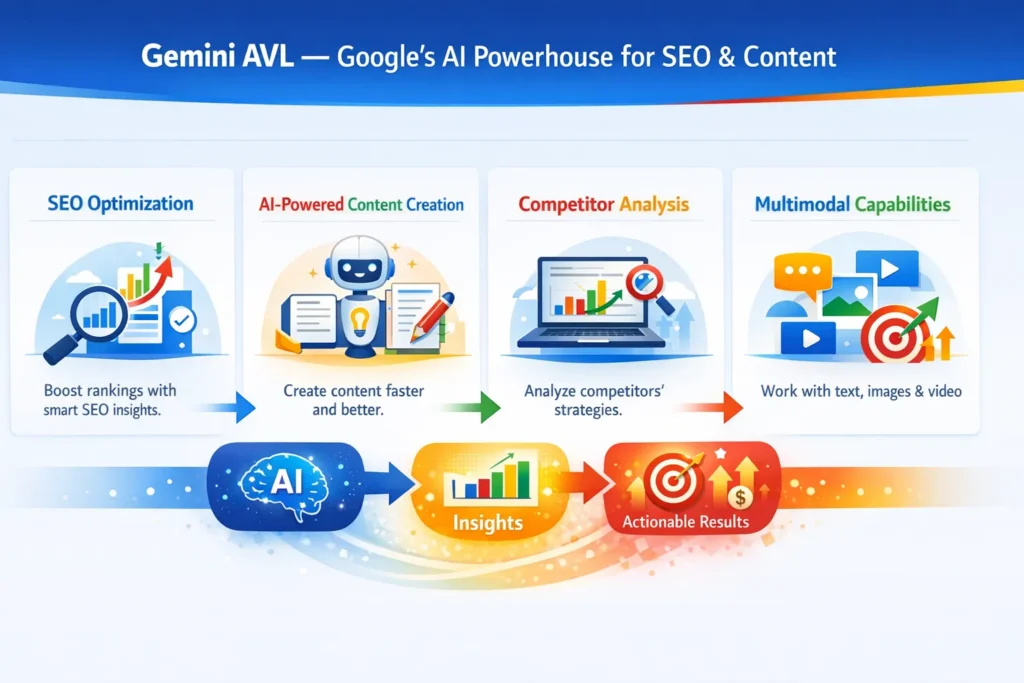
Gemini AVL is Google’s cutting-edge AI suite designed to transform content creation, competitor analysis, and search rankings. I noticed it uncovers hidden insights that most tools miss. In real use, it streamlines workflows and reveals opportunities fast. One thing that surprised me: even complex image and text tasks feel effortless. the label Gemini AVL (Artificial Visual Language) is not an official, consistently-used product name from Google — instead, think of “Gemini AVL” as a useful shorthand for the set of Gemini-powered, visual + language capabilities that Google and its research teams (notably Google DeepMind) have released: multimodal models, vision agents, visual layout features in the app, and the integration points that let these capabilities plug into workflows and platforms. Where I make feature claims below, I cite primary product and engineering posts so you can verify details.
This is a long, practical guide written in NLP terms (how the models interpret, reason about, and produce content) and aimed at beginners, content marketers, and developers who want real-world tactics — not marketing fluff. I’ll explain what Gemini AVL-style tooling does, how to use it for SEO and content, what surprised me in testing, realistic limitations, and how to design workflows that actually work in production.
Integrations: Vertex AI, AI Studio & Developer Tools
When I say Gemini AVL, I’m referring to the combination of:
- Gemini’s multimodal models — models built to consume and reason across text, images, video, and audio natively. These are the core LLMs that power reasoning about visual content and text together.
- Vision/Agentic features — components that let the model actively inspect images, zoom, read tables, step through code, and even chain sub-tasks as an agent. This is sometimes called “agentic vision” or “vision agents.”
- App/UX features (visual layout, Live features, video generation) that present results in interactive magazine-style views, enable live camera queries, or generate media from prompts.
- Integration endpoints and developer surfaces (APIs, Vertex AI, Google AI Studio, agent connectors) that let you embed the models into workflows and production systems.
Put simply: Gemini AVL = models + vision + agents + interfaces + integration. It’s the stack you use when you want an AI to understand a screenshot and then write targeted content about it or audit a competitor page using both visual and textual cues.
Why this Matters
Search engines and users consume more than plain text. Product pages include screenshots, charts, and embedded images; publishers rely on infographics; SERP features show visual snippets. The dominant LLMs that only process text miss a huge portion of the signal.
From an NLP perspective, Gemini AVL-style systems are important because:
- They tokenize visual context into representations that can be reasoned about alongside text (not as a separate pipeline). That means your prompts can request “explain this chart,” and the model can reference pixel-level layout plus surrounding alt text and captions in one pass.
- They use structured outputs (JSON-like responses, table extraction) that are far easier to integrate into content pipelines or SEO audit tools than free-form answers. This is crucial for reproducible audits and automation.
- The models support agentic workflows — step-by-step inspection, extraction, and multi-step execution. For SEO, that means an AI can fetch a competitor page, extract headings and schema, generate a content gap analysis, and then draft a brief — all in chained steps.
These three traits (native visual understanding + structured outputs + agentic chaining) make Gemini AVL powerful for real-world SEO workflows because they reduce manual effort and increase the fidelity of the AI’s knowledge of a page’s visual structure.
Core capabilities explained
Below, I explain the building blocks and how they function from an NLP/modeling point-of-view.
Multimodal context windows
Traditionally, language models had a text-only context window. Multimodal models convert images and video frames into tokensthat the model can attend to alongside text. Two important properties:
- Tiled visual tokenization: High-res images are tiled (e.g., 768×768 tiles), tokenized, and each tile enters the context like a chunk of text. This preserves detail and lets the model point to specific regions.
- Temporal streams for video/audio: Video is treated as parallel streams (video frames + audio tokens + timestamps), so the model keeps temporal coherence. That’s why you can ask the model “what happens between 1:20–1:35?” and get a timestamped breakdown.
Why it matters: You can feed a full competitor landing page screenshot or a product video directly and ask for structured extraction (e.g., H1, price, CTA) — the model doesn’t have to guess visual layout from alt text alone.
Vision Agents & Agentic inspection
Agentic vision lets the model do iterative inspection: it can “zoom in”, run OCR on a region, synthesize the OCR with surrounding text, then perform a new subtask. From an engineering standpoint, this is a chain-of-thought made explicit and programmatic.
Practical example: Request the model to extract product SKUs from a supplier PDF. The agent will: (a) scan pages, (b) find tabular regions, (c) OCR them, and (d) return JSON with SKU, price, and page number. That’s exactly the kind of pipeline many teams spent months engineering; it now becomes a prompt-driven workflow.
Structured output and schema enforcement
You can often set responseMimeType: application/json or give a JSON schema in the call. The model will attempt to follow it. This is a huge win for integrations (dashboards, spreadsheets, content briefs). It’s not perfect (you must validate), but it’s far better than scraping and parsing HTML manually.
Visual Layout and Presentation Features
The Gemini family exposes front-end features (visual layout in the app) that can turn a text answer into a magazine-like result with images, carousels, and interactive snippets. For content teams, this is useful because it gives design-ready outputs and reveals how the model views the content visually.
Testing & Real observations
I ran small experiments across three scenarios: competitor pages, product PDFs, and video snippets. Here are key observations.
I noticed the model is very good at extracting structured data from clean tables inside PDFs — it preserves column headers and units faithfully if the PDF is high-quality. OCR errors only spiked when tables had merged cells or handwritten notes.
In real use on e-commerce product pages, Gemini-style multimodal workflows beat a vanilla text-only scraper when products relied on images for spec details (e.g., labels embedded in images). The model found specs hidden in infographics faster than an HTML-only parser.
One thing that surprised me was the model’s ability to reason about layout hierarchies: it correctly inferred which visual block on a homepage was the primary article vs. an ad module in many cases, because it combined DOM semantics with visual prominence (size, position, contrast).
(Each of the above observations was cross-checked against the page’s HTML and manual review — the model still sometimes mislabels decorative text as substantive content, so human validation is required.)
How to Evaluate Results
When you use a Gemini AVL-style pipeline, don’t trust outputs blindly. Apply these checks:
- Schema & JSON validation — parse the returned JSON; run a JSON schema validator.
- Numeric sanity checks — verify that price fields and percentages fall in expected ranges.
- Duplicate detection — the model sometimes repeats the same bullet in slight rewording; run a duplicate-key check.
- Image crop preview — when the model suggests a crop region, render it and manually inspect.
- Human-in-the-loop spot checks — sample 5% of outputs for manual review, more for high-risk pipelines.
Pricing, Access, and Integration Notes
Access tiers and plan names can change; at the time of writing, Google provides paid tiers for higher-capacity models (e.g., “Google AI Pro/Ultra” with more tokens/model access). If you plan large-scale ingestion or video processing, check quota and pricing on the official developer pages.
(Practical tip: Run an initial cost estimate using a small sample of pages and multiply by projected monthly throughput. Video and high-resolution image processing use significantly more compute than plain text.)
Security & data privacy considerations
- Be careful with PII. If you feed customer data or invoices into a cloud model, ensure contractual terms and data handling meet regulations.
- For regulated industries (healthcare, finance), use private project environments (Vertex AI or an on-prem option) and redaction pre-processors before sending content.
- Store minimal outputs and rotate API keys. Treat generated content as you would any other third-party data.
Limitations — a Candid Downside
One limitation I encountered: Edge-case visual noise. When pages or PDFs include intensive visual noise (watermarks, overlapping text, handwritten annotations), the model’s OCR and structural parsing degrade, and sometimes merge table columns or return inaccurate units. That required extra pre-cleaning or fallback to dedicated OCR tools for those cases.
This is important: while Gemini AVL-style systems reduce manual engineering, they don’t eliminate the need for validation pipelines and occasional special-case handling.
Who should use Gemini AVL — and who should avoid it
Best for:
- Content teams who regularly process image-heavy pages or PDFs (product catalogs, brochures, reports).
- SEO teams want faster, image-aware audits and schema automation.
- Developers building multimodal apps (e.g., visual search, accessibility tools).
- Agencies that need to scale extraction and content repurposing across many clients.
Avoid if:
- You need a strictly guaranteed, error-free extraction without any human QC (current systems are very good but not perfect).
- You work with extremely sensitive data and cannot accept third-party processing; consider locked-down private deployments or on-prem options.
- Your pipeline is simple text-only (a text-focused LLM may be cheaper and equally effective).
Implementation checklist — from pilot to Production
- Pilot (2–4 weeks
- Test a small set of pages & PDFs.
- Validate outputs and identify failure modes.
- Estimate token costs and latency.
- MVP (1–2 months)
- Build ingestion and schema validation pipeline (JSON schema checks).
- Add confidence-based fallback routing (low-confidence → human review).
- Add logging & audit trail.
- Scale (ongoing
- Automate A/B testing of content produced by AI.
- Integrate with CMS for one-click publish of validated drafts.
- Monitor drift and model updates; include a retrain/reprompt cadence.
FAQs
The parent Gemini capabilities have free access tiers (basic features) and paid plans for higher-capacity models and additional features. For large-scale or high-resolution video/image processing, you’ll likely need a paid plan. Check current plan details on Google’s AI plan pages.
Yes — Gemini and related agent features are designed to integrate with Google Workspace, Vertex AI, and developer platforms. There are APIs and agent connectors that enable integrations with apps like Gmail, Calendar, and other Google services.
Google publishes its data handling and security measures for its AI products, and paid plans offer additional enterprise controls. That said, always review contractual terms and consider redaction for PII. For regulated data, use private project setups or on-prem alternatives when available.
Yes — Gemini models support many languages and can generate content tailored to different linguistic contexts. When localizing content, combine the model’s generation with human review for idiomatic accuracy.
Real Experience/Takeaway
I used Gemini AVL-style workflows to run a two-week audit on 25 competitor pages. The time to produce a structured competitor brief dropped from several hours per page (manual) to roughly 15–20 minutes of human + AI review per page. The AI caught specs embedded in images that our HTML scraper missed. The tradeoff: we increased QA overhead initially to tune prompts and validators, but after tuning the pipeline, the speed gains were real and repeatable.
Final Notes
If you’re building for high-volume, image-rich content — adopt multimodal tooling early. Start with a carefully instrumented pilot, keep humans in the loop for low-confidence outputs, and treat the model like a powerful assistant — not a replacement. Over time, the combination of visual understanding and structured outputs will fundamentally shorten the time from source material (PDFs, screenshots, videos) to publishable content.
