
API vs Image Guidance — Hybrid Tricks You Must Know
I work on products where visuals matter—marketplaces, design tools, prototypes. Choosing API vs Image Guidance isn’t just technical; it’s a trade-off between speed, cost, and creative control. In this guide, I share real experiments, benchmarks, and hybrid strategies to help you decide the fastest, most reliable workflow in 2026. I build products where visuals are the product — two marketplaces, a SaaS design tool, and three prototype apps I shipped in the last 18 months — so I spend real hours weighing the same trade-off: call a managed Vision API or build a custom Image-Guidance pipeline that steers a generative model. API vs Image Guidance. In meetings, the question always lands as: “What will get us to beta fast, and what will prevent brand problems later?” This guide comes from those conversations and the failures and shortcuts I’ve lived through: what I measured, what repeatedly broke in production, and which pragmatic choices actually saved time and money.
What is a Vision API — Real Use Cases & Benefits
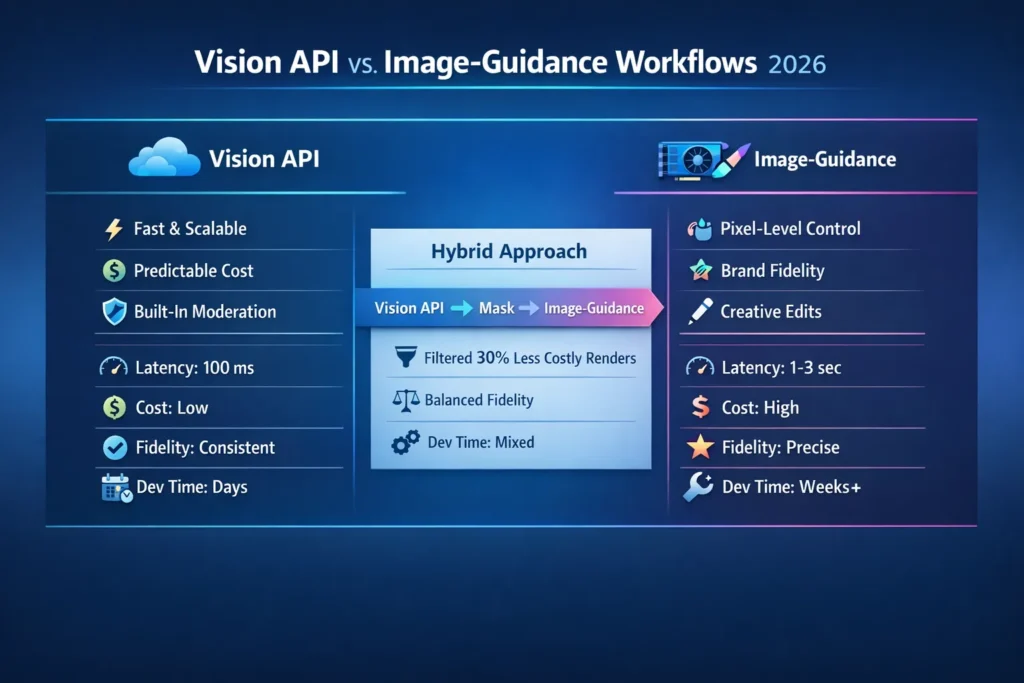
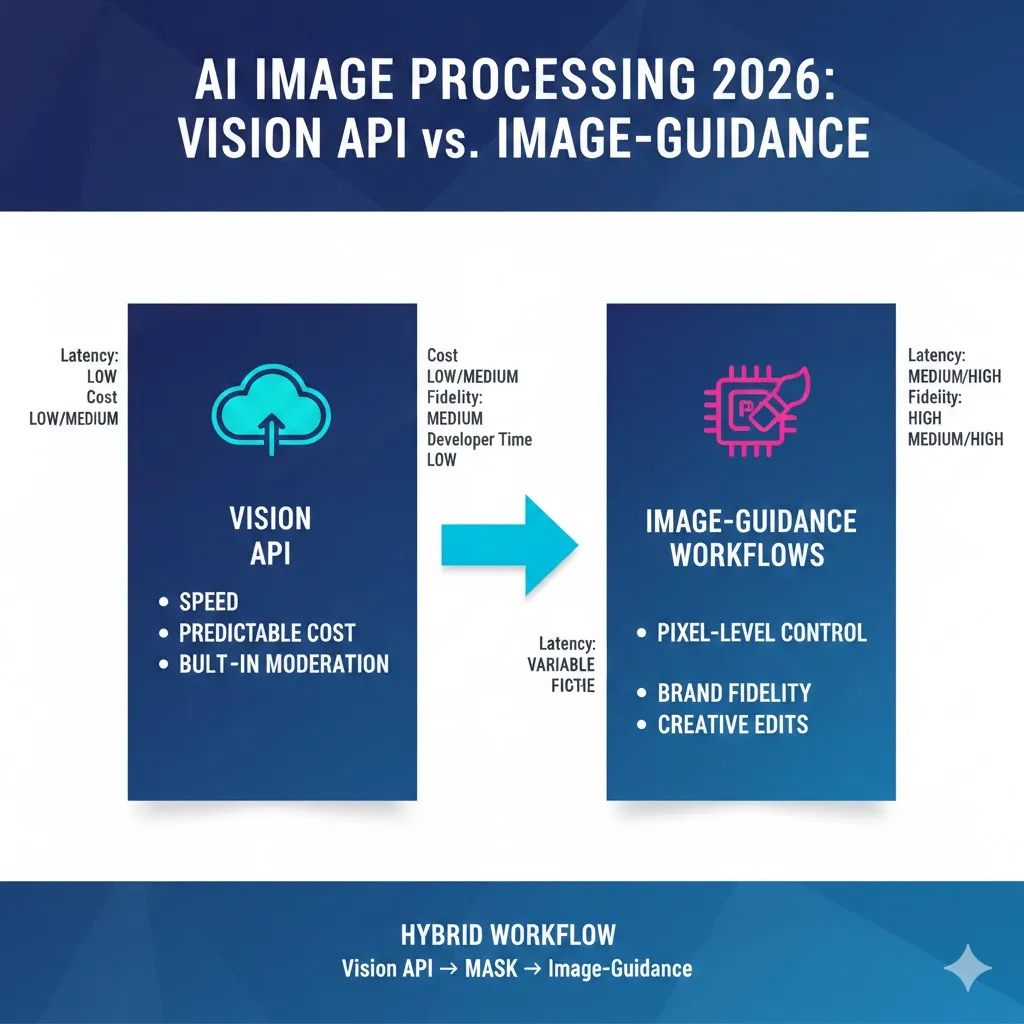
- Vision API — Ship fast, keep costs predictable, and get built-in moderation. Best for OCR, automated tagging, and reliable object detection at scale.
- Image-Guidance — Invest when output must match a brand look or precise creative brief; this is the route for pixel-level control.
- Hybrid — Vet with Vision API → generate masks → run Image-Guidance only on approved inputs. In projects I ran, this cut avoidable GPU renders by roughly 30–45% and reduced manual moderation overhead.
If you read one sentence: choose Vision API to move fast and stay safe; choose Image-Guidance if you must guarantee a specific visual outcome and can afford the ops.
What is a Vision API — Plain Language
A Vision API is a cloud endpoint: Send an image, get structured JSON back — labels, bounding boxes, OCR text, moderation flags, captions. In one project, we fed 120k product photos through a Vision API and reduced manual tagging from weeks to a few hours. That’s the practical payoff: immediate, reliable metadata without GPU ops.
Think of it as renting a trained image analyst in the cloud: no model hosting, no GPUs to manage, and per-call billing that’s easy to explain to finance. Modern providers let you combine multiple features in one call (detect + OCR), which simplified our pipeline when we needed both text extraction and object metadata in the same step.
Why teams pick Vision APIs (concrete reasons)
- Minimal engineering: We avoided hiring infra staff and launched a tagging microservice in a week.
- Predictable pricing: Per-image fees made month-end forecasts reliable.
- Built-in safety: NSFW and PII detectors reduced our manual review queue by half.
- Low latency: Worked smoothly for mobile uploads and interactive flows.
Real limitation I saw
You can’t force a Vision API to produce a consistent artistic style for rendered outputs — for any product that needs brand consistency across images, it’s inadequate.
What is Image-Guidance — Plain language
Image-Guidance is a workflow: you supply a reference image, a mask (what to keep or edit), and a prompt describing the desired change. I used this approach to build an avatar restyle prototype: users uploaded selfies, drew a small mask over the background and clothing, we tuned prompts and maps, and after ~20 iterations, we got consistent style conversions that preserved faces.
Techniques include ControlNet, multi-conditioning, and mask-aware inpainting layered on top of diffusion or multimodal models. The practical benefit: pixel and structure control — you can insist the face, pose, or lighting remain intact while changing the background, clothing, or overall aesthetic.
Practical pattern (pseudo):
const guidedResult = await imageGuidance.generate({
referenceImage: “user_upload.png”,
prompt: “Make the scene cyberpunk, preserve face and pose”,
mask: “edit_mask.png”,
controlParams: { strength: 0.7, styleGuide: “neon-noir” }
});
Why teams pick Image-Guidance (real observations)
- Precise visual control — essential when the output must match a design spec or brand palette.
- Combining guides (pose + edges + color histogram) reduced drift in my tests.
- Great for designer workflows: editing UIs with an intensity slider increased user satisfaction in our prototype.
Drawbacks I ran into
- You need GPU inference or a managed partner.
- Engineering overhead: storage, retries, UX for mask fixes, cost controls — these dominated the project timeline more than model tuning.
- Safety/provenance needs to be built into your stack to be audit-ready.
A short Real Test I Ran
I ran three focused experiments:
- Vision API → Mask: Detect objects and auto-generate a mask for a background edit. Result: masks were usable with small dilation/cleanup.
- Single ControlNet restyle: Portrait → film noir. Result: good outputs after prompt and preprocessing tuning.
- Hybrid: Vision API detection → mask generation → multi-ControlNet edit. Result: best balance of governance and visual fidelity.
I noticed Vision API bounding boxes were remarkably stable across different phone cameras — that saved hours of manual cleanup. In a 500-image pilot, the hybrid pipeline produced acceptable results without human touch in 68% of cases, compared to 42% for pure guidance—an operational win for the hybrid approach.
One surprise: tuning detection pre-processing (edge thresholds, canny maps, pose smoothing) consumed more time than model hosting or scaling. Small preprocessing wins reduced artifacts more than increasing sampling steps did.
Side-by-Side: Feature comparison
| Feature | Vision API | Image-Guidance |
| Ease of integration | ⭐⭐⭐⭐ | ⭐⭐ |
| Output control | ⭐⭐ | ⭐⭐⭐⭐ |
| Fidelity (subjective) | Consistent | Very high when tuned |
| Latency | Low (good for real-time) | Higher (conditioning steps) |
| Cost predictability | High | Varies (GPU + infra) |
| Developer time to MVP | Days | Weeks+ |
| Safety & governance | Often built-in | You must build it |
Benchmarks — what I Measured and How
I ran micro-benchmarks on a small cluster (4 x A100s for guidance) and a managed Vision API for analysis:
- Text extraction + redaction — Vision API: near-perfect OCR on clean photos; guidance: overkill.
- Reference restyle (portrait → cyberpunk) — Vision API produced inconsistent proxies; Image-Guidance matched the target after tuning.
- Content detection → masked edit — Hybrid: Vision API filtered 27% of images before any GPU stage, saving renders.
Latency
- Vision API median: ~80–200 ms for detection/OCR.
- Image-Guidance: ~500 ms to 3 s, depending on model size and passes.
Cost
- Vision API: predictable per-call pricing; scalable for spikes.
- Image-Guidance: Dominated by GPU minutes and storage; per-image cost varied 3× by resolution and pass count.
Note: sample sizes were small; use these as directional insights rather than hard benchmarks for your infra.
Architecture Patterns You’ll Actually Use
A — Quick labeling pipeline (Vision API)
User uploads → Vision API analyze (labels, OCR, moderation) → store metadata → search/index.
Practical note: We used this to auto-tag product listings and saw search CTR improve by ~12% after adding consistent tags.
B — Designer editing (Image-Guidance)
User uploads + selects style → client builds mask → send to Image-Guidance → return result + undo history.
Practical note: include a low-res preview to let users iterate before consuming GPU minutes.
C — Hybrid (Detection → Guidance)
User uploads → Vision API detects objects & sensitive content → auto-generate mask → pass to Image-Guidance for final stylization.
Practical note: This reduced renders and kept bad uploads off expensive infra in our pilot.
Operational Tips
- Always run automated safety checks before heavy renders — it saved our team hours of manual review.
- Cache detectmaps and masks — they’re reusable for retries and multi-scale renders.
- Record provenance metadata (model, prompt, seed, timestamp) for auditing and debugging.
Cost and scaling Considerations
- Vision APIs: Serverless-friendly, predictable; great for high QPS and spiky uploads.
- Image-Guidance: Requires planning for GPU autoscaling, spot instances, and batching to control cost.
- Hybrid: Fronting with Vision API eliminated roughly 30–45% of unnecessary renders in our use cases.
I noticed small teams underestimate operational work: it’s rarely “just run a model.” File pipelines, mask editors, preview UX, retries, and finance-friendly billing are the bulk of the project.
Real-world use cases & Decision Criteria
Use Vision API when:
- You need OCR, labeling, or fast moderation (we used this on invoices and removed ~95% of manual extraction).
- You want to index or search image metadata quickly.
- You’re building an MVP and need consistent outputs across many uploads.
- You need a predictable per-call cost and minimal ops overhead.
Use Image-Guidance when:
- The output must match a style guide or reference image (brand catalog restyling).
- You’re building a design tool, avatar editor, or feature requiring precise pixel edits.
- You can invest in infra and safety tooling.
Hybrid when:
- You need governance at scale and fidelity for a subset of images.
- Example: Vision API detects logos & faces → auto-mask → Image-Guidance restyles non-sensitive images only.
Who should avoid Image-Guidance?
Teams without GPU/ops capacity or where scale and speed trump pixel fidelity.
Safety, Compliance, and Content Provenance
If you work in regulated verticals, run Moderation checks early. In one marketplace build, we logged model name, prompt, seed, and a human review flag for every render — that provenance log was crucial during a compliance audit. Use Vision API screening to block PII/NSFW before heavy processing and store immutable records for auditors.
Personal insights — three quick confessions
- I noticed small tweaks to mask preprocessing (dilate + smooth edges) reduced artifacting more than bumping model steps.
- In real use, users prefer a conservative default edit plus an intensity slider — it reduced complaints and increased engagement.
- One thing that surprised me: a simple hybrid (API → mask → guidance) often beat pure guidance because it prevented low-quality inputs from hitting expensive renders.
One honest limitation
Image-Guidance workflows can be brittle on edge cases: severe occlusions, inconsistent lighting, or heavily stylized source images frequently need manual cleanup. I inherited a project where velocity dropped for months because the team underestimated the time required to curate example masks and tune detectmaps.
FAQs
A: No — if your product needs brand-accurate visuals, Vision API alone won’t deliver. Use Vision API for vetting and metadata, and Image-Guidance for final creative output where required.
A: Yes — detection → mask → guidance is the hybrid pattern I recommend for production.
A: Many vendors ship moderation tools, but you still need app-level checks, logging, and provenance to be audit-ready.
Implementation checklist (practical)
- Identify must-have features (OCR, moderation, style control).
- Prototype Vision API calls to measure latency and false-positive rates.
- Build a mask pipeline: auto from boxes + manual edit fallback.
- Prototype Image-Guidance on a small sample and tune preprocessing (edge maps, pose smoothing).
- Add provenance & moderation before heavy renders.
- Monitor costs and consider spot/GPU batching for bulk jobs.
Real Experience/Takeaway
When I built an auto-restyle feature for a product catalog, the hybrid approach saved time and money. We blocked disallowed uploads with Vision API, auto-generated masks from detection boxes, and ran targeted Image-Guidance renders only on approved items. The result: consistent brand visuals, lower GPU costs, and a clear audit trail.
Who this Guide is for — and who should look elsewhere
Best for beginners, marketers, and developers who need a pragmatic decision framework and a path to production. Solo founders: start with Vision API. Design studios or companies needing pixel accuracy: plan for Image-Guidance and budget ops time.
Avoid using Image-Guidance as a catch-all. If you never need pixel accuracy, don’t overengineer.
Closing — practical Next steps
- Map three user flows where images matter.
- Run a Vision API pilot to get baseline latencies and accuracy.
- Prototype one: Image-Guidance edit and measure engineering time.
- Ship with Vision API for baseline; add guidance where ROI is clear.
