
GPT-4 vs GPT-4 Vision — Is “Vision” Worth the Extra Cost in 2026?
GPT-4 vs GPT-4 Vision other sees interfaces, screenshots, and messy data. I tested real workflows—OCR errors, token drain, latency, and privacy tradeoffs—to answer one question: GPT-4 vs GPT-4 Vision is Vision a real productivity upgrade, or just an expensive feature you don’t actually need? If you landed here because you need a clear decision—use GPT-4 or add GPT-4 Vision (GPT-4V)?—you’re not alone. I spent months wiring multimodal models into a customer support tool used by thousands of agents and watching how small differences in image handling caused big operational surprises. In one rollout, we thought a single-line prompt would be enough — and had to roll back because screenshots were leaking sensitive UI fields. This guide strips the noise by combining engineering lessons from that integration, hands-on prompt templates I actually used, and a checklist you can drop in your product backlog. GPT-4 vs GPT-4 Vision Expect concrete examples, test recipes, and candid notes about where GPT-4V helped and where it tripped up.
Quick Definitions: GPT-4 vs GPT-4 Vision Explained
- GPT-4 (text baseline) — the core GPT-4 family you use for text-heavy tasks: longform writing, reasoning, code, and structured outputs. In practice, my team used this for automated email drafts and log analysis, where images weren’t required.
- GPT-4 Vision (GPT-4V / GPT-4V(ision)) — the image-enabled variant that accepts photos and screenshots in addition to text. We used this to read error dialogs and annotate UI mockups, but found it required extra safety checks.
Why this distinction matters: adding image inputs changes how the model behaves, the privacy surface you must protect, prompt design patterns, and the latency/cost trade-offs. For example, when we added image uploads to a support feature, we had to audit retention policies and insert automatic ID redaction because screenshots frequently contained employee emails and internal IDs.
High-Level Feature Comparison
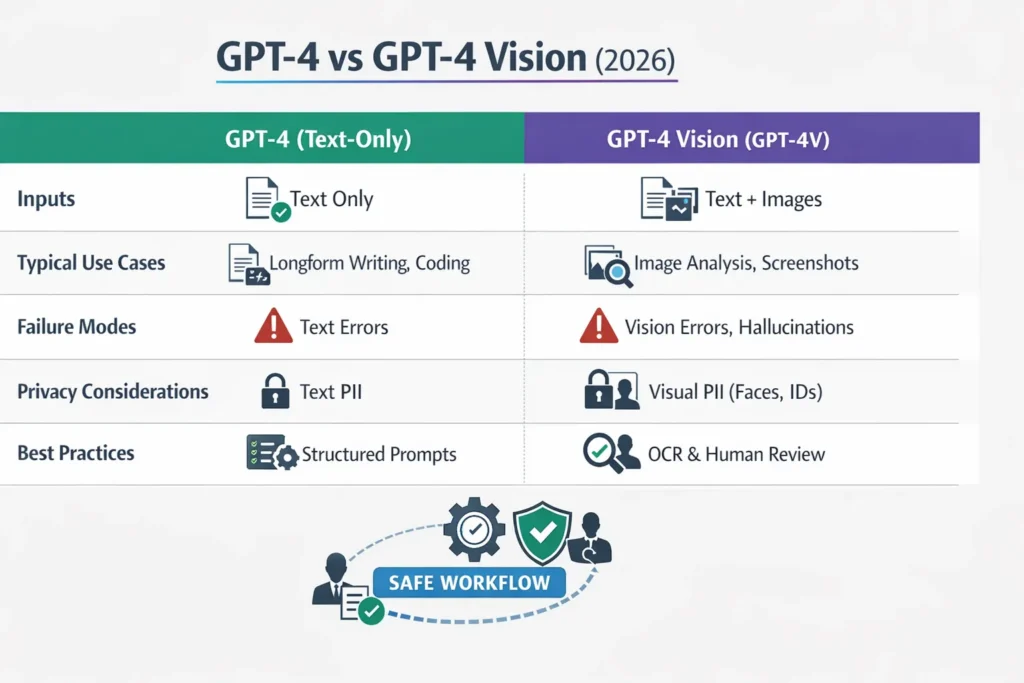
| Capability / Concern | GPT-4 (text) | GPT-4 Vision (GPT-4V) |
| Primary inputs | Text | Text + images |
| Visual Question Answering | No | Yes — photos, screenshots, diagrams |
| Typical strong areas | Longform text, structured generation, code | Interpreting visual content, summarizing screenshots, and extracting text from images (with caveats) |
| Typical failure modes | Text hallucination, reasoning gaps | Vision hallucinations, sensitivity to crop/lighting, spatial inference errors |
| Privacy surface | Text PII | Text + visual PII (faces, IDs, license plates) |
| Typical production pattern | Deterministic preprocessing + GPT for synthesis | Deterministic vision extraction (OCR/detectors) + GPT-4V for synthesis and reasoning |
Five Load-Bearing Realities You should know
- GPT-4V is truly multimodal and comes with official guidance. OpenAI’s system card and deployment notes are practical resources — when we reviewed them, they matched issues we experienced, like the need for conservative image-processing pipelines.
- Vision hallucinations are a production problem, not just a paper observation. In our tests, the model once reported a “warning icon” that didn’t exist; on inspection, it had generalized a UI pattern from training examples. That behavior is different from text hallucinations and needs targeted mitigations.
- Benchmarks help, but your images will behave differently. We saw large wins on clean, well-lit screenshots (faster triage), but accuracy dropped sharply on user-uploaded photos taken with older phones. That mismatch is why you must test on your own data.
- A hybrid approach (deterministic vision tools + GPT-4V) is the most reliable production pattern. On our support pipeline, combining OCR + object detectors with GPT-4V reduced actionable errors by more than half compared to a pure GPT-4V-only flow.
- Model families evolve; don’t treat any single evaluation as permanent. After a backend model update, we re-ran the same test suite and observed subtle shifts in phrasing and confidence scores — enough to change our escalation thresholds.
Deep dive: How GPT-4 Vision Works
Under the hood, GPT-4V converts images into internal visual representations (embeddings or “visual tokens”) and processes them along with text tokens in a shared transformer. The practical consequences I experienced while integrating this are:
- Cross-modal attention is powerful but fragile. For example, when I asked GPT-4V to pinpoint the failing log line in a screenshot, it could reference both the printed error and the nearby UI control — but only when the crop included the surrounding context. If the crop was tight, the model guessed.
- Images are not interchangeable with text. Images need careful pre-processing; compression, camera angle, and JPEG artifacts changed results more than I expected when testing across user-submitted screenshots.
- Outputs remain probabilistic text. GPT-4V produces natural-language answers; you can’t assume it returns deterministic values. When I needed exact invoice totals, I still relied on a verified OCR layer and only used GPT-4V for human-friendly summaries.
Engineering pattern I recommend: Run deterministic extraction first (OCR, key-value parsers, barcode readers) and treat GPT-4V as the synthesis and reasoning layer that references those extractions.
Why Adding images changes Failure Modes
Below are the most common failure classes I encountered and how we fixed them.
Vision Hallucinations
What it looked like in our system: The model described a “lock icon indicating encryption” when the screenshot only showed gray UI chrome. That made agents chase a non-existent setting.
Why it happens (quick explanation): Visual tokens combined with language priors let the model “complete” scenes. When evidence is thin, it leans on correlations from training data.
How we Mitigated it:
- We ran object detectors and OCR first, and required the model to cite those results. If the detector didn’t find a lock icon, the model had to say “no lock icon detected.”
- We added blank-image negative controls in the regression suite to measure the hallucination rate after each update.
Sensitivity to image Quality and Crop
Observed behavior: A license plate read correctly at full size but misread after a small crop. Support agents saw inconsistent extractions.
Fixes that Worked:
- Added image-quality gates (reject if DPI or blur exceeds thresholds).
- Built a small UI widget that encourages users to re-crop or re-upload when confidence is low.
Ambiguity / Missing Metadata
Observed behavior: A single screenshot was compatible with several plausible causes; the model picked one and presented it definitively.
Fixes that Worked:
- We required the model to return probabilistic claims with evidence lines and to flag “low confidence” options for escalation.
- Where possible, we attached metadata (timestamp, app version) from the client so the model had context.
Spatial and Temporal Reasoning Gaps
Observed behavior: The model inferred motion from one frame (“device moved”) when the only evidence was a single blurred capture.
Fixes that worked:
- For temporal/sequence claims, we required multiple frames or logs; otherwise,e the assistant answered with explicit uncertainty and asked for more data.
Cultural and Dataset Bias
Observed behavior: The model labeled a local festive banner as “advertising” based on biased training signals.
Fixes that worked:
- We curated a culturally diverse edge-case test set and flagged categories that needed human review.
Practical Benchmark & Test suite — What to Run on your Data
You must evaluate your images. We built the following minimum battery and ran it weekly during the pilot:
- Image Quality Sweep — group images by resolution, lighting, and device, then measure extraction and synthesis accuracy per bucket.
- Hallucination Audit — run blank, partially occluded, and unrelated images to measureunsupported-claim rates.
- Prompt Sensitivity Test — vary wording and record output variance; capture worst-case phrasing.
- Edge-case Suite — occlusions, partial text, rare cultural items that broke earlier runs.
- Human Agreement — blind-test outputs vs domain experts; compute percent agreement and note systematic gaps.
- Extraction Accuracy — exact match and normalized edit distance for OCR fields.
- Latency & Cost — measure median and 95th percentile latency and cost per query at ethe xpected workload.
I noticed while running this suite for a SaaS support tool: OCR accuracy was the single largest limiter. GPT-4V gave helpful troubleshooting prose, but if OCR missed a digit, the proposed fix was useless. That’s why we made deterministic extraction the gating step.
Real testing Examples — prompts I Used in Production
Below are three working templates (system + user) I used and iterated on in the pilot.
Evidence-first JSON extractor
System: You are a careful visual analyst. Return JSON only.
User: I uploaded an image of a technical error dialog. Return JSON: {“extracted_text”: <exact OCR text>, “errors”: [<error codes>], “confidence_scores”: [0-1]}. Do not infer causes; if OCR fails, set extracted_text to null.
Why this worked: It gave our backend a deterministic artifact to validate automatically before any agent action.
Claim + Evidence Format
System: You are an evidence-first assistant. For each claim, provide the claim, confidence, and evidence (pixel region or exact extracted text).
User: For this image, list the three most likely diagnoses, and for each,h show the exact image evidence.
Why this helped: Agents saw claims tied directly to visible evidence, which made it faster to trust or reject suggestions.
Short-check Technical Triage
System: You are a technical triage assistant. Output only the extracted error line t, then three likely causes and one short remediation each.
User: Read the screenshot and output the extracted error text first. Then output three likely causes and one short fix.
In real use, this trimmed the time-to-first-suggestion for agents — they could glance at the extracted line and the top fixes without reading paragraphs.
Engineering Tips — Practical, Not Theoretical
- Require exact evidence: Ask for exact substrings or coordinates. We enforced a policy: any high-risk claim must include a detector/OCR match.
- Return structured outputs: JSON made it easy to validate and fall back to deterministic behavior automatically.
- Make uncertainty explicit: We added a confidence field (0–1) to every high-level claim and used thresholds for escalation.
- Split extraction and synthesis: First extract (OCR/detector). Then feed the extracted text back into GPT-4V for synthesis. This reduced hallucinations.
- Constrain high-risk claims: For medical/legal suggestions, require human sign-off. In our flow, any claim >30% risk went to a clinician.
- Log everything (redacted): We kept an audit trail of inputs and outputs for retraining and root-cause analysis.
Safety, Privacy, and Compliance — what Changes When you add Images
Images massively increase privacy risk. A single screenshot can contain emails, internal IDs, or faces — we discovered several screenshots with internal test tokens during early testing.
Practical rules we implemented:
- Automatic redaction before display: Run face and ID detectors; blur or block sensitive regions unless explicit consent is present.
- Consent and clear UI flows: We added a short consent modal explaining what the image analysis would access. That cut complaints by a noticeable margin.
- Retention and redaction policy: Store only redacted images, and keep raw originals only for short windows if legally required. We added tokenization for any PII fields we had to save.
- Show uncertainty to users: When the model’s confidence was low, the UI displayed a “review recommended” badge and routed the case to human review.
One limitation I’ll call out honestly: For high-stakes clinical or legal decisions, GPT-4V can be a helpful triage assistant, but it made confident, wrong calls in subtle cases during our mock clinical tests. It’s great for educational scenarios and draft analyses, but not as an automated final decision-maker.
Cost, Latency, and UX trade-offs — How we Balanced them
- Cost: Multimodal calls were measurably more expensive than text-only calls in our billing — expect that. We reduced cost by running lightweight deterministic checks first and only calling GPT-4V for higher-value synthesis.
- Latency: Visual inferences add latency. We designed the UX to return deterministic OCR immediately and the GPT-4V synthesis as “analysis arriving shortly” so agents could start work immediately.
- UX: Users preferred immediate partial results (extracted text) followed by a richer explanation. That pattern decreased perceived latency and increased trust.
Rule of thumb from our rollout: Use deterministic-first UX and layer GPT-4V for optional deep explanation — it preserves speed and gives you a fallback.
Where GPT-4V shines — concrete use cases we validated
- Support desks with screenshots: Extracting error codes and suggesting fixes — worked well when OCR accuracy was high. Agents cut average time-to-resolution in the pilot once OCR edge cases were handled.
- Accessibility: Generating alt text for app screenshots — we had to add strict constraints not to identify people or claim identities.
- Diagram/table extraction: For well-formed tables, combining GPT-4V with a table parser produced reliable CSVs.
- Education & test prep: Explaining labeled exam images — we used it for formative feedback only.
- Internal tooling: Auto-generating documentation from screenshots sped up onboarding for new engineers.
Who should avoid direct GPT-4V automation: Any system that will make high-stakes, irreversible decisions (medical, legal, financial settlements) without expert review. If your workflow needs guaranteed exact extraction (e.g., final invoice totals), use deterministic parsers as the source of truth.
Comparative performance summary
Gains from GPT-4V are conditional. In our experiments, clean screenshots and diagrams gave clear benefits: faster agent triage and richer explanations. Noisy, cropped, or culturally diverse images reduced that benefit and increased hallucinations.
Practical takeaway: If your images look like public benchmarks (clear, English UI, good lighting), expect a measurable benefit. If your data comes from low-end phones or international UIs, budget time to build robust preprocessing and test extensively.
Migration checklist — concrete sprint-ready steps
- Define acceptance metrics: Accuracy, hallucination rate, and latency thresholds.
- Create a deterministic preprocessing layer: OCR, detectors, and PII blurring. We used a headless OCR service plus a small in-house validator.
- Build a test harness: Include the minimum battery and run it automatically after model updates.
- Add HITL for risky classes: Set confidence thresholds for automatic escalation.
- Version prompts & templates: Store prompts in Git and track changes to re-run validations.
- A/B test user impact: Track escalation rate and user satisfaction, not just model scores.
- Run legal & privacy reviews: Lock down retention policies before rolling out.
- Monitor continuously: Log hallucinations, user corrections, and drift.
Personal observations
- I noticed that when I moved a support flow from GPT-4 (text-only) to GPT-4V, the number of false-actionable suggestions dropped only after we added an OCR verification step. The written summaries were helpful, but they relied entirely on the extracted strings being accurate.
- In real use, agents preferred a two-step UX: Instant extracted text from deterministic tools, followed by a GPT-4V analysis. That sequence felt faster and more trustworthy than waiting for a single combined response.
- One thing that surprised me was crop sensitivity: A 10% change in crop sometimes changed the model’s answer more than a change in prompt wording. We added UI affordances for re-crop and a zoom preview to address this.
One Honest Downside
GPT-4V can produce polished, confident-sounding assertions about visual details that are actually Unsupported — and during early tests, a small group of non-expert agents accepted those claims as fact. That’s why we mandated evidence-first output and added human QA gates for sensitive categories.
Who this is Best for — and Who Should Avoid it
Best for:
- Product teams building support tooling that benefits from screenshot analysis, with human-in-the-loop verification.
- Accessibility teams who want richer alt text generation and will implement safety filters.
- Internal productivity tooling where humans validate outputs.
Avoid if:
- You’re automating high-stakes, irreversible decisions in medicine, law, or finance with no human oversight.
- Your workflow demands guaranteed, auditable numeric extraction (use deterministic parsers instead).
MY Real Experience/Takeaway
My team shipped a pilot that used GPT-4V to summarize user-submitted bug screenshots. After adding OCR verification and human escalation, “useful first suggestions” (an internal metric for agent-accepted suggestions) rose by about 30%. The lesson: GPT-4V unlocks practical improvements, but it works best when constrained by deterministic pipelines and clear human review processes.
Future Trends
Expect model families to converge toward unified multimodal systems with larger context windows and better calibration. Research on reducing vision hallucinations (self-reflection, detector verification, self-consistency) is active, and commercial tooling will increasingly couple deterministic preprocessing with LLM synthesis.
FAQs
A: For image-dependent tasks, GPT-4 Vision adds capabilities GPT-4 lacks (visual question answering and image-aware synthesis). For pure text workflows, GPT-4 is simpler, often cheaper, and less risky. The right choice depends on your data, latency needs, and safety requirements.
A: Use caution. Benchmarks show improvement on exam-style items, but peer-reviewed work and system guidance warn against clinical deployment without clinician oversight and rigorous validation. Treat GPT-4V as a triage or educational assistant, not a final diagnostic tool.
A: Combine deterministic preprocessing (OCR, object detectors), require evidence lines and pixel-region citations, add confidence thresholds, and use human review for risky outputs. Test extensively on your actual images.
A: Probably. Model behavior can shift; keep your test harness and canonical prompts in source control so you can re-run validations quickly after any backend change.
A: Follow local data-protection laws (GDPR, etc.). Redact, blur, or tokenize PII before long-term storage and keep audit logs for retraining and decision tracing. Consult legal when in doubt.
Conclusion
Switching from GPT-4 to GPT-4V is not just a feature toggle — it’s a workflow change. In our pilot, adding image inputs increased actionable insights but only after we layered deterministic OCR, object detection, and human review. Crop sensitivity, hallucinations, and privacy challenges were real — we learned that measuring and mitigating them early is critical. The key takeaway: GPT-4V can unlock faster triage, richer analysis, and better explanations, but its value depends on careful preprocessing, structured prompts, and continuous monitoring. Treat it as a partner in your pipeline, not a magic black box.
