

Leonardo Phoenix 1.0 — Complete Review
Quick snapshot: This is a long, practical, NLP-framed guide for teams and creators who want to use Leonardo Phoenix 1.0 for real-world, repeatable image production.
Introduction — What is Leonardo Phoenix 1.0?
Leonardo Phoenix 1.0 is a production-oriented text-to-image model family designed for repeatability and fidelity. From an ML/NLP lens, treat Phoenix as a multimodal generative model conditioned on a textual prompt embedding. Its training and inference emphasis is on conditioning fidelity. I.e., given a long token sequence describing layout, typography, or readable text, Phoenix is optimized to keep those conditioned attributes consistent across runs. That makes it practical for deterministic asset generation where labels and microcopy matter.
Phoenix ships inside Leonardo’s web UI (features like Flow State and a Universal Upscaler) and is also accessible via developer endpoints and partner platforms (Replicate, Cloudflare Workers AI). That combination makes Phoenix useful both for creative, human-in-the-loop tasks and for programmatic, automated pipelines.
In short: if your core requirement is predictable outputs that respect long conditioning instructions (brand palette, exact label text, UI microcopy), Phoenix is built for that use case.
Quick facts & why it matters
What it is (technical): A conditional image generator that accepts text prompts, optional style tokens, and runtime parameters (seed, steps, resolution). The model’s optimization target includes perceptual metrics for visual fidelity and additional loss terms or training strategies to improve rendered text readability inside images.
Where to use it:
- Creative UI for designers (Flow State for rapid variations)
- Programmatic endpoints for automation (Replicate, Cloudflare, Leonardo API)
- Batch processing pipelines for catalogs, marketing assets, and mockups
Why teams pick it (ML rationale):
- Prompt fidelity: Phoenix’s inference mapping from prompt embedding → image distribution is tuned to reduce conditional entropy for long prompts. The result: fewer re-runs to get the exact layout/labeling you want.
- Coherent in-image text: Many diffusion models struggle to render legible glyphs. Phoenix incorporates training and inference techniques (e.g., glyph-aware augmentation, OCR-feedback loops) that improve legibility for short phrases and labels.
- Determinism & reproducibility: Seeds + versioned model weights + prompt archive = reproducible outputs. This supports audits, A/B testing, and regulated workflows.
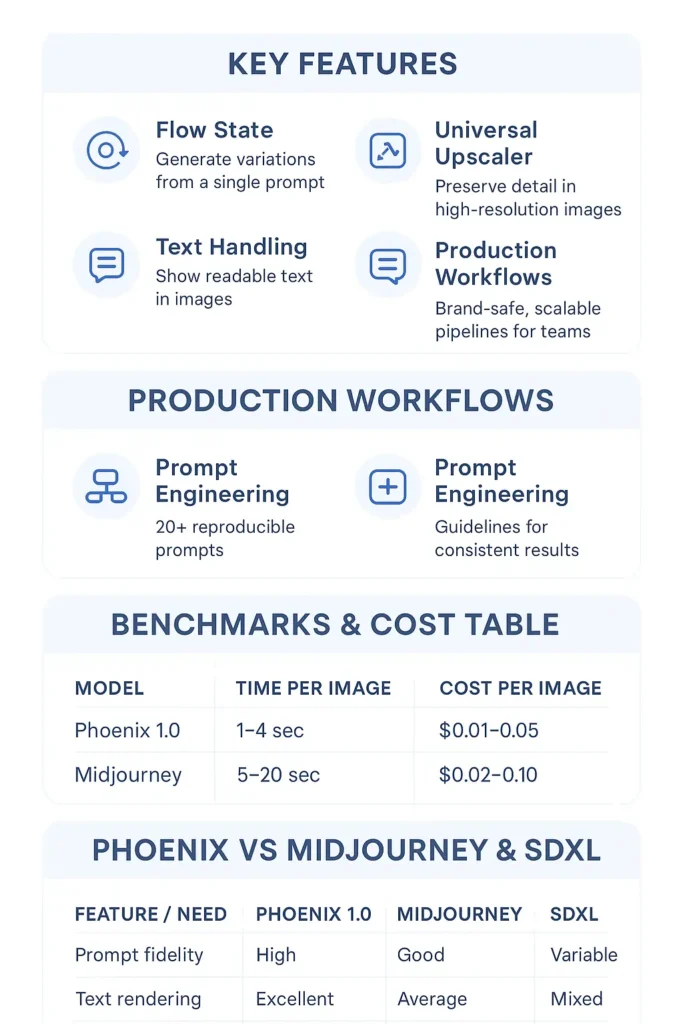
Key features of Phoenix 1.0
Below, I explain the production-facing features through an NLP/ML lens, why they matter, and how to operationalize them.
Prompt fidelity & iterative prompting (conditioning fidelity)
What it does (ML terms): Phoenix reduces divergence between conditional distributions when longer prompts are provided. Practically, this means the mapping from text tokens to image latent space preserves more of the semantics you specify (camera, mood, labels).
Why it matters (operational): When generating many assets with variable fields (product names, SKU numbers), you can template prompts and rely on the model to honor those fields rather than hallucinating or dropping text.
How to leverage (tips):
- Tokenize long instructions into explicit clauses, separated by commas; models often parse sentence boundaries better.
- Use seed values for reproducibility.
- Include a short negative-prompt section to reduce common artifacts (watermarks, extra limbs).
Flow State — fast ideation
What it does: Flow State is a UI + generation mode that emits many variations from a single conditioning vector by sampling different noise seeds or sampling strategies.
NLP/ML view: It’s essentially running the conditional generator multiple times with controlled stochasticity, producing a population of candidate outputs from the same conditioning input.
When to use: Ideation; exploring styles and minor composition changes without re-authoring prompts.
Workflow tip: Use Flow State to create a candidate set (20–50 images), then apply automated ranking (CLIP/CLIPScore or a domain-specific classifier) to pre-filter for human review.
Universal Upscaler
What it does: Upscaling module that increases output resolution while preserving texture and text legibility.
ML view: A specialized super-resolution network or iterative upscaling guided by the original latent. The upscaler may incorporate perceptual loss and adversarial components to produce crisp high-res images.
Why it matters: Producing print-ready or 4K assets without separate tools reduces friction and variance introduced by third-party upscalers.
Operational note: For batch pipelines, run a lower-res pass for drafts and apply upscaling for final candidates only — saves compute and cost.
Coherent in-image text
What it does: Phoenix incorporates training/evaluation that optimizes for OCR readability of rendered glyphs.
ML considerations:
- During training, Phoenix likely used glyph-aware augmentations or synthetic text overlays to reduce overfitting to illegible glyph shapes.
- Inference strategies (higher guidance scale for text tokens, specialized prompts indicating exact text) help maintain legible microcopy.
Best practices:
- Always provide exact microcopy strings in prompts.
- If you need precise typography, include font family tokens (e.g., “sans-serif modern, Montserrat-like”).
- Post-generation: run an OCR check (Tesseract or cloud OCR) to compare expected vs actual text.
Developer-friendly deployment
What it does: Phoenix is accessible via Leonardo’s API and partner-hosted endpoints (Replicate, Cloudflare), enabling batch jobs, callbacks, and serverless generation patterns.
Why it matters: Teams can embed generation into CI/CD pipelines, CMS ingestion flows, and promotional automation — enabling dynamic, on-demand asset creation.
Operational tips:
- Store prompt + seed + model version in image metadata for auditability.
- Use partner per-tile pricing info (Cloudflare’s 512×512 tile pricing) to estimate costs at scale.
- Use retries + idempotency keys when making generation calls to avoid duplicate billing or inconsistent results.
Phoenix 1.0 vs Competitors
When choosing a model, quantify what you need: consistency (how often output matches prompt), text readability (OCR accuracy), style flexibility, and throughput/latency. Here’s a pragmatic comparison from an evaluation/metrics perspective.
| Feature / Need | Phoenix 1.0 | Midjourney | SDXL & forks |
| Prompt fidelity | High — tuned for long conditioning | Good — often stylized and creative | Variable — depends on checkpoint & prompt engineering |
| Text rendering | Excellent (higher OCR accuracy) | Average | Mixed; often needs post-edit |
| Production tools | Flow State, Universal Upscaler, API | Discord-first; community tools | Ecosystem dependent; many forks |
| Ease of use (team) | Web app + API, designed for pipelines | Discord + bot workflow | Technical setup common |
| Output style | Deterministic & controlled | Artistic & stylized | Flexible, checkpoint-dependent |
Key takeaway: If you need consistent, production-grade images with readable labels and reproducibility, Phoenix is often the better choice. If you want exploratory, painterly outputs with less deterministic control, Midjourney or certain SDXL variants may be preferable.
Production workflows — brand-safe & scalable
Scale means more than parallel API calls: it requires monitoring, validation, and auditability.
Workflow overview (pipeline)
- Brand Template & Prompt Library: Keep canonical templates as JSON with placeholders.
- Prompt Generation: Programmatically fill placeholders with SKU product names, dates, or copy.
- Validation (pre-run): Quick sanity checks (character length for labels, banned words).
- Generation: Call API with seed and metadata.
- Automated QC: OCR for in-image text, barcode readers, blur detectors, histogram checks.
- Upscale & Post-Process: Run Universal Upscaler, then apply final color-correction.
- Human Review: Designers review top-ranked assets.
- Publish & Track: Save images to CDN with metadata and version history.
Example: Product catalog pipeline
- Step A: Pull SKUs from DB.
- Step B: Fill the prompt template with product_name, label_text, and color.
- Step C: Call Phoenix API with seed = deterministic_hash(SKU + model_version).
- Step D: Run OCR to verify label_text. If OCR confidence < threshold, queue for human review or re-run with higher guidance.
- Step E: Upscale the final candidate and upload to CDN.
Automated quality checks (technical ideas)
- OCR verification: Compare the expected string with the OCR result; compute Levenshtein distance and confidence.
- Blur detection: Use Laplacian variance for blur estimation.
- Color compliance: Compute palette distance between generated image histogram and brand palette using Earth Mover’s Distance.
- Text placement validation: Use object detection to confirm logo or label positions are within a tolerance box.
Licensing & audit
- Persist prompt, seed, and model_version as structured metadata for each generated asset.
- Confirm commercial terms in Leonardo’s policy and partner docs. If you include trademarked logos or real-l
- Look at people, do legal checks.
Benchmarks, speed & cost
When evaluating production models, track both quality and cost.
Suggested metrics
- OCR Accuracy (%): Percentage of target microcopy correctly recognized.
- CLIPScore / CLIP similarity: Measures semantic alignment between prompt and image.
- FID / LPIPS: Perceptual quality relative to ground-truth datasets (if available).
- Throughput (images/sec): Effective images generated per second at target resolution.
- Cost per image: Dollars per image at chosen resolution/steps.
Example illustrative table (estimates)
| Model | Typical use | Time per 1024×1024 image (estimate) | Cost per 1024×1024 (estimate) |
| Phoenix 1.0 (Leonardo / Cloudflare) | Production-ready UI, text-heavy images | 1–8s per 512×512 tile (depends on infra) | $0.01–$0.06 per 1024×1024 (estimate) |
| Midjourney | Artistic, stylized imagery | 5–20s via Discord queue | $0.02–$0.10 (varies by plan) |
| SDXL (self-hosted / API) | Flexible, checkpoint-dependent | Varies by hardware | Varies widely — depends on infra |
Throughput tip: Use shorter step counts for drafts and scale up for finals. Use batch optimizations and tile strategies for very high-res renders.
Pros & Cons
Pros
- High conditioning fidelity: better at following long prompts and token sequences.
- Deterministic runs with seeds + versioning make A/B testing and audits simpler.
- Improved in-image text rendering (higher OCR accuracy).
- Developer integrations (Replicate, Cloudflare) make automation feasible.
- Built-in upscaler reduces pipeline complexity.
Cons
- Slight learning curve to master advanced prompt engineering for edge cases.
- Community resources may be less consolidated than for long-standing tools (e.g., Midjourney).
- Less spontaneous or “wild” artistic flair by default; output is more controlled (which is good for production, not always for experimentation).
Frequently Asked Questions
A: Leonardo typically offers free tiers for experimentation but charges credits for heavy usage, advanced features, or partner-hosted runs. For production workloads, plan on a paid tier or partner costs — estimate by running a representative sample and measuring cost/throughput.
A: Generally, yes, but confirm Leonardo’s license terms for commercial use at the time you generate images. Save prompt + seed + model version in your metadata to document provenance and consult legal for logos, trademarks, and likenesses.
A: Use a Brand Prompt Template (explicit color codes and font tokens), insert exact microcopy strings, set deterministic seeds per asset, and validate outputs via OCR. Combine automated checks with manual review for final approval.
A: Replicate is simpler for prototyping and scripting. Cloudflare Workers AI is better for serverless, low-latency, and per-tile pricing models at scale. Choose based on latency, geographic distribution, and cost profile.v
A: Flow State is a rapid variation mode — it samples many outputs from a single prompt to surface diverse candidates. Use it for ideation; then apply automated ranking (CLIP/CLIPScore) or human curation to pick finalists for upscaling
Conclusion
Leonardo Phoenix 1.0 is optimized for control, readable in-image text, and production workflows. For teams building catalogs, UI screenshots, or marketing assets where microcopy and consistency are non-negotiable, Phoenix should be on your shortlist.
Recommended first steps:
- Sign up for Leonardo and run small, seeded tests.
- Create a Brand Prompt Template and 5 sample prompts for your asset types.
- Test Flow State to generate 20–30 candidate variations; then use automated ranking and OCR checks.
Integrate a single pipeline (Replicate or Cloudflare) to measure cost and latency empirically.
